Dabbler AI Orchestration
Your AI work, organized like work. Instead of a chat log you scroll
back through, this extension gives AI-led development the same shape the
rest of your project has: named units of work, an ordered plan for each
one, a step list that shows where the work actually is, and a record at
the end that survives the conversation. The tree below is not a summary
someone wrote — it is read back from files on disk that the workflow
writes as it goes.
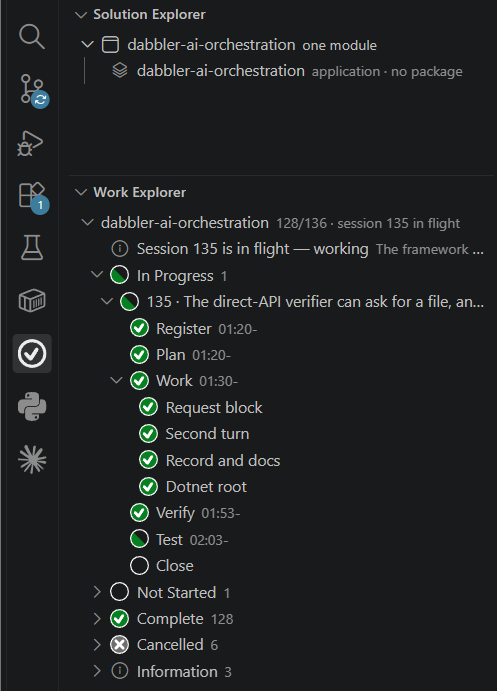
The main features
1. AI work organized into modules, sessions and steps. A module is
a unit of a solution owned by one developer at a time; sessions are
numbered directly in the repository, in one ordered plan you and the AI
co-design before code is written; each session carries its own step
checklist. The AI Work Explorer renders all of it with live progress —
expand the session in flight and you see the step it is on and when each
finished step started — and the Solution Explorer above it shows what
the project is built from, module by module.
2. Automatic cross-provider verification. Every session is reviewed
before it closes by a model from a different provider than the one that
did the work — the Primary Reviewer is defined as NOT THE AUTHOR, and
where nobody has chosen a model it resolves by excluding the orchestrator's own
provider, resolved from the model registry, never from a label a model
reports about itself. Round 1 reviews the full evidence (the session's
plan, git status, the complete diff, untracked files); when findings
need fixing, later rounds review the fix delta, up to a bounded round cap.
You don't have to remember to ask for it, and the AI cannot decide its own
diff is too small to bother: a close with no verification evidence runs
the verification itself, and when no cross-provider reviewer can be
reached the close stays blocked until an operator resolves it — there is
no silent pass. A finding the orchestrator believes is wrong doesn't loop
forever either: it can dispute the finding with evidence from the
repo, and a deadlock at the round cap goes to a third adjudicating
provider that neither wrote nor reviewed the work. There is no waiver.
At the cap the loop ends itself and says which end it reached —
remediated at the cap, where every blocking finding was fixed and the
cap left the fix unreviewed, so the work lands labelled unreviewed; or
unresolved, where findings still stand and nothing lands but the record.
No verdict a person can type exists anywhere in the product.
3. The build files are the solution.
The Solution Explorer reads your .slnx, .sln, .csproj or pom.xml files
and shows each project, what it references and what references it — there is
nothing to declare beside them. Every session runs in the repository itself.
Right-click the solution row for Ship by Default or Release on
Request, whichever changes when the solution's sessions publish: on
request, the default, a session's plan asks to release; ship by default, it
releases unless its plan holds it. It is dabbler.release in
.vscode/settings.json, and dabbler configure --release sets the same.
4. Works through a Copilot seat or direct API keys.
|
Direct provider APIs |
GitHub Copilot CLI seat |
| Setup |
Set DABBLER_ANTHROPIC_API_KEY / DABBLER_OPENAI_API_KEY / DABBLER_GEMINI_API_KEY |
Install the Copilot CLI and sign in; set the vehicle with dabbler configure --transport copilot-cli |
| Spend |
Metered API calls, every one recorded per model and per session |
Covered by your existing Copilot subscription |
| Best for |
Anyone with provider accounts |
Shops whose staff hold only a Copilot seat and cannot get provider keys |
Verification needs reach to at least two provider families — two of the
three keys, or one seat that exposes two families.
5. The framework runs the session; you do the work. Start Session
registers the session and starts the framework's loop, which judges each
answer, advances the session and writes the next instruction. Your AI
keeps dabbler session wait running in the background — so its chat stays
free for you — does what each instruction says, answers with the command
it names, and runs the waiter again until it says done. Registration, the plan, each step's own checks, the
cross-provider round and its remediation, the complete test suite as the
run of record, the commit, the push and the close are all the framework's
— not a checklist anyone has to remember.
6. Seven gates at the close, each one earned. session close runs
verification clean, working tree clean, pushed to remote, test run fresh,
pins current, published when releasable, and verdict vocabulary — and only then flips the state
and commits its own bookkeeping. Every one of them exists because a real
incident got past a weaker check; none guards a hypothetical.
7. Ample markdown documentation of the work. Each repository keeps its
paper trail in predictable, human-readable places under one sessions root:
session-plan.md (the plan), activity-log.json (every step,
timestamped), change-log.md (what shipped, appended at every
verification and close), decisions-log.md (rendered from the activity
log, never hand-written), and sessions.json (where things stand, with
verification verdicts). You can step away and know exactly what happened
while you weren't watching — months later, from the repo alone.
8. The machine owns the record. All of the above is written through
sanctioned, schema-validated writers; verification rounds land in a
machine-only ledger with the raw reviewer output saved before any parsing,
and out-of-band edits are detectable. No code path accepts a hand-written
verdict.
Requirements
- VS Code 1.135+ — the earliest release measured to carry an
extension host with an unflagged
node:sqlite, which the seat-cost
reader needs
- Nothing else to install. The router ships inside this extension and
runs on the editor's own Node: no runtime, no virtual environment, no
global package and no registry. A Node of your own (22.18+) is needed
only to run
dabbler outside VS Code
- A provider for the router to call — either two of the three
DABBLER_*_API_KEY variables (the normal provider-issued keys from
Anthropic, OpenAI, and Google; Dabbler only prefixes the names), or an
authenticated GitHub Copilot CLI seat exposing two provider families
- One orchestrator AI agent in VS Code (Claude Code or GitHub Copilot
— the framework is agent-agnostic)
Get started
Open a project folder and click the Dabbler AI Orchestration icon — in
a workspace that has no sessions yet, the extension offers to set the
project up for you (or run Dabbler: Set Up New Project from the
Command Palette yourself). Setup writes the managed instruction blocks
your AI agent reads, the ignore rule for the router's machine state, the
project's own declaration and the first two sessions — then commits them,
because session 1 is refused while they sit uncommitted. From there, choose
Start Session on the repository's row and watch the tree: the plan and
the decomposition run through the same tracked, verified pipeline as every
session after them.
The full workflow, command by command, is in the
quick start;
what the framework does for itself once a session is under way is in
driving a session;
the on-disk formats are documented in the
schema reference.
Two UAT walkthroughs build a small multi-module solution end to end, from
an empty folder to a running program, with every expected output captured
from a real run:
.NET
and
Java, Maven and Spring.
The framework is open-source (MIT) — your costs are entirely your
provider's API spend or your Copilot seat; nothing in this extension is
paywalled.
Building from source
The extension bundles the router and calls it in-process, so the tree and
the terminal cannot disagree about what the record says.
- Build the VSIX:
npm install && npm run package
- Unit tests:
npm run test:unit (vscode-stub, no Electron)
- UI tests:
npm run test:playwright (downloads VS Code on first run)

