SAP Dictionary for VS Code
Instant SAP table and field descriptions in VS Code — hover over any SAP identifier to see what it means.
Works offline. No SAP connection required. Bundled with 674 standard tables and views (16,700+ fields) covering ABAP (FI/MM/SD/HR/Basis) and SAP HANA System/Monitoring Views.
Features
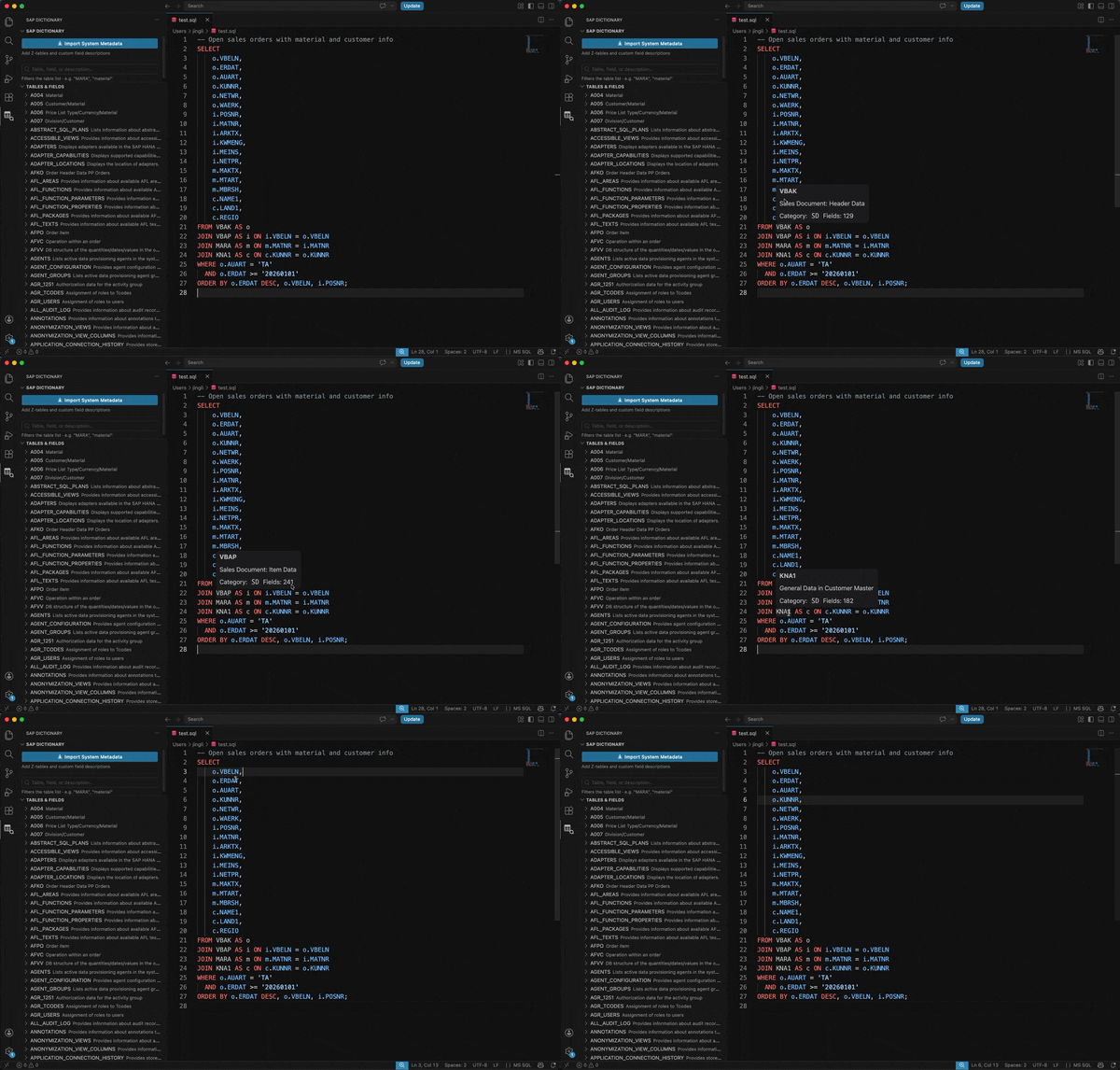
Hover Tooltips — hover over SAP table or field names in .abap, .sql, .hdbview, .hdbtable, .hdbprocedure, .hdbcalculationview files.
MATNR · MARA
Material Number

Type: `CHAR`  Length: 18
Data Element: `MATNR`
Sidebar Panel — browse and search all 674 tables and 16,700+ fields. Fuzzy search matches table names, field names, and descriptions (mar matches MARA, MARC, MARD…). Searching by field name surfaces matching fields directly in the results.
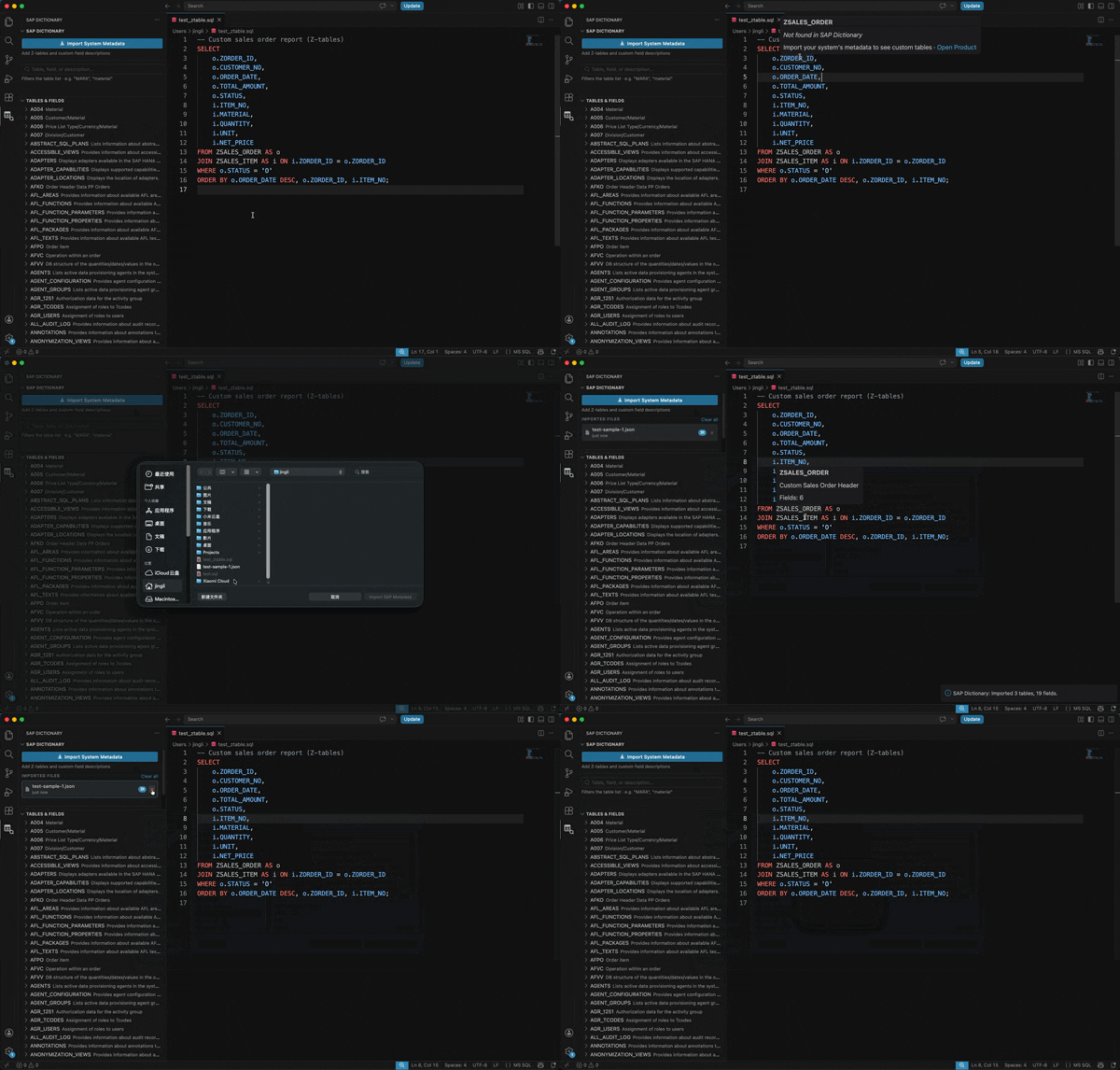
Import Your System's Metadata — import one or more JSON exports from your SAP system to add Z-tables and team-specific descriptions. Imported files are listed in the sidebar individually and can be removed one at a time. Your data takes priority over the bundled data.
Quick Start
- Install the extension
- Open any
.abap or .sql file
- Hover over an uppercase identifier like
MARA, VBAK, or M_ACTIVE_STATEMENTS
Bundled Coverage
| Module |
Key Tables |
| FI (Finance) |
BKPF, BSEG, SKA1, SKAT, ACDOCA, T001… |
| MM (Materials) |
MARA, MARC, MARD, MAKT, EKKO, EKPO, MSEG… |
| SD (Sales) |
VBAK, VBAP, KNA1, KNVV, VBRK, LIKP… |
| HR |
PA0001, PA0002, PA0008, HRP1000… |
| Basis |
USR02, T000, TADIR, TRDIR, DD03L… |
| HANA System Views |
TABLES, COLUMNS, VIEWS, INDEXES… (~205) |
| HANA Monitoring Views |
M_ACTIVE_STATEMENTS, M_CONNECTIONS… (~354) |
Click Import System Metadata in the sidebar, or run SAP Dictionary: Import System Data (JSON) from the command palette, and select a JSON file.
You can import multiple files. Each appears as a separate entry in the sidebar — remove any one without affecting the others.
The top-level structure must have a tables object. Everything else is optional.
{
  "exported_at": "2026-05-11T00:00:00Z",
  "system": "PRD",
  "tables": {
    "ZTABLE_NAME": {
      "description": "Human-readable table description",
      "fields": {
        "FIELD_NAME": {
          "description": "Human-readable field description",
          "type": "CHAR",
          "length": 20,
          "is_key": true,
          "data_element": "ZFIELD_NAME_DE"
        }
      }
    }
  }
}
Top-level fields
| Field |
Required |
Description |
tables |
yes |
Object mapping table names to table definitions |
exported_at |
no |
ISO timestamp — informational only |
system |
no |
System ID — informational only |
Table definition
| Field |
Required |
Description |
fields |
yes |
Object mapping field names to field definitions |
description |
no |
Table description shown in hover tooltip and sidebar |
Field definition
| Field |
Required |
Description |
description |
no |
Field description. Empty string shows "No description available" with a CTA to get AI descriptions |
type |
no |
ABAP/HANA data type (CHAR, NUMC, DATS, INT4, CURR, etc.) |
length |
no |
Field length in characters |
is_key |
no |
true if this field is part of the primary key |
data_element |
no |
ABAP data element name |
Table and field names are case-insensitive on import (stored and matched in uppercase).
If you import a file that overlaps with a previously imported file, the later import wins on a per-field basis.
Minimal valid example
{
  "tables": {
    "ZORDERS": {
      "description": "Custom Sales Orders",
      "fields": {
        "ORDER_ID": { "description": "Order Number" },
        "STATUS":   { "description": "Order Status" }
      }
    }
  }
}
Export Methods
Option A — HANA SQL (for HANA-native tables):
SELECT table_name, column_name, data_type_name, length, comments
FROM sys.table_columns
WHERE schema_name = 'YOUR_SCHEMA'
ORDER BY table_name, position;
Option B — ABAP SQL Console / ADT (for ABAP Dictionary):
SELECT d~tabname, t~ddtext AS table_desc,
       d~fieldname, d~position, d~datatype, d~leng,
       COALESCE(f~ddtext, e~ddtext) AS field_desc
  FROM dd03l AS d
  LEFT JOIN dd02t AS t ON t~tabname = d~tabname AND t~ddlanguage = 'E'
  LEFT JOIN dd03t AS f ON f~tabname = d~tabname AND f~fieldname = d~fieldname AND f~ddlanguage = 'E'
  LEFT JOIN dd04t AS e ON e~rollname = d~rollname AND e~ddlanguage = 'E'
  WHERE d~tabname LIKE 'Z%'
    AND d~fieldname NOT LIKE '.%'
  ORDER BY d~tabname, d~position.
Convert the query output to the JSON format above and import via the sidebar button.
Commands
| Command |
Description |
SAP Dictionary: Import System Data (JSON) |
Import a JSON metadata file |
SAP Dictionary: Clear Imported Data |
Remove all imported metadata |
SAP Dictionary: Search Tables & Fields |
Fuzzy search via command palette |
SAP Dictionary: Open Product Page |
Learn about AI-powered descriptions |
Supported File Types
.abap · .sql · .hdbview · .hdbcalculationview · .hdbtable · .hdbprocedure
Missing Descriptions?
If your Z-tables show "Not found in SAP Dictionary" or "No description available", import your system's metadata (see above).
Z-tables with no descriptions at all? Every SAP project has them — the 50-200 custom tables that only one person on the team truly understands. If that knowledge lives in someone's head instead of your codebase, you have a bigger problem than a missing tooltip.
→ Rosetta automatically builds a searchable knowledge base for your entire data stack — Z-tables, custom fields, business logic, dbt models. Early access is open.
Built by Rosetta — Knowledge Indexing for Data Teams
SAP, ABAP, and SAP HANA are trademarks of SAP SE. This extension is not affiliated with or endorsed by SAP SE.

