Pickety
Architectural guardrails for TypeScript projects.

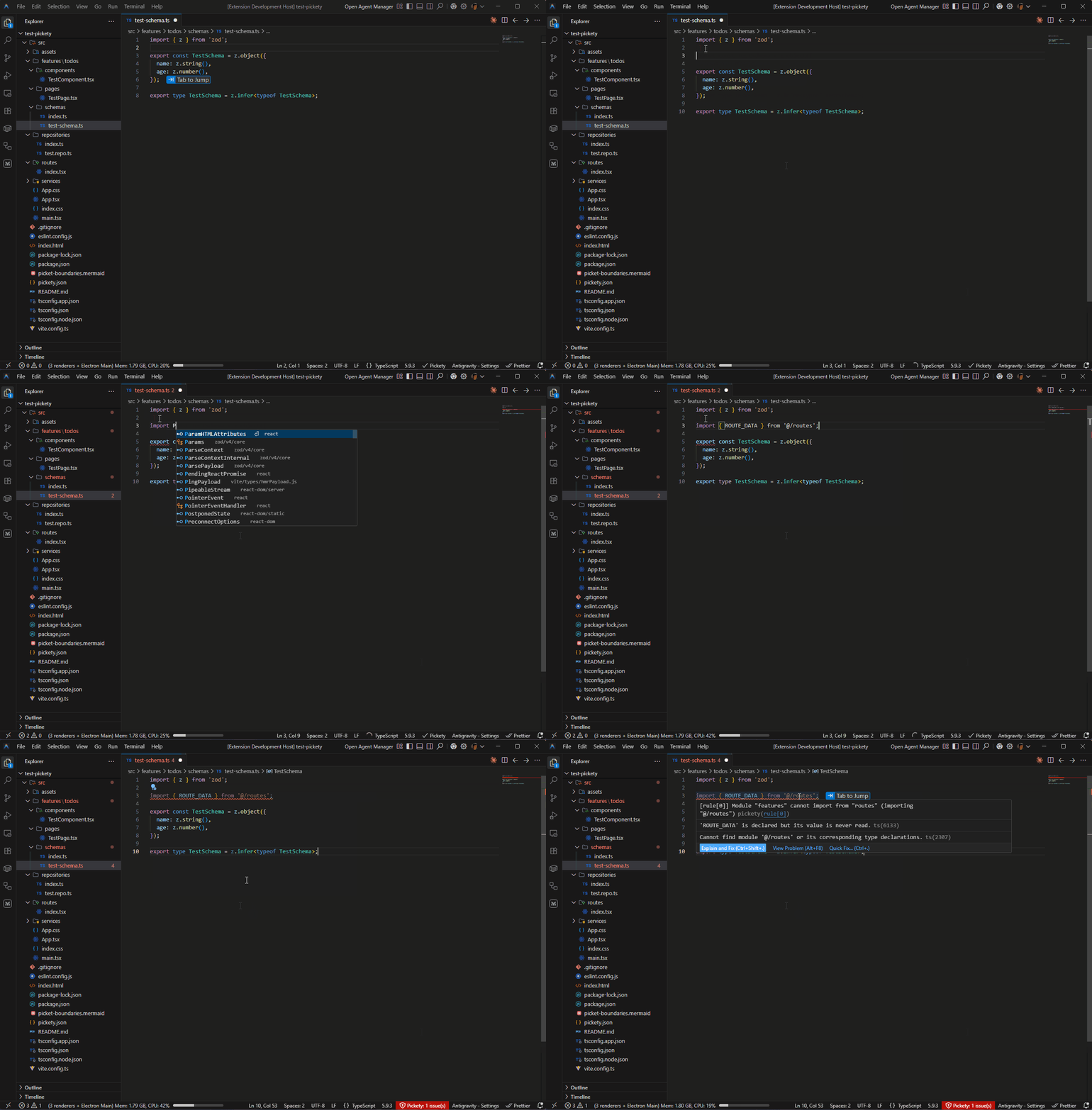
Pickety is a VS Code extension that stops architecture erosion before it starts. Define your module boundaries once in a simple JSON file, and every illegal import lights up instantly -- right in your editor, as you type. No more "we don't import that here" comments in code review. No more accidental coupling that quietly rots your codebase over months.
Zero runtime dependencies. Zero build steps. Just drop in a config and your entire team — and your AI coding agents — get a real-time Senior Architect sitting on their shoulder, enforcing the rules that actually matter.
Why Pickety?
Every growing TypeScript codebase develops architectural rules:
- Features shouldn't import other features
- Shared components can't reach into the app layer
- Utilities must remain dependency-free
- Routes should only access their own feature's pages
These rules live in developers' heads and break silently. Pickety makes them explicit, enforceable, and visible.
Built for the AI Era
AI coding agents are incredibly fast, but they don't have "Senior Engineer intuition" — they haven't lived through your project's history and don't know your unwritten architectural rules. Pickety bridges this gap by turning tribal knowledge into hard, machine-readable constraints.
- Tribal Knowledge → Hard Constraints: Don't hope an agent "figures out" your architecture. A single
pickety.json tells every agent exactly which boundaries are sacred.
- Zero-Latency Feedback Loops: In-editor diagnostics (squiggles) provide instant course-correction. Agents see violations as they write code, fixing architectural errors before you even open a PR.
- Machine-Readable Health: The CLI provides ASCII-formatted health reports (stability, coupling, depth) that agents can ingest to make informed refactoring decisions.
- Impact Analysis for Reasoning: "Show Impact" gives agents a transitive dependency chain, preventing them from making a "simple" change that breaks a dozen distant modules.
Whether you're using Claude Code, Cursor, GitHub Copilot, or Windsurf, Pickety acts as an automated Senior Architect sitting on the agent's shoulder, keeping it on the rails.
Why not just use ESLint?
ESLint is great at code-level rules -- naming conventions, unused variables, consistent syntax. Pickety solves a different problem: architecture-level rules that ESLint was never designed for.
|
ESLint |
Pickety |
| Scope |
Single-file lint rules |
Cross-module boundary enforcement |
| Setup |
Plugin ecosystem, parser config, flat config migration |
One pickety.json file |
| Boundary logic |
no-restricted-imports with manual regex per path |
Declarative module map + glob-based rules |
| Interpolation |
Not supported |
$name variables enforce scoped relationships automatically |
| Strict containment |
Not supported |
only and containedTo whitelist who can import a target |
| Architectural visibility |
None |
Auto-generated Mermaid boundary diagrams |
| Health metrics |
None |
Coupling, instability, and dependency depth per module |
| Impact analysis |
None |
Transitive dependent graph before you refactor |
| Gradual adoption |
All-or-nothing per rule |
maxViolations lets you ratchet down tech debt over time |
| Dependencies |
Dozens of transitive deps |
Zero (Self-contained) |
ESLint's no-restricted-imports can block a handful of hard-coded paths. But the moment you need "features can't cross-import each other" or "route X can only touch feature X's pages", you're writing fragile regex that nobody maintains. Pickety expresses those constraints in a few readable lines and enforces them in real time.
Use both. Let ESLint handle code style and correctness. Let Pickety handle the architectural rules that keep your codebase from quietly rotting.
Features
- Real-time enforcement -- violations appear as you type, not just on save
- Glob patterns -- flexible module definitions using minimatch syntax
- Interpolation variables -- enforce scoped relationships like "route X can only import from feature X"
- Strict enforcement -- use
only and containedTo to restrict modules to specific consumers
- Per-rule severity -- mark some boundaries as hard errors and others as soft warnings
- Debt tracking -- set a
maxViolations threshold per rule to adopt boundaries gradually in legacy codebases
- Named rules -- identify exactly which rule triggered a violation
- tsconfig.json alias support -- automatically resolves
@/* and other path aliases
- Boundary diagrams -- auto-generate Mermaid diagrams of your architecture
- Impact Analysis -- see exactly who depends on a file (transitively) before refactoring
- Module Health -- track coupling, instability, and dependency depth across your project
- Circular dependencies -- auto-detect feedback loops between your modules
- Quick fixes -- jump directly to the rule in
pickety.json from any violation
- Status bar -- always know whether Pickety is active and how many violations exist
- CLI --
pickety check for CI/CD pipelines, matching IDE behavior exactly
- JSON Schema -- autocomplete and inline validation for
pickety.json
- No external dependencies -- self-contained bundle requires zero
npm install at runtime
- Zero config beyond
pickety.json -- no build plugins, no complex environment to set up
Quick Start
1. Install the Pickety extension from the VS Code Marketplace.
2. Generate your config using the command palette:
Ctrl+Shift+P (or Cmd+Shift+P on Mac) → Pickety: Initialize Configuration
This creates a pickety.json in your workspace root and opens it immediately. The generated file includes a starter module map and example rules — edit them to match your project structure.
3. Done. Pickety activates automatically. Violations appear as red/yellow squiggles in the editor, in the Problems panel, and in the status bar.
Prefer writing it by hand? Add a pickety.json to your workspace root. The JSON Schema (included via the $schema field in the generated file) provides autocomplete and inline validation as you type.
{
  "$schema": "https://raw.githubusercontent.com/DanielSerio/pickety/main/resources/pickety.schema.json",
  "modules": {
    "features": "src/features/*",
    "components": "src/components/**/*",
    "utils": "src/utils/**/*"
  },
  "rules": {
    "module-boundaries": {
      "severity": "error",
      "rules": [
        {
          "importer": "features",
          "imports": "features",
          "name": "no-cross-feature",
          "message": "Features should not import other features directly"
        }
      ]
    }
  }
}
Configuration
Modules
Map logical module names to file glob patterns. Each file belongs to the first module whose pattern matches.
{
  "modules": {
    "features": "src/features/*",
    "components": "src/components/**/*",
    "hooks": "src/hooks/**/*",
    "utils": "src/utils/**/*"
  }
}
Patterns ending with /* are automatically expanded to /**/* for deep matching.
Rules
Each rule defines an import boundary between modules.
| Field |
Type |
Required |
Description |
imports |
string |
Yes |
Target module name, glob, or file path pattern |
importer |
string |
Conditional |
Source module name or glob pattern. Required unless using containedTo. |
allow |
boolean |
No |
true = permit, false = forbid. Default: false |
only |
boolean |
No |
true = the imports target can ONLY be used by this importer. |
containedTo |
string \| object |
No |
Shortcut for only: true. Restricts imports to this path pattern. Accepts a plain string or an object with path and optional unless. |
message |
string |
No |
Custom diagnostic message shown in the editor |
severity |
string |
No |
"error" or "warn". Overrides the global severity |
name |
string |
No |
Rule identifier. Shown in diagnostics and quick fix labels |
Glob Patterns
Both importer and imports support glob syntax. Use * to match all modules:
{
  "importer": "utils",
  "imports": "*",
  "message": "Utils must remain dependency-free"
}
When imports contains a /, it matches against the resolved file's relative path, letting you target subdirectories:
{
  "importer": "routes",
  "imports": "features/**/components",
  "message": "Routes cannot import feature components"
}
Strict Enforcement (only & containedTo)
Standard rules are "blacklist" style: they forbid specific connections. only and containedTo are "whitelist" style: they forbid everyone else from importing a target.
only
Use only to ensure a module is only consumed by a specific layer:
{
  "importer": "services",
  "imports": "repositories",
  "only": true,
  "message": "Repositories can only be used by the Service layer"
}
containedTo
Use containedTo for "private" file patterns that should never leak outside their owner. It is a shortcut for only: true where the importer is the allowed scope.
String form — the common case:
{
  "imports": "src/features/$name/internal/*",
  "containedTo": "src/features/$name/**/*",
  "message": "Internal files cannot be imported outside their feature"
}
Object form — use when you need to exempt specific variable values from the rule. The unless map is evaluated with AND semantics: every entry must match simultaneously for the exemption to apply.
{
  "imports": "features/$name/components/**/*",
  "containedTo": {
    "path": "features/$name/**/*",
    "unless": { "$name": "shared" }
  },
  "message": "Features components must be imported by their own feature."
}
This enforces feature isolation for component imports, but allows any module to import from features/shared/components/**/* — useful for a shared component library that lives alongside feature modules.
Interpolation Variables
Use $variable placeholders to enforce that path segments match between the importer and the target:
{
  "importer": "routes/$name/*",
  "imports": "features/$name/pages/*",
  "allow": true,
  "message": "Routes must import pages from their matching feature"
}
With this rule, routes/auth/index.ts can import from features/auth/pages/ but not from features/billing/pages/.
Boundary Diagrams
Pickety can auto-generate a Mermaid diagram of your module boundaries. Each rule appears as its own section with clear ALLOW/DENY labeling.
Add this to your pickety.json:
{
  "boundary-diagrams": true
}
Or specify a custom output path:
{
  "boundary-diagrams": "docs/architecture.mermaid"
}
You can also generate diagrams on demand via the command palette: Pickety: Generate Boundary Diagram.
Impact Analysis
Before refactoring a file, you need to know who depends on it. Pickety's Impact Analysis shows you the transitive dependency chain — every file that might be affected by your change, grouped by the module they belong to.
Run Pickety: Show Impact from the command palette to see a searchable list of all files that import the current file (directly or indirectly).
Module Health Metrics
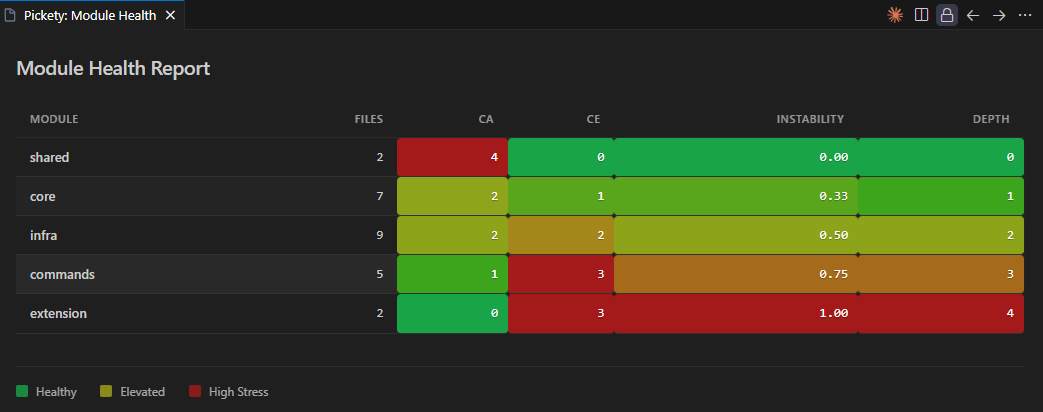
Quantify the quality of your architecture with industry-standard coupling metrics. Pickety analyzes your entire project to compute stability and complexity scores for every module.
- Afferent Coupling (Ca): How many modules depend on this one? (Responsibility)
- Efferent Coupling (Ce): How many modules does this one depend on? (Dependency)
- Instability (I): The ratio
Ce / (Ca + Ce). Measures how resilient a module is to external changes.
- Dependency Depth: The length of the longest dependency chain starting from this module.
View these metrics anytime using Pickety: Show Module Health, or enforce project-wide quality standards in pickety.json:
Built for Humans and Agents
The Module Health feature provides two interfaces depending on who is using it:
- For Humans: Running the VS Code command opens a clean, color-coded HTML Webview panel. The table highlights healthy modules in green and unstable or problematic modules in red, making it easy to spot architectural issues at a glance.
- For AI Agents: Running the
pickety check CLI with the health argument outputs a clean, ASCII-formatted table directly to stdout. This allows agents to ingest the current state of your architecture and make informed decisions about where to place new code or when refactoring is needed.
{
  "health": {
    "maxInstability": 0.8,
    "maxDepth": 5,
    "maxAfferentCoupling": 20
  }
}
Threshold violations appear as diagnostics directly on your pickety.json file.
Commands
| Command |
Description |
Pickety: Initialize Configuration |
Generate a starter pickety.json and open it |
Pickety: Refresh Configuration |
Reload pickety.json, aliases, and file index |
Pickety: Generate Boundary Diagram |
Generate a Mermaid diagram of your boundaries |
Pickety: Show Impact |
See transitive dependents of the active file |
Pickety: Show Module Health |
View coupling and stability metrics for modules |
Example
A complete configuration enforcing feature isolation, dependency direction, utility purity, and scoped routing:
{
  "modules": {
    "app": "src/app/**/*",
    "features": "src/features/*",
    "routes": "src/routes/*",
    "components": "src/components/**/*",
    "hooks": "src/hooks/**/*",
    "utils": "src/utils/**/*"
  },
  "rules": {
    "module-boundaries": {
      "severity": "error",
      "rules": [
        {
          "importer": "features",
          "imports": "features",
          "name": "no-cross-feature",
          "message": "Features should not import other features directly"
        },
        {
          "importer": "components",
          "imports": "features",
          "name": "no-component-to-feature",
          "message": "Shared components should not depend on features"
        },
        {
          "importer": "utils",
          "imports": "*",
          "name": "utility-purity",
          "message": "Utils must remain dependency-free"
        },
        {
          "importer": "routes/$name/*",
          "imports": "features/$name/pages/*",
          "allow": true,
          "name": "scoped-routing",
          "message": "Routes must use pages from their matching feature"
        },
        {
          "imports": "src/features/$name/internal/*",
          "containedTo": "src/features/$name/**/*",
          "name": "internal-isolation",
          "message": "Internal feature logic cannot leak outside its feature"
        }
      ]
    }
  },
  "boundary-diagrams": true,
  "health": {
    "maxInstability": 0.7,
    "maxDepth": 4
  }
}
For more patterns -- Feature-Sliced Design, Onion Architecture, scoped utilities -- see the Rule Recipes.
Pickety is designed for speed, using optimized regex for import extraction and caching dependency graphs in memory. For most projects, analysis is near-instant.
Large Workspaces
To prevent IDE hangs on massive codebases, Pickety applies certain limits in the VS Code extension:
- File Limit: If your workspace contains more than 5,000 TypeScript/JavaScript source files, Pickety will disable background features (Circular Dependency Detection and Module Health Metrics) for performance.
- Real-time Boundary Checks: Standard boundary enforcement on the active file always remains active, regardless of project size.
If these limits are reached, a warning will appear in the Pickety output channel. You can still run full project analysis via the CLI: pickety check.
Benchmarks
In a synthetic project with 500 files and 10 modules, a full project analysis (pickety check) completes in under 600ms on a standard developer machine.
Documentation
Contributing
We welcome contributions! See CONTRIBUTING.md for development setup, workflow, and guidelines.
License
MIT
This project bundles and distributes code from open-source projects. See ThirdPartyNotices.txt for a complete list of licenses and attributions.

