
JSON MonkeyThe one stop JSON workbench for VS Code. Edit any .json in polished visual form - no config required. Generate and validate against JSON Schema, generate class definitions in TypeScript, Go, Rust, Java, Kotlin, Swift, Scala, C#, PHP and Python, and import from/export to XML, YML and CSV. Installation Launch VS Code Quick Open ( Ctrl+P), paste the following command, and press enter.Copied to clipboard |

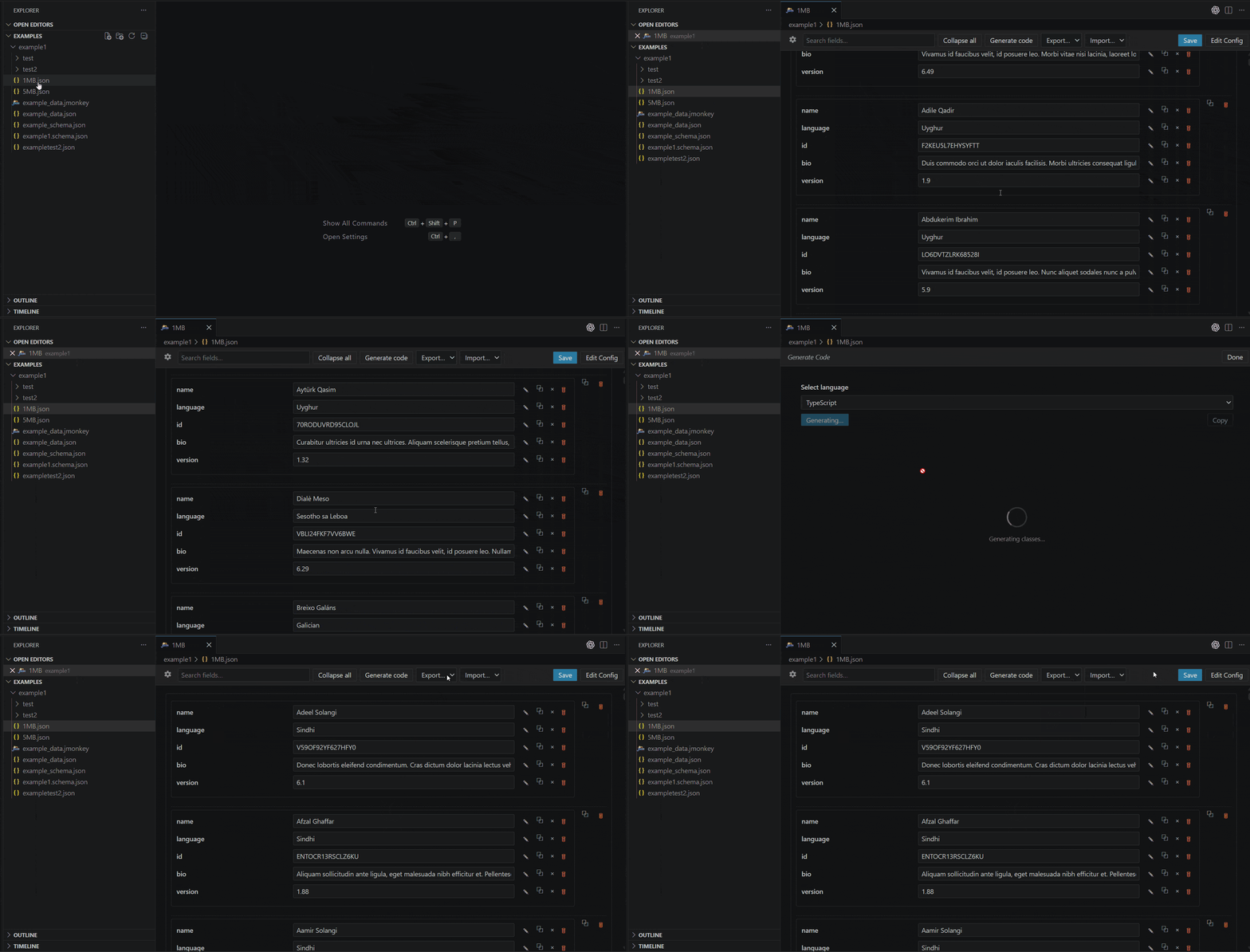
JSON MonkeyThe friendliest way to edit JSON in VS Code. Open any
Why you'll like it
Quick startEdit any JSON in seconds
That's the whole flow. No Want pickers, tabs, or defaults? Customize once.The moment you want JSON Monkey to do more than "render this JSON" — say, use a datetime picker for
From now on, opening either file gives you your customized editor. You can delete the
Starting from scratch (no JSON yet)Don’t have any JSON to begin with? You can start from an empty file and import existing data into it:
Nothing is written to disk until you press Save, so you can review (and edit) the imported data first. Table of contents
Opening the editorThere are three ways in:
The editor tab title comes from the descriptor's
Editing your data
Customizing with
|
| You want to… | Add a .jmonkey? |
|---|---|
| Just edit JSON in a form | No |
| Use a date / time / datetime picker on certain fields | Yes |
| Use a dropdown for an enum field | Yes |
| Group top-level keys into tabs | Yes |
| Seed default values when adding new items | Yes |
| Validate against a JSON Schema | Optional (auto-detected — see Conventions) |
Structured Config editor
Clicking Edit Config opens a dedicated form with three always‑visible sections:
| Section | What it edits | Add button |
|---|---|---|
| General | name, path, and (when present) schema |
Add schema field (when schema is absent) |
| Tabs | tabs[] — each entry { name, field }. Only applicable to the root level of data. |
+ Add tab → appends { name: "Tab N", field: "tab_N" } |
| Fields | fields[] cards — each card targets one or more field names, optionally declares a widget type, and optionally supplies a default_value authored through the recursive value editor |
+ Add field entry → appends { fields: [] } |
Each field entry combines what used to be split across the old per‑type fields object and the top‑level defaults array. A card exposes:
- a
fieldsstring list — the field patterns this entry applies to. Each pattern can be a leaf key name (log_level) or a full dot path (object1.object2.log_level,orders.items[].price,logs[3].level) so identical leaf names in different parts of the tree can carry different widgets and defaults. Always an array, even for a single pattern. - a
typeselector —(none),datetimepicker,timepicker,datepicker,select,checkbox,textarea, orcolor, - an options editor (rendered only when
typeisselect), - a Set default_value checkbox — when on, a recursive value editor lets you author any JSON shape (
string | number | boolean | null | list | object) for the default.
When type is omitted, JSON Monkey infers the widget kind from default_value (when present), then from the JSON schema, then from the runtime value.
Select entry — produced with one click:
{
  "fields": ["log_level"],
  "type": "select",
  "options": [
    { "value": "debug", "label": "Debug" },
    { "value": "info",  "label": "Info"  },
    { "value": "warn",  "label": "Warn"  },
    { "value": "error", "label": "Error" }
  ],
  "default_value": "info"
}
Datetimepicker with a shared default — one entry targets multiple field names:
{
  "fields": ["start_date", "end_date"],
  "type": "datetimepicker",
  "default_value": "2024-01-01 00:00:00.000"
}
Default‑only entry (no type) — widget inferred from default_value; useful for nested object/array seeds shared across multiple keys:
// Built entirely from the UI — string list of fields, object default_value
// with a nested list of numbers.
{
  "fields": ["monday", "tuesday", "wednesday", "thursday", "friday"],
  "default_value": {
    "start_time": "08:00",
    "end_time": "17:00",
    "breaks": [30, 60]
  }
}
First save creates the file. If you started by opening a .json directly, the very first time you press Ctrl+S in config mode JSON Monkey writes <yourfile>.jmonkey next to your JSON and re-opens the editor on it. Subsequent saves update that file in place.
Returning to data view. The bottom‑right button in config mode reads:
- Discard Edits while there are unsaved descriptor changes, or
- Back to Data when nothing is dirty and
name+pathare both filled in.
Settings tab
Click the gear icon in the toolbar to open the JSON Monkey Settings tab:
- Sort keys automatically — when on, object keys are displayed in alphabetical order; when off (default), keys are rendered in the order they appear in your JSON file. Either way, key insertion order is preserved on save, and renaming a key keeps it in its original slot.
Generating a JSON Schema
You don't have to hand-write a schema — JSON Monkey can generate one from your existing data.
- Open your file in JSON Monkey (a
.jsondirectly, or a.jmonkey). - Click Edit Config in the toolbar.
- Click Generate schema.
What happens:
- JSON Monkey infers a draft 2020‑12 schema from your current data (merging shapes across array items so it accepts every entry you already have).
- The schema is written to disk:
- to the path in your existing
schemafield, or - if
schemais missing, to<name>.schema.jsonnext to your file.
- to the path in your existing
- If a file already exists at that path, VS Code asks you to confirm the overwrite.
- The
schemafield of your descriptor is updated automatically when it was missing. - The new schema is loaded and live validation kicks in immediately.
🧠 The generated schema is intentionally type‑only — no
formatkeywords. This avoids common over‑strictness pitfalls (e.g."format": "date"rejecting"2024‑01‑01 00:00:00"). The descriptor'sdatetimepicker/timepickerlists are still used to render the right pickers — they just don't need a matchingformatin the schema.
Generating code from JSON
JSON Monkey can convert your JSON data into ready-to-use class / type definitions in a wide range of languages — perfect for bootstrapping models, DTOs or API clients from a sample payload.
- Open your file in JSON Monkey (a
.jsondirectly, or a.jmonkey). - In Data mode, click Generate code in the toolbar.
- Pick a target language from the dropdown and click Generate.
- Copy the result into your project.
Supported languages
| Language | Output style |
|---|---|
| TypeScript | export interface declarations + type aliases |
| Go | struct types with JSON tags |
| Rust | structs with serde derive attributes |
| Java | public static class POJOs nested in one file |
| Kotlin | data class declarations |
| Swift | struct types conforming to Codable |
| Scala | case class declarations (Scala 3) |
| C# (.NET) | class definitions with properties |
| PHP | class definitions with typed properties |
| Python (class) | Plain Python classes with type hints |
| Python (dataclass) | @dataclass-decorated classes with type hints |
What you get
- Automatic class consolidation — objects with identical field shapes (e.g. every item in a 10 000-element array) are detected and merged into a single reusable class instead of being repeated.
- Idiomatic root handling — when your JSON's top level is an array, JSON Monkey emits an idiomatic root alias in each language (
export type Root = Item[],type Root []Item,pub type Root = Vec<Item>,typealias Root = [Item], …) instead of wrapping it in a useless container class. - Nullable / mixed types —
nulls in sample data widen the corresponding fields to the language's nullable / optional equivalent. - Big files stay responsive — generation runs after a short defer with a progress spinner, so the editor never feels frozen on multi‑megabyte JSON.
💡 You don't need a
.jmonkeyfor this — code generation works directly from your JSON.
Exporting to XML, YAML or CSV
Need to hand your JSON to a tool that doesn’t speak JSON? JSON Monkey can convert the file you’re currently editing into another format and write it wherever you choose.
- Open your file in JSON Monkey (a
.jsondirectly, or a.jmonkey). - In Data mode, pick a format from the Export… dropdown in the toolbar: XML, YAML, or CSV.
- A Save As dialog appears, pre-filled with
<yourfile>.xml/.yaml/.csvnext to your source file. Adjust the location and confirm.
Format details
| Format | Output | Notes |
|---|---|---|
| XML | Well-formed UTF-8 XML wrapped in a single root element named after your source file. Arrays render as repeated <item> children; primitives become text content; empty values become self-closing tags. |
JSON keys that aren’t valid XML names (spaces, leading digits, special characters) are sanitized to safe element names — and the original key is preserved as a data-name="…" attribute so nothing is lost. |
| YAML | Block-style YAML 1.2 with two-space indents. Strings are quoted only when needed (e.g. they look like numbers, booleans, or contain special characters). Empty containers render as [] / {}. |
No external YAML library is bundled — the emitter is built in. |
| CSV | RFC 4180 with \r\n line endings and quoted fields, prefixed with a UTF-8 BOM so Excel opens it correctly. Header row = the union of all keys seen across rows, in first-seen order. Missing keys become empty cells. Nested objects / arrays are JSON-encoded into a single cell. |
CSV requires the JSON’s root to be an array of objects. Other shapes show a clear error and the Save dialog isn’t opened. |
Good to know
- Validation-gated, like Save. The Export dropdown is disabled while schema validation is failing — invalid data can’t be exported, with the same tooltip as the Save button.
- No descriptor required. Export works on plain
.jsonfiles; you don’t need a.jmonkeyfor any of the three formats. - Nothing is overwritten silently. VS Code’s native Save As dialog handles the file choice — cancel anytime and nothing is written.
- One-way conversion. Export writes to a brand-new file; it never modifies the JSON you’re editing.
Importing from XML or CSV
Already have data in XML or CSV and want to edit it as JSON? JSON Monkey can read it in, convert it on the fly, and load it straight into the form view — replacing the current document content.
- Open a JSON file in JSON Monkey (or create an empty
.jsonand open it — see Starting from scratch). - In Data mode, pick a format from the Import… dropdown in the toolbar: XML or CSV.
- Choose your source file in the Open dialog. JSON Monkey parses it, converts it to JSON, and renders the new data immediately. Press Ctrl+S when you’re ready to write it to disk.
Format details
| Format | What’s read | Notes |
|---|---|---|
| XML | Well-formed UTF-8 XML. The root element is unwrapped — its contents become the JSON value. Elements with only text become strings (with true / false / null and JSON numbers coerced to their primitive form). Sibling elements that all share the same tag become arrays; mixed children become objects. Standard entity references (&, <, >, ", ', plus numeric &#NN; / &#xHH;) are decoded. |
Pairs perfectly with Export → XML: a data-name="…" attribute on any element overrides the tag name as the JSON key, so keys that were sanitized on export are restored on import. |
| CSV | RFC 4180 CSV with an optional UTF-8 BOM. The first non-empty row is treated as the header row; each subsequent row becomes a JSON object keyed by header. Quoted fields ("…"), the "" escape, embedded newlines, and \r\n / \n / \r line endings are all supported. |
Cells stay as strings — no auto-coercion to numbers or booleans. Empty input (or only a header row) imports as []. |
Good to know
- Replaces existing data. Import overwrites the in-memory document. Press Ctrl+Z to undo and restore the previous content; nothing is written to disk until you press Ctrl+S afterwards.
- Always enabled in Data mode. Unlike Save / Export, Import is not gated by schema validation — you can use it to fix invalid data.
- Parse failures leave your data untouched. Malformed XML or CSV shows an error notification and the editor keeps its current content.
- No YAML import. Only XML and CSV are offered on the way in. (Export still supports YAML.)
- Pairs with Empty
.json. You can create a new empty.jsonfile in the Explorer, open it with Edit with JSON Monkey, and Import straight into it.
.jmonkey descriptor reference
Only path is required. Everything else is optional and can be added gradually.
| Field | Type | Purpose |
|---|---|---|
name |
string |
Display name — shown as the editor tab title |
version |
string |
Descriptor schema version. Current value: "2". Used to track future migrations — always written by the Config editor. |
path |
string |
Required. Path to the JSON data file, relative to the .jmonkey |
schema |
string |
Path to a JSON Schema file. Enables validation‑gated Save |
tabs |
array |
Splits the root object across tabs. Omit for a single flat page |
fields |
array |
List of field entries — widget hints and/or per‑field default values |
tabs — split the form across tabs
Each entry maps a top‑level key of your JSON file (field) to a tab labelled name.
"tabs": [
  { "name": "General",  "field": "general"  },
  { "name": "Schedule", "field": "schedule" },
  { "name": "Advanced", "field": "advanced" }
]
Use it when your top‑level object has a few logical groups; skip it for small files.
fields — widgets and per-field defaults
fields is an array of entries. Each entry targets one or more field patterns and can declare a widget type, supply a default_value, or both.
Field patterns. A pattern can be:
- a leaf key name —
"log_level"matches everylog_levelanywhere in the tree (legacy behaviour, still supported); - a full dot path —
"object1.object2.key_1"matches only that exact location; - with
[]—"orders.items[].price"matches every array item; - with
[N]—"logs[3].level"matches only that index.
More specific patterns automatically override less specific ones, so you can declare a general fallback plus targeted overrides in the same descriptor. Grab any field's exact path with the 📋 Copy key path button on that row and paste it into fields[].
"fields": [
  {
    "fields": ["start_date", "end_date"],
    "type": "datetimepicker",
    "format": "yyyy-MM-dd HH:mm:ss.SSS",
    "default_value": "2024-01-01 00:00:00.000"
  },
  {
    "fields": ["start_time", "end_time"],
    "type": "timepicker"
  },
  {
    "fields": ["birth_date"],
    "type": "datepicker"
  },
  {
    "fields": ["enabled", "is_admin"],
    "type": "checkbox"
  },
  {
    "fields": ["description", "notes"],
    "type": "textarea"
  },
  {
    "fields": ["theme_color", "orders.items[].color"],
    "type": "color",
    "default_value": "#3fa9f5"
  },
  {
    "fields": ["log_level"],
    "type": "select",
    "options": [
      { "value": "debug", "label": "Debug" },
      { "value": "info",  "label": "Info"  },
      { "value": "warn",  "label": "Warn"  },
      { "value": "error", "label": "Error" }
    ],
    "default_value": "info"
  },
  {
    "fields": ["monday", "tuesday", "wednesday", "thursday", "friday"],
    "default_value": { "start_time": "08:00", "end_time": "17:00" }
  }
]
| Key | Required? | Notes |
|---|---|---|
fields |
yes | Array of field patterns this entry applies to — leaf key names (log_level) or full dot paths (orders.items[].price, logs[3].level). See Field patterns above. |
type |
no | One of datetimepicker, timepicker, datepicker, select, checkbox, textarea, color. When omitted, the widget is inferred from default_value, then the schema, then the runtime value. |
default_value |
no | Seed value used when one of the listed patterns is (re)created. Any JSON shape — primitive, array, or nested object. For color, use a hex string such as "#3fa9f5" or "#3fa9f580" (with alpha). |
options |
when type === "select" |
[{ "value": string, "label": string }]. |
format |
when type === "datetimepicker" |
Optional. When set, the picker reads/writes the JSON value using this pattern, and Save is blocked if any matching field's value doesn't roundtrip. See Datetime format tokens below. |
Datetime format tokens
Numeric, 24-hour, locale-independent. Anything outside a recognised token (and outside a '...' quoted block) is a literal separator. Use '' for a literal apostrophe.
| Token | Meaning | Range |
|---|---|---|
yyyy / yy |
Year (4-digit / 2-digit) | |
MM / M |
Month of year | 1–12 |
dd / d |
Day of month | 1–31 |
DDD / DD / D |
Day of year | 1–366 |
HH / H |
Hour of day (24h) | 0–23 |
mm / m |
Minute | 0–59 |
ss / s |
Second | 0–59 |
SSS / SS / S |
Millisecond | 0–999 |
ww / w |
ISO week of year | 1–53 |
u |
ISO day of week (Mon=1…Sun=7) | 1–7 |
Examples: yyyy-MM-dd HH:mm:ss.SSS, yyyy-MM-dd'T'HH:mm:ss, yyyy-'W'ww-u.
Note: the picker is minute-resolution — ss/SSS are written as zero on every edit because <input type="datetime-local"> doesn't expose sub-minute precision. Hand-edit the JSON for non-zero seconds/millis.
Widget resolution order
- The highest-scoring
fields[]entry whose pattern matches the current field's path (full-path patterns outrank leaf-only ones, exact-index patterns outrank[]). - JSON Schema hints (
enum→ select,format: date-time→ datetimepicker,format: color→ color picker, etc.). - The JS runtime type of the current value.
Default value resolution order
- The highest-scoring
fields[]entry (same scoring as above) that also definesdefault_value. - Schema
default, thenconst, thenenum[0]. - For array items without a schema: the shape of the first existing item, with primitive leaves emptied.
- The type's zero value (
"",0,false,{},[]).
Conventions
If you don't set schema, JSON Monkey also looks for these siblings of the data file:
<dataFile>_schema.json<dataFile>.schema.json
So config.json will pick up config_schema.json automatically — no descriptor needed.
Validation
When a schema is loaded:
- Every edit is re‑validated live.
- Supported drafts: 2020‑12, 2019‑09, 7 (selected automatically from the schema's
$schemaURI). - When validation fails, a red banner lists each issue as
<json‑pointer> – <message>and the Save button is disabled until you fix the data (or update the schema).
💡 The Edit Schema toolbar button lets you fix the schema visually without leaving JSON Monkey.
Toolbar reference
| Button | When visible | What it does |
|---|---|---|
| Save | always | Save the file you're currently editing (data, descriptor, or schema). Disabled while validation fails. |
| Edit Config | Data mode | Switch to editing the descriptor in the structured Config editor. If no .jmonkey exists yet, saving here creates one next to your JSON. |
| Edit Schema | Data mode, when schema is present | Switch to editing the JSON Schema, in the same visual editor. |
| Generate code | Data mode | Open the code generator: pick a target language and emit class / type definitions from the current JSON data. |
| Export… (dropdown) | Data mode | Convert the current JSON data to XML, YAML, or CSV and open a Save As dialog. Disabled while schema validation is failing. CSV requires an array of objects. |
| Import… (dropdown) | Data mode | Read XML or CSV from a chosen file, convert it to JSON, and replace the current document content. Always enabled (works on empty .json files too). Press Ctrl+Z to undo, Ctrl+S to save. |
| Save Config / Save Schema | Config / Schema mode | Save pending changes to the descriptor / schema. |
| Discard Edits | Config / Schema mode, while dirty | Discard pending changes and return to data view. |
| Back to Data | Config mode, when clean and name + path are set |
Return to data view without making any changes. |
| + Add schema field | Config mode, when descriptor has no schema |
Inserts an empty "schema": "" field into the descriptor. |
| Generate schema | Config mode, when descriptor has no resolved schema | Generates a JSON Schema from the current data, writes it to disk, and (if needed) updates the descriptor's schema field. Requires both the descriptor and the data JSON to be loaded. |
| ⚙ Settings | Data mode | Opens the JSON Monkey Settings tab (e.g. Sort keys automatically). |
Full worked example
Suppose you have example_data.json you want to edit with pickers, tabs and a schema. You can either:
- Build it from the UI — open
example_data.jsonwith JSON Monkey, click Edit Config, fill in tabs / fields / pickers, click Generate schema, then Ctrl+S. JSON Monkey creates bothexample_data.jmonkeyandexample_data.schema.jsonfor you. - Hand-write it — drop a file like this next to your data:
example1.jmonkey
{
  "name": "Example 1",
  "version": "2",
  "schema": "example_schema.json",
  "path": "test/example_data.json",
  "tabs": [
    { "name": "Tab 1", "field": "demo_tab_1" },
    { "name": "Tab 2", "field": "demo_tab_2" },
    { "name": "Tab 3", "field": "demo_tab_3" }
  ],
  "fields": [
    {
      "fields": ["start_date", "end_date"],
      "type": "datetimepicker",
      "format": "yyyy-MM-dd HH:mm:ss.SSS",
      "default_value": "2024-01-01 00:00:00.000"
    },
    {
      "fields": ["start_time", "end_time"],
      "type": "timepicker"
    },
    {
      "fields": ["monday", "tuesday", "wednesday", "thursday", "friday"],
      "default_value": { "start_time": "08:00", "end_time": "17:00" }
    },
    {
      "fields": ["select_field"],
      "type": "select",
      "options": [
        { "value": "option1", "label": "Option 1" },
        { "value": "option2", "label": "Option 2" },
        { "value": "option3", "label": "Option 3" }
      ]
    }
  ]
}
Tips & FAQ
Do I have to create a .jmonkey file?
No. Just right-click any .json → Edit with JSON Monkey and you'll get a form view immediately. The .jmonkey only appears if you save customizations from the Edit Config screen.
Can JSON Monkey edit any JSON file?
Yes — any valid JSON. Add a .jmonkey later if you want pickers, tabs, defaults or schema-gated validation.
Where does the .jmonkey file go?
Right next to your JSON, named <yourfile>.jmonkey. If that name is already taken, JSON Monkey adds a -1, -2, … suffix.
Do I have to write a JSON Schema?
No. Without a schema you still get a usable form. Add a schema only when you want validation, better widget inference, or required enforcement. The Generate schema button can build one for you.
Where does the generated schema go?
By default, <descriptor‑name>.schema.json next to the .jmonkey file (or wherever descriptor.schema already points). VS Code prompts before overwriting.
Can I edit the underlying JSON file by hand while JSON Monkey is open? Yes — external changes are picked up automatically.
Does it work with Workspace Trust? Yes. JSON Monkey only reads/writes files referenced by your descriptor, the same way any custom editor would.
Troubleshooting
- JSON Monkey editor is blank — open View → Output → JSON Monkey and Developer: Open Webview Developer Tools. Any error from the bundled webview will surface there.
- Save button is greyed out — schema validation is failing. Check the red banner at the top.
- "Edit with JSON Monkey" missing on a
.jsonfile — use Right-click → Open with… → JSON Monkey, or run JSON Monkey: Open from the Command Palette. - Validation complains about
format: "date"— your data isn'tYYYY‑MM‑DD. Either drop theformatkeyword (recommended; see Generating a JSON Schema) or usedate-timewith an ISO 8601 value.
License
MIT