CybeDefend
Scan. Detect. Fix. — Security meets AI, right in your editor.
Website •
Features •
Installation •
Getting Started •
Security Scanning •
CybeAgent •
Configuration •
Acknowledgments
Overview
CybeDefend brings security scanning and an AI-powered fix agent directly into your code editor. In a single workflow you can:
- Scan your project for vulnerabilities (SAST, SCA, IAC, secrets, CI/CD)
- Review findings with severity ratings, CWE references, and data flow details
- Fix issues instantly — either with one-click AI remediation or automated dependency upgrades
Features
Security Scanning
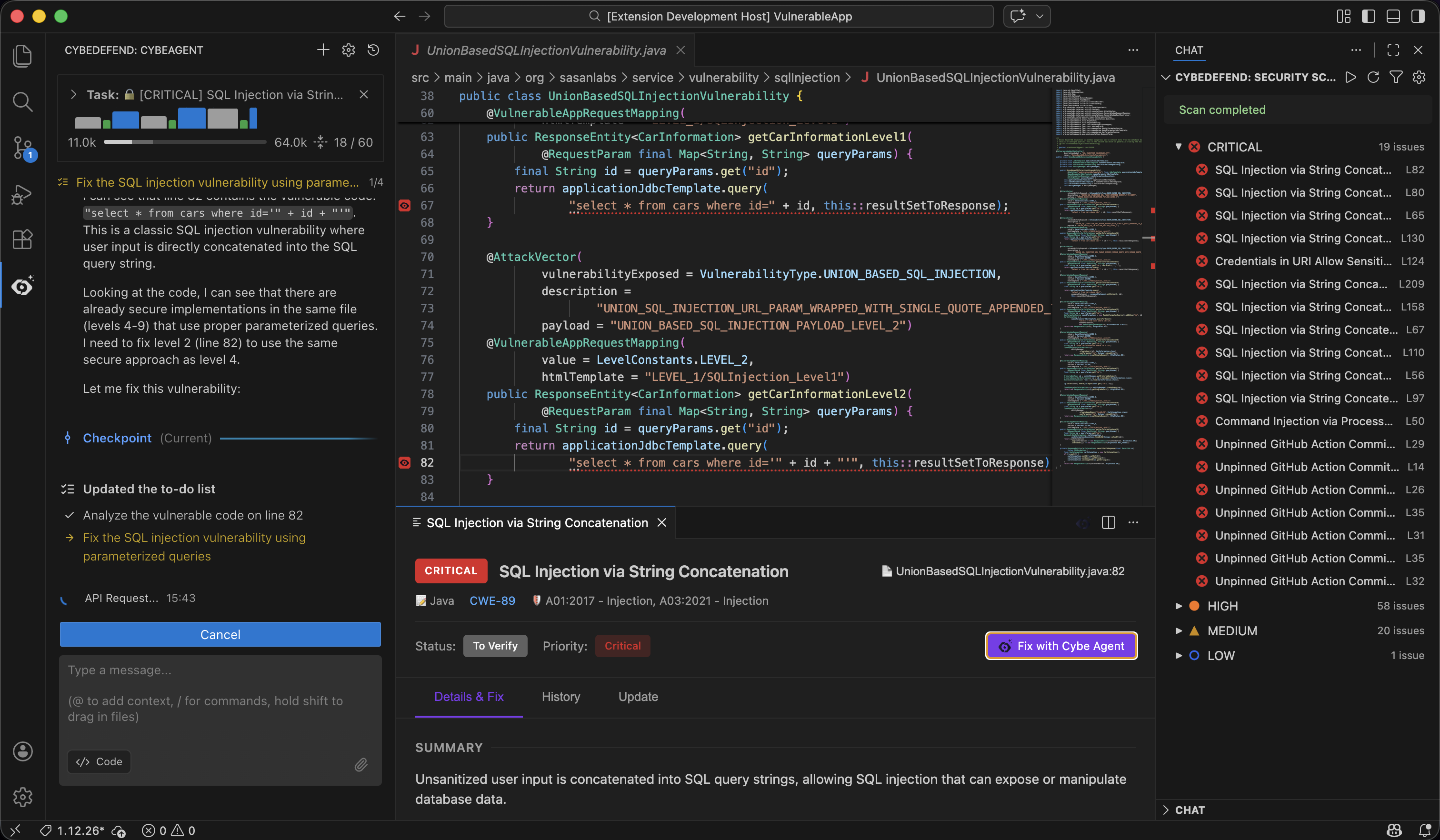
Run a full security audit of your codebase without leaving your editor. CybeDefend supports five scan types:
|
Scan Type |
What It Finds |
| 🔍 |
SAST |
SQL injection, XSS, path traversal, command injection — with taint analysis and data flow tracking |
| 📦 |
SCA |
Known CVEs in your dependencies (npm, Maven, pip, Go, NuGet, RubyGems, Cargo, Swift, Packagist) |
| 🏗️ |
IAC |
Misconfigurations in Terraform, CloudFormation, Kubernetes, Docker |
| 🔑 |
Secret Detection |
Leaked API keys, tokens, passwords, and certificates |
| ⚙️ |
CI/CD |
Insecure pipeline configurations and overly permissive permissions |
Results appear in a dedicated sidebar, grouped by severity — Critical, High, Medium, Low, Info — with colored gutter icons and diagnostic underlines directly in your code.
CybeAgent — AI-Powered Fix
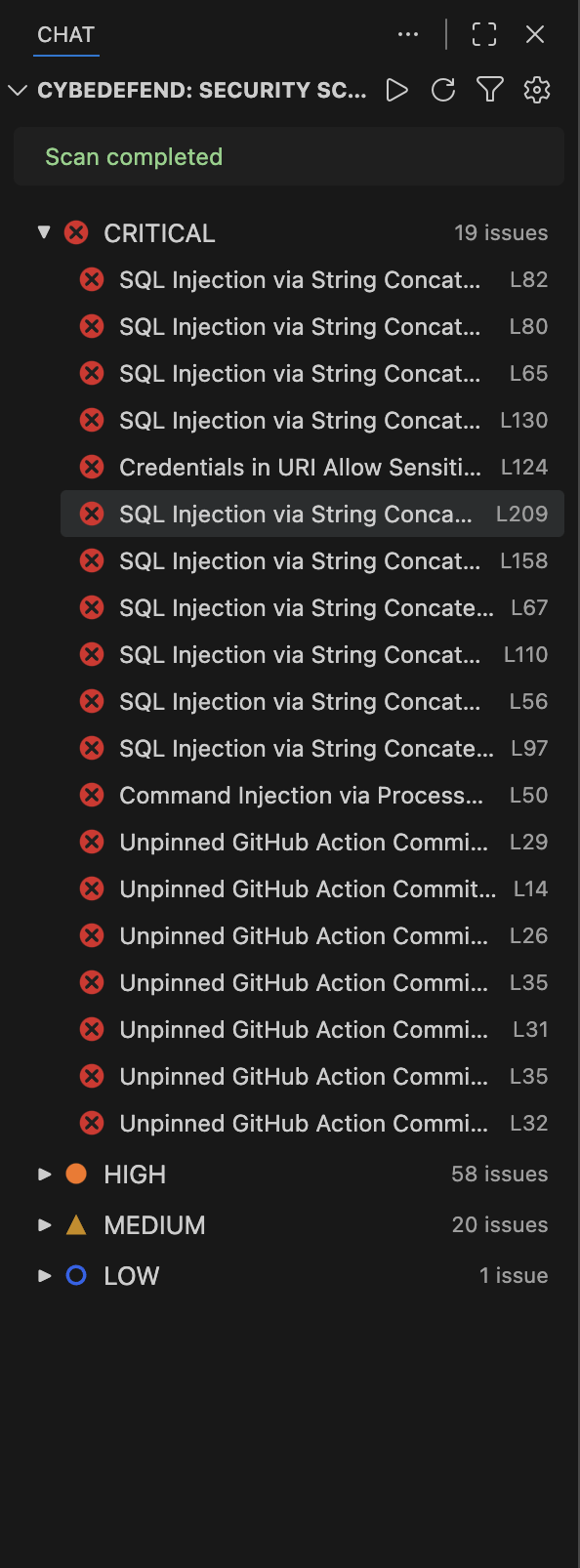
When a vulnerability is detected, click "Fix with CybeAgent" to let the AI agent fix it for you. The agent receives the full context of the issue — severity, CWE, OWASP classification, vulnerable code snippet, data flow, and remediation guidance — then proposes a precise code edit that you can review and apply.
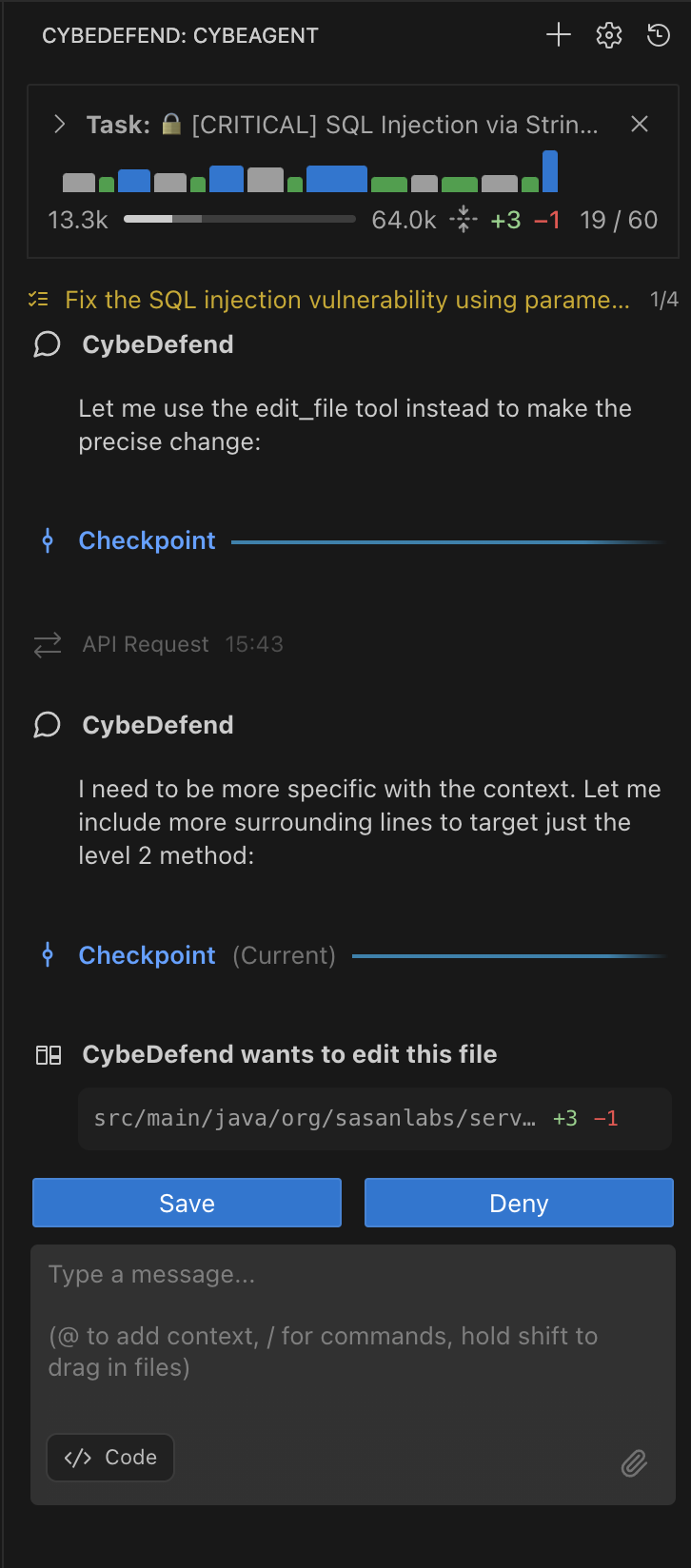
CybeAgent identifies a SQL injection vulnerability, analyzes the code, and generates a fix using parameterized queries — all inside the editor.
DeepFix — Automated Dependency Upgrades
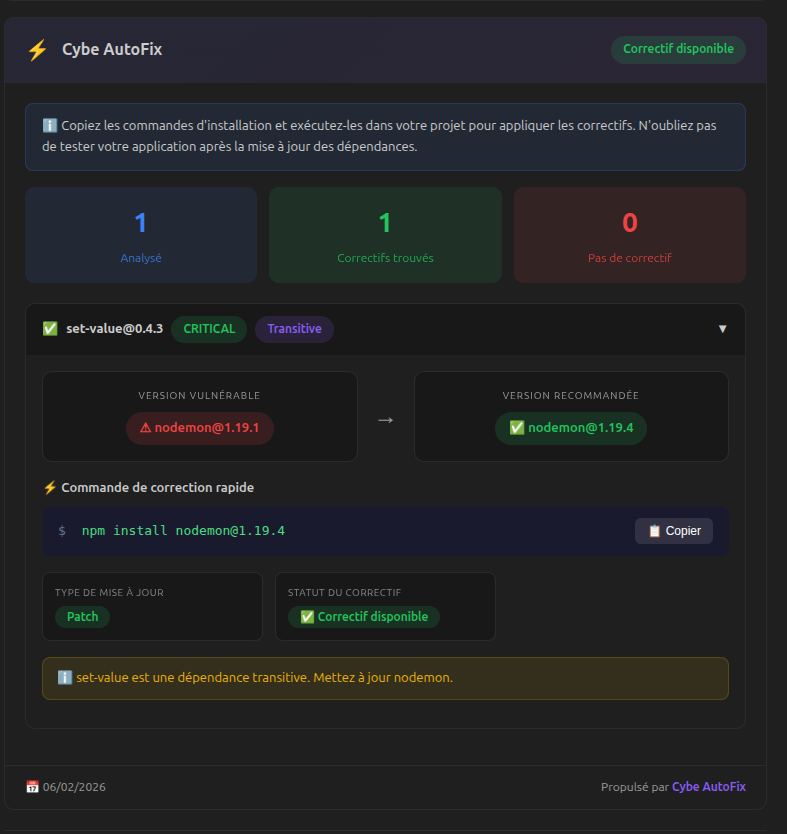
For SCA vulnerabilities (insecure dependencies), CybeDefend includes DeepFix: an automated engine that resolves safe version upgrades across 10 package ecosystems. No AI needed — just a one-click upgrade command.
npm · maven · pip/pypi · go · nuget · packagist · rubygems · crates · swiftpm
Editor Integration
CybeDefend integrates deeply into your editor:
- Gutter icons — Severity-colored markers on every vulnerable line
- Diagnostics — Native squiggly underlines, visible in the Problems panel
- Context menu — Right-click a vulnerability marker to view details or trigger a fix
- Status bar — Live scan progress and result summary
Localization
Available in English and French.
Install from the Marketplace
- Open the Extensions panel (
Ctrl+Shift+X / Cmd+Shift+X)
- Search for CybeDefend
- Click Install
Getting Started
1. Sign In
Click the CybeDefend icon in the Activity Bar, sign in with your CybeDefend account, and select your project. Authentication uses a secure PKCE-based OAuth2 flow.
2. Run a Security Scan
- Open the CybeDefend Security panel (shield icon in the Activity Bar)
- Click Play to start a scan
- Browse results grouped by file, severity, or vulnerability type
- Click any finding to see full details, data flow, and remediation advice
- Click "Fix with CybeAgent" to generate an AI fix, or use DeepFix for automated dependency upgrades
Your workspace is linked to a CybeDefend project and branch in the extension settings.
Security Scanning
Vulnerability Lifecycle
Manage the status of each finding directly from VS Code:
| Status |
Meaning |
to_verify |
Needs triage |
confirmed |
Validated vulnerability |
not_exploitable |
False positive |
resolved |
Fixed |
ignored |
Accepted risk |
Ignoring Files
Create a .cybedefend file at the root of your project to exclude files or directories from scanning. Uses the same syntax as .gitignore.
CybeAgent
CybeAgent is the built-in AI assistant. It can read, edit, and create files, run terminal commands, search your codebase, and interact with web pages — all through natural language.
| Tool |
Description |
| Read File |
Read file contents with line range support |
| Edit File |
Modify existing files with precise replacements |
| Write File |
Create new files |
| Apply Diff / Patch |
Apply unified diffs and patches |
| Search & Replace |
Find and replace across files |
| Execute Command |
Run terminal commands |
| Browser Action |
Navigate, click, type, screenshot web pages |
| List Files |
Explore directory structures |
| Search Files |
Regex search across the workspace |
| Codebase Search |
Semantic search across your project |
| Ask Followup |
Ask clarifying questions |
| Todo List |
Track multi-step task progress |
Keyboard Shortcuts
| Shortcut |
Action |
Cmd+Shift+A / Ctrl+Shift+A |
Focus chat input |
Cmd+Alt+A / Ctrl+Alt+A |
Toggle auto-approve |
Configuration
Access settings via Cmd+, (macOS) or Ctrl+, (Windows/Linux) → search "cybedefend".
| Setting |
Default |
Description |
cybedefend.region |
eu |
CybeDefend region (eu or us) |
cybedefend.allowedCommands |
["git log", "git diff", "git show"] |
Pre-approved terminal commands |
cybedefend.deniedCommands |
[] |
Blocked terminal commands |
cybedefend.commandExecutionTimeout |
0 |
Command timeout in seconds (0 = no limit) |
cybedefend.enableCodeActions |
true |
Show quick-fix code actions |
cybedefend.apiRequestTimeout |
600 |
API request timeout in seconds |
cybedefend.debug |
false |
Enable debug logging |
Regions
| Region |
Auth Endpoint |
Description |
eu |
auth-eu.cybedefend.com |
European Union (default) |
us |
auth-us.cybedefend.com |
United States |
Acknowledgments
CybeDefend is built on top of Kilo Code, an open-source AI coding agent. We extend it with security scanning, authentication, and the CybeDefend AI provider.
cybedefend.com

