Skip to content
| Marketplace
Sign in
Visual Studio Code>Linters>ArchSentinelNew to Visual Studio Code? Get it now.
ArchSentinel

ArchSentinel

Cristy

|
2 installs
| (0) | Free
Visualize dependencies, detect cycles, and protect your software architecture in real time.
Installation
Launch VS Code Quick Open (Ctrl+P), paste the following command, and press enter.
Copied to clipboard
More Info

ArchSentinel 🛡️

ArchSentinel Logo
**The Guardian of Your Clean Architecture.**
Visualize dependencies, detect cycles, and enforce architectural boundaries in real-time. Version License VS Code

🌐 Visit Official Website

🚀 Overview

ArchSentinel is a static analysis tool designed for teams who care about Software Architecture. It goes beyond simple linting by modeling your project as a directed graph to detect structural anomalies.

Whether you follow Clean Architecture, Hexagonal, or Onion Architecture, ArchSentinel ensures your dependency rules are respected, preventing "Spaghetti Code" before it happens.

✨ Key Features

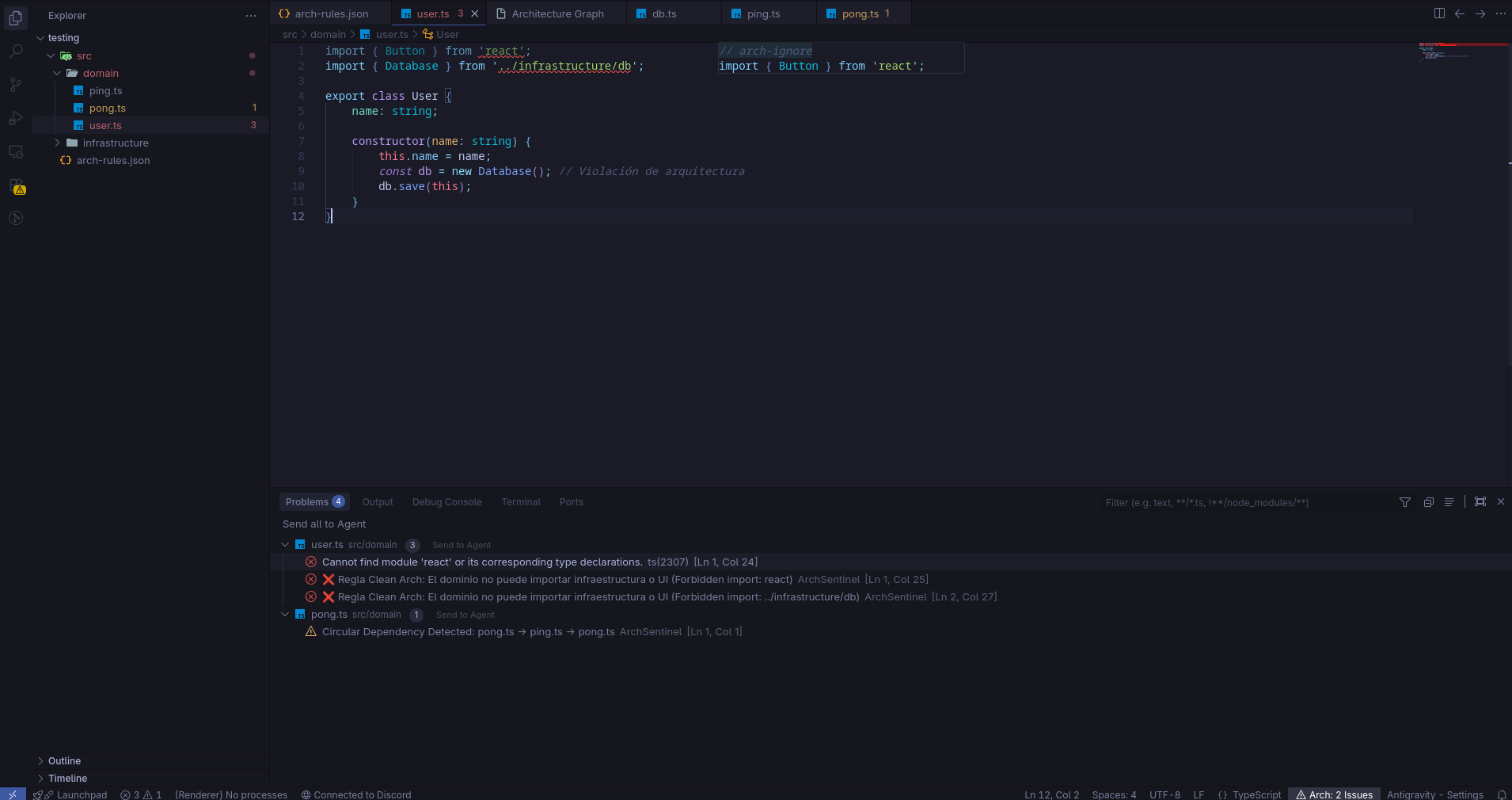
1. 🏗️ Boundary Enforcement

Define strict rules in a simple JSON file. If your Domain Layer tries to import the Infrastructure Layer, ArchSentinel will flag it immediately inside the editor.

  • Real-time feedback: Red squiggles on forbidden imports.
  • Language Support: TypeScript (.ts, .tsx) and Dart/Flutter (.dart).

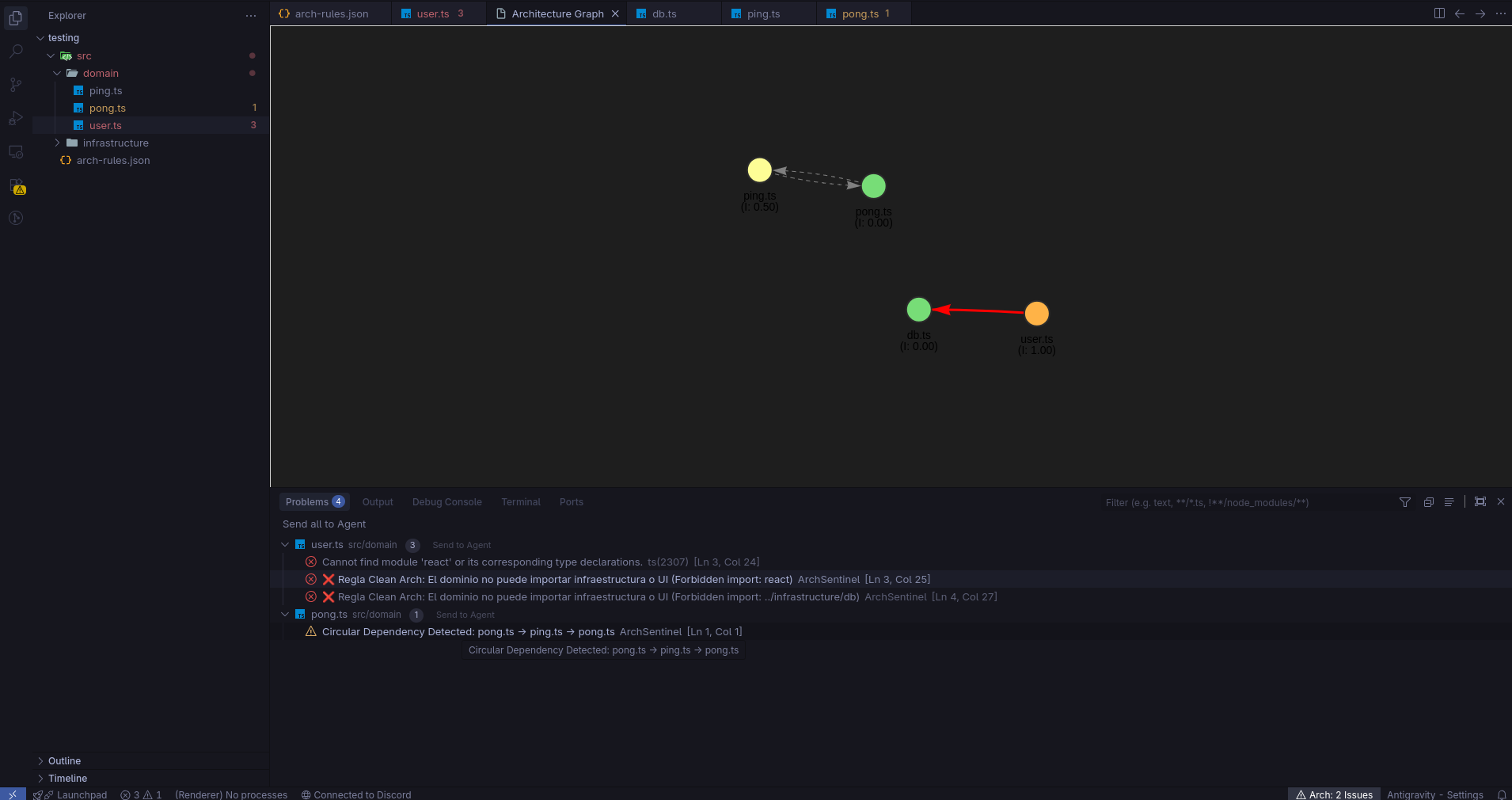
2. 🕸️ Interactive Architecture Graph

Visualize your project's health with a physics-based graph.

  • Command: ArchSentinel: Show Architecture Graph
  • Visual Feedback: - 🔴 Red Thick Lines: Forbidden dependencies.
    • 🟡 Yellow Lines: Suppressed/Ignored violations.
    • ⚪ Gray Dashed Lines: Healthy connections.

3. 📐 Scientific Metrics (Instability)

We calculate Robert C. Martin's Instability Metric (I) for every file: $$I = \frac{FanOut}{FanIn + FanOut}$$

  • Green Nodes (0-0.3): Stable components (e.g., Domain entities).
  • Orange Nodes (0.7-1): Volatile components (e.g., UI, Scripts).

4. 🔄 Circular Dependency Detection

Detects dangerous cycles (e.g., A -> B -> C -> A) that cause runtime errors and infinite loops. The extension warns you about these structural deadlocks instantly.

5. 🛠️ Developer Experience (DX)

  • JSON Schema: Autocomplete and validation for your arch-rules.json.
  • Quick Fixes: One-click actions to ignore specific violations using // arch-ignore.

📸 Screenshots

Architecture Visualization Real-time Linting
Graph View Linting Error

⚙️ Configuration

Create a file named arch-rules.json in the root of your workspace.

Example for Clean Architecture:

{
  "rules": [
    {
      "scope": "src/domain",
      "forbidden": ["src/infrastructure", "src/ui", "react", "flutter"],
      "message": "❌ The Domain layer must remain pure and independent."
    },
    {
      "scope": "src/application",
      "forbidden": ["src/ui", "src/infrastructure/web"],
      "message": "⚠️ Application layer should not depend on UI details."
    }
  ]
}

🛡️ Suppressing Rules

Sometimes you need to break the rules temporarily (e.g., legacy code or rapid prototyping). You can suppress a violation by adding a comment on the line before the import:

// arch-ignore
import { Database } from '../infrastructure/db'; 

This will turn the error into a warning and change the edge color in the graph to Yellow.


📦 Installation

  1. Open VS Code.
  2. Go to the Extensions view (Ctrl+Shift+X).
  3. Search for "ArchSentinel".
  4. Click Install.
  5. Reload VS Code to activate.

🤝 Contributing

We believe in open source! If you want to add support for Python, Java, or improve the graph visualization:

  1. Fork the repository.
  2. Create your feature branch (git checkout -b feature/AmazingFeature).
  3. Commit your changes (git commit -m 'Add some AmazingFeature').
  4. Push to the branch (git push origin feature/AmazingFeature).
  5. Open a Pull Request.

📝 License

Distributed under the MIT License. See LICENSE for more information.

  • Contact us
  • Jobs
  • Privacy
  • Manage cookies
  • Terms of use
  • Trademarks
© 2025 Microsoft