Skip to content
| Marketplace
Sign in
Visual Studio Code>Other>Codex Terminal CompanionNew to Visual Studio Code? Get it now.
Codex Terminal Companion

Codex Terminal Companion

ColinChen

|
7 installs
| (0) | Free
Live Codex terminal status, automatic names, one-click switching and optional completion alerts. Supports Remote SSH.
Installation
Launch VS Code Quick Open (Ctrl+P), paste the following command, and press enter.
Copied to clipboard
More Info

Codex Terminal Companion

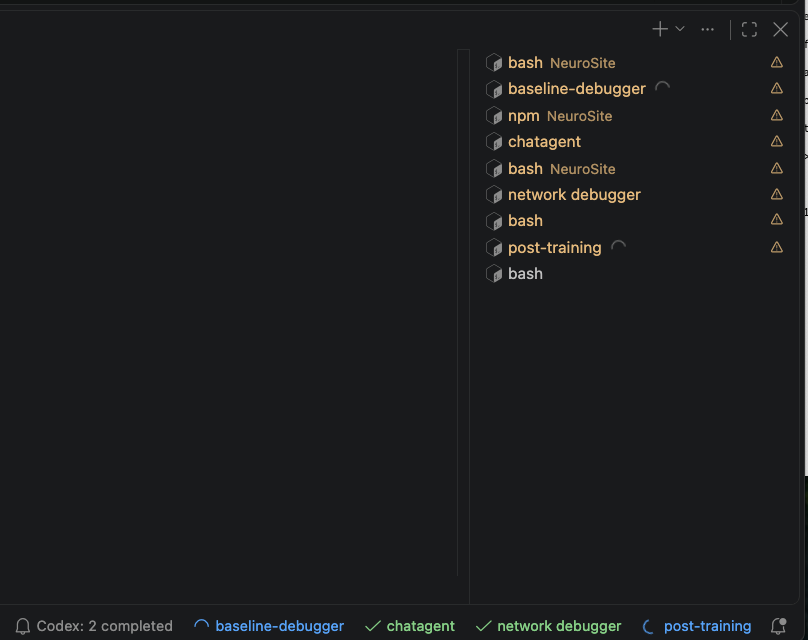
See which Codex conversations are working, finished, or interrupted, right in VS Code.

Codex terminals with background spinners, conversation names, and an unread completion counter

Feature What you get
Live activity Colored status indicators and background terminal spinners.
Automatic names Name the selected terminal after its Codex conversation.
Completion alerts (optional) A notification when a turn finishes, plus an unread counter.

Activity and automatic names are on by default. Completion alerts are off by default. Adjust them independently with Codex Terminal Companion: Open Settings.

Automatic detection supports macOS and Linux; Windows supports manual binding. For Remote SSH, install the extension on the server. Native spinners need a supported VS Code version and a terminal list wide enough to show them.

  • Contact us
  • Jobs
  • Privacy
  • Manage cookies
  • Terms of use
  • Trademarks
  • Your Privacy Choices
  • Consumer Health Privacy
© 2026 Microsoft