Project RenamifierSafely rename projects in Visual Studio. Updates the project file, directory, namespaces, using statements, fully qualified references, and project references across your entire solution. |

Project RenamifierRename projects the way it should have always worked!
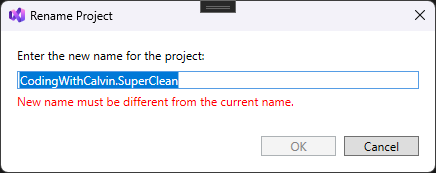
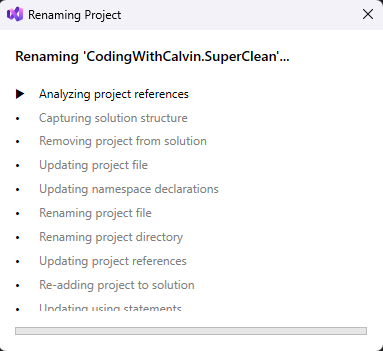
Tired of the tedious, error-prone process of renaming a project in Visual Studio? Say goodbye to manual find-and-replace across dozens of files! Project Renamifier handles everything automatically - one click, one dialog, done! ✨ FeaturesWhen you rename a project, this extension handles all of the following automatically:
The extension shows a progress dialog with step-by-step status as it performs the rename operation, and includes error handling with rollback support if something goes wrong. 📸 Screenshots
🛠️ InstallationVisual Studio Marketplace
Manual InstallationDownload the latest 🚀 Usage
💻 Supported Versions
🤝 ContributingContributions are welcome! Whether it's bug reports, feature requests, or pull requests - all feedback helps make this extension better. 🔧 Development Setup
📄 LicenseThis project is licensed under the MIT License - see the LICENSE file for details. 👥 Contributors
Made with ❤️ by Coding With Calvin |