
Incremental Editing Engine for VS Code
Chat with the Incremental Editing Engine from the VS Code sidebar. Describe a change. The engine finds the one function or block it touches and sends only that to the model. You review the diff before anything is written.
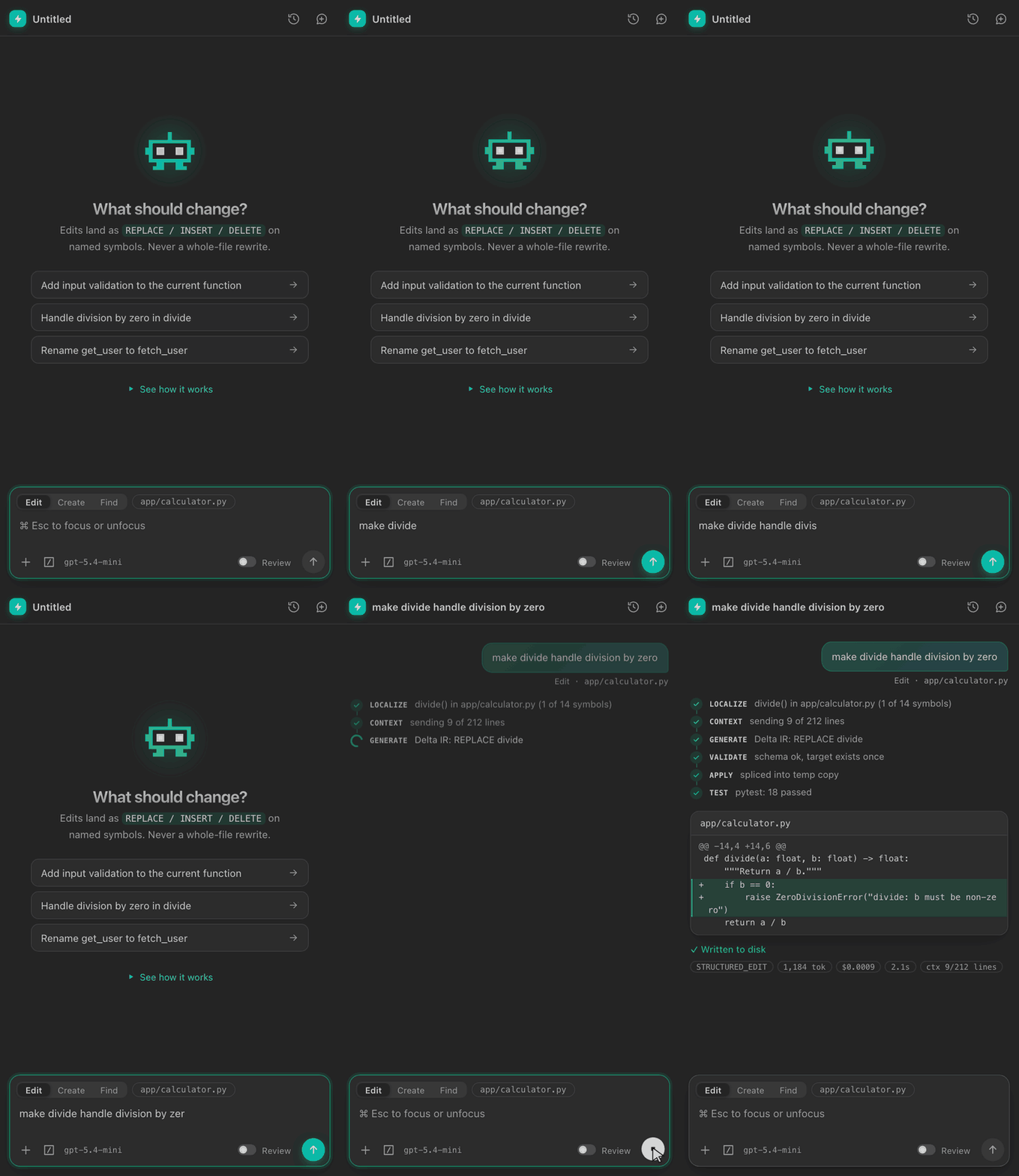
The extension doesn't reimplement the engine. It starts the engine's local backend (iee serve) and talks to it from a native sidebar chat.
Getting started
- Install the extension: in VS Code open the Extensions view, click ⋯ → Install from VSIX… and pick
incremental-editing-engine-0.1.0.vsix.
- Open a project folder and click the ⚡ icon in the Activity Bar.
- On first open the extension sets up the engine by itself: it creates a private Python environment and installs the engine that ships inside the extension. This takes 1-3 minutes, once. You only need Python 3.10 or newer installed.
- Click Add key and paste your OpenAI API key. If you use a gateway or a virtual key (LiteLLM, Azure, a proxy), enter its base URL in the second prompt. The key is kept in VS Code's secret storage and only passed to the local engine.
To change or remove your key later, click the key icon in the sidebar header, or type /remove-key.
That's it. No cloning, no pip install, no .env file.
Everything runs on your machine. The engine keeps its data in VS Code's extension storage, and each VS Code window starts its own engine on a free port.
Usage and cost
Every run shows its strategy, model, input / output / cached tokens, estimated cost, model time, and how many lines of the file were sent. The pill in the header shows this conversation's total cost and tokens; click it for a breakdown plus all-time totals (with a reset). Costs are estimates from the engine's price table, not your provider's bill.
Usage
- Click the ⚡ Incremental Editing icon in the Activity Bar, press Cmd+Esc (Ctrl+Esc on Windows/Linux), or click IEE in the status bar. Tip: drag the view into the Secondary Side Bar to keep it beside your editor.
- Pick a mode with the switch above the input: Edit (change existing code), Create (write a new file) or Find (locate code, no edits).
- In Edit mode the file in the active editor is the target. Click its chip to let the engine auto-locate the file instead, or press + to pick another file.
- Type / for commands:
/edit, /create, /find, /file, /auto, /new, /history, /settings.
- Review (default): each validated diff waits for Accept or Reject. Nothing touches disk before you accept. Turn on Auto-apply to write validated changes straight away.
- Open diff opens the proposed file in VS Code's diff editor.
- Conversations are saved per workspace. Use the clock icon to resume one, and the bubble icon to start a new one.
- Incremental Editing Engine: See How It Works opens a short walkthrough with the demo above.
- Commands: Set OpenAI API Key, Remove OpenAI API Key, Reinstall Engine, Show Log, Start / Stop / Restart Server.
- Open Full Web UI needs a source checkout of the engine (see Settings,
command).
Settings
| Setting |
Default |
Description |
incrementalEditingEngine.model |
(engine default) |
Model the engine uses. |
incrementalEditingEngine.openaiBaseUrl |
(empty) |
OpenAI-compatible base URL for a gateway or virtual key. |
incrementalEditingEngine.projectDir |
(empty) |
Project directory to edit. Empty uses the first workspace folder. |
incrementalEditingEngine.python |
(auto) |
Python 3.10+ used for first-run setup. |
incrementalEditingEngine.command |
(empty) |
Advanced: run your own engine (e.g. a source checkout's iee) instead of the bundled one. |
incrementalEditingEngine.host / port |
127.0.0.1 / 8787 |
Address for a custom command engine. The bundled engine picks a free port. |
Building from source
cd vscode-extension
npm install
npm run compile      # builds dist/extension.js
npm run package      # produces a .vsix via @vscode/vsce
Install the resulting .vsix via the Extensions view → ... menu → Install from VSIX..., or:
code --install-extension incremental-editing-engine-0.1.0.vsix

