
Codecarbon extension
This extension allows you to track the carbon emissions of your code directly from your VsCode. It uses the CodeCarbon package to estimate the carbon emissions of your code.
Features
- Track the carbon emissions of your code directly from your VsCode.
- Start and stop the emissions tracking with a simple click.
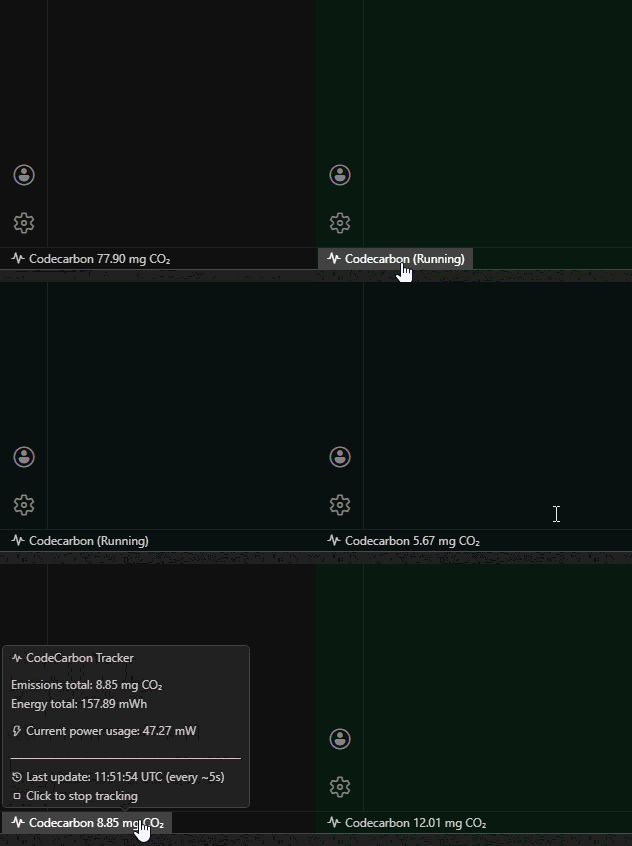
- Real-time metrics display: View live CPU, GPU, and RAM power usage, energy consumption, and total emissions directly in the status bar.
- Detailed tooltip showing:
- Current power usage (CPU/GPU/RAM in Watts)
- Total energy consumed (CPU/GPU/RAM in kWh)
- Total CO₂ emissions since tracking started
- Save it into a csv file for further analysis.
Commands
Use the Command Palette (Ctrl/Cmd+Shift+P) and run:
Codecarbon: Start tracking emissionsCodecarbon: Stop tracking emissionsCodecarbon: Restart tracking emissionsCodecarbon: Open tracking logs
Run policy
- The extension enforces a single active CodeCarbon tracker per workspace to avoid duplicate writes to
emissions.csv.
- If a previous VS Code session leaves a stale tracker process, the extension attempts to clean it up automatically on the next start.
Q&A
Why does tracking fail with “Another instance of codecarbon is already running”?
CodeCarbon uses a lock file to prevent multiple trackers running at the same time on the same machine.
This extension enforces that single-run policy (allow_multiple_runs = false) to avoid duplicate metrics and conflicting writes.
What should I do if I see that warning?
- Stop CodeCarbon in other VS Code windows or terminals on the same machine.
- Start tracking again from this window.
- If a previous session crashed, reopening and starting tracking again will trigger stale process cleanup for this workspace.
Optional keybindings
If you want keyboard shortcuts, add these to your keybindings.json:
[
  {
    "key": "ctrl+alt+e",
    "command": "codecarbon.start"
  },
  {
    "key": "ctrl+alt+shift+e",
    "command": "codecarbon.stop"
  },
  {
    "key": "ctrl+alt+r",
    "command": "codecarbon.restart"
  },
  {
    "key": "ctrl+alt+l",
    "command": "codecarbon.openLogs"
  }
]
Requirements
The extension uses codecarbon to measure the carbon emissions. This package connects to your hardware via specific APIs to get to know the power usage of your CPU/GPU/RAM. These APIs depend on the brand and OS. See https://docs.codecarbon.io/latest/introduction/methodology/#power-usage for the needed tools for your specific setup.
Note: if you do not install the requirements, codecarbon will track in fallback mode.
- The extension behavior is designed to be consistent on Linux, macOS, and Windows (same start/stop commands, status bar state model, and logs).
- Hardware-level power collection accuracy depends on OS-specific CodeCarbon dependencies and vendor tooling. Review the official CodeCarbon power usage requirements in the link above.
- When those dependencies are unavailable, CodeCarbon may use fallback estimation mode; the extension still runs, but metrics fidelity can differ by platform.
Extension Settings
This extension contributes the following settings:
codecarbon.launchOnStartup: If true, the extension will start tracking the emissions when you open a new window. Defaults to true.codecarbon.notifications: Notification policy for popups. Use default to show start/stop info and recoverable warnings, or minimal to only show blocking errors.codecarbon.emissionsFile: Optional CSV destination path. Set an absolute path (for example in your home directory) to use one central emissions.csv across workspaces.
Contributing
Some ideas on how to contribute to this extension:
- Testing: You can help by testing the extension and reporting any issues you find.
- Feedback: You can help by providing feedback on the extension. Feel free to open any issues or feature requests.
- Documentation: You can help by improving the documentation.
- Code: You can help by contributing code to the extension.
See CONTRIBUTING.md for more information..

