ClrKernel Notebooks
Run C# notebooks in VS Code on ClrKernel —
no Python, no Jupyter. C# is the core, and cells can also be SQL, DAX, KQL,
F#, Python, PowerShell, shell, HTTP, or Mermaid in the same notebook.
Each notebook gets its own session — variables and connections never leak
between notebooks open in the same window.
Files matching *.nb.md open as notebooks: ```csharp-tagged blocks are code
cells (```sql, ```dax, ```powershell, etc. select the other
languages), everything else is markdown. The same file is a readable document on
GitHub and runs headlessly in any ClrKernel session via #!import — one file,
three lives. A Polyglot .dib opens here too, runs as it is, and offers to
become the .nb.md beside it.
Features
- Real C# with REPL state — variables, classes, and usings persist across
cells, powered by Roslyn scripting (the same engine as the ClrKernel Jupyter
kernel).
- IntelliSense that knows your session — completion, hover, and signature
help from a built-in language server (no C# Dev Kit needed). Completions
reflect the live session: variables from cells you've run, types from
#r "nuget:" packages, and your imports — with /// documentation on hover,
on each completion item as you move through the list, and on signature
parameters, sourced from nuget packages, the .NET base library, and
ClrKernel's own API.
- Go to Definition / Peek Definition — F12 (or ⌥F12 to peek) jumps to a
symbol defined in your cells, opens readable decompiled C# for everything
else (the BCL, nuget packages, ClrKernel itself), and on a
using line opens
a browsable overview of that namespace's public types with their summaries.
- Extension methods defined in cells — a cell of extension-method classes
(or namespace declarations) compiles as a real class library behind the
scenes, so defining, re-defining, calling, completing, and F12 all behave
like an IDE;
#r "nuget: …" in the same cell works.
- One session per notebook — each notebook has its own variables,
connections, and loaded packages, and Restart Kernel resets only the
active notebook, leaving the others running.
- NuGet packages in cells —
#r "nuget: PackageName, Version", plus custom
feeds via #i "nuget:<feed-url>".
- HTTP request cells — set a cell's language to HTTP (or use a
```http tag) to make requests in the VS Code REST Client .http syntax:
variables, system variables ({{$guid}}, {{$timestamp}}), ###-separated
requests, and chaining ({{login.response.body.$.token}}). Responses render
as rich cards — status, timing, collapsible headers, highlighted JSON.
- SQL cells — set a cell's language to SQL (or use a
```sql tag) to
run T-SQL against Microsoft SQL Server, with T-SQL highlighting, live syntax
checking, and completion. Connections are named and secret-free: click the
connection button by the cell's language picker to add one through a guided
prompt (server, database, auth, encryption) — the password goes to your OS
credential store, never the notebook. Results render in the interactive grid
(below), and a #!sql-connect --name analytics also hands C# cells a variable
analytics to query with.
- Interactive results grid — SQL results and C# query/
DisplayTable() output
render as a sortable grid with a global filter, a per-column filter row, a
per-column value picker (▾ funnel: search + checkboxes of distinct values),
a one-click Clear, and an Analyze panel of per-column stats. All filters
combine.
- Query databases from C# — an ergonomic
SqlServer API (SqlServer.Connection(...) .Query(sql).Results()) returns rows that both render as the grid and enumerate
as dynamic or typed objects; plus bulk-copy, MERGE, and transactions. Opt-in
provider packages (ClrKernel.Database.Provider.Oracle, ClrKernel.Database.Provider.Odbc) give the same
experience against Oracle and ODBC sources.
- DAX & Analysis Services — set a cell to DAX (or a
```dax tag) to
query SSAS / Azure AS / Fabric semantic models, with a cube connection button
(add / edit cube). From C# the AnalysisServices and Fabric helpers query with DAX, read
model metadata, process partitions, and bulk-load Fabric Warehouse tables.
- F# cells — set a cell to F# (or a
```fsharp tag) for one F#
Interactive session per notebook: bindings persist, a trailing expression is
the result, and completion, hover and diagnostics come from the session.
#!share --from csharp x at the top of a cell brings a C# value across, and
#!share --from fsharp y in a C# cell does the reverse.
- KQL cells — set a cell to KQL (or a
```kql tag) to query Kusto:
Azure Data Explorer, a Fabric Eventhouse / KQL database, or Log Analytics,
with Entra sign-in, a connection button, connections.json, and completion
for operators, functions and the database's tables and columns.
- Shared libraries —
#!import "lib.dib" / #!lib with --register
prefixes and run-once semantics; imports .dib, .ipynb, .md, and .csx
files.
- Live output —
Console.WriteLine streams as it happens; displays created
with DisplayAs update in place (progress, timers, tables).
- Mermaid diagram cells — set a cell's language to Mermaid (or use a
```mermaid tag) to render flowcharts, sequence diagrams, and more. They
render fully offline (the library is embedded — no CDN), follow the editor
theme, and can also be produced from C# with source.DisplayMermaid().
- PowerShell cells — set a cell's language to PowerShell (or use a
```powershell tag) to run PowerShell in a persistent in-process runspace,
with state shared across cells and native IntelliSense — completion, hover, and
signature help (cmdlets, parameters, paths, and session variables). No separate
PowerShell install required.
- Shell cells — set a cell's language to Shell Script (or
```bash,
```zsh, ```sh tags) to run shell commands like one terminal session:
the working directory and exported environment persist across cells, ANSI
colour renders, and a non-zero exit fails the cell with its exit code.
- Remote cells over SSH / PSRemoting — register a target with
#!shell-connect --name web01 --host … --user … (SSH keys/agent) or
#!pwsh-connect --name srv --host … (SSH by default, or --winrm), then run
any shell or PowerShell cell on it with --connection <name>. Passwords come
from the OS credential store, never a file.
- Executable markdown — notebooks that render as plain markdown everywhere
else and diff cleanly in pull requests.
Quick start
Install the .NET SDK (8.0 or later).
Install this extension.
Run a cell. The first time, if ClrKernel isn't found the extension
offers to install it for you
(dotnet tool install --global ClrKernel --version 1.3.*).
Prefer to do it yourself? Run that command in a terminal ahead of time —
include the --version, because this build talks to kernel 1.3.x and
says so if it finds another.
Create a notebook — either run ClrKernel: New Markdown Notebook from the
Command Palette (or File → New File… → Markdown Notebook), or make a file
ending in .nb.md:
# My first ClrKernel notebook

```csharp
Console.WriteLine("Hello from ClrKernel");
```
Run the cell with the ClrKernel C# controller.
.nb.md files open as notebooks automatically. If one opens as plain text
instead (a pre-existing editor association can win), right-click it →
Reopen Editor With… → ClrKernel Markdown Notebook, or add
"workbench.editorAssociations": { "*.nb.md": "clrkernel-markdown" } to your
settings.
Querying data
The quickest way to run SQL is the guided connection button — no directive syntax
to memorize:
Add a cell and set its language to SQL (the cell's language picker, bottom
right of the cell), or type ```sql in a .nb.md file.
Click the connection button next to the language picker. Choose Add
connection…, then follow the prompts: name, server, database, authentication
(SQL login, Windows Integrated, or Microsoft Entra), and encryption. For a local
or on-prem server with a self-signed certificate, pick "Encrypt, trust the
server certificate." A SQL-login password is saved to your OS credential store
(Keychain / Credential Manager / libsecret) — never written to the notebook.
Write a query and run the cell:
SELECT TOP 100 * FROM dbo.Orders ORDER BY OrderDate DESC;
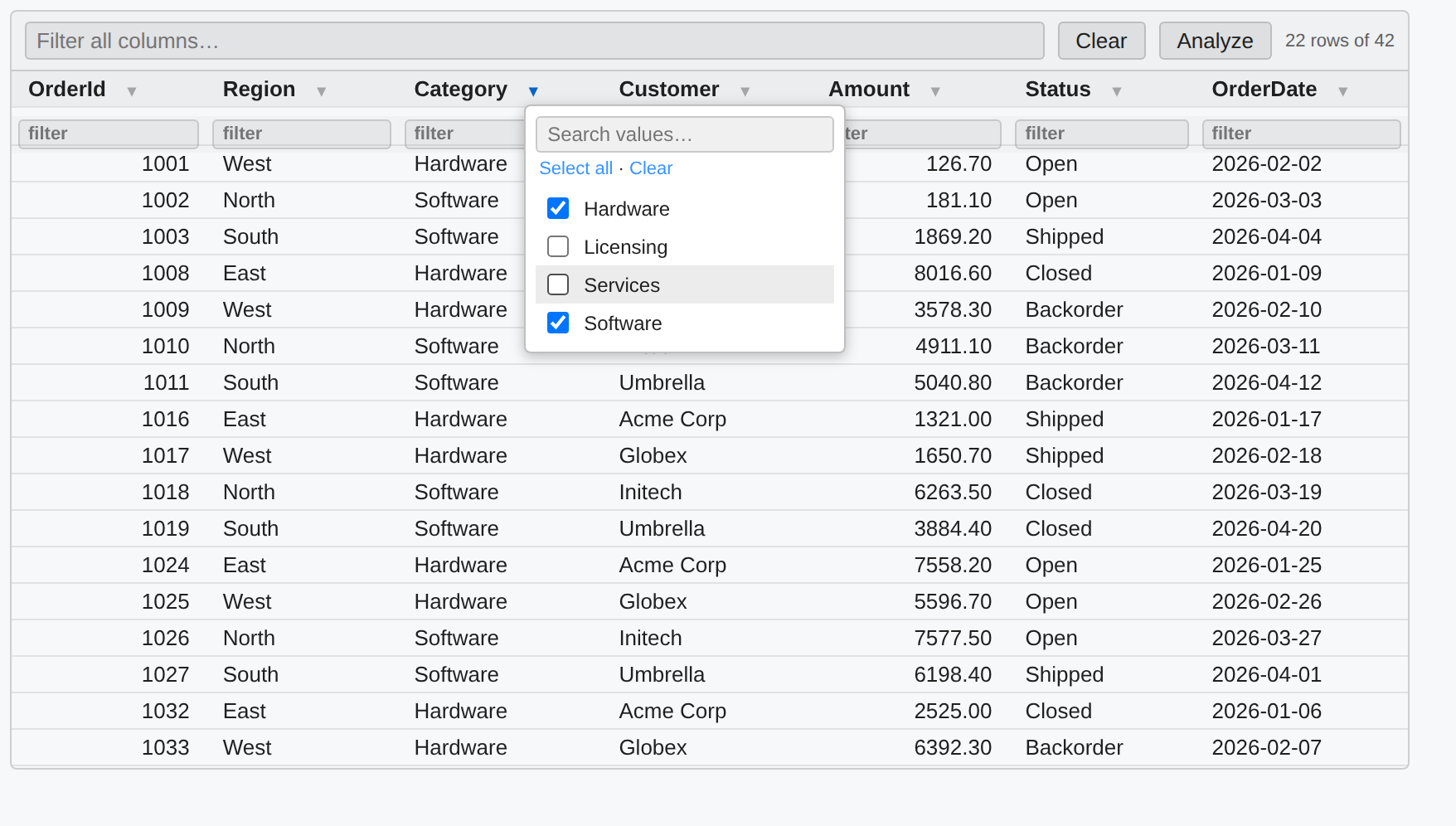
Results appear in the interactive grid: click a header to sort, type in the top
box to filter everything, type in a column's own box or open its ▾ picker to filter
that column (all filters combine), Clear resets them, and Analyze shows
per-column stats. The connection button's dropdown also lists Edit connection…
and lets you pick which connection a cell targets.

Filter any column on its own — type in its box, or open its ▾ picker to check
specific values. Every filter combines, and the row count updates live:
Behind the button, the connection is just a #!sql-connect cell — you can also
write it by hand, and when the name is a valid identifier it's available to C#
cells as a variable of that name:
#!sql-connect --name analytics --server sql-warehouse --database reports --auth integrated --default
analytics.Query("select * from dbo.Orders where Total > @t", new { t = 1000 }).Results()
DAX cells work the same way with a cube connection button (Add / Edit cube),
targeting SSAS, Azure Analysis Services, or a Fabric / Power BI semantic model.
For the full data story — the fluent SqlServer API, other providers (Oracle, ODBC),
ETL (bulk copy / MERGE / pipelines), Analysis Services, and Fabric Warehouse
writes — see the ClrKernel README
and the samples/ folder (Sql.nb.md, SqlQuery.nb.md, Dax.nb.md, and more).
Settings
| Setting |
Default |
Description |
clrkernel.server.command |
clrkernel |
Command that launches the server. The default works when the ClrKernel global dotnet tool is installed. |
clrkernel.server.args |
["lsp"] |
Arguments for the command. For a dev build, set command to dotnet and args to ["<path>/ClrKernel.dll", "lsp"]. |
The server's log (including anything it writes to stderr) is in the
ClrKernel output channel (View → Output).
How it works
The extension spawns clrkernel lsp — a Language Server over stdio — and talks
to it with a single connection that carries both cell execution and the language
features (completion, hover, signature help). Execution and IntelliSense share
one ClrKernel.Core.Scripting engine per notebook, so completions reflect
exactly what that notebook has run. One server process runs per VS Code window,
holding a separate session for each notebook — variables and connections never
leak between notebooks, and Restart Kernel drops just the active notebook's
session.
Requirements
- .NET runtime 8.0+ (newer majors work)
- ClrKernel 1.3.x — on PATH as a dotnet tool, or configured via settings.
The extension installs and updates it within that range for you.
The extension and the kernel ship separately and talk over a private
clrkernel/* JSON-RPC surface, so the pairing matters: 0.10 is where the
language-descriptor handshake, clrkernel/languages and
clrkernel/connections/describe arrived. A kernel outside the range is a
warning, not a refusal — cells still run, and only the connection UI stops
working, so the extension says what to do rather than blocking the notebook.
The warning carries an Update Kernel button; it stops the running kernel
first, which a bare dotnet tool update cannot do while a notebook window is
holding one open.
Developing this extension
dotnet build src/ClrKernel/ClrKernel.csproj -c Release
cd editors/vscode
npm install
npm run compile
Open editors/vscode in VS Code and press F5 — the Extension Development Host
launches with samples/ open. Point the settings at your built ClrKernel.dll
(command dotnet, args [<path-to-dll>, "lsp"]).
License
Apache-2.0
| |

