Claude Code Limit Tracker


Disclaimer: This extension is an independent community project and is not affiliated with, endorsed by, or officially supported by Anthropic. It relies on an undocumented internal API endpoint that Anthropic may change or remove at any time without notice. Use at your own risk.
Displays your Claude Code usage limits directly in the VS Code status bar — always visible, no commands needed.
What it shows
The status bar item shows both of Claude Code's limits side by side:
5hr: 54% used | W: 72% used
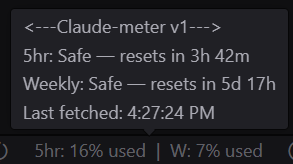
Hovering shows a detailed tooltip:
5hr: Warning — resets in 2h 15m
Weekly: Warning — resets in 3d 4h
Last fetched: 14:34:21
The background colour reflects the worse of the two limits:
| Usage | Status | Colour |
|-------|--------|--------|
| 0–49% | Safe | Default |
| 50–79% | Warning | Yellow |
| 80–99% | Near End | Red |
| 100% | Full | Red |
Status bar states
 |
 |
 |
| Safe (0–49%) |
Warning (50–79%) |
Near End / Full (80–100%) |
Data refreshes automatically every 5 minutes. Use Claude Limit: Refresh from the Command Palette (Ctrl+Shift+P) to force an immediate update.
Setup
- Install the extension from the VS Code Marketplace — search "Claude Code Limit Tracker" or "Claudo-meter"
- Make sure Claude Code is installed and you are logged in on the same machine
- That's it — no configuration needed. The extension activates automatically when VS Code starts
- Look for it in the bottom status bar. Hover to see the detailed tooltip. Use Claude Limit: Refresh from the Command Palette (
Ctrl+Shift+P) to force an immediate update
Requirements
- Claude Code must be installed and you must be logged in on the same machine
- The extension reads your OAuth token from
~/.claude/.credentials.json — this file is created automatically when you log into Claude Code
No API key or manual configuration is required.
Privacy
The only outbound network call this extension makes is:
GET https://api.anthropic.com/api/oauth/usage
Authorization: Bearer <your existing Claude Code token>
No data is collected, stored, or sent anywhere by this extension. The token is read from your local credentials file and used solely for this single request.
Known limitations
- The endpoint is undocumented. It was discovered by the community and is not part of Anthropic's official API. It may break or be removed without warning.
- Aggressive rate limiting. The endpoint rejects requests faster than every 5 minutes. The extension respects this automatically.
- Token expiry. If your Claude Code session expires, the extension will silently fail to fetch and keep showing the last known values until you re-authenticate with Claude Code.
- Local only. This extension only works on a machine where Claude Code is installed and authenticated.

