ACH Language Support
Language server and editing support for NACHA ACH files, and VSCode Plugin.
ACH (Automated Clearing House) files are the fixed-width, 94-character-per-line format used for electronic banking transactions across the US financial system. This extension provides full Language Server Protocol support — diagnostics, hover, completions, formatting, navigation, and more — so you can inspect, edit, and validate ACH files directly in your editor.
Features
Diagnostics

Real-time parse and validation errors with 20+ configurable rules covering check digits, routing numbers, batch totals, addenda counts, and more.
Hover

Field descriptions, format, column range, and current value; contextual info for amounts (cents → dollars), routing numbers (valid/invalid), dates, SEC codes, and transaction codes.
Inlay Hints

Cursor-aware field labels displayed inline with smart conversions for amounts, dates, routing numbers, and codes. Toggle with Ctrl+Alt+H.
Semantic Highlighting
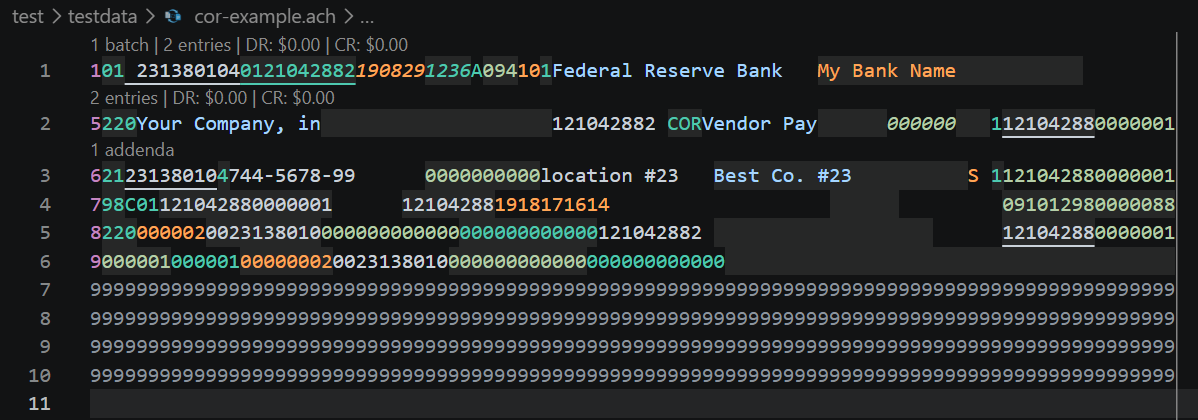
Per-field syntax highlighting using 8 token types with adjacency-aware coloring to ensure no two neighboring fields share the same color.
Code Actions
Quick fixes to recalculate check digits, pad short lines, set record size, fix batch/file control totals, fix service class codes, fix dates/times; "Recalculate All" source action.

Document and range formatting via the ach-ts library; pads short lines in range selections.

Code Folding
Collapse batches (header through control) and entries with their addenda records.

Field Navigation
Ctrl+Arrow moves the cursor between fields instead of words; Ctrl+Up/Down moves between sections (batches, file header/control).

Document Symbols
Outline view showing file header → batches → entries → addenda hierarchy with amounts and names.
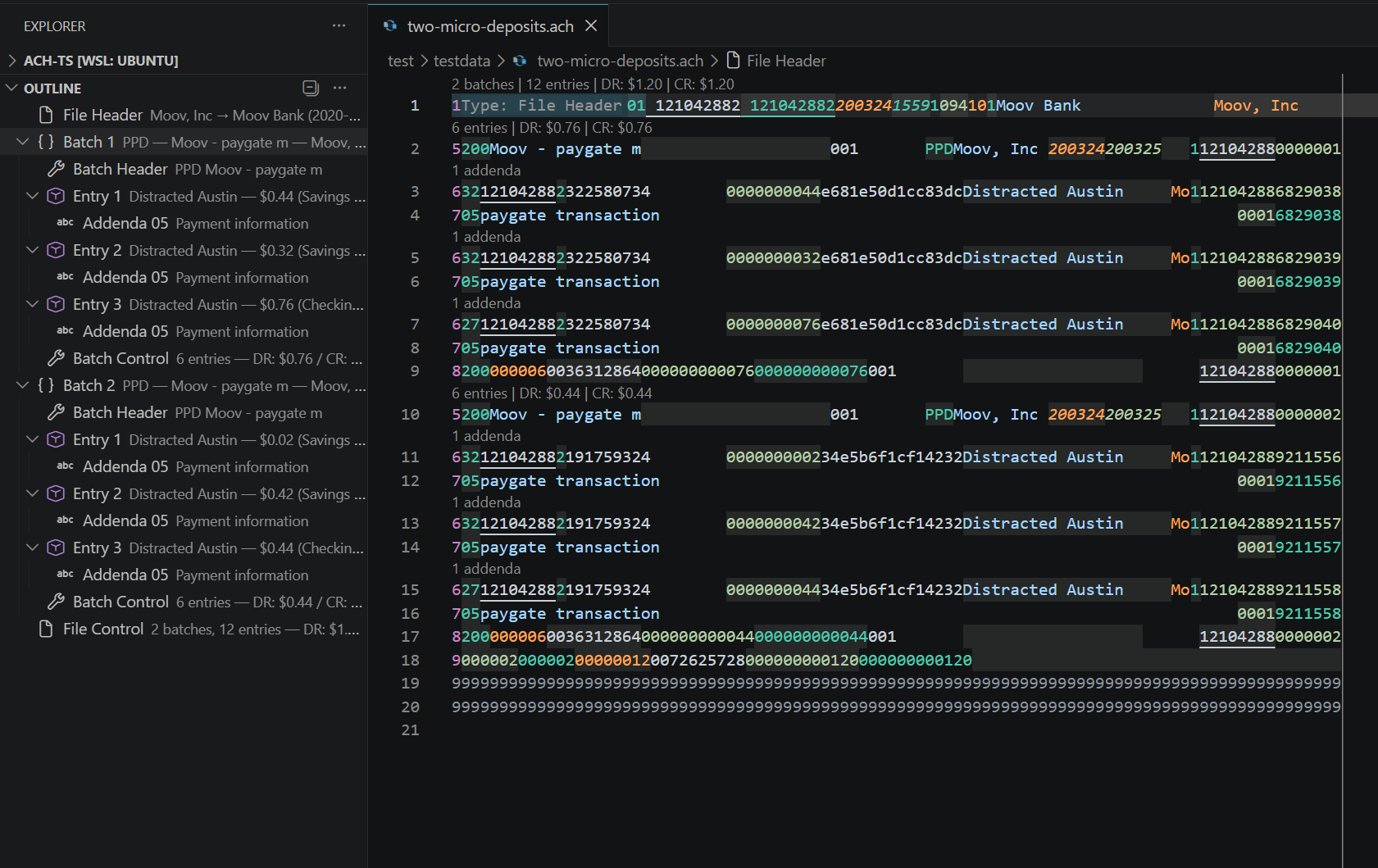
ACH Explorer
Tree view in the sidebar showing file structure; click a node to jump to its line.
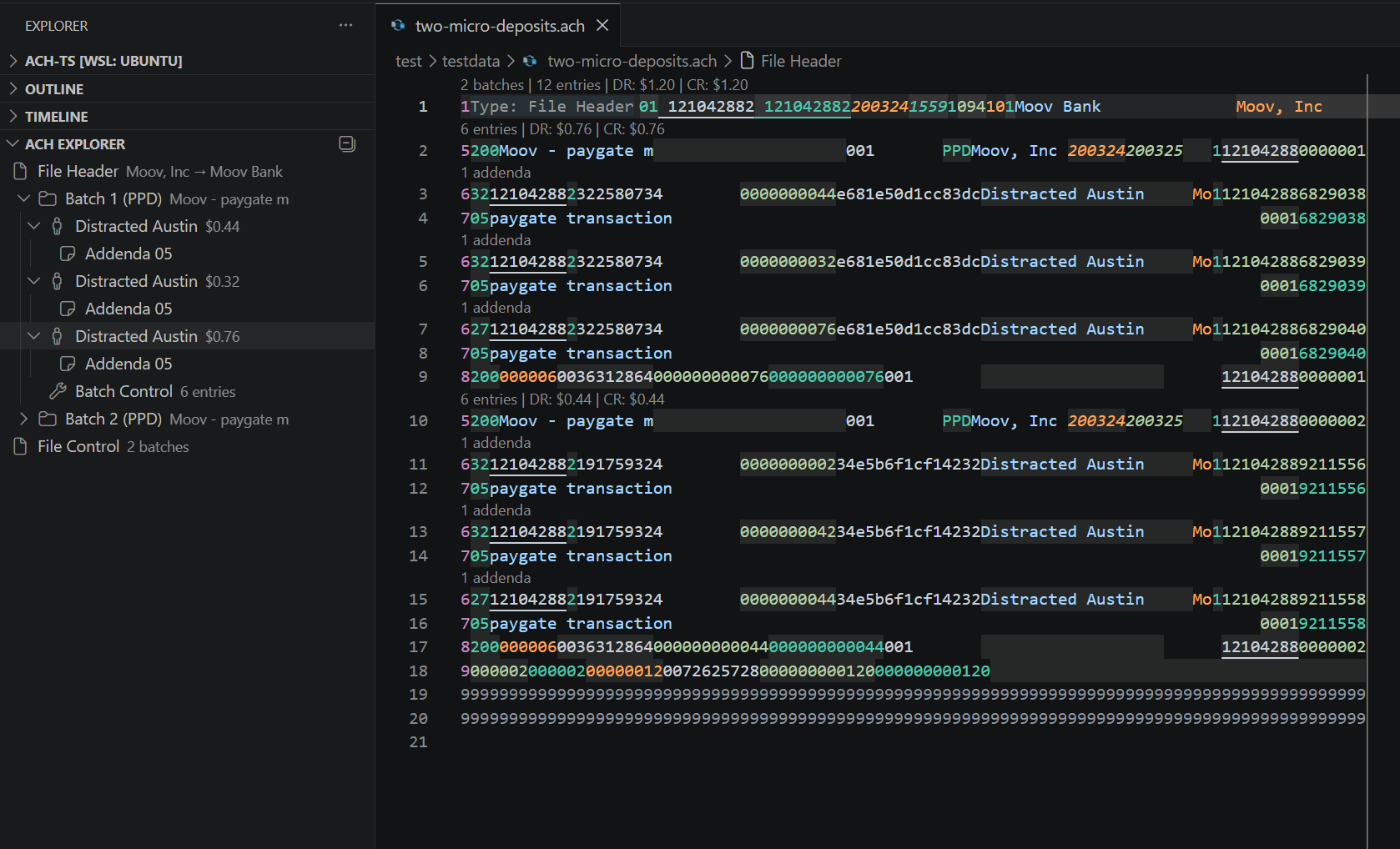
Structured Preview
Structured viewer with view, edit, search, and diff modes; open with Ctrl+Shift+V or enable auto-open via ach.autoOpenPreview.
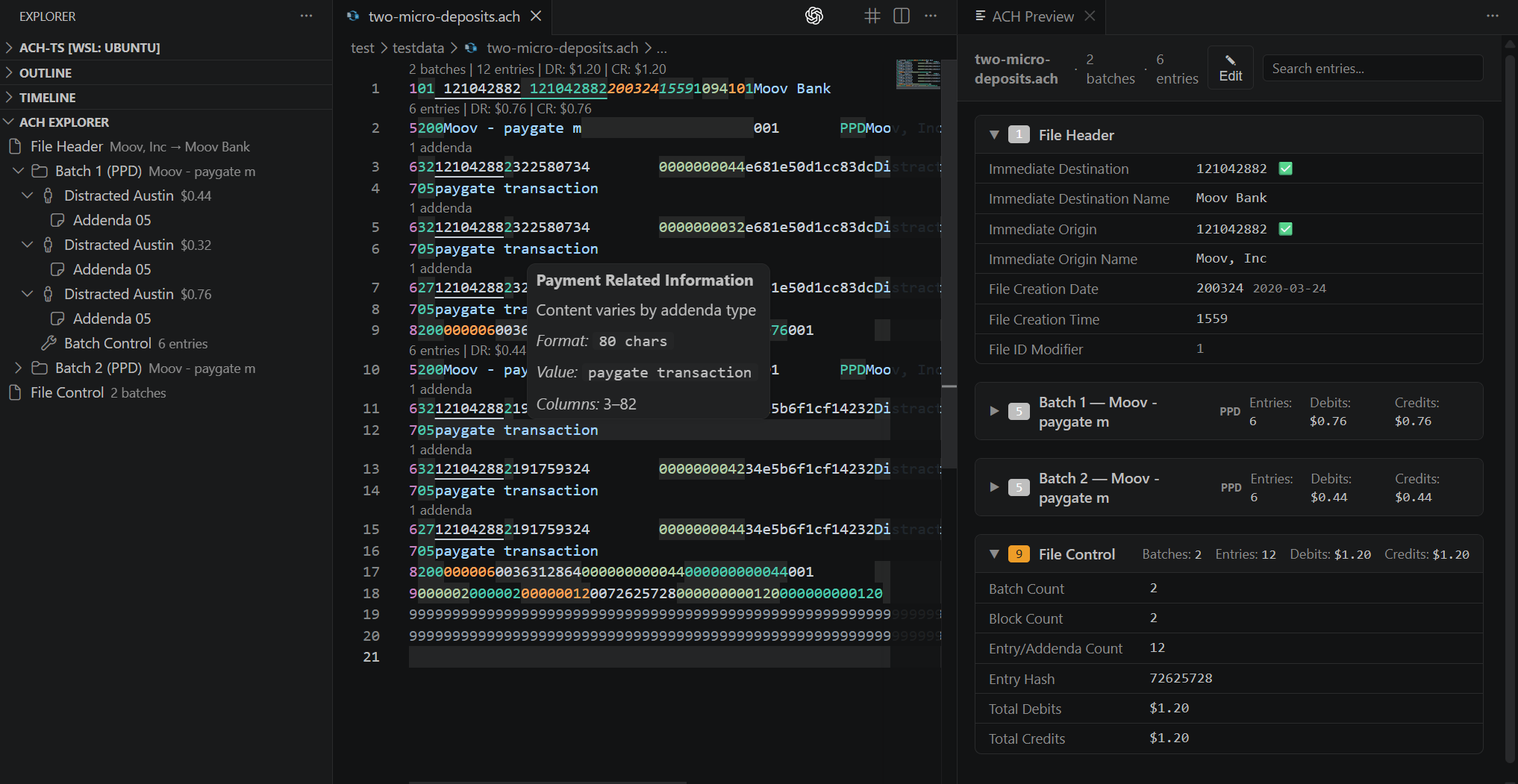
And More
- Completions — Record type templates (1/5/6/7/8/9), SEC codes (PPD, CCD, IAT, WEB, …), transaction codes, service class codes, addenda types, and file ID modifiers
- Go to Definition — Jump between batch headers and controls, entries and their batch headers, addenda and their entries
- Find References — Find all entries/addenda in a batch, sibling entries, or linked header/control records
- CodeLens — Inline stats above file header (batch/entry counts, DR/CR totals), batch headers (entry counts, totals), and entries with addenda (addenda count)
- Document Links — Clickable routing numbers linking to FedACH lookup
- Selection Range — Smart expand selection: field → record → batch → file
- Workspace Symbols — Search company names, entry names, and batch descriptions across all open ACH files
- Field Decorations — Zebra-striped alternating backgrounds to visually separate fields on each line
- Status Bar — Batch/entry counts, debit/credit totals, and error/warning counts at a glance
- Context Menu — Select Field and Copy Field Value from the right-click menu
- Snippets — 10 templates for record types, complete batches, and full ACH files
- Merge Files — Merge multiple ACH files into as few files as possible using NACHA rules
- Export/Import JSON — Round-trip ACH files through JSON using
ach-ts serialization
- Create New File — Scaffold a new ACH file with today's date
- Validate All — Batch-validate every
.ach file in the workspace with a progress report
Installation
Search for ACH Language Support in the VS Code Extensions view, or install from the command line:
code --install-extension christopherdavenport.ach-lsp
To install from a .vsix file:
code --install-extension ach-lsp-0.1.0.vsix
Keyboard Shortcuts
| Command |
Windows / Linux |
macOS |
| Open Preview |
Ctrl+Shift+V |
Cmd+Shift+V |
| Move to Next Field |
Ctrl+Right |
Alt+Right |
| Move to Previous Field |
Ctrl+Left |
Alt+Left |
| Select to Next Field |
Ctrl+Shift+Right |
Alt+Shift+Right |
| Select to Previous Field |
Ctrl+Shift+Left |
Alt+Shift+Left |
| Move to Next Section |
Ctrl+Down |
Alt+Down |
| Move to Previous Section |
Ctrl+Up |
Alt+Up |
| Select to Next Section |
Ctrl+Shift+Down |
Alt+Shift+Down |
| Select to Previous Section |
Ctrl+Shift+Up |
Alt+Shift+Up |
| Toggle Inlay Hints |
Ctrl+Alt+H |
Cmd+Alt+H |
Commands
All commands are available via the Command Palette (Ctrl+Shift+P):
- ACH: Open Preview — Open the structured preview panel
- ACH: Toggle Inlay Hints — Show or hide inline field labels
- ACH: Toggle Field Separators — Show or hide zebra-striped field backgrounds
- ACH: Select Field — Select the field at the cursor position
- ACH: Copy Field Value — Copy the trimmed value of the field at cursor
- ACH: Validate All ACH Files — Validate every
.ach file in the workspace
- ACH: Export to JSON — Export the active ACH file to JSON format
- ACH: Import from JSON — Import a JSON file and convert to ACH
- ACH: Merge ACH Files — Merge multiple workspace ACH files into one
- ACH: Create New ACH File — Scaffold a new ACH file with today's date
- ACH: Move Cursor to Next Field / Previous Field
- ACH: Select to Next Field / Previous Field
- ACH: Move to Next Section / Previous Section
- ACH: Select to Next Section / Previous Section
Configuration
General
| Setting |
Type |
Default |
Description |
ach.maxNumberOfProblems |
number |
1000 |
Maximum number of problems reported by the server |
ach.trace.server |
string |
"off" |
Traces communication between VS Code and the language server (off, messages, verbose) |
ach.fieldSeparators |
boolean |
true |
Show visual separators between fields in the editor |
ach.autoOpenPreview |
boolean |
false |
Automatically open the preview panel when opening an ACH file |
Validation
All validation settings are booleans defaulting to false. Set to true to relax the corresponding rule.
| Setting |
Description |
ach.validation.skipAll |
Disable all validation |
ach.validation.allowZeroBatches |
Allow files with no batches |
ach.validation.customTraceNumbers |
Allow trace numbers that don't match ODFI |
ach.validation.requireABAOrigin |
Require valid ABA routing number as origin |
ach.validation.bypassOriginValidation |
Skip origin field validation |
ach.validation.bypassDestinationValidation |
Skip destination field validation |
ach.validation.allowMissingFileHeader |
Allow files without a File Header record |
ach.validation.allowMissingFileControl |
Allow files without a File Control record |
ach.validation.bypassCompanyIdentificationMatch |
Skip batch header/control company ID match |
ach.validation.customReturnCodes |
Allow non-standard return codes in Addenda 99 |
ach.validation.unequalServiceClassCode |
Allow mismatched service class codes |
ach.validation.allowUnorderedBatchNumbers |
Allow non-ascending batch numbers |
ach.validation.allowInvalidCheckDigit |
Skip routing number check digit validation |
ach.validation.unequalAddendaCounts |
Allow addenda count mismatches |
ach.validation.preserveSpaces |
Retain trailing whitespace during parsing |
ach.validation.allowInvalidAmounts |
Allow malformed amount fields |
ach.validation.allowZeroEntryAmount |
Allow entries with zero dollar amounts |
ach.validation.allowSpecialCharacters |
Allow non-alphanumeric characters in fields |
ach.validation.allowEmptyIndividualName |
Allow blank individual name fields |
ach.validation.bypassBatchValidation |
Skip all batch-level validation |
ach.validation.skipFileCreationValidation |
Skip file creation date validation |
ach.validation.skipBatchHeaderCompanyValidation |
Skip company name/ID validation in batch headers |
Development
Prerequisites: Node.js 20+
git clone https://github.com/christopherdavenport/ach-lsp.git
cd ach-lsp
npm install
npm run compile
Press F5 in VS Code to launch the Extension Development Host with the extension loaded.
npm test          # Run server tests (vitest)
npm run lint      # Lint client and server
npm run package   # Build .vsix for distribution
License
MIT

