CrabAir ✈️🦀
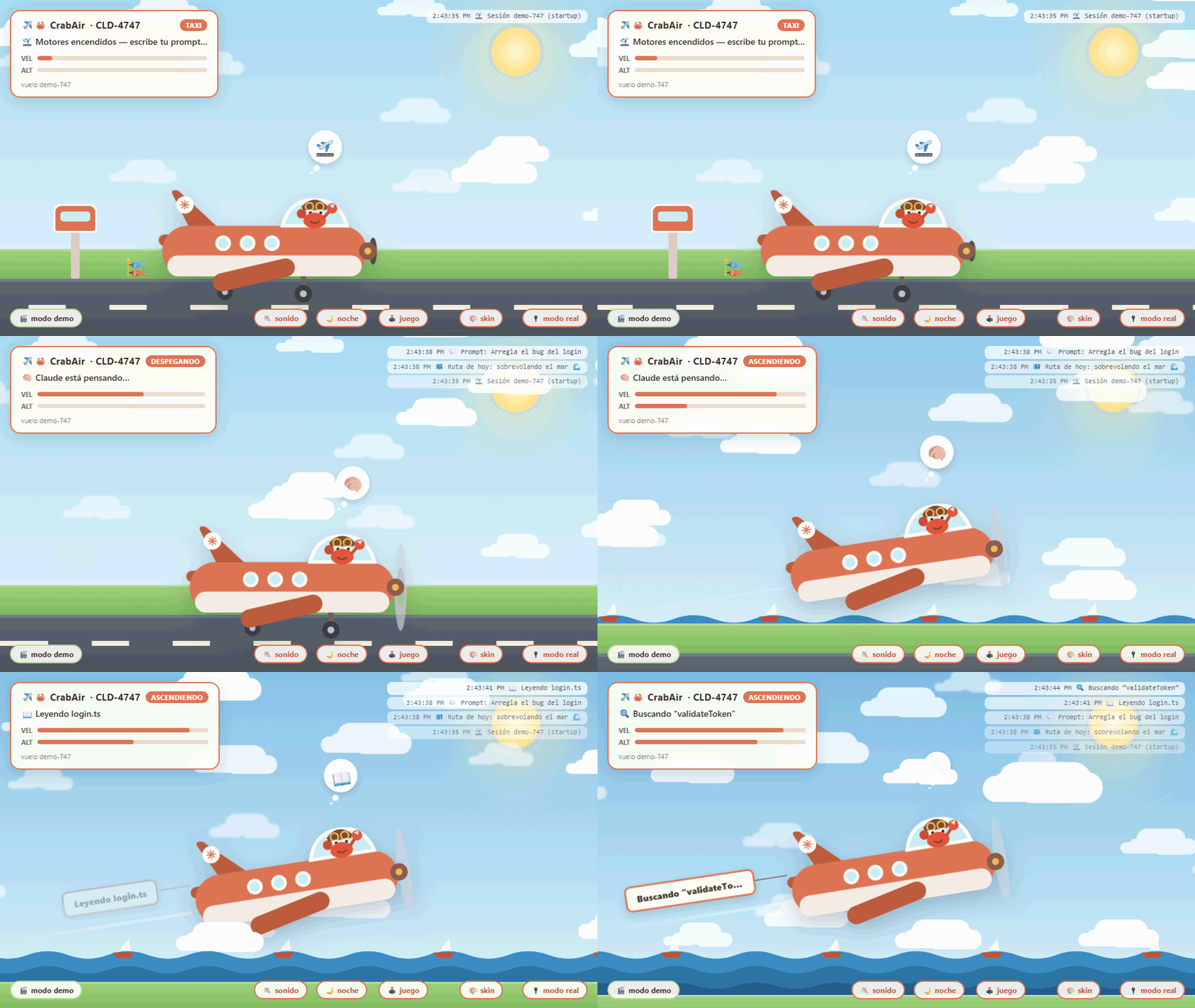
An ambient status view for Claude Code, inside VS Code. A plane, flown by Claude's crab, takes off
when you send a prompt, tracks every tool call and subagent in flight, and lands when your session goes idle.
Una vista de estado ambiental para Claude Code, dentro de VS Code. Un avión, pilotado por el cangrejo
de Claude, despega cuando envías un prompt, sigue cada herramienta y subagente en vuelo, y aterriza
cuando tu sesión queda inactiva.
🌍 Bilingual / Bilingüe — follows your VS Code display language (English by default, Spanish on
Spanish editors). / Sigue el idioma de tu VS Code (inglés por defecto, español en editores en español).
English
- 🛫 New Claude Code session → taxi, then takeoff when you send your prompt
- ✈️ In flight, the banner shows what Claude is doing:
📖 Reading…, ⚡ Running…, ❓ Asking…
- 🛩️ Each delegated subagent flies as an escort mini-plane
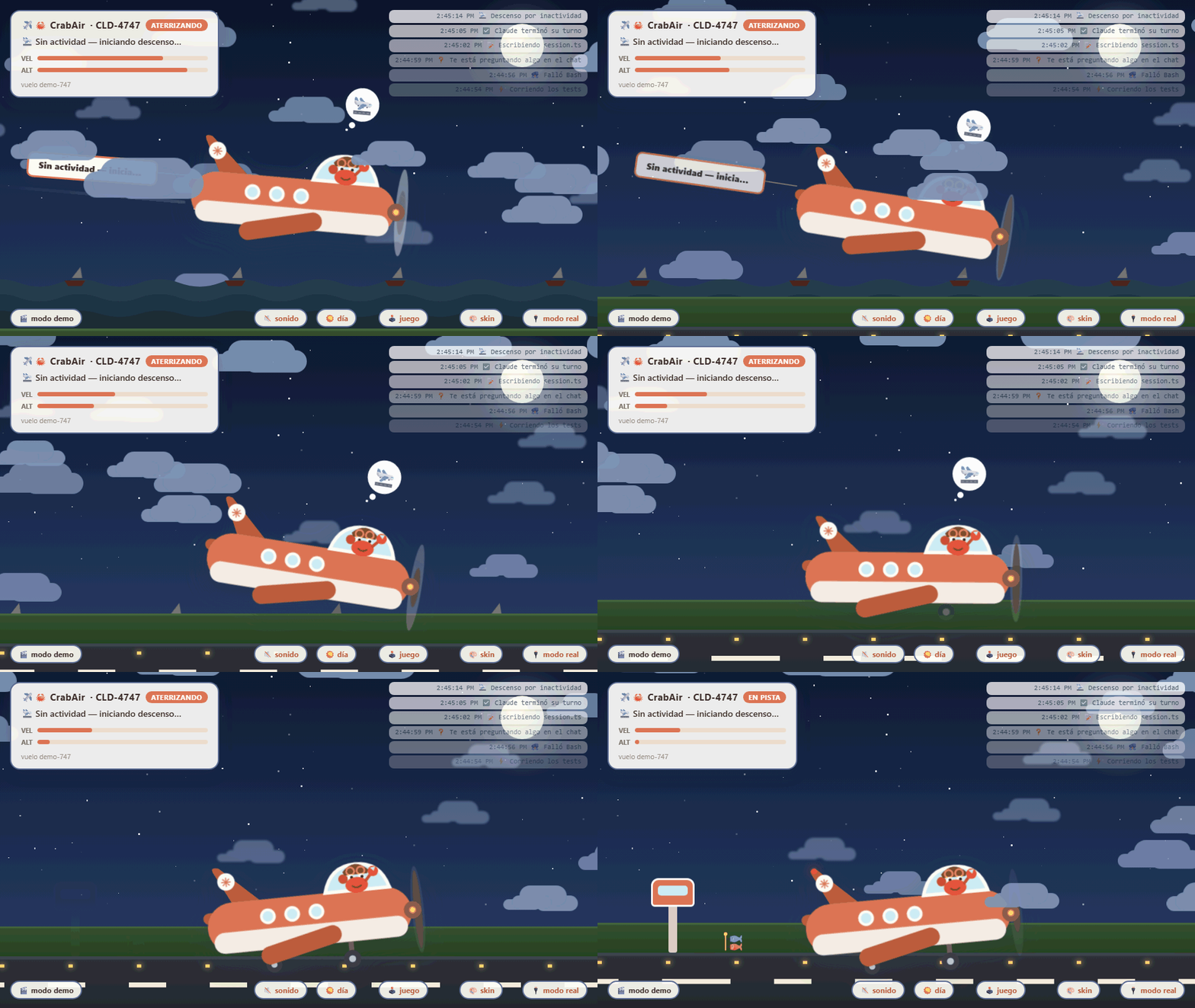
- 🛬 Idle after its turn → it lands on its own (and aborts if you type again)
- ⛈️ Turbulence when a tool fails · 📋 flight summary on landing
- 🌙 Automatic night mode with moon, stars and runway lights · 🔊 optional engine sound
- 🕹️ Minigame to dodge obstacles while you wait — points only, nothing gets interrupted;
with coins, shield/magnet power-ups and unlockable plane skins
Usage
- The control tower starts on its own when VS Code opens (click
✈️🦀 in the status bar, or the
"CrabAir: Toggle On / Off" command, to turn it off/on).
- Run "CrabAir: Install Claude Code global hooks" once (with backup and confirmation) so all your
new Claude Code sessions make the plane fly.
- Open the view: the paper-plane icon in the activity bar → "Flight CLD-4747" — and drag it wherever
you like. There's also "CrabAir: Open in a large panel".
- Want it on another monitor? The "🌐 browser" button (or "CrabAir: Open in the browser"): the
same live scene at
http://localhost:4747, served by the extension itself.
Settings
| Setting |
Default |
What it does |
crabair.port |
4747 |
Port for the local tower (must match the hooks) |
crabair.autoStart |
true |
Start the tower when VS Code opens |
crabair.idleSeconds |
120 |
Seconds of inactivity before landing |
crabair.waitReminder |
true |
Notify you if Claude has been waiting for a reply |
crabair.waitMinutes |
3 |
Minutes before the "Claude is waiting" reminder |
Hooks are fire-and-forget HTTP to 127.0.0.1: with the tower off they fail silently and never get
in Claude Code's way. Nothing leaves your machine.
Español
- 🛫 Nueva sesión de Claude Code → taxi y despegue al enviar tu prompt
- ✈️ En vuelo, la pancarta muestra qué hace Claude:
📖 Leyendo…, ⚡ Ejecutando…, ❓ Preguntando…
- 🛩️ Cada subagente delegado vuela como mini-avión escolta
- 🛬 Sin actividad tras terminar el turno → aterriza solito (y cancela si vuelves a escribir)
- ⛈️ Turbulencia cuando una herramienta falla · 📋 resumen de vuelo al aterrizar
- 🌙 Modo nocturno automático con luna, estrellas y luces de pista · 🔊 sonido de motor opcional
- 🕹️ Minijuego para esquivar obstáculos mientras esperas — solo puntos, nada se interrumpe;
con monedas, power-ups de escudo/imán y skins del avión desbloqueables
Uso
- La torre de control se enciende sola al abrir VS Code (clic en
✈️🦀 en la barra de estado, o el
comando "CrabAir: Encender / Apagar", para apagarla/encenderla).
- Ejecuta "CrabAir: Instalar hooks globales de Claude Code" una vez (con backup y confirmación) para
que todas tus sesiones nuevas de Claude Code hagan volar el avión.
- Abre la vista: icono del avioncito de papel en la barra de actividades → "Vuelo CLD-4747" — y
arrástrala a donde más te guste. También hay "CrabAir: Abrir en panel grande".
- ¿Lo quieres en otro monitor? Botón "🌐 navegador" (o "CrabAir: Abrir en el navegador"): la misma
escena en vivo en
http://localhost:4747, servida por la propia extensión.
Ajustes
| Ajuste |
Por defecto |
Qué hace |
crabair.port |
4747 |
Puerto de la torre local (debe coincidir con los hooks) |
crabair.autoStart |
true |
Encender la torre al abrir VS Code |
crabair.idleSeconds |
120 |
Segundos sin actividad antes de aterrizar |
crabair.waitReminder |
true |
Avisarte si Claude lleva rato esperando tu respuesta |
crabair.waitMinutes |
3 |
Minutos antes del aviso de "Claude te está esperando" |
Los hooks son HTTP fire-and-forget hacia 127.0.0.1: con la torre apagada fallan en silencio y nunca
estorban a Claude Code. Nada sale de tu máquina.
Source & web version / Código y versión web: github.com/ChristianFonseca/crabair · MIT

