BackendOps: Backend Builder & API Tester
Build CRUD backends, test APIs, and catch frontend-backend drift before runtime.
Powered by Chiragverse.
BackendOps scans your JavaScript and TypeScript workspace locally, compares frontend API calls with backend routes, highlights mismatches directly in VS Code, and helps developers generate API routes plus database-backed CRUD files from the terminal.
Why Use It
- Find missing API routes before a user hits them.
- Catch HTTP method drift such as frontend
POST against backend-only GET.
- Detect request body shape drift, response usage drift, and TypeScript response type drift.
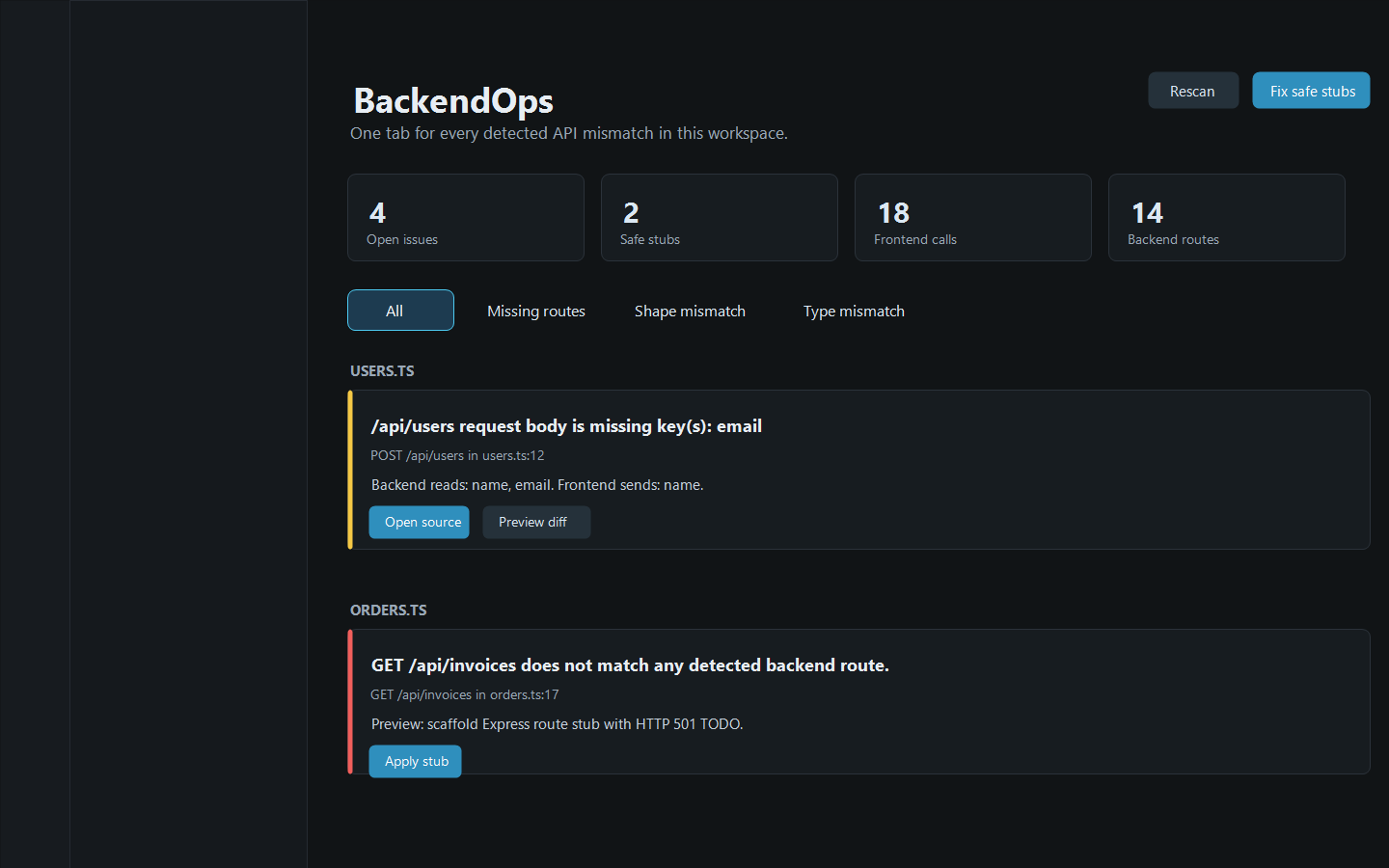
- Review all issues in one dashboard tab instead of hunting through the Problems panel.
- Preview safe stubs with a real VS Code diff before applying them.
- Create new Express or Next.js API routes from a structured form.
- Test detected and generated APIs directly inside VS Code.
- Generate Prisma/PostgreSQL, Prisma/MongoDB, or Mongoose/MongoDB CRUD backends from a model.
- Generate
.env database URLs and a backend setup guide with install commands.
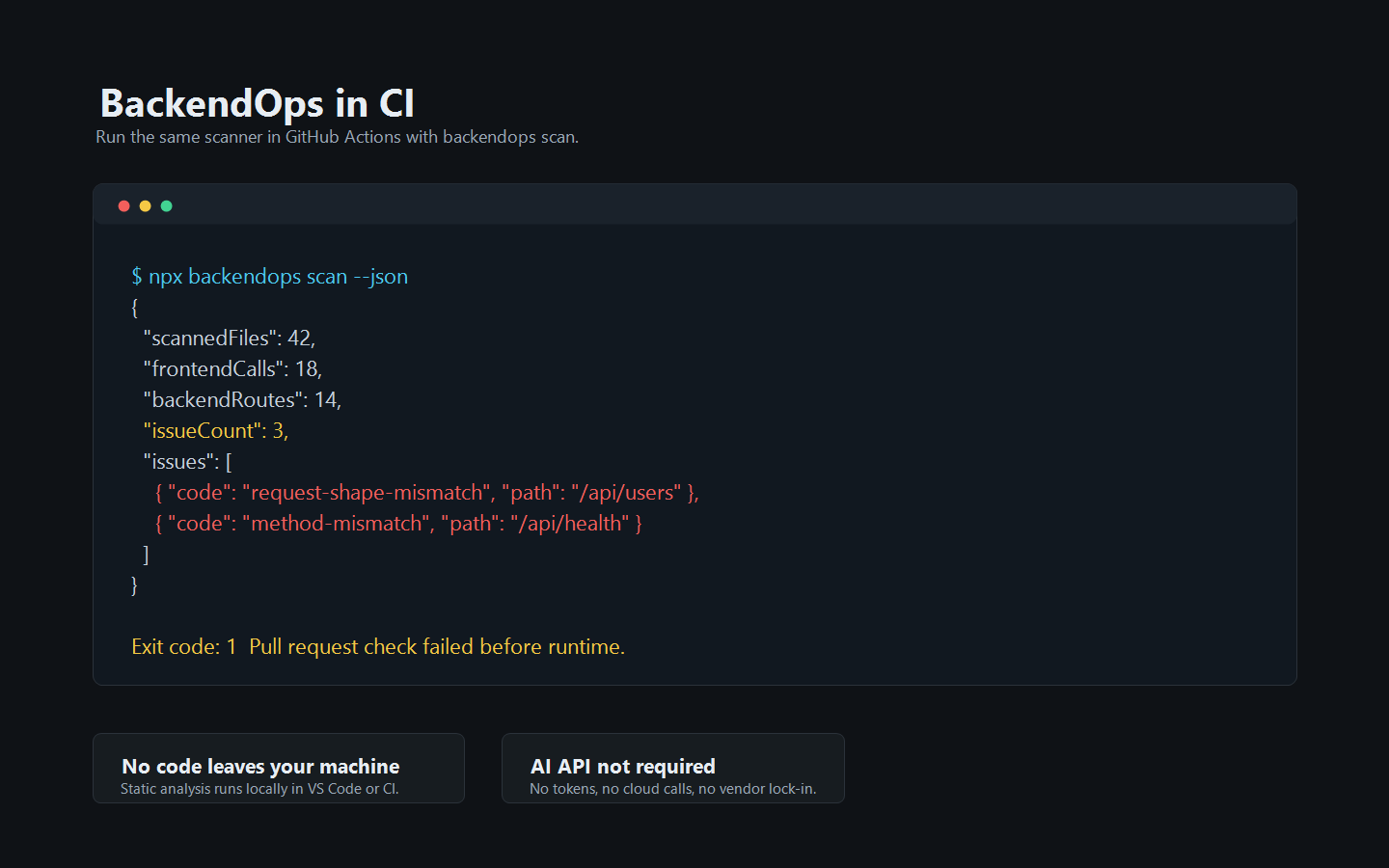
- Run the same scanner in CI with
backendops scan.
Privacy
No code leaves your machine.
BackendOps performs static analysis locally in VS Code or inside your CI runner. It does not call AI APIs, hosted LLMs, telemetry APIs, analytics services, or remote scanning services.
See PRIVACY.md.
Screenshots
Detects Frontend Calls
fetch("/api/...")axios.get/post/put/patch/delete(...)axios.create({ baseURL }) instances- imported local API clients exported from another file
- configured custom clients such as
api.get("/users")
- SWR and React Query query keys
ky, superagent, ofetch, and Nuxt $fetch- generated SDK and GraphQL files are ignored by default
Detects Backend Routes
- Express app and router routes
- same-file and cross-file Express router mounts
- Next.js app routes and pages routes
- NestJS controllers, method decorators, and global prefix
- Fastify route methods and
fastify.route({ method, url })
- Hono routes
- tRPC handler endpoints
- Remix / React Router resource routes under
routes/api.*
Reports Drift
- missing backend route
- HTTP method mismatch
- frontend request body keys missing from backend expectations
- frontend response fields not returned by backend
- TypeScript generic response types that do not match backend response keys
Safe Fixes
For supported Express and Next.js route/method issues, BackendOps can scaffold explicit 501 TODO stubs.
Fixes are intentionally not business logic. They only make the route/method exist and return a clear 501 response until a developer replaces the TODO implementation.
Safety behavior:
- preview diff before applying
- duplicate route protection
- apply all safe stubs from the dashboard
- undo the last applied stub in the current VS Code session
- no auto-stub for shape/type mismatch issues
API Route Builder
Run BackendOps: Create API Route to create a new endpoint with less typing.
The builder gives developers structured controls for:
- framework: Express or Next.js App Route
- method:
GET, POST, PUT, PATCH, DELETE
- endpoint path such as
/api/users or /api/users/:id
- target backend file or Next.js app route root
- request body keys
- response keys
- status code
- preview diff
- generate API
- try API against a local server
Generated routes are working templates with safe placeholder values. They are designed to compile and run, then be replaced with real business logic.
API Tester
Run BackendOps: Open API Tester to send requests without leaving VS Code.
The tester supports:
- detected backend routes from the scanner
- generated OpenAPI files under
openapi
- method, endpoint, base URL, headers, query params, and JSON body editing
- generated sample headers and bodies for known CRUD routes
- response status, headers, body, and timing
- request history for quick repeat testing
DB CRUD Builder
Run BackendOps: Build DB CRUD Backend to generate a database-backed backend from VS Code.
The builder supports:
- Prisma + PostgreSQL
- Prisma + MongoDB
- Mongoose + MongoDB
- Next.js App Routes
- Express routers
.env generation for DATABASE_URL or MONGODB_URI- Prisma 7 PostgreSQL config via
prisma.config.ts
BACKENDOPS_BACKEND_SETUP.md with install and run commands- one-click dependency install commands in a VS Code terminal
- Prisma helper script for
generate, push, migrate, and studio
- BackendOps Doctor diagnostics for Prisma, Docker, dependency, and
.env setup issues
- generated Zod request validation
- auth/role guard placeholders on write routes
- pagination, filtering, searching, and sorting on list routes
- standard API error helpers
- service and repository layer files used by generated routes
- API smoke tests under
test/backendops
- OpenAPI 3.1 export under
openapi
- Docker Compose for PostgreSQL or MongoDB
- existing
schema.prisma or Mongoose model field detection
Commands
BackendOps: Create API RouteBackendOps: Build DB CRUD BackendBackendOps: Open API TesterBackendOps: Diagnose Backend ProjectBackendOps: Scan WorkspaceBackendOps: Open Issues DashboardBackendOps: Generate ReportBackendOps: Undo Last Applied StubBackendOps: Show Output
CLI / CI
After installing the package:
backendops scan
Useful options:
backendops scan --root ./apps/web
backendops scan --json
backendops scan --max-files 3000
backendops doctor --root ./apps/api
Terminal Backend Builder
Developers who prefer the terminal can open a builder menu:
backendops
backendops build opens the same menu.
The menu supports:
- scan API drift
- diagnose generated backend setup
- add one Express or Next.js API route
- generate database-backed CRUD APIs
The same builder also works with flags for scripts:
backendops build --kind route --framework next-app --method POST --endpoint /api/users --request-keys "name,email" --response-keys "id,name,email"
backendops build --kind crud --framework next-app --data-layer prisma-postgresql --model User --fields "name:String, email:String unique"
backendops build --kind crud --framework express --data-layer mongoose-mongodb --model Product --fields "title:String, price:Float" --write
Builder commands preview generated files by default. Add --write to create or update files. Supported CRUD data layers:
- Prisma + PostgreSQL
- Prisma + MongoDB
- Mongoose + MongoDB
CRUD generation also creates .env, BACKENDOPS_BACKEND_SETUP.md, Zod validators, auth guard placeholders, standard error helpers, service/repository layers, pagination/filter/sort list handlers, API tests, OpenAPI docs, Docker Compose, and Prisma helper scripts by default. Prisma + PostgreSQL projects include Prisma 7 prisma.config.ts and the PostgreSQL adapter dependency; Prisma + MongoDB install guidance pins Prisma 6.19 until Prisma 7 MongoDB support lands. Use --database-url, --env-file, --no-env, --no-setup-guide, --no-docker-compose, --no-openapi, or --no-tests when you need different behavior.
Run BackendOps Doctor when generated backend setup fails:
backendops doctor
node scripts/backendops-doctor.mjs
Doctor flags common blockers such as Prisma 7 schema/config mismatch, missing @prisma/adapter-pg, stale Prisma helper scripts, Docker/PostgreSQL port mismatch, and missing .env values.
To build from an existing model instead of typing fields:
backendops build --kind crud --data-layer prisma-postgresql --model User --from-existing
backendops build --kind crud --data-layer mongoose-mongodb --model Product --from-existing
For Prisma projects, the generated helper supports:
node scripts/backendops-prisma.mjs generate
node scripts/backendops-prisma.mjs push
node scripts/backendops-prisma.mjs migrate init
node scripts/backendops-prisma.mjs studio
Exit codes:
0: no drift issues found1: drift issues found2: CLI/config/runtime error
GitHub Actions example:
name: BackendOps

on:
  pull_request:

jobs:
  api-drift:
    runs-on: ubuntu-latest
    steps:
      - uses: actions/checkout@v4
      - uses: actions/setup-node@v4
        with:
          node-version: 20
      - run: npm ci
      - run: npx backendops scan
The old api-drift-radar command remains available as a compatibility alias.
Optional Config
Create .backendops.json in your project root:
{
  "ignorePaths": ["/api/external/**", "/api/healthz"],
  "customClients": [
    {
      "name": "api",
      "baseUrl": "/api"
    }
  ],
  "ignoreGraphQL": true,
  "ignoreGeneratedSdk": true
}
Legacy .api-drift-radar.json config files are still read as a fallback.
Development
npm install
npm run compile
npm test
Open this folder in VS Code and press F5 to launch an Extension Development Host.
For a ready local demo with known issues, open demo-project-broken inside the Extension Development Host, run BackendOps: Scan Workspace, then run BackendOps: Open Issues Dashboard.
Publishing Note
The publisher field in package.json must match the Visual Studio Marketplace publisher account used to publish the extension.

