Caspian Taskmaster
Stop context-switching. Your issue tracker belongs where your code lives.
Caspian Taskmaster is a full-blown issue tracker built directly into VS Code — Kanban board, GitHub Issues + Projects (v2) sync, image attachments, AI triage, metrics, and native MCP integration with Claude and Gemini. Create, track, and close issues without ever leaving your editor. Your AI assistant can read and update your issues — and your GitHub Projects — in real time. No browser tabs. No external tools. No friction.
Every bug you track in a separate app is a context switch that slows you down. Caspian Taskmaster eliminates that entirely.
Screenshots
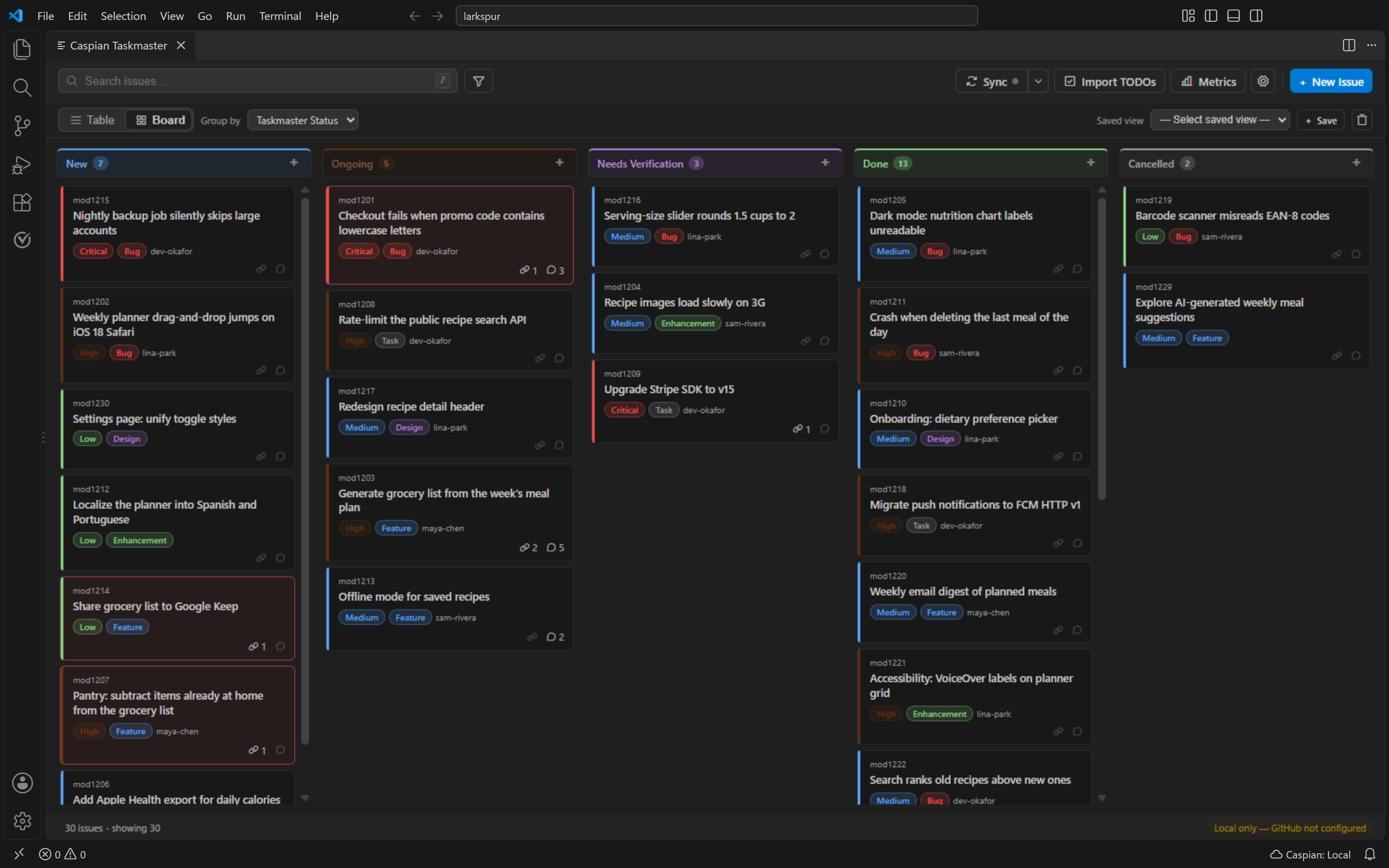
Kanban board: five colour-coded status lanes, drag-and-drop, priority, type and assignee on every card. Shown here in a dark theme; the rest of the gallery uses a light theme, and Taskmaster follows whichever VS Code theme you use.
|
|
 |
 |
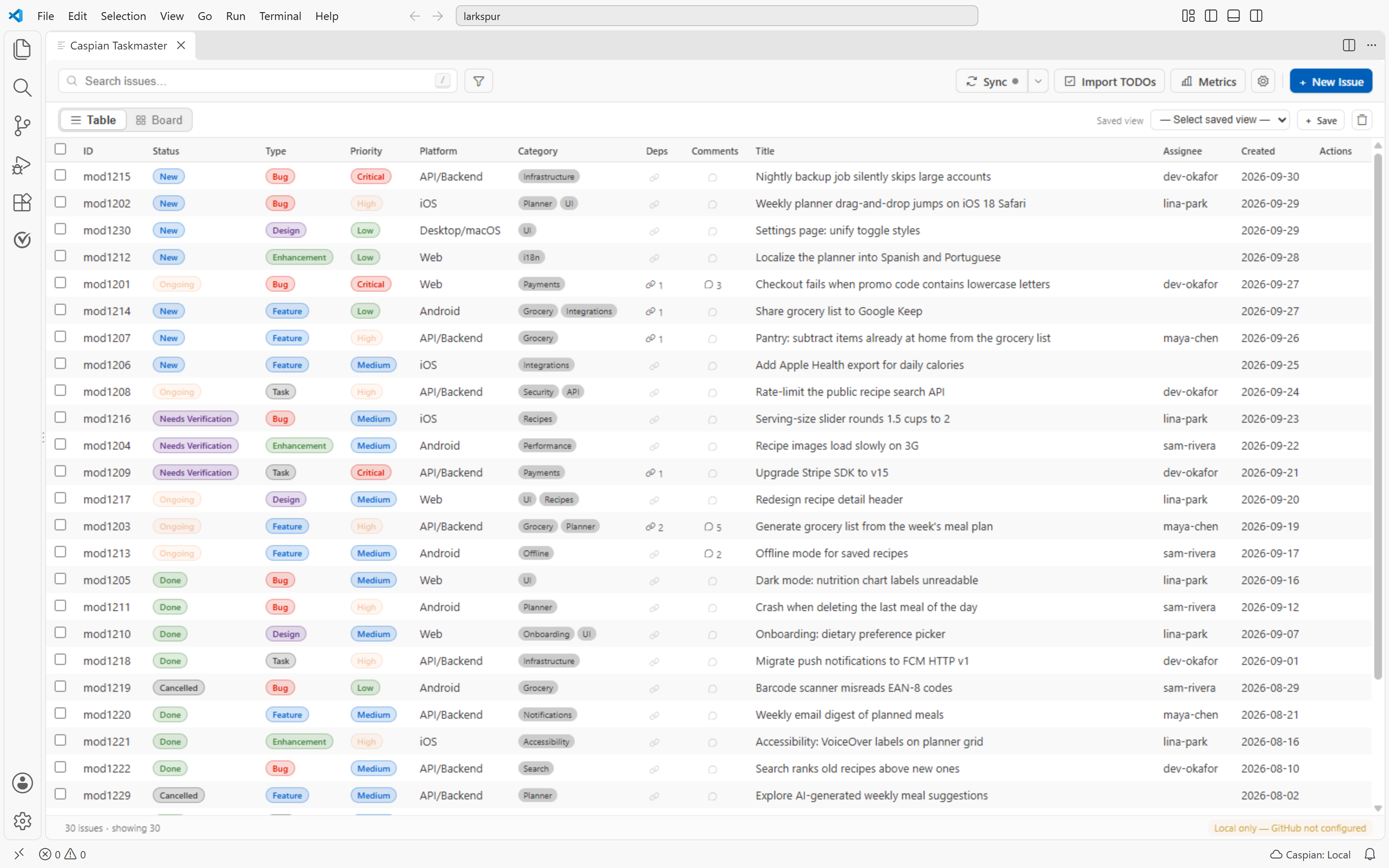
| Table view: sortable, filterable, bulk-selectable, with dependency and comment counts |
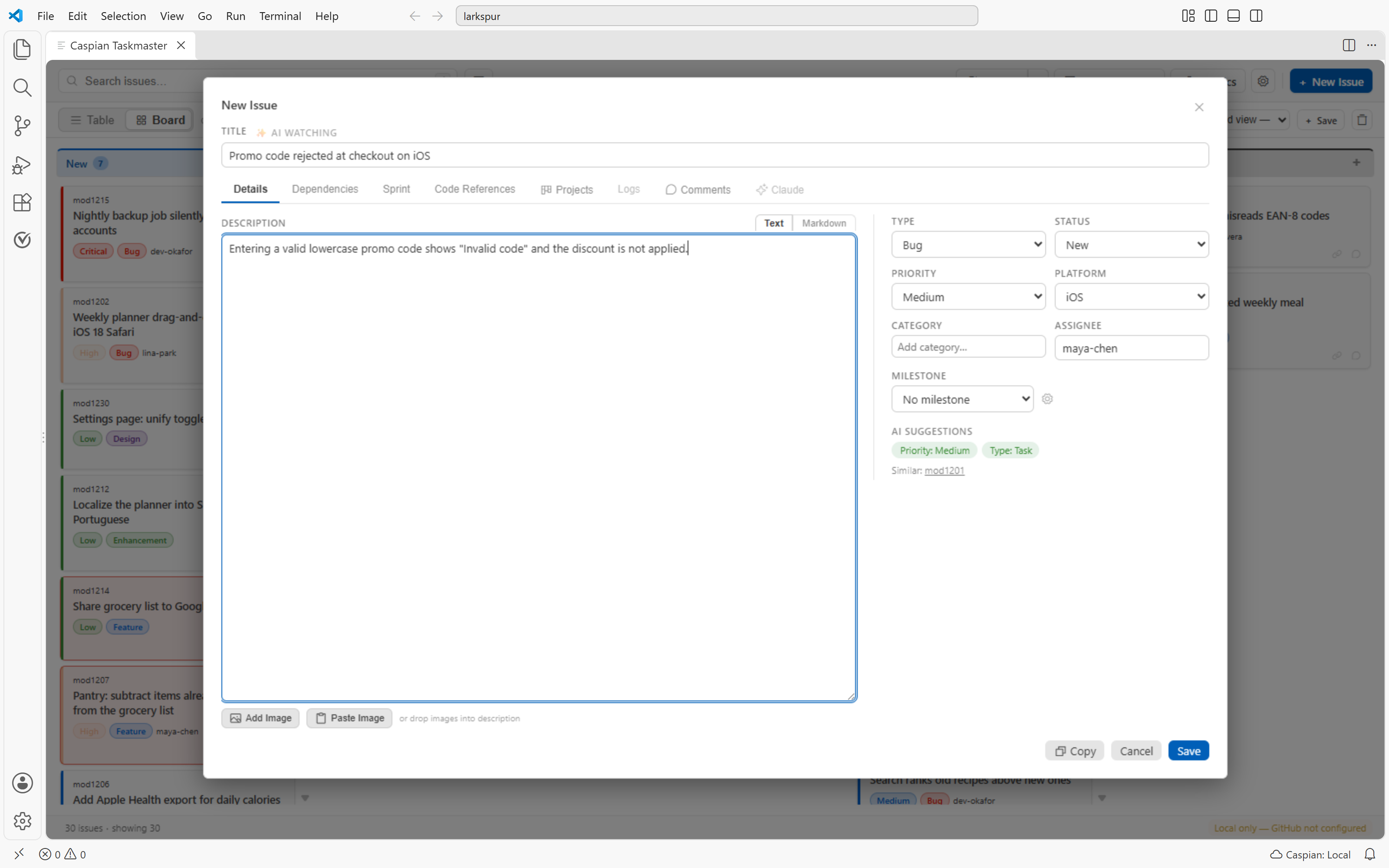
New issue: priority and type suggestions as you type, and a warning when a similar issue already exists |
 |
 |
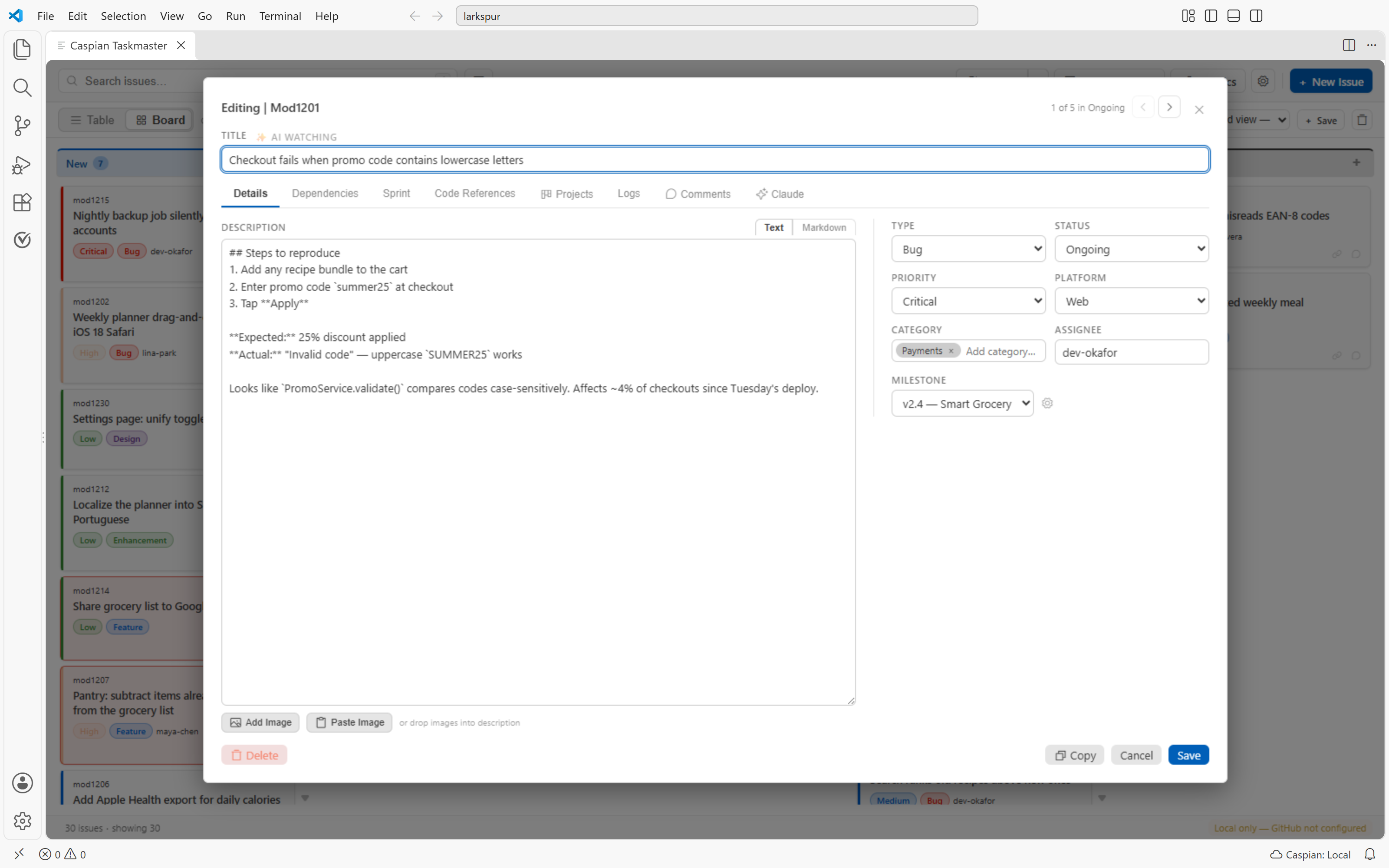
| Issue popup: Markdown description, every field, and next/previous navigation within a lane |
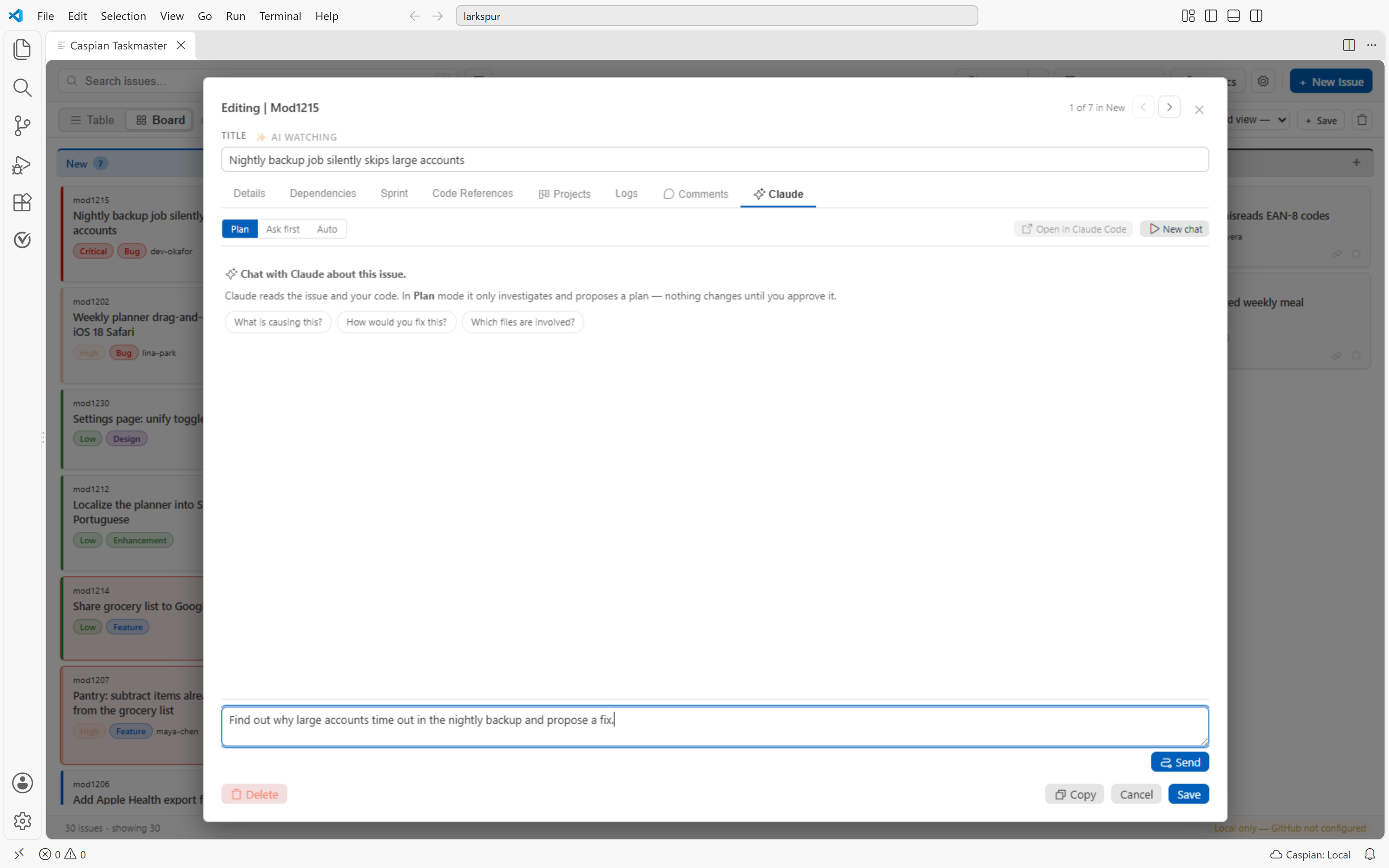
Claude chat: discuss an issue with your own Claude Code; Plan mode changes nothing until you approve |
 |
 |
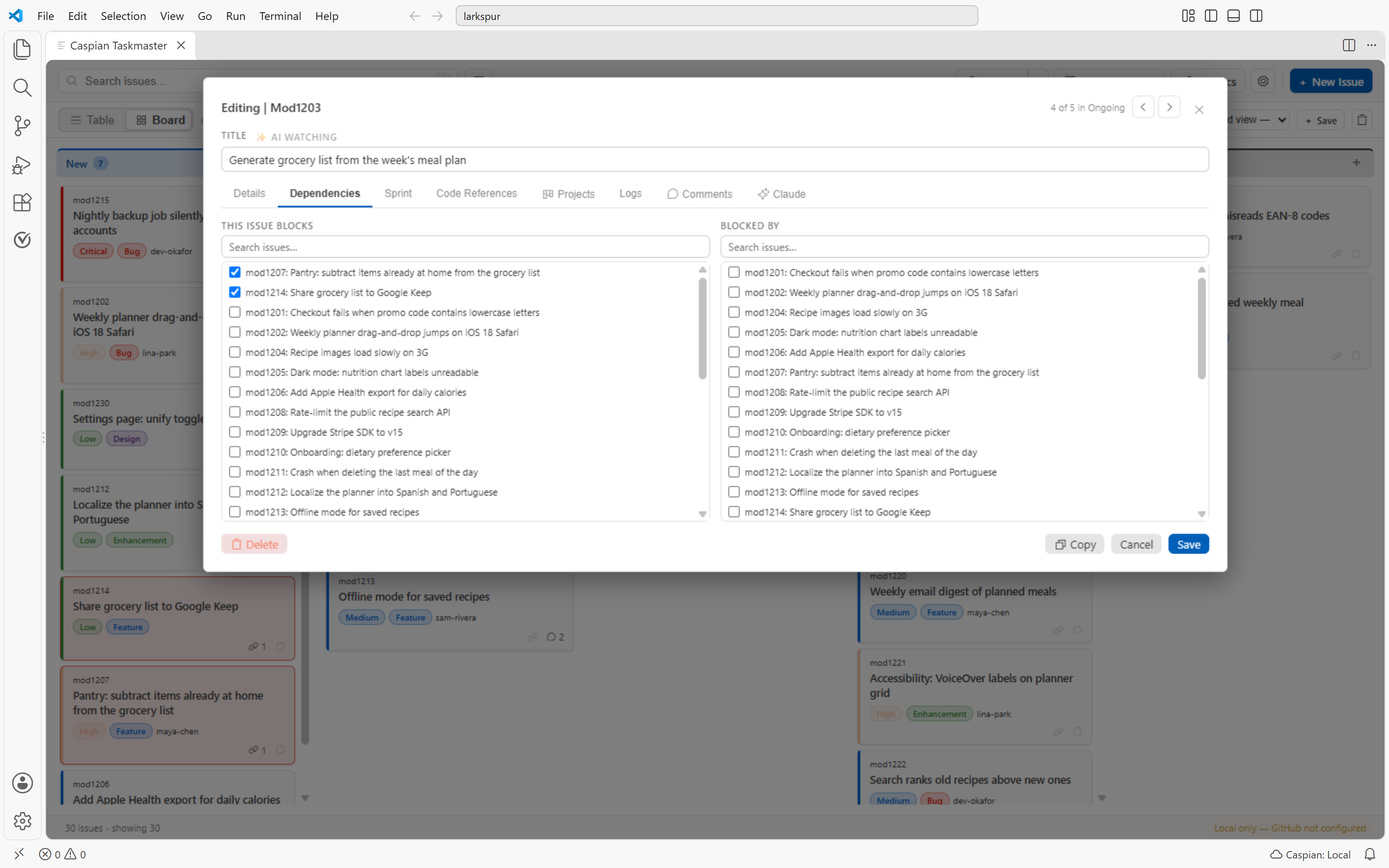
| Dependencies: blocks / blocked-by links, with blocked cards highlighted on the board |
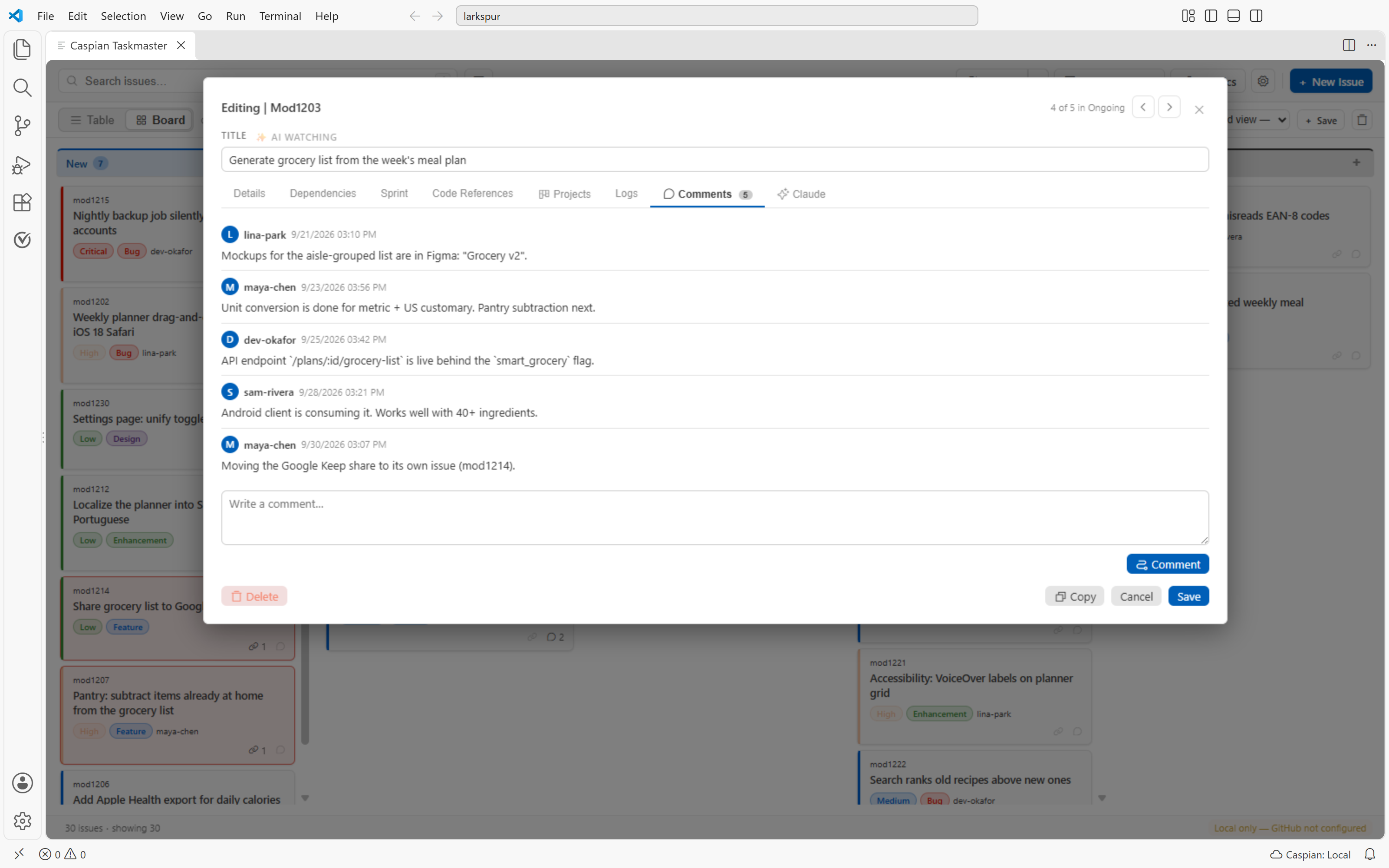
Comments: write them offline; they sync to GitHub on the next push |
 |
 |
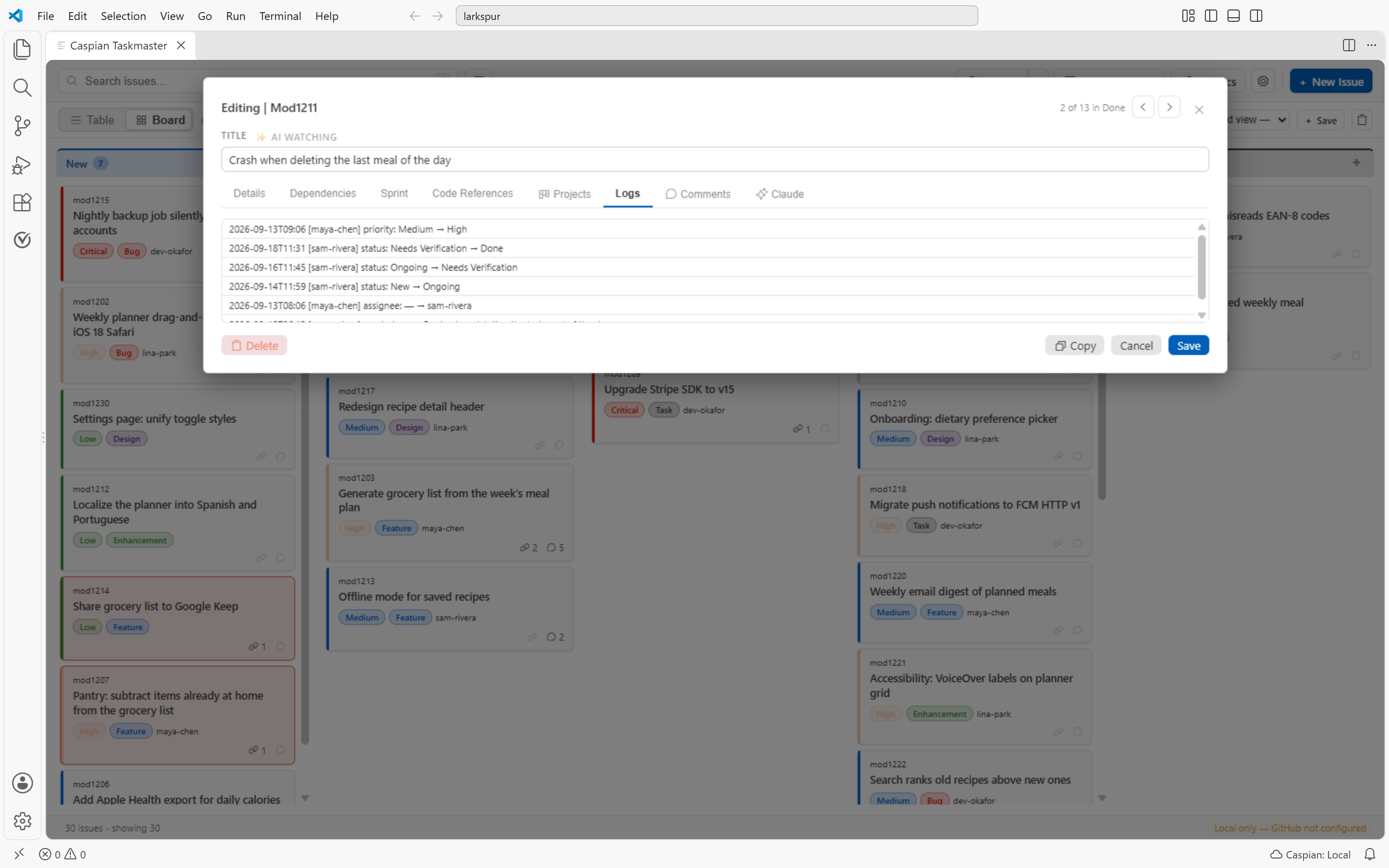
| Audit log: every field change with author, timestamp, and old and new values |
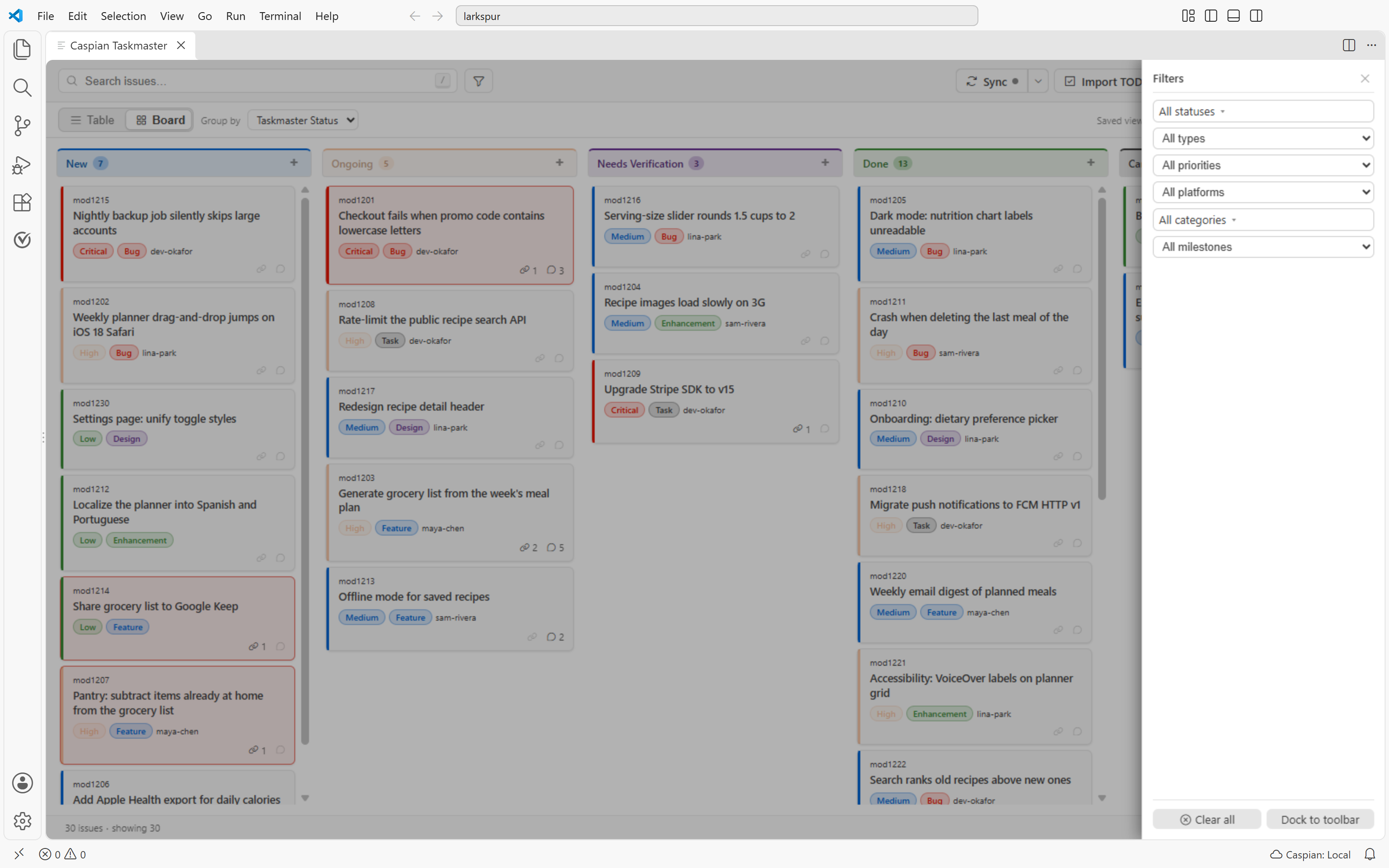
Filter drawer: status, type, priority, platform, category and milestone filters in a slide-in drawer |
 |
 |
| Sidebar panel: your issues grouped by status, right next to your code |
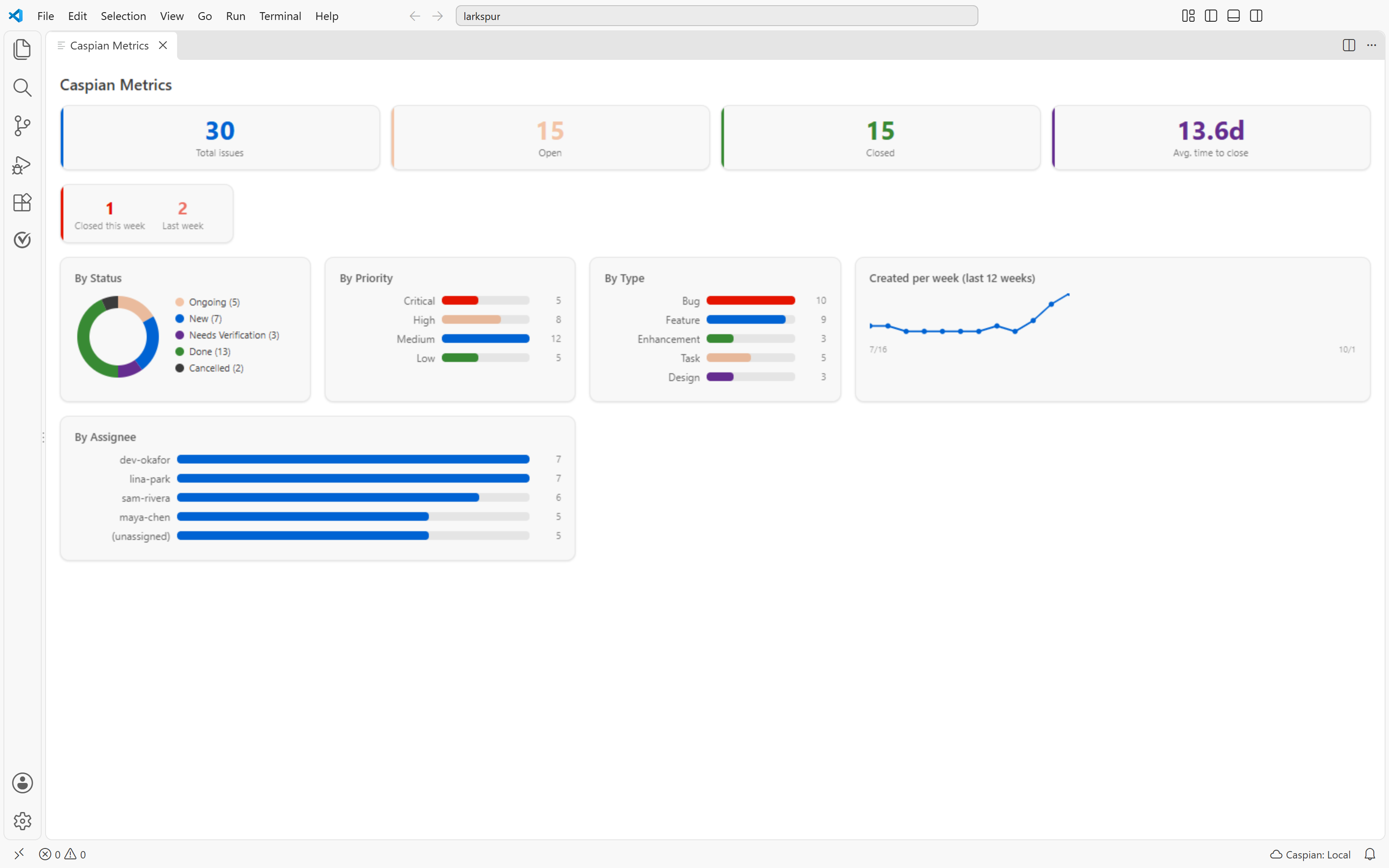
Metrics dashboard: open vs closed, time to close, breakdowns and a 12-week trend |
 |
 |
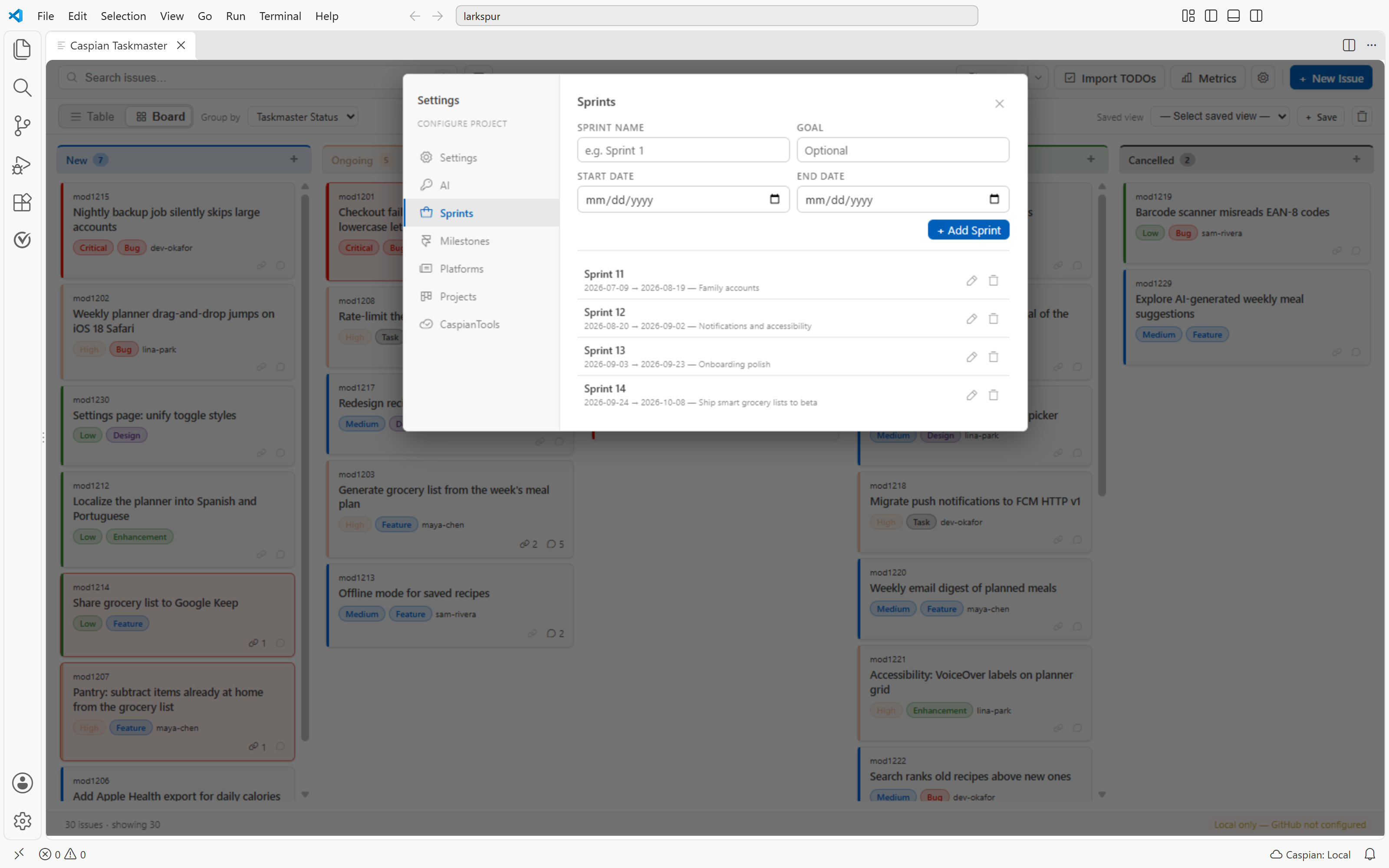
| Sprint planning: sprints with date ranges and goals, and story points per issue |
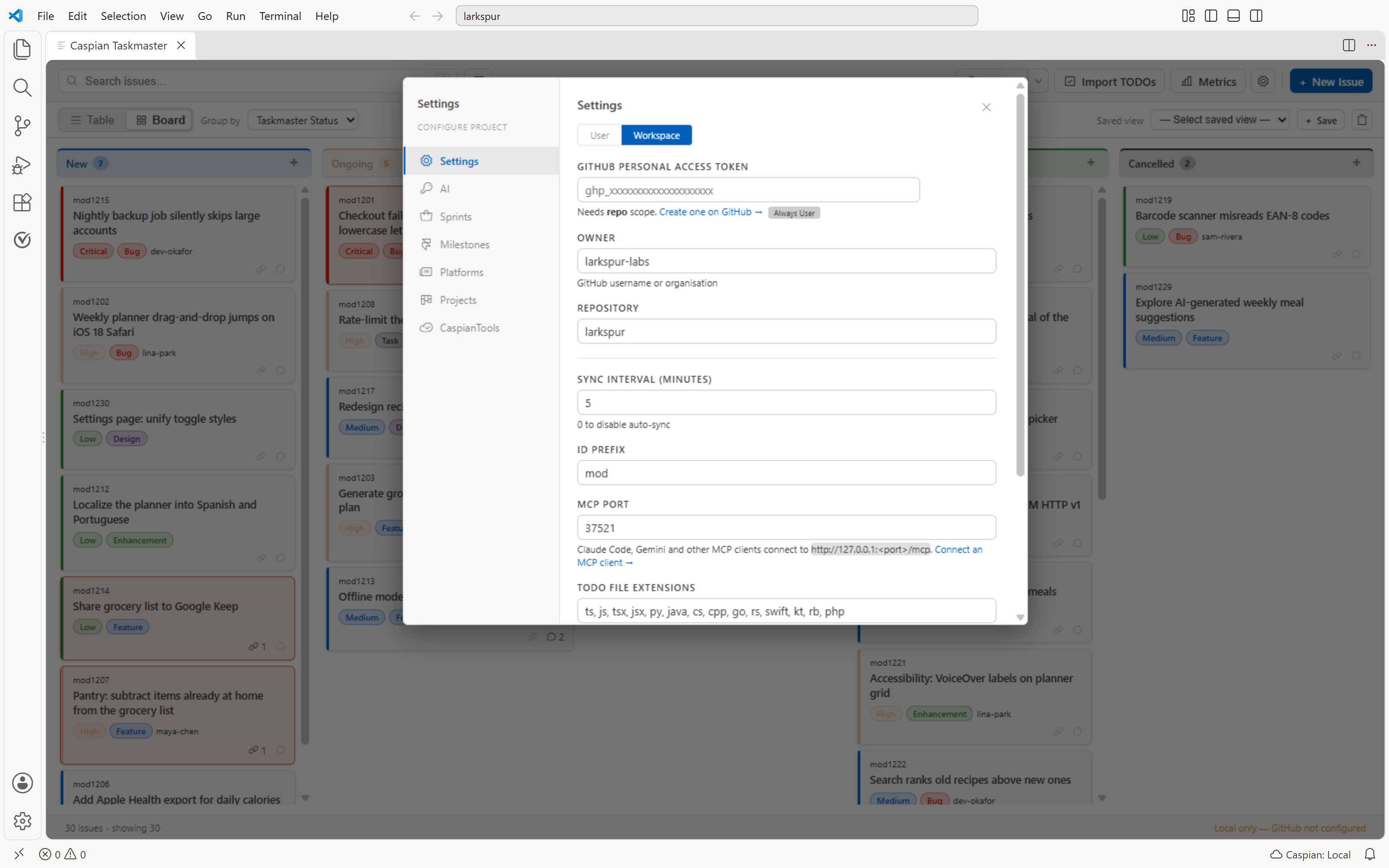
Settings: GitHub, AI provider, MCP and sync options in one popup |
Features
- Chat with Claude in the issue popup (1.31.0, experimental, opt-in) — a Claude tab in the issue popup lets you discuss an issue with Claude and have it fix the code. It runs the Claude Code you already use (the Claude Code VS Code extension or the
claude CLI), signed in with your own account, so usage counts toward your Claude plan and no API key is needed. New chats start in Plan mode: Claude reads the issue and your code and proposes a plan, and nothing changes until you approve it. When it finishes a fix, its summary is posted to the issue and the issue moves to Needs Verification. Off by default — see Chat with Claude in the issue popup.
- Bidirectional sync with caspiantools.com (1.20.0) — once you Connect, edits in VS Code propagate to the web within ~30s, and edits on the web propagate to VS Code within ~30s. Two coordinated loops (outbound dirty sweep, inbound short-poll); first-write-wins; one-shot backfill prompt for any local-only issues you have when you connect. Issue doc fields only this release; comments + log + sprints + milestones + attachments land in subsequent versions.
- Share an issue at caspiantools.com (1.19.0) —
Caspian Taskmaster: Share Issue at caspiantools.com from the command palette pushes a single issue to the web companion with isPublic: true, copies the public URL to your clipboard, and opens it in the browser. The shared page renders title, status, priority, type, and description at caspiantools.com/share/{id} without auth — perfect for sending a teammate or PM a link without making them install VS Code.
- Connect to caspiantools.com (1.21.0) — click the new sidebar
$(plug) button (or the status-bar pill, or the empty-state CTA, or the command palette) to open caspiantools.com in your browser, sign in with any provider you use on the web (Google / GitHub / email), and pick which workspace this VS Code install should sync with. The browser dispatches a vscode:// URI back to the extension with a one-shot Firebase custom token; refresh tokens land in vscode.SecretStorage (encrypted at rest) and the chosen workspaceId in globalState. Replaces the 1.18.0 GitHub-only OAuth path — Google and email sign-ins now work end-to-end.
- Kanban board + table view — toggle between a drag-and-drop Kanban board (always five Taskmaster status columns) and the sortable, filterable table. On the board, the
Group by dropdown sub-groups cards within each status column by Type, Priority, Platform, Milestone, Assignee, or any GitHub Project single-select field; view preference is remembered. Both surfaces show dependency and comment counts at a glance — small icon-and-number chips on every row and card, dimmed when zero, sortable in the table.
- GitHub bidirectional sync — changes in VS Code push to GitHub Issues; GitHub changes pull back automatically; conflict resolution UI when edits collide
- GitHub Projects (v2) integration, offline-capable — list, add, remove, and edit project-item field values (Status, Priority, Iteration, and any custom single-select, text, number, or date field) directly from the issue editor; Board view can group columns by any project's single-select field with drag-and-drop updating GitHub. Attaching a project to an unsynced or local-only issue stages the link locally with a
pending sync marker; the next sync push resolves the issue's GraphQL node ID and creates the project item
- AI-powered triage — as you type a new issue, priority/type/category suggestions appear based on keyword heuristics and similarity to existing issues. Categories are multi-value: an issue can carry several free-text labels (e.g. "Auth" + "UI"), picked from a chip multi-select with autocomplete, filterable from a dedicated toolbar dropdown
- Metrics dashboard — click the chart icon in the toolbar (or run the command palette command) for total/open/closed counts, by-priority/type/status bars, donut chart, 12-week trend sparkline, average days to close — all pure CSS/SVG
- Import TODOs — scan your workspace for
TODO/FIXME/HACK/BUG comments, multi-select any number of them in a single picker, and create issues in one sweep. Already-imported entries are remembered per workspace and demoted to the bottom on subsequent scans, so you keep seeing what's actually new. FIXME and BUG map to High priority; TODO and HACK to Medium
- Commit integration —
closes mod1180 or fixes mod1180 in a commit message auto-sets the issue to Done
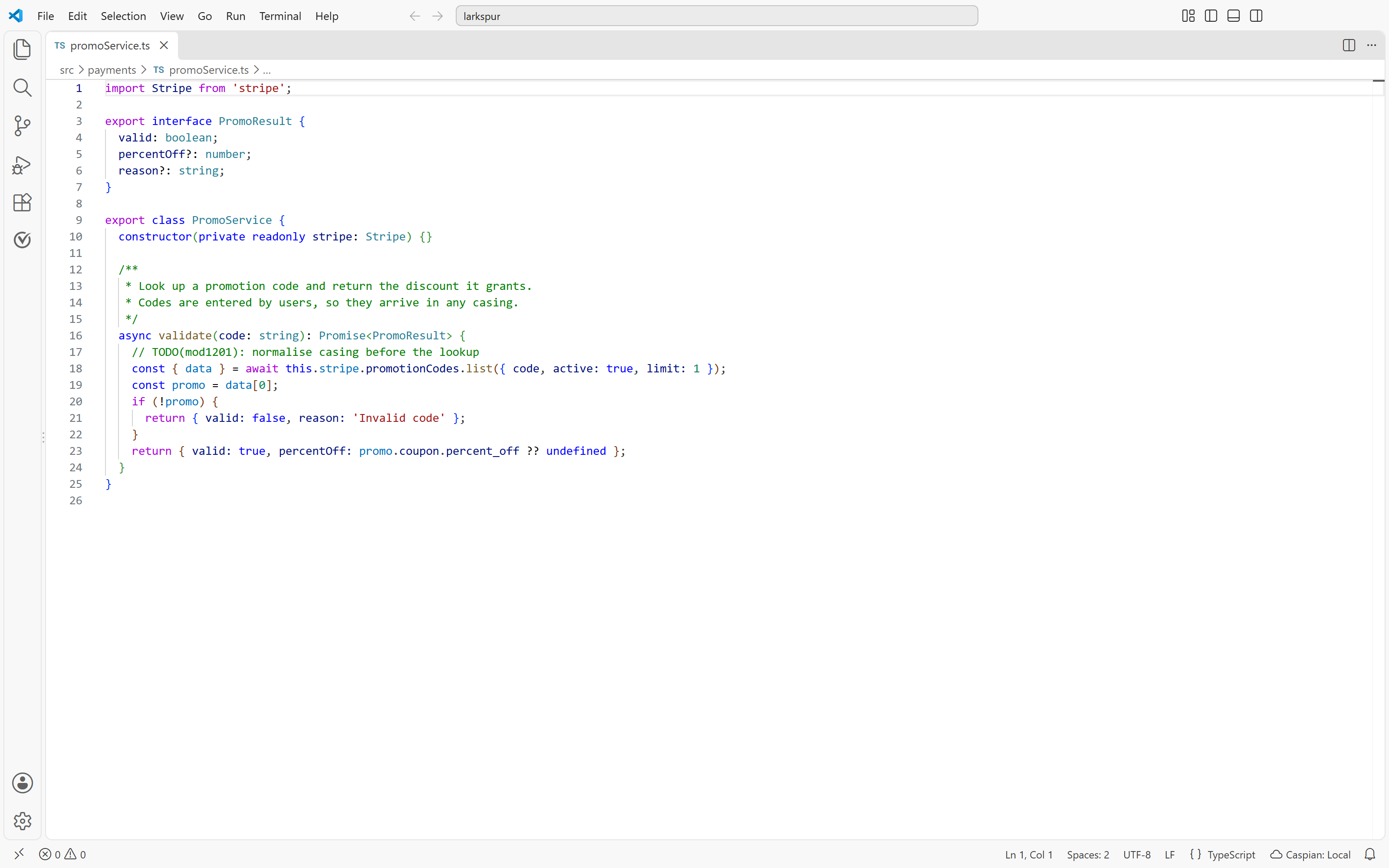
- Inline code references — attach file/line positions to issues; gutter icons appear in the editor at the linked lines
- Issue dependencies —
blocks/blockedBy relationships with cycle detection
- Image attachments — paste from clipboard, drag-and-drop, or pick files to attach images to any issue; images render inline in markdown preview and are stored efficiently as separate files
- Rich markdown editor — Text / Markdown tab toggle with full-width rendered preview in the create/edit modal
- Tabbed edit modal — Details, Dependencies, Sprint, Comments, and Logs tabs keep the modal organized (plus a Claude tab when Claude chat is turned on). If the issue changes elsewhere while it's open — a sync, an MCP tool, a commit, Claude — fields you haven't touched update in place, so Save never writes old values back
- Offline-capable issue commenting — Comments tab is always available, on every issue, whether or not it's linked to GitHub. Comments you author write to a local
Issue.localComments queue immediately, render in the list with a yellow pending dot, and ride the next sync push to GitHub. On synced issues the local list is merged with GitHub's own comments on tab open and the count badge stays accurate
- Sprint planning — create sprints with date ranges and goals, assign issues to sprints with story point estimates
- Milestones — create milestones, assign issues, group the board by milestone
- Bulk operations — select multiple issues, change status/priority/assignee or delete in one action
- Saved views — name and save any filter+sort combination; reload with one click
- Sidebar panel — quick glance at issues without leaving your code; Table-only (the Kanban board isn't useful in a narrow column, so the list/board toggle is hidden here — open the full tracker for the board), with a header cloud icon that connects to caspiantools.com when signed out and opens it when signed in
- Complete audit log — every field change logged with author, timestamp, and old/new values
- MCP server — Claude Code, Gemini Code Assist and other MCP clients can read and update your issues through the local server at
http://127.0.0.1:37521/mcp; Connect MCP Client adds it to Claude Code in one click
- Multi-provider AI engine — connect to VS Code LM API (Copilot) or any OpenAI-compatible endpoint for built-in AI features
- Duplicate Sentinel — semantic duplicate detection surfaces possible duplicates as you create new issues (embeddings with TF-IDF + bigram + Levenshtein fallback)
- Ghost Writer — AI pre-fills new issues from your current editor context (file, selection, diagnostics, git diff)
- Fluid (narrow-mode) layout — when the tracker panel is dragged below 400 px, button labels collapse to icons, the view auto-switches to Table and the list/board toggle is hidden (your preferred view is restored as soon as you widen the panel again), and filters / saved-views / TODOs / Metrics tuck into a slide-in side panel behind a burger icon (next to the search field) — keeping the tracker usable in a half-width activity-bar side bar
Fields per issue
| Field |
Values |
| ID |
Auto-generated (e.g. mod1180) |
| Title |
Free text |
| Type |
Bug / Feature / Enhancement / Task / Design |
| Status |
New / Ongoing / Needs Verification / Done / Cancelled |
| Priority |
Critical / High / Medium / Low |
| Platform |
Customizable (16 defaults: iOS, Android, Web, Desktop/Windows, etc.) |
| Categories |
Free text — multi-value (e.g. ["Auth", "UI"]). Auto-discovered from existing issues; pick from a chip multi-select. Filterable from the toolbar (OR-match) and persisted in saved views. |
| Assignee |
GitHub username (auto-filled with configured owner on new issues) |
| Milestone |
Sprint / milestone name |
| Sprint |
Sprint name (with date range and goal) |
| Story Points |
Numeric estimate for sprint planning |
| Description |
Rich markdown with Text / Markdown tab toggle |
| Code references |
File + line ranges linked to editor gutter |
| Dependencies |
Blocks / blocked-by issue IDs |
| Created by |
Auto from config |
| Date entered |
Auto |
| Change log |
Full history of every edit |
Setup
1. Install the extension
cd caspian-taskmaster
npm install
npm run compile
# Then press F5 in VS Code to launch Extension Development Host
2. Connect to GitHub (optional)
Run command palette → Caspian Taskmaster: Configure GitHub Repo
Or click the gear icon in the tracker toolbar to open the Settings popup → Settings tab, which provides the same GitHub configuration with live token verification and User/Workspace scope toggle.
You'll be prompted for:
- GitHub PAT — create at https://github.com/settings/tokens (needs
repo scope; add project too if you want GitHub Projects sync)
- Owner — your GitHub username or org
- Repo — repository name
GitHub is optional — all features work locally without it. GitHub Projects integration is additionally optional and only activates when you enable at least one project in Settings → Projects.
The Settings popup also has a CaspianTools tab showing the cloud connection at a glance — connected workspace (name + id), account uid, sync engine state, pending changes, last in/out sync times — with one-click Connect / Disconnect / Open caspiantools.com / Sync all local / Re-sync from cloud buttons. Reflects auth changes live without a reload.
3. Open the tracker
- Sidebar: click the Caspian Taskmaster icon in the activity bar
- Full tab: click the preview icon in the sidebar
Issues view title bar (top-right of the panel) — or run command palette → Caspian Taskmaster: Open Full Tracker
GitHub sync
Issues sync automatically every 5 minutes (configurable). Manual sync: click Sync in the tracker toolbar — it syncs GitHub and caspiantools.com (whichever are connected) in one go. The caret beside it opens a Sync menu with per-target status, last-sync time, per-target sync and Set up / Connect actions. You can also click the indicator in the status bar or run Caspian Taskmaster: Sync with GitHub.
The status bar shows your owner/repo name and a persistent sync indicator — green with "✓ 2m ago" after a successful sync, red with "✗" after a failure. Hover for exact timestamps and the next auto-sync countdown.
How it works:
- Local issues are tagged with a
local-id:mod1180 label on GitHub so IDs stay stable
- Status, priority, type, platform, and categories are stored as GitHub labels (
status:Ongoing, priority:High, etc.). Multiple category:Foo / category:Bar labels round-trip cleanly with multi-value categories.
- The full description, code references, and change log are written into the GitHub issue body as markdown
- Deletion sync: deleting an issue locally closes the corresponding GitHub issue (with a
deleted-locally label) on the next sync, preventing re-import
- Conflict resolution: if a sync detects both local edits and a newer GitHub version, a conflict is flagged; run Resolve Sync Conflicts to pick field-by-field which version to keep
- Issue commenting: every issue (synced or not) shows a Comments tab. Locally-authored comments persist on the issue with a
pending sync marker until the next sync push reaches GitHub; on already-synced issues the local list is merged with GitHub's own comments on tab open
GitHub Projects (v2)
Caspian Taskmaster pulls in GitHub Projects (v2) alongside Issues via GraphQL. Requires the project scope on your PAT.
Setup:
- Add
project scope to your PAT at https://github.com/settings/tokens.
- Open Settings → Projects tab (or run Caspian Taskmaster: Manage GitHub Projects).
- Click Refresh — all projects you have access to are listed (your own projects plus the repo owner's projects).
- Check the Sync box for each project you want to sync.
What syncs (bidirectionally):
- An issue's project memberships — which projects it's in
- Every custom field value on each project item (Status, Priority, Iteration, and any text/number/date/single-select field)
Where it shows up:
- Every synced issue gains a Projects tab in the editor, one card per project the issue belongs to. Edit any field inline — changes push to GitHub immediately.
- Add a project from the same tab's dropdown, or run Caspian Taskmaster: Add Issue to GitHub Project from the command palette.
- Remove with one click (trash icon on the project card).
- The Board view always draws the five Taskmaster status lanes. The Group by dropdown (next to the Table/Board switch) adds sub-group headers inside each lane, so cards cluster by Type, Priority, Platform, Milestone, Assignee, or any synced project's single-select field (e.g. Status, Priority) without leaving their status column. Dragging a card between columns updates Taskmaster status. Each lane header also exposes a small + icon — clicking it opens the New Issue modal with Status pre-populated to that lane, so the new card lands directly in the lane it was created from.
What doesn't sync:
- Meta fields (Title, Assignees, Labels, Reviewers, Milestone, Linked pull requests, Repository) — these come from the issue itself, not the project.
- Non-single-select, non-iteration fields are displayed but editable only via type-appropriate input (text/number/date). PRs are filtered out entirely.
Commit integration
When you commit with a message like:
fix: handle null session on login — closes mod1185
Caspian Taskmaster automatically sets mod1185 status to Done. Use ref instead of closes/fixes to just add a log entry without changing the status.
Enable/disable via caspianTaskmaster.commitWatcherEnabled setting.
Import TODOs
Click Import TODOs in the tracker toolbar (or run Caspian Taskmaster: Import TODOs from Workspace from the command palette). Caspian Taskmaster scans your workspace for TODO, FIXME, HACK, and BUG comments across all configured source file extensions and presents them in a multi-select QuickPick. Tick any number of entries at once and Caspian creates one issue per selection, each pre-populated with a code reference back to the original file:line.
The picker remembers what you already imported (state lives in context.workspaceState, scoped to that workspace). On subsequent scans those entries are decorated with a check icon, annotated with the issue ID they became, and sorted to the bottom of the list — so the picker leads with what's genuinely new. They remain pickable in case you actually want a duplicate.
Triage is type-aware: FIXME and BUG create High-priority issues; TODO and HACK stay at Medium. Configure scanned extensions via caspianTaskmaster.todoFileExtensions.
AI integration
Option 1: Copy as AI prompt (works with any AI)
Click the clipboard icon on any issue row in the table or on any card in the Kanban board. This copies a structured markdown block — including inline images — to your clipboard. When pasted into rich text apps (Slack, Gmail, Word, Claude, Gemini), attached images appear as actual images. In plain text contexts, images appear as descriptive text links.
Option 2: MCP server (Claude Code, Gemini and other MCP clients)
Caspian Taskmaster runs a local MCP server at http://127.0.0.1:37521/mcp (Streamable HTTP transport). Every request needs an Authorization: Bearer <token> header. That stops other local processes, users on the machine and web pages from reading or changing your issues. The token is created once and kept in VS Code's encrypted secret storage, so a client you connect keeps working across restarts.
Connect a client — run Caspian Taskmaster: Connect MCP Client from the command palette (Ctrl/Cmd+Shift+P) and pick:
| Option |
What it does |
| Add to Claude Code |
Runs claude mcp add with your Claude Code for this workspace. That covers the Claude Code VS Code extension and the claude CLI, using the copy bundled with the extension if claude isn't on your PATH. Start a new Claude Code conversation afterwards; /mcp shows it as connected. |
| Copy the Claude Code command |
For a terminal where claude is on your PATH. Run it in the project folder:
claude mcp add --transport http caspian-taskmaster http://127.0.0.1:37521/mcp --header "Authorization: Bearer <token>" |
| Copy Gemini config |
For Gemini Code Assist and Gemini CLI. Merge it into ~/.gemini/settings.json:
{ "mcpServers": { "caspian-taskmaster": { "httpUrl": "http://127.0.0.1:37521/mcp", "headers": { "Authorization": "Bearer <token>" } } } } |
| Copy JSON for other MCP clients |
{ "mcpServers": { "caspian-taskmaster": { "type": "http", "url": "…", "headers": { "Authorization": "Bearer <token>" } } } }, for Claude Code's .mcp.json, Cursor and other clients that take url + headers. |
The copied config contains your token. Keep it out of version control: prefer Add to Claude Code, which stores it in ~/.claude.json rather than in a project file. If the token ever leaks, run Caspian Taskmaster: Regenerate MCP Token and connect your clients again.
Only one VS Code window can serve the port at a time. A second window on the same machine reports that the port is in use; give that workspace its own caspianTaskmaster.mcpPort if you need both. The older plain-REST routes (GET /mcp/tools, POST /mcp/call) still work for scripts that use them.
Sixteen MCP tools:
| Tool |
What it does |
get_issue |
Full details of a specific issue |
list_issues |
Filtered list (status, type, priority, platform, categories — array OR-match; legacy category substring still accepted) |
search_issues |
Full-text search across title, description, categories |
get_issue_prompt |
Formatted AI prompt block for an issue |
suggest_triage |
AI-assisted priority/type/categories suggestions (returns up to 2 categories) |
create_issue |
Create a new issue |
update_issue |
Update fields on an existing issue |
bulk_update_issues |
Update multiple issues at once |
close_issue |
Close an issue (set status to Done) |
add_dependency |
Add a blocks/blockedBy relationship |
create_sprint |
Create a new sprint with date range and goal |
get_sprint_issues |
List all issues assigned to a sprint |
list_projects |
List locally known GitHub Projects (v2) and their field metadata |
add_issue_to_project |
Add a synced issue to a GitHub Project |
remove_issue_from_project |
Remove an issue from a GitHub Project |
set_project_field |
Set a project item's field value (Status, Priority, etc.) |
Discuss an issue with Claude, then let it fix the code — without leaving the issue popup.
What it uses. The chat runs your own Claude Code: the copy bundled with the Claude Code VS Code extension, the native installer's ~/.local/bin/claude, or claude on your PATH (or a path you set in caspianTaskmaster.claudeChat.cliPath). It is signed in with your account, so usage counts toward your Claude plan's limits, exactly like using Claude Code directly. No API key is used or stored: the extension never reads your credentials, and it removes ANTHROPIC_API_KEY from the chat's environment so a stray key can't silently switch you to pay-per-token billing. The chat header shows which account it's using (e.g. Claude Max · Claude Code 2.1.286), and warns if your Claude Code is signed in with an API key or cloud provider instead.
Turn it on. Settings (gear) → AI → Claude chat. It is off by default. The first time, a dialog explains what it does. The setting is user-level only, so a repository's .vscode/settings.json can't switch it on, swap the executable or change the default mode. It needs a trusted workspace with the repository folder open.
Modes — the same ones Claude Code uses, switchable at any time from the chat header:
| Mode |
What Claude may do |
| Plan (default for new chats) |
Read and search the code only. When it's ready, it shows its plan as a card: Approve → Auto, Approve → Ask first, or Keep planning with your feedback. |
| Ask first |
Every file edit and command shows an approval card first. |
| Auto |
Claude Code's Auto mode: its safety classifier lets low-risk actions run without asking and blocks risky ones. Asks for confirmation the first time you pick it. |
Approval cards. Anything the current mode doesn't allow shows as a card in the chat with the command, or a –/+ preview of the edit: Allow, Allow for this chat (never written to your settings files), Deny with an optional note to Claude, or Deny & stop. Questions from Claude appear as cards with clickable answers. Stop interrupts at any time. If Claude needs you while the popup isn't showing that chat, VS Code shows a notification with a Review button, and the Claude tab gets a dot.
What you see. Replies stream in as Claude writes them. Every tool call shows as a one-line chip (read, search, edit, run…) with its output a click away. Changed files lists everything Claude edited, each with Diff (against git) and Open.
When a fix is done. Claude ends its final message with a ## Summary. That summary is posted to the issue as a comment, and the issue moves to Needs Verification. Claude's first edit also moves a New issue to Ongoing. Done and Cancelled issues keep their status. Comments are labelled 🤖 Claude (via Claude Code chat), credential-looking strings are masked, and they sync to GitHub like any other comment. If a turn changed files but didn't end with a summary, a Post summary to issue button appears instead. Turn this off with caspianTaskmaster.claudeChat.updateTask.
Guardrails. Publishing is blocked by default (caspianTaskmaster.claudeChat.blockPublishing): git push, git tag, gh release, gh pr create, gh api and npm/vsce/ovsx publish commands are denied. Claude is also told not to commit, bump versions or run release checklists unless you ask in the chat, even if the repository's own instructions (a CLAUDE.md, say) tell it to after every task. Issue text is passed to Claude as quoted data, not as instructions. These are guardrails, not a sandbox: Claude works in your checkout with your permissions.
Conversations. Each issue keeps its own conversation. Close the popup, switch issues or reload VS Code, and the next message picks up the same Claude Code session. New chat starts over. Open in Claude Code continues the conversation in the Claude Code panel; sending another message from the popup afterwards branches it back. The chat log is kept in VS Code's per-workspace storage (claude-chats/), never on the issue itself, so it is not synced to GitHub or caspiantools.com.
Limits. At most three chats run at once, and an idle one shuts down after 10 minutes (it resumes when you send the next message). Claude works in the first workspace folder, and warns if that repository isn't the issue's repository. Run Caspian Taskmaster: Stop All Claude Chats to end every running chat.
Anthropic doesn't allow third-party products to offer claude.ai login or plan usage without approval. Caspian Taskmaster never offers a login: the chat only starts the Claude Code you installed and signed in to yourself, and it stays off until you turn it on.
Configuration
| Setting |
Default |
Description |
caspianTaskmaster.githubToken |
"" |
GitHub PAT |
caspianTaskmaster.owner |
"" |
GitHub owner |
caspianTaskmaster.repo |
"" |
GitHub repo |
caspianTaskmaster.syncIntervalMinutes |
5 |
Auto-sync interval (0 = off) |
caspianTaskmaster.idPrefix |
"mod" |
ID prefix (mod → mod1180) |
caspianTaskmaster.mcpPort |
37521 |
MCP server port (one VS Code window per port) |
caspianTaskmaster.todoFileExtensions |
common source types |
Extensions scanned by TODO Harvester |
caspianTaskmaster.commitWatcherEnabled |
true |
Auto-close issues from commit messages |
caspianTaskmaster.defaultView |
"tracker" |
Where to open: tracker (editor tab), sidebar, or panel (bottom area) |
caspianTaskmaster.sidebarLayout |
"compact" |
Activity Bar sidebar layout: compact (task list grouped by status, with quick-add) or full (the whole tracker table). compact also stops the sidebar redirecting to the editor tab. |
caspianTaskmaster.aiProvider |
"none" |
AI provider: none, vscode (any VS Code LM extension), openai-compatible, or claude. Run Detect AI Provider command for auto-setup. |
caspianTaskmaster.aiEndpoint |
"" |
Base URL for API endpoint (Claude defaults to https://api.anthropic.com) |
caspianTaskmaster.aiApiKey |
"" |
API key for OpenAI-compatible or Claude endpoint |
caspianTaskmaster.aiModel |
"" |
Model name for the AI provider |
caspianTaskmaster.claudeChat.enabled |
false |
Turn on the Claude tab in the issue popup (user setting only) |
caspianTaskmaster.claudeChat.defaultMode |
"plan" |
Mode new chats start in: plan, default (Ask first) or auto |
caspianTaskmaster.claudeChat.updateTask |
true |
Post Claude's summary as a comment and move the issue's status when a fix is done |
caspianTaskmaster.claudeChat.blockPublishing |
true |
Block push, tag, release and publish commands in Claude chats |
caspianTaskmaster.claudeChat.model |
"" |
Model for Claude chats (e.g. opus, sonnet); empty uses your Claude Code default |
caspianTaskmaster.claudeChat.cliPath |
"" |
Path to the claude executable; empty finds it automatically (machine setting) |
Uninstall & reinstall
Run command palette → Caspian Taskmaster: Prepare to Uninstall before uninstalling to choose:
- Save data for reinstall — backs up your tasks, milestones, sprints, saved views, and settings to
~/.caspian-taskmaster/backup/. On next install, the extension offers to restore everything.
- Remove everything — permanently deletes all extension data on uninstall.
If you uninstall without running the command, your data is automatically backed up (safe default).
Keyboard shortcuts
| Key |
Action |
Ctrl+N (in tracker) |
New issue |
Ctrl+Enter (in modal) |
Save issue |
Alt+← / Alt+→ (in modal) |
Previous / next issue in the same lane |
Enter (in the Claude chat box) |
Send the message (Shift+Enter for a new line) |
Escape |
Close modal |
| Double-click row |
Edit issue |
| |

