OpenSCAD Workbench
Preview OpenSCAD models inside VS Code: color, customizer sliders, cross-sections and 2D slice
measurement. The model renders in an editor panel next to the code, not in a separate application.
Requirements
OpenSCAD must be installed. The extension needs the Manifold backend and colored 3MF export, so
use a 2025 or newer development snapshot; the 2021.01 stable release is too old, and the preview
says so rather than failing on the first render.
Take it from the Development Snapshots section of
openscad.org/downloads.html. The release offered at the top
of that page, and the plain openscad Homebrew cask, are both 2021.01.
On macOS, brew install --cask openscad@snapshot is the one-line route. The .dmg works too:
drag OpenSCAD.app into /Applications and the extension looks inside the bundle, so there is
nothing further to configure.
The extension finds it by, in order:
- the
scadPreview.openscadPath setting, if set;
- the newest
OpenSCAD*.AppImage in the file's folder or any folder above it;
- on macOS, the newest
OpenSCAD*.app in /Applications or ~/Applications;
openscad on PATH.
On Windows there is no standard location to search, so set scadPreview.openscadPath to your
openscad.exe.
Use
Open a .scad file and click the preview icon in the editor title bar, or run OpenSCAD
Workbench: Open Preview from the command palette. The model re-renders when you save the file or any file
it includes or uses.
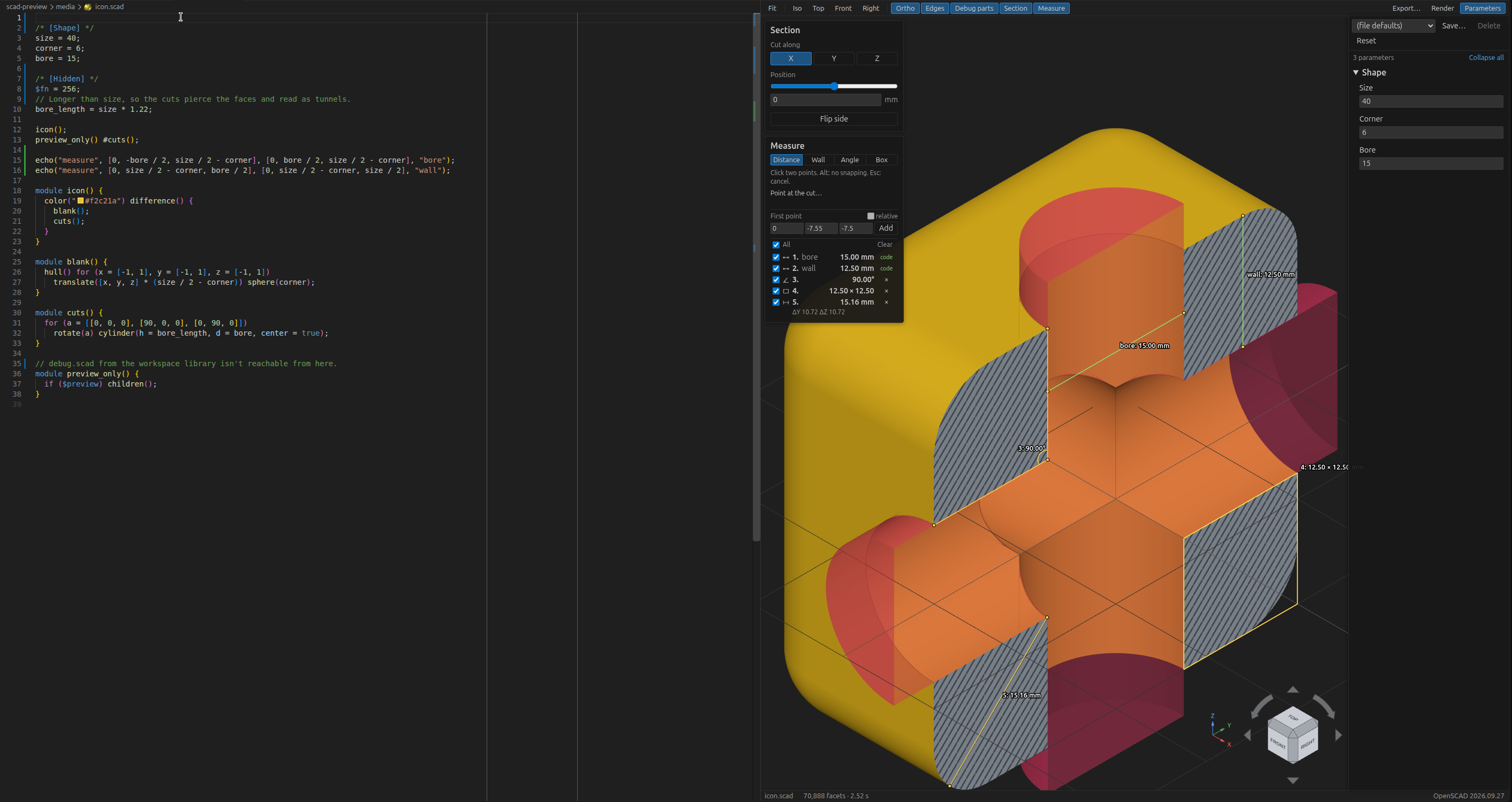
- Parameters — sliders, dropdowns, checkboxes and text fields built from the file's Customizer
comments, with saveable presets. Dragging a slider renders at reduced
$fn for speed and does
one full render when you let go.
- Section — cut the model on any axis and see a solid cut face.
- Measure — on a cut, snap to the outline to measure distances, wall thickness, angles and
bounding boxes.
echo("measure", ...) in the file draws its own measurements in a second color.
Measurements you add by hand are kept in a .scad-preview/ folder beside the file, which is
worth adding to .gitignore.
- Debug modifiers —
# parts are drawn see-through in a highlight color and % parts faintly,
from a second pass that runs after each render.
- Export — write STL or 3MF with the parameter values currently in the panel.
Everything else — colors, panel sides and widths, the navigation cube, orthographic view, facet
edges — is under scadPreview.* in Settings.
Two settings exist because OpenSCAD process startup dominates small renders:
scadPreview.unpackAppImage (on by default) unpacks the AppImage once into the extension's
storage, about 300 MB, and runs the unpacked copy. Starting an AppImage costs about 0.3 s per
render; the unpacked copy starts in about 0.05 s. It is redone when the AppImage changes.scadPreview.draftFn sets the $fn used for the quick renders while a slider is moving.
Develop
npm install
npm run build      # bundle extension + webview into dist/
npm test           # unit tests
npm run typecheck
npm run package    # build a .vsix
Press F5 to launch a development host. By default it opens whatever folder you point the
launch configuration at; open a .scad file there and click the preview button.
docs/openscad-cli-findings.md records what the OpenSCAD command line does and does not support,
which is where most of the design constraints come from.
License
GPL-3.0-or-later. See LICENSE, and THIRD-PARTY-NOTICES.md for
the bundled MIT libraries.

