COZYROC Pygmy - SSIS Package Viewer
Explore and analyze SSIS packages (.dtsx), SSIS project files (.dtproj), and SSIS deployment projects (.ispac) in Visual Studio Code (no need for Visual Studio, SSDT or SSIS runtime).
Also available as a free web app at https://pygmy.cozyroc.cloud
What You Can Do
• Open .dtsx, .dtproj, and .ispac files in a dedicated visual designer, closely resembling the SSIS Designer experience in Visual Studio.)
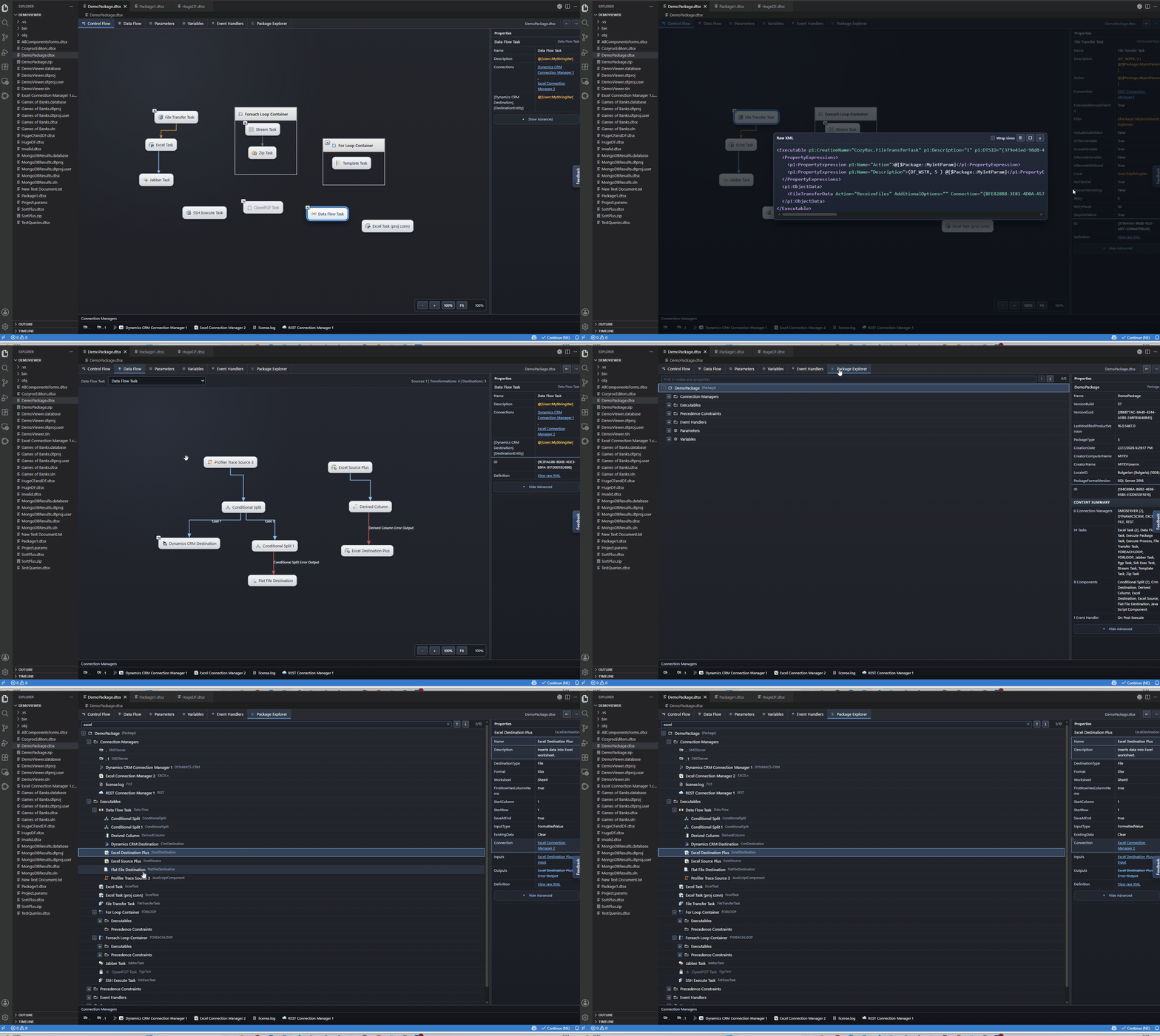
• Explore Control Flow, Data Flow, Parameters, Variables, and Event Handlers
• Inspect detailed properties of connection managers, tasks, components, parameters & variables, event handlerss, and more — including their underlying XML definitions.
• Quickly navigate package elements through cross-references. Browse and search the entire package structure using the Package Explorer
Quick Start
1. Open a .dtsx, .dtproj, or .ispac file in Visual Studio Code.
2. If prompted, choose Open With... and select SSIS Package Viewer/COZYROC Pygmy. To switch to the default text editor that use Reopen Editor With....
3. Explore the package using the designer tabs and click on any item to view its properties and where is it referenced.
Privacy-First
• Your SSIS packages are analyzed locally within VS Code—no package data is uploaded or shared.
• Optional telemetry can be disabled at any time through the extension settings.
Notes
• Read-only viewer: editing of SSIS packages is not supported.
• Packages using EncryptAllWithPassword are not supported. The viewer does not attempt to decrypt or access encrypted sensitive data.
• Need to run SSIS packages or open them directly in Visual Studio? Consider the free COZYROC Pygmy Desktop app
Support
• Click on the Feedback link in the viewer canvas to provide feedback or report issues.
About
COZYROC simplifies enterprise data integration with powerful SSIS and cloud connectivity solutions.
Connect virtually any system, automate data movement, and deliver projects faster with hundreds of ready-to-use, battle-tested connectors and integration components.
Check out our COZYROC SSIS+ and our COZYROC Cloud.

