Design Python Tkinter interfaces visually, preview the real window, validate the project, and export clean Python code without leaving VS Code.


TK-Form brings a WinForms-style workflow to Tkinter. Place widgets on a canvas, edit their properties and events, check the generated project, launch a real Tkinter Preview, and Export Python from the same editor.
Personal use is free. Commercial/enterprise use requires a paid license. Donation is optional and does not change license rights. TK-Form is source-available, not OSI open source.
Install
Install from the Visual Studio Code Marketplace:
code --install-extension Byeong-cheolKim.tk-form
Or download the latest tk-form-<version>.vsix from the Releases page and use Install from VSIX... in the Extensions view.
Design Tkinter UIs Visually
Build forms with a visual canvas while keeping the project in a readable .tkform.json format.
- Drag, resize, align, snap, and zoom common Tkinter and ttk widgets.
- Edit layout, text, colors, widget options, and events in the property inspector.
- Navigate complex forms through the widget tree.
- Manage menus, Tk variables, image resources, and non-visual components.
- Set window-level options: title, window icon, minimum size, and screen-center startup placement.
- Work with Button, Label, Entry, Text, Frame, Notebook, Treeview, and other commonly used widgets.
- Start from six included examples: Login, Settings Panel, Data Browser, plus three ttkbootstrap projects.
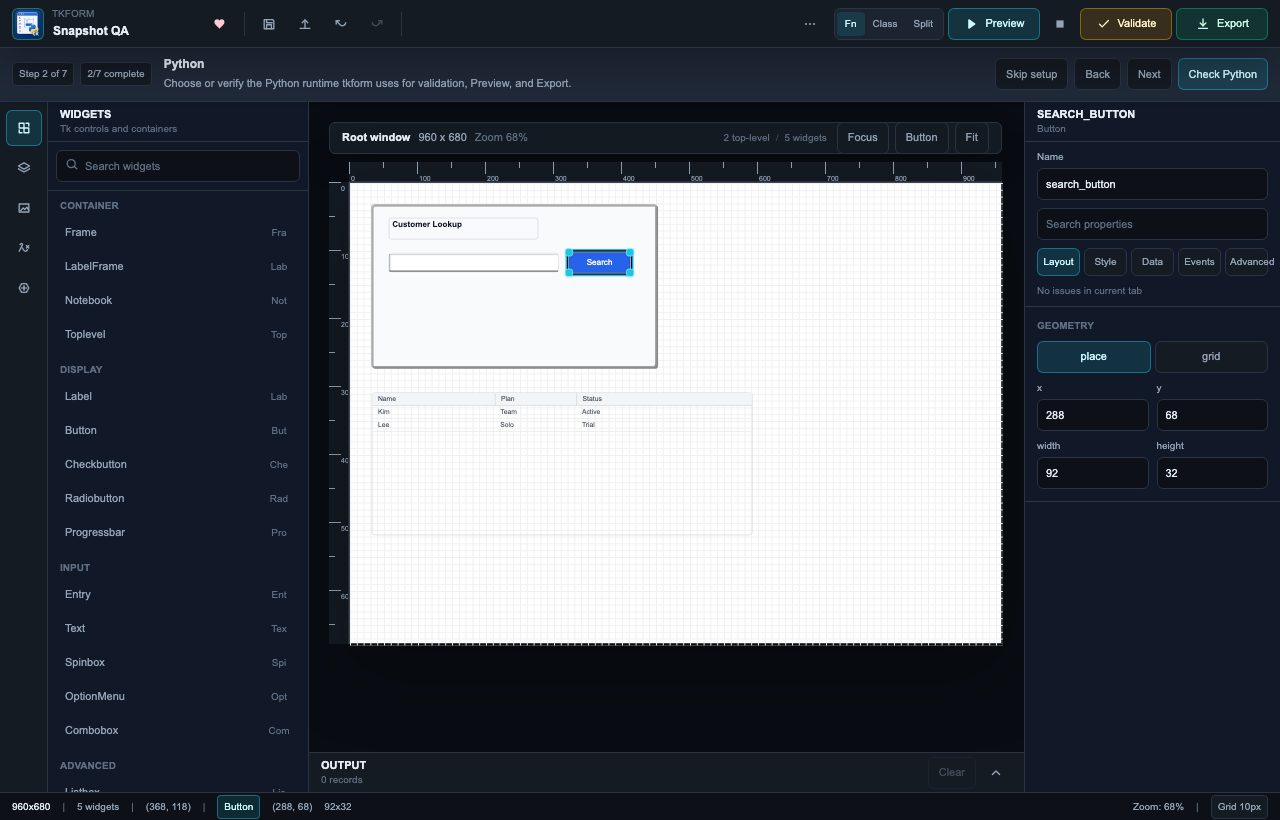
TK-Form is useful for individuals learning Tkinter, Internal tool teams building focused desktop utilities, and Tkinter maintenance teams modernizing existing tools. Commercial or organizational use requires a Commercial License.
Quick Start
- Open a local folder and trust the workspace. Python-backed actions remain disabled in an untrusted workspace.
- Open the Command Palette and run
TK-Form: Open Example Project.
- Choose
Login, save the generated .tkform.json file, and let the custom editor open it.
- Open the toolbar
Python panel. Enter an absolute Python executable path or leave it blank to use the configured/default runtime, then select Check Python or Check.
- Select
Validate to check the project and generated code.
- Select
Preview to open the real Tkinter window.
- Select
Export and save the generated .py file.
To create a project from scratch, run TK-Form: New Project. Opening any existing .tkform.json file launches the visual editor automatically.
ttkbootstrap 2.x
TK-Form can author projects for ttkbootstrap 2.x. Choose ttkbootstrap when activating the toolkit, select a supported theme such as bootstrap-light, and set per-widget bootstyle values in the Inspector. The bundled Ttkbootstrap Login project demonstrates primary and success outline styles. Ttkbootstrap Widgets demonstrates the seven ttkbootstrap-only provider widgets. Ttkbootstrap Dialogs demonstrates themed dialogs, toast, tooltips, and catalog-gated Bootstrap Icons.
Phase 1 shared widgets (the original 25-type catalog) work in both tkinter and ttkbootstrap projects. Phase 2 adds DateEntry, LabeledScale, Meter, Floodgauge, Tableview, ScrolledText, and ScrolledFrame. Phase 3 adds Components-rail types TtkMessagebox, Querybox, DatePickerDialog, ColorPickerDialog, ToastNotification, and ToolTip, plus icon / iconSize / iconOnly on Button, Label, Checkbutton, Radiobutton, and Menubutton. Provider-only widgets and components appear only in the ttkbootstrap palette. Switching back to tkinter is blocked while those widgets or components exist.
- Real ttkbootstrap Preview requires Python 3.10 or newer with
ttkbootstrap>=2,<3 installed in the selected Preview interpreter.
- When ttkbootstrap is missing or 1.x is detected, TK-Form shows the exact selected interpreter path and the fixed command
<python> -m pip install "ttkbootstrap>=2,<3" before installation. Installation runs only after confirmation and only in that interpreter.
- A successful install is checked again in the same interpreter before TK-Form retries the original Preview once.
- Static canvas editing, Validate, and Function/Class/Split-file Export remain available without importing ttkbootstrap. These Python-backed actions still require Workspace Trust.
MessageBox still exports tkinter.messagebox. Use TtkMessagebox for ttkbootstrap's themed Messagebox API. File picking remains the shared FileDialog component. FontDialog and Querybox get_font are not supported.- Querybox
integer/float export numeric initialvalue/minvalue/maxvalue. ColorPicker results bind as result.hex. Meter and Floodgauge can reference a project Tk variable (Meter syncs amountusedvar; Floodgauge uses constructor variable/textvariable).
- Icons are catalog names. The design Canvas shows a letter placeholder; Preview uses ttkbootstrap
Icon attributes when the installed package provides them. TK-Form does not bundle icon fonts.
The design Canvas approximates ttkbootstrap styling and layout. Real Preview is authoritative for the final theme, widget measurements, and platform rendering.
From Design to Python
The normal workflow stays inside one VS Code editor:
- Design — place widgets and edit properties or event code.
- Validate — catch schema, layout, option, and code-generation problems.
- Preview — run the generated interface with a local Python runtime and real Tkinter.
- Export — write a Python starting point in the structure that fits your project.
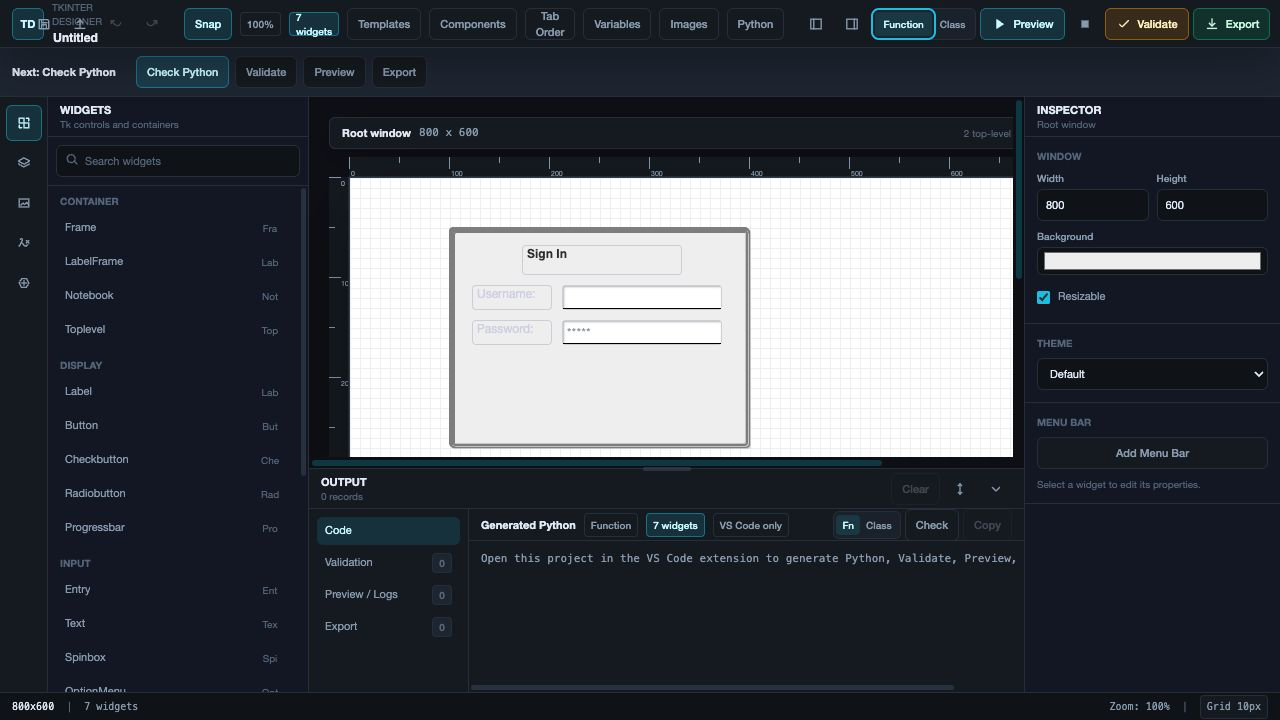
Validation runs before code generation so export problems are reported in the designer output dock. The toolbar also provides Stop preview when a Preview process is running.
TK-Form adds declarative animations to widgets that use the generated Tkinter layout. Select a widget, open Animations in the Inspector, and choose Add Animation. Each animation has a Python-safe name, preset, trigger, duration, delay, easing curve, and repeat behavior.
- Presets:
slide, shake, bounce, pulse, and color, plus fill (animate a Progressbar/Floodgauge value toward a target) and grow (grow a place() widget from zero to its designed size).
- Triggers: window load, click, hover enter/leave, focus in/out, or manual control.
- Easing:
linear, easeIn, easeOut, easeInOut, backOut, elasticOut, or bounceOut.
- Repeats: a bounded repeat count or continuous
infinite playback.
Preset-specific controls set direction, distance, axis, cycles, scale, or a target bg/fg hex color. Run Validate and Preview before export: validation rejects missing targets, unsupported layout or color combinations, invalid values, and generated Python name collisions.
Function, Class, and Split-file exports generate start_<animation_name>() and stop_<animation_name>() APIs. Event-driven animations are wired automatically; use these APIs when the trigger is manual or when application logic needs explicit playback control. Actual Notebook tab frames are not animation targets because Tk manages their geometry.
See the complete English animation guide or 한국어 애니메이션 안내.
Export Modes
- Function export creates a straightforward single-file script. Named widgets are available through
root._tkform_widgets for follow-up code.
- Class export creates an
App(tk.Tk) class and exposes named widgets as self.<widget_name> attributes.
- Split-file export regenerates
ui_<project>.py while keeping the user entry point separate. It creates app.py only when it does not already exist.
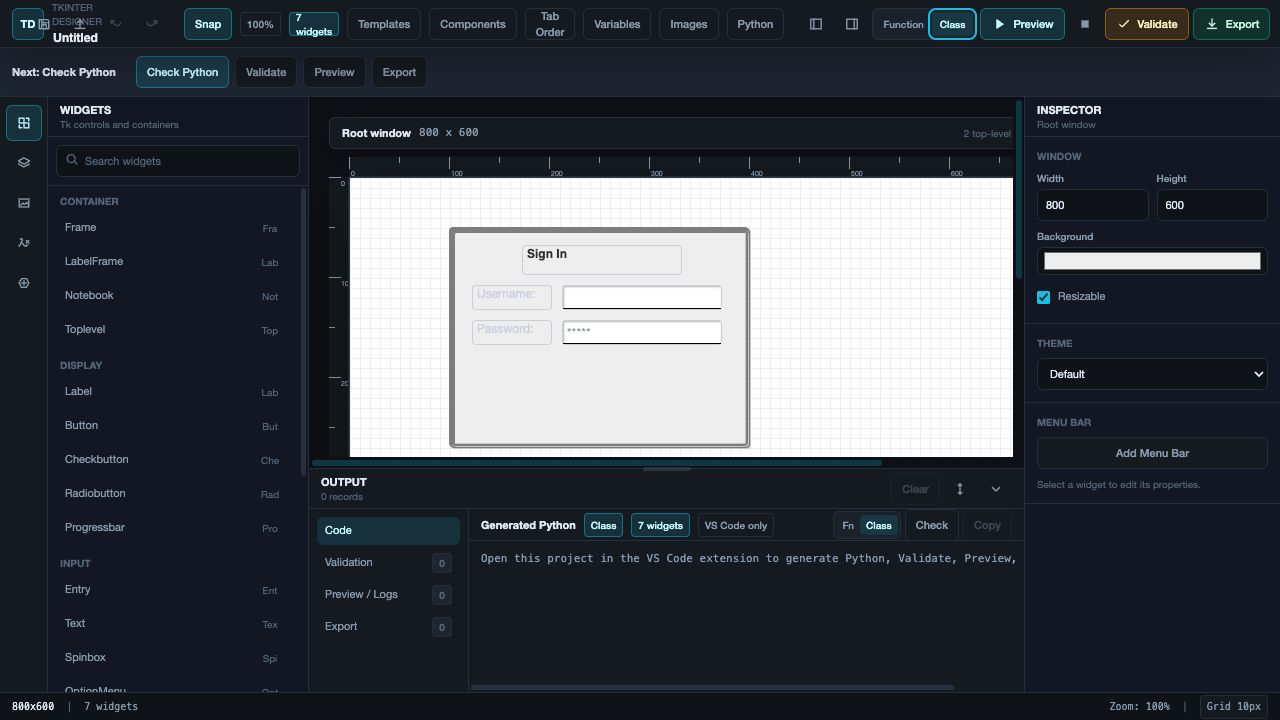
Generated Python is an editable starting point. Manual edits inside regenerated UI files are not preserved across repeated exports. With Split-file export, keep custom application logic in app.py instead of ui_<project>.py.
AI-Assisted Design
Optionally pair TK-Form with Codex, Copilot, Cursor, or another AI coding agent by registering the TK-Form AI Skill:
https://github.com/atk-bckim/bckim-skills/tree/main/TKform-skill
Copy this prompt into your AI tool:
Register this skill: https://github.com/atk-bckim/bckim-skills/tree/main/TKform-skill
A useful AI-assisted workflow is:
- Open or select a
.tkform.json file.
- Attach a screenshot, sketch, or reference image when your AI tool supports images.
- Ask for a form, dialog, layout, or focused widget changes.
- Review the result in TK-Form, then Validate and Preview it.
Commands
Open the Command Palette to run:
TK-Form: New Project — create a new design file.TK-Form: Open Project — open an existing .tkform.json design.TK-Form: Open Example Project — create a writable copy of an included example.TK-Form: Validate Project — validate the active design.TK-Form: Preview Project — launch the active design with real Tkinter.TK-Form: Stop Preview — stop the running Preview process.TK-Form: Export Python — export the active design.TK-Form: Open Output — show validation, Preview, and Export messages.TK-Form: Check Python Runtime — open the Python panel and check the runtime.TK-Form: Copy Support Summary — copy a sanitized diagnostic summary without project source or event code.
Python Preview Settings
In most cases, select a runtime from the designer toolbar's Python panel. These VS Code settings are also available:
tkform.pythonPath — absolute Python path used for Preview.tkform.enginePythonPath — optional Python path used by validation and code generation.tkform.previewInheritPythonPath — prepend the project folder and inherit the existing PYTHONPATH; disabled by default.
Preview runtime precedence:
- Runtime saved in the designer
Python panel.
tkform.pythonPath.TKFORM_PREVIEW_PYTHON.- The backend engine runtime.
Validation and code-generation runtime precedence:
TKFORM_ENGINE_PYTHON.tkform.enginePythonPath.python3 on macOS/Linux or python on Windows.
If Preview cannot open a window, confirm that the selected runtime includes Tkinter:
python3 -c "import tkinter; print(tkinter.TkVersion)"
Requirements and Workspace Trust
- VS Code 1.94 or later.
- A local Python 3.9+ runtime for the bundled validation/export engine, with Tkinter for Preview.
- Python 3.10+ and ttkbootstrap 2.x for real ttkbootstrap Preview. Standard Tkinter projects retain their existing runtime compatibility.
- Exported tkinter code still targets Python 3.4 and later; the 3.9+ floor applies only to the extension's engine runtime, not to generated code.
- A local workspace folder trusted by VS Code for Python-backed actions.
Opening, editing, and saving .tkform.json files works in an untrusted workspace. Validation, code generation, Export, Python runtime inspection, and Preview execute local Python, so TK-Form disables those actions until the workspace is trusted.
Only run Python-backed actions in projects you trust. TK-Form does not collect telemetry; see SECURITY.md and PRIVACY.md for details.
Current Limitations
- The canvas approximates Tk layout behavior; use Validate and Preview before relying on final sizing.
- ttkbootstrap Phase 3 adds ttkbootstrap-only dialogs, toast, tooltips, and catalog-gated Bootstrap Icons. FontDialog is not modeled.
- ttkbootstrap 3.x is not supported. Select an environment with ttkbootstrap 2.x.
- Manual edits inside regenerated UI files are not preserved across repeated exports.
- Split-file export protects an existing
app.py, but the generated ui_<project>.py file is replaced on subsequent exports.
- TK-Form currently focuses on practical single-window forms and commonly used Tkinter/ttk widgets rather than full two-way synchronization with handwritten Python.
- License automation, in-app account management, and broad enterprise self-service are not included in this release.
See KNOWN_LIMITATIONS.md for the detailed technical boundaries.
License and Support
TK-Form is source-available under the TK-Form Personal Free and Commercial License.
- Personal use is free under LICENSE.
- Commercial/enterprise use requires a paid license; see COMMERCIAL-LICENSE.md.
- Commercial licenses start from USD 49 per seat per year. Contact
bckim7639@gmail.com for quotes, invoices, evaluation terms, and enterprise support terms.
- Donation is optional and does not replace a Commercial License.
- Code received at or before commit
34053e3237455565b6943769f9b74f2778bfec3b retains the legacy MIT terms documented in LICENSE-MIT-LEGACY.md.
- Third-party dependency notices are listed in ThirdPartyNotices.txt.
For troubleshooting and issue-reporting guidance, see SUPPORT.md. Release changes are listed in CHANGELOG.md.
Feedback
Report bugs and suggest features in the public TK-Form feedback repository. Include the output from TK-Form: Copy Support Summary, your VS Code and Python versions, operating system, workspace-trust status, and concise reproduction steps. Do not include project source or event code in an initial report.

