Skip to content
| Marketplace
Sign in
Visual Studio Code>Programming Languages>EasyARXML — ARXML ViewerNew to Visual Studio Code? Get it now.
EasyARXML — ARXML Viewer

EasyARXML — ARXML Viewer

BlagojeMrkic

|
2 installs
| (0) | Free
Graphical viewer for AUTOSAR ARXML files. Opens a diagram of components, ports and connectors beside your .arxml. Everything runs locally — your files never leave your machine.
Installation
Launch VS Code Quick Open (Ctrl+P), paste the following command, and press enter.
Copied to clipboard
More Info

EasyARXML — ARXML Viewer

See the architecture inside an AUTOSAR .arxml file, right next to the XML.

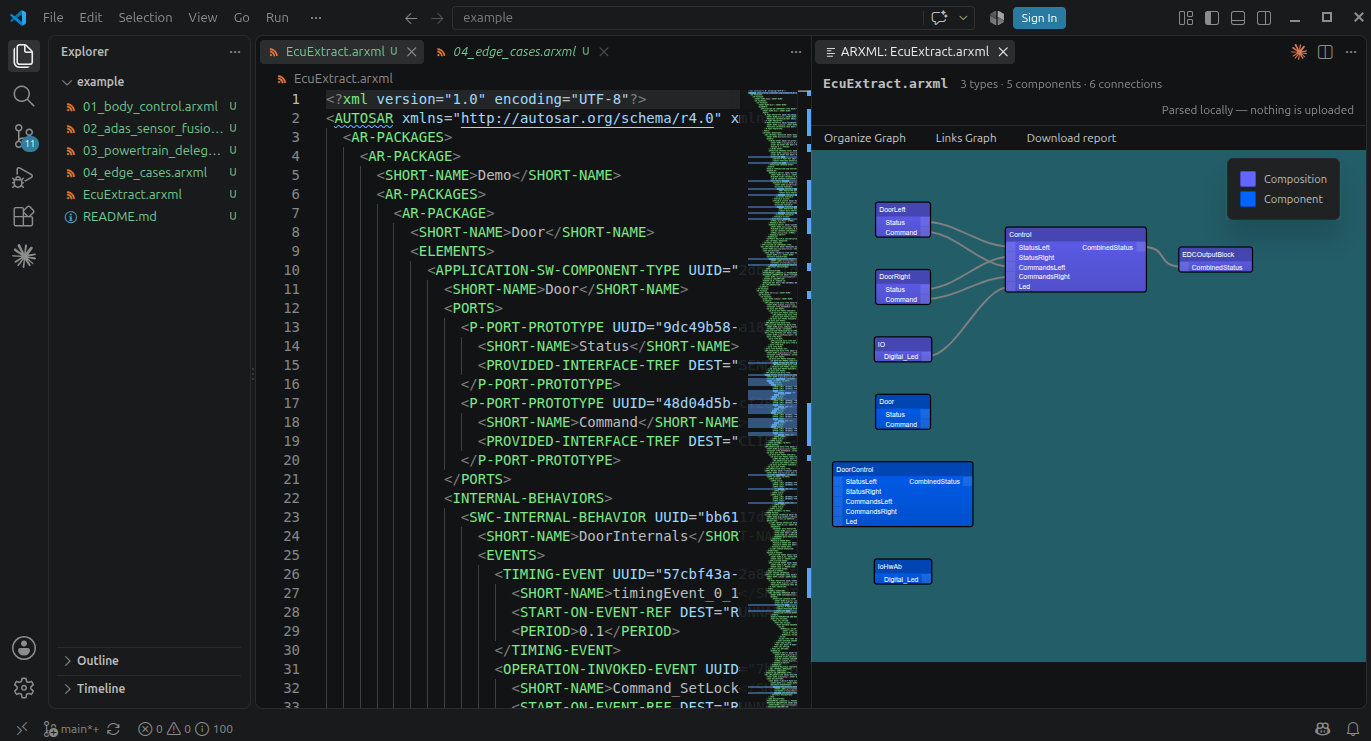
Open any .arxml and EasyARXML draws it: software components as blocks, their P-Ports and R-Ports on the blocks, and the connectors between them as lines you can follow. No more scrolling through thousands of lines of XML to work out what talks to what.

EasyARXML previewing an ARXML file in VS Code

Your files never leave your machine

This is the part that matters in automotive.

ARXML describes confidential vehicle software architecture, and most of it is covered by an NDA. EasyARXML reads the file from the open document inside your editor and parses it there. There is no server, no upload, no account and no telemetry on file contents. It works with your network cable unplugged.

You don't have to take that on trust: the extension is MIT licensed, so you or your security team can read exactly what it does.

Features

  • Preview to the side — the diagram opens beside the file, your cursor stays in the XML
  • Follows the active editor — click a different .arxml and the diagram switches with it
  • Live updates — edit the XML and the diagram re-renders as you type
  • Auto-arrange — lay the graph out automatically
  • Theme-aware — follows your VS Code colour theme
  • No setup — no configuration, no account, no toolchain

Getting started

  1. Open a .arxml file
  2. Run EasyARXML: Open ARXML Preview to the Side from the Command Palette (Ctrl+Shift+P / Cmd+Shift+P), or click the graph icon in the editor title bar

You can also right-click any .arxml in the Explorer and choose the same command.

What it understands

Classic AUTOSAR 4.x (the r4.0 schema):

Element Shown as
APPLICATION-SW-COMPONENT-TYPE, SERVICE-SW-COMPONENT-TYPE blocks
P-PORT-PROTOTYPE / R-PORT-PROTOTYPE ports on the blocks
COMPOSITION-SW-COMPONENT-TYPE composition blocks and instances
ASSEMBLY-SW-CONNECTOR connections between components
DELEGATION-SW-CONNECTOR connections to the composition boundary

If a connector points at something the file doesn't define — common when an architecture is split across several ARXML files — the rest of the diagram still renders and the unresolved items are listed instead of failing.

Settings

Setting Default Description
easyarxml.liveUpdate true Re-render the diagram while you type

Also available in the browser

Same parser, same diagram, nothing to install: easyarxml.com — useful when someone sends you an ARXML and you just want a quick look. It runs entirely client-side too.

Feedback

Built by Blagoje Mrkić, a Model-Based Systems Architect working in automotive — because reading raw ARXML got old.

Found a file it renders badly? I'd like to know: blagoje@blnlabs.com

Licence

MIT

  • Contact us
  • Jobs
  • Privacy
  • Manage cookies
  • Terms of use
  • Trademarks
© 2026 Microsoft