
Binean NovaCentral hub for Ingenium core insurance system development in VS Code. Includes COBOL debugging support and Policy Backup Management with fuzzy search. Installation Launch VS Code Quick Open ( Ctrl+P), paste the following command, and press enter.Copied to clipboard |

Binean Nova - Ingenium Development Hub for VS CodeBinean Nova transforms VS Code into a full-featured IDE for the Ingenium core insurance system. Build, debug, and manage Ingenium — all from one place, without modifying Ingenium source code.
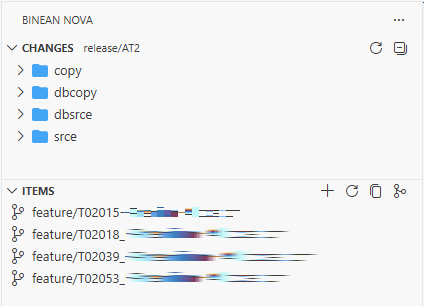
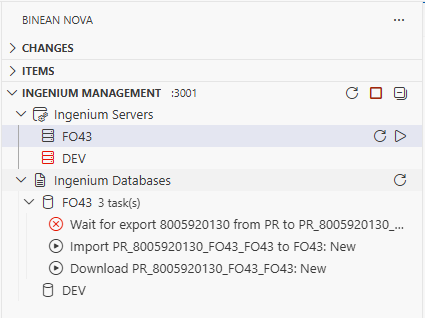
Activity Bar — Nova PanelA dedicated Binean Nova tab in the Activity Bar provides three views: The Changes and Items panes are designed for day-to-day branch validation before merge. They give you a fast view of what changed from BSL (Production) and what test items exist on your current working branch.
ChangesLists all file differences between your current branch and BSL (Production).
ItemsLists all items being tested on the current branch (differences from BSL (Production)).
Ingenium ManagementMonitor and control Ingenium servers and database tasks.
Highlights
Getting StartedPrerequisites
Installation
Launch
FeaturesBuild —
|



| Debug Configuration | Use Case |
|---|---|
| Ingenium | Interactive online COBOL program debugging |
| Ingenium Batch | Batch job debugging with env / envFile support |
Both configurations support db_region (DB region folder name) and db_secret_pass (password decryption secret) launch attributes.
Commands
| Command (Palette) | Description |
|---|---|
Binean Nova: Initialize Environment |
Run nexus init to set up the Nova directory structure |
Binean Nova: Build Ingenium |
Compile all modified Ingenium programs (Ctrl+Shift+B) |
Additional contextual commands (available in tree views and editor title bar):
| Context | Command | Description |
|---|---|---|
Editor (.cbl) |
Compile Ingenium Program | Compile the current COBOL file |
| Changes view | Open Diff / Open File / Rename | Work with changed files |
| Items view | New Item / Copy Name / Copy Merge Command / Copy List / Copy Merge Script | Manage branches |
| Ingenium Mgmt | Start / Stop Management | Launch or shut down the isman service |
| Ingenium Mgmt | Start / Stop Region | Control individual Ingenium regions |
| Ingenium Mgmt | Refresh / Start Task / Delete Task | Manage policy and database tasks (idb: backup, restore, refresh) |
Documentation
For detailed user guides, configuration reference, and step-by-step instructions:
🌐 https://www.binean.com/docs/binean_nexus/guides/intro
| Guide | Link |
|---|---|
| Getting Started | User Guides |
| VS Code Extension Guide | Extension Guide |
| icomp — Compiler | Compiler Guide |
| Toolchain Overview | Toolchain |
| Architecture | Architecture |
| Security & Compliance | Security |
Companion CLI Tools
Binean Nova works with a suite of Rust-powered command-line tools:
| Tool | Purpose | Guide |
|---|---|---|
nexus |
Nexus Utilities | Guide |
ing |
Ingenium Utilities | Guide |
icomp |
Ingenium COBOL Compiler | Guide |
iman |
Ingenium Manager Client | Guide |
ipol |
Ingenium Policy Client | Guide |
idb |
Ingenium Database Client | Guide |
isman |
Ingenium Manager Server | Guide |
benova |
Binean Nova Environment Tool | Guide |
itun |
SSH Tunnel Manager | Guide |
Keyboard Shortcuts
| Shortcut | Action |
|---|---|
Ctrl+Shift+B |
Build all modified files |
F5 |
Start debugging |
Ctrl+Shift+D |
Open Run and Debug view |
Ctrl+Shift+P |
Open Command Palette |
Roadmap
| Phase | Name | Focus |
|---|---|---|
| 1 | Nexus (Current) | Modern IDE and plug-and-play CLI tools |
| 2 | Orbit | Service-oriented architecture via ihost micro-API |
| 3 | Vista | Modern web UI replacing legacy Path Finder |
| 4 | Apex | Core re-engineering with Rust |
Feedback & Contributions
Found a bug or have a suggestion? Please open an issue on the project's GitHub page. Contributions are welcome.
Contact: ingenium.modernization@gmail.com