Protobuf Pro
Comprehensive Protocol Buffers support for Visual Studio Code
Navigation · IntelliSense · Diagnostics · Formatting · Linting · Interactive Schema Graphs & more
Comprehensive Protocol Buffers language support for Visual Studio Code
Get syntax highlighting, advanced IntelliSense, robust diagnostics, fast formatting, smart compilation, breaking change detection, and interactive schema visualization, all seamlessly integrated in your editor.
Note:
Protobuf Pro is the direct successor of vscode-proto3. The codebase is entirely new with even more features and improvements. If you encounter any issues migrating from vscode-proto3, please open an issue.
Thanks to the contributors of vscode-proto3 for their foundational work!
Author: Fernand Benachile (Dr.Benachile)
🗂️ Table of Contents
🚀 Quick Start
- Install Protobuf Pro from the VS Code Marketplace.
- Open any
.proto or .textproto file – syntax highlighting, IntelliSense, diagnostics, and formatting work right away!
- Open the Command Palette (
Ctrl/Cmd+Shift+P) and try actions like Protobuf: Compile This Proto or Protobuf: Show Schema Graph.
- Install
protoc for advanced code generation, and optionally more tools for lint and formatting.
- (Optional) Configure custom build output paths as needed:
// .vscode/settings.json
{
  "protobuf.protoc.path": "protoc",
  "protobuf.protoc.options": ["--proto_path=${workspaceFolder}", "--go_out=${workspaceFolder}/gen/go"]
}
💻 Install
- Marketplace:
ext install Dr.Benachile.protobuf-pro (or search inside VS Code).
- From Source:
git clone, npm install, then npm run compile, and press F5 in VS Code.
✨ Features
Navigation & IntelliSense: Go to definition, find references, workspace symbol search, auto-import, and fuzzy matching.
Diagnostics: 30+ built-in checks – syntax, import resolution, duplicate fields, naming conflicts, reserved ranges, cycle detection, and much more.
Code Lens: Shows inline reference counts and symbol data.
Document Links: Instantly open or navigate to import paths.
Hover Information: In-depth descriptions, references, and usage details.
Code Actions: Fast fixes: organize imports, convert proto2 ↔ proto3, auto-renumber fields.
Completion: Intelligent suggestions for fields, types, enum values, and imports.
Validation & CEL / Protovalidate: Get completions and assistance for validator expressions.
Formatting: Powerful built-in formatter, or use clang-format / buf format. Smart alignment of fields and keys.
Compilation: One-click protoc execution for single file or all protos, with full argument customization.
Linting: Integrate with Buf/Protolint – run linter on save or on demand.
Breaking Change Detection: Quickly identify breaking schema changes via git or reference baseline.
Schema Graphs: Visual, interactive message/enum relationship diagrams.
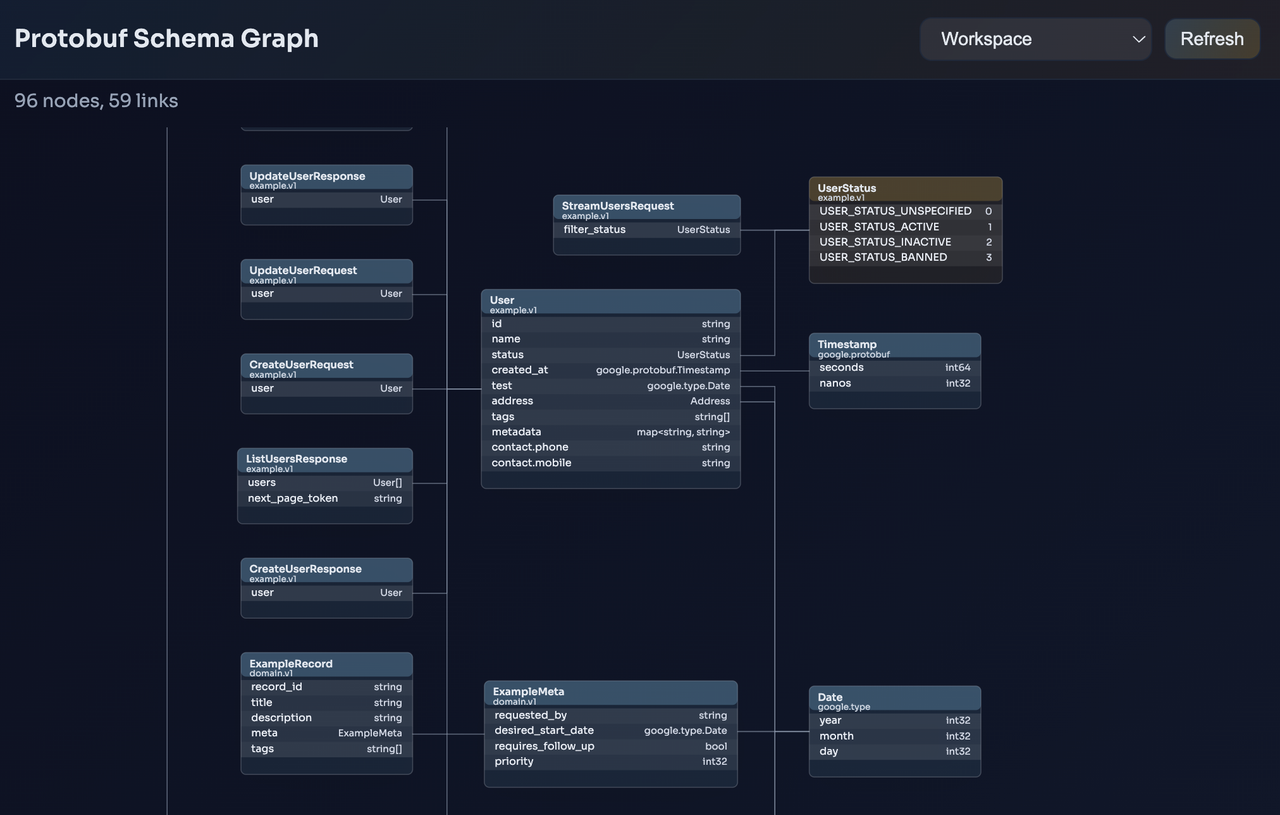
Example: Schema Graph Feature
Buf.yaml Support: Reads your workspace configuration.
Templates: Common Proto statement templates at your fingertips.
Refactoring: Rename, renumber, auto-fix recommendations.
Toolchain Management: Easy install and upgrade of proto tools from within VS Code.
Dependency Suggestions: Hints for missing BSR modules and more.
Auto-Detection: Proactively detects installed tools and project setup.
Full feature details in the documentation.
📝 Common Tasks
- Format current file:
Protobuf: Format Document
- Compile file:
Protobuf: Compile This Proto
- Compile all protos:
Protobuf: Compile All Protos
- Check breaking changes:
Protobuf: Check for Breaking Changes
- Lint code:
Protobuf: Run External Linter (Buf/Protolint)
- Visualize relationships:
Protobuf: Show Schema Graph
- Renumber tags:
Protobuf: Renumber Fields/Enums
🏁 Commands
| Command |
Description |
Protobuf: Compile This Proto |
Run protoc on the active proto file |
Protobuf: Compile All Protos |
Compile all workspace protos |
Protobuf: Check for Breaking Changes |
Compare schema to baseline (git/file) |
Protobuf: Show Schema Graph |
Draw message/enum relationship graph |
Protobuf: Renumber Fields/Enums |
Auto-renumber tags/fields and enums |
Protobuf: Format Document |
Pretty format using built-in, clang-format, or buf |
Protobuf: Run External Linter |
Perform linting using Buf/Protolint |
Protobuf: Go to Definition / Find References |
IntelliSense-powered navigation |
⚙️ Settings Cheat Sheet
All options are searchable under "protobuf" in the VS Code settings.
| Setting |
Description |
Default |
protobuf.formatter.enabled |
Enable built-in formatter + semicolon fixer |
true |
protobuf.formatter.insertEmptyLineBetweenDefinitions |
Ensure single blank line between top-level definitions |
true |
protobuf.formatter.maxEmptyLines |
Maximum consecutive blank lines allowed |
1 |
protobuf.formatOnSave |
Auto-format proto files on save |
false |
protobuf.protoc.path |
Path to the protoc binary |
"protoc" |
protobuf.protoc.options |
Extra command line arguments to protoc (as array) |
[] |
protobuf.protoc.compileOnSave |
Compile proto files on save |
false |
protobuf.breaking.enabled |
Check for breaking schema changes |
false |
protobuf.breaking.againstGitRef |
The git ref to compare against |
"HEAD~1" |
protobuf.externalLinter.linter |
Linter to use: buf or protolint |
"none" |
protobuf.clangFormat.enabled |
Use clang-format for formatting instead of built-in |
false |
protobuf.clangFormat.style |
Style for clang-format (e.g. "file") |
"file" |
Example:
// .vscode/settings.json
{
  // Formatting options
  "protobuf.formatOnSave": true,
  "protobuf.formatter.alignFields": true,

  // Import include paths
  "protobuf.includes": [
    "${workspaceFolder}/protos"
  ],

  // Protoc configuration
  "protobuf.protoc.path": "protoc",
  "protobuf.protoc.options": [
    "--proto_path=${workspaceFolder}",
    "--go_out=${workspaceFolder}/gen/go",
    "--go_opt=paths=source_relative"
  ],

  // Lint configuration
  "protobuf.externalLinter.enabled": true,
  "protobuf.externalLinter.linter": "buf",
  "protobuf.externalLinter.runOnSave": true,

  // IntelliSense/hover
  "protobuf.completion.autoImport": true,
  "protobuf.hover.showDocumentation": true
}
📖 Documentation
Find more documentation in the docs/ folder and on the GitHub repository.
- protoc:
brew install protobuf
- buf:
brew install bufbuild/buf/buf or npm install -g @bufbuild/buf
- protolint:
brew install protolint or go install github.com/yoheimuta/protolint/cmd/protolint@latest
- clang-format:
brew install clang-format or use LLVM tooling
👩💻 Development
Requirements: Node.js 18+, npm 9+, VS Code 1.85+
- Setup:
npm install
- Build:
npm run compile
- Test:
npm run test
- Debug/develop: Open in VS Code and press
F5 to launch Extension Development Host
Check protos in examples/, and common types in resources/google-protos/.
🤝 Support
If you enjoy the extension, star the repo or leave a rating!
🐞 Troubleshooting
protoc: command not found: Install protoc and adjust your PATH or set protobuf.protoc.path.- Linter issues? Install buf/protolint and restart VS Code.
- Import errors? Check your
--proto_path and protobuf.protoc.options.
- Formatting not as expected? Try enabling
protobuf.clangFormat.enabled for external configs.
🎉 Contributing
Pull requests and contributions are always very welcome!
Please run npm run compile and npm run test before submitting PRs.
📄 License
MIT License © 2025 Fernand Benachile. See LICENSE for details.