Monitor your remaining AI quota for Claude, GitHub Copilot, OpenAI Codex, and Grok, plus your DeepSeek and Kimi API balance - live in VS Code (v0.8.0).
Features
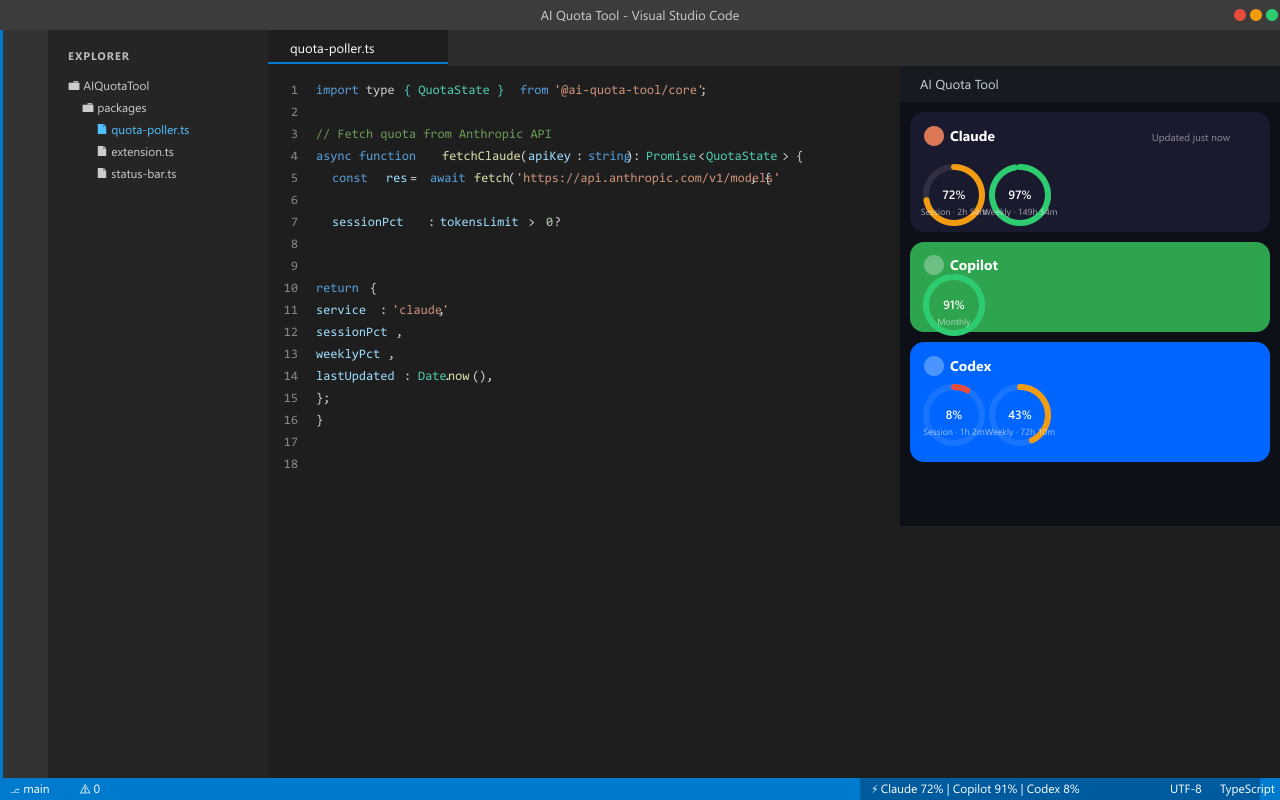
- Status bar item — remaining quota at a glance for Claude, Copilot, Codex, and Grok (lower of session/weekly %); amber when any service drops below 10%
- Dashboard panel — full quota breakdown with session and weekly progress rings (or honest Copilot / Grok status without fake %)
- Grok — paste grok.com
sso cookie in Set Up Accounts; short-window rate-limits plus SuperGrok weekly pool when available
- DeepSeek and Kimi — paste an API key in Set Up Accounts to see account balance (money left, not a percent)
- Standalone (V1 product) — fetches quota directly from VS Code using your session credentials; no Chrome extension required
- Optional Chrome push — if you also run the legacy Chrome package, it may merge readings over local WebSocket (freshest-wins); not required
- Automatic refresh — polls every 60 seconds in the background
Setup (one time)
- Install the extension
- Open the Command Palette (
Ctrl+Shift+P / Cmd+Shift+P)
- Run "AI Quota Tool: Set Up Accounts"
- Paste session credentials for the services you use (each is optional)
How to get each credential
Claude session key (claude.ai usage bars — not an Anthropic Console API key)
- Open claude.ai in Chrome and sign in
- Open DevTools (
F12) → Application tab → Cookies → https://claude.ai
- Copy the value of
sessionKey (starts with sk-ant-sid)
GitHub Copilot — click Sign in with GitHub in the setup panel. VS Code handles the OAuth flow — no token copying required. Remaining usage % is often unavailable from GitHub; the dashboard shows an honest seat status instead of inventing 100%.
ChatGPT session token (for Codex)
- Open chatgpt.com in Chrome and sign in
- Preferred: DevTools → Network → any
chatgpt.com request → Request Headers → copy the full Cookie value and paste it into Set Up Accounts
- Or: Application → Cookies → if you see
__Secure-next-auth.session-token.0 and .1, that is one session split for size. Double-click each Value (full text, not …), paste .0 on line 1 and .1 on line 2
- Save & Test exchanges cookies for a short-lived access token, then reads usage
Important: Do not glue .0+.1 into a single un-named string. The browser sends them as two cookie names; the extension does the same.
Grok sso cookie (grok.com short-window remaining)
- Open grok.com in Chrome and sign in
- Open DevTools (
F12) → Application tab → Cookies → https://grok.com
- Copy the value of
sso (JWT, often starts with eyJ)
DeepSeek API key (platform.deepseek.com account balance)
- Open platform.deepseek.com and sign in
- Go to API keys and create or copy a key
- Paste it into Set Up Accounts
Kimi API key (platform.kimi.ai account balance)
- Open platform.kimi.ai and sign in
- Go to API keys and create or copy a key
- Paste it into Set Up Accounts
Use Save & Test to validate before the secret is kept. Use Clear saved key / token / cookie to remove a secret. Paste a new value and Save & Test to replace.
Usage
| Command |
Description |
AI Quota Tool: Open Dashboard |
Opens the quota dashboard panel |
AI Quota Tool: Set Up Accounts |
Set, replace, or clear session credentials |
Click the status bar item ($(pulse) AI Quota) to open the dashboard directly.
Optional: Chrome package (legacy)
A Chrome extension package may exist in this monorepo for optional browser-session push. It is not part of the VS Code V1 product bar. This extension works fully standalone.
Privacy and security
This extension stores Claude sessionKey, ChatGPT session tokens, and Grok sso cookies, plus DeepSeek and
Kimi API keys, in SecretStorage for standalone mode. Do not claim “no credentials stored.” See
docs/GROK-SPEC.md.
- Session cookies and API keys are account-level secrets. Treat them like passwords.
- Stored only in VS Code SecretStorage on this machine (encrypted at rest by the host OS / VS Code), not in plain-text settings or our servers.
- Secrets are sent only to the owning service (claude.ai, chatgpt.com, grok.com, api.deepseek.com, api.moonshot.ai, or GitHub APIs) for quota reads — no telemetry backend.
- Lifecycle: Save & Test validates before persist; replace by saving again; Clear saved key removes the secret.
- Invalid or expired sessions drop the quota ring and show a session expired status-bar cue; the secret is not auto-deleted. Open Set Up Accounts to replace or clear. Stale “full quota” is never invented.
- Optional local WebSocket (
127.0.0.1) may receive quota updates from the Chrome extension; any process on your machine could spoof that channel.
Requirements
- VS Code 1.95 or later
- Active accounts on the services you want to monitor (Claude Pro/Free, GitHub Copilot, ChatGPT, Grok, DeepSeek, Kimi)
Publishing (maintainers)
Releases go to the Visual Studio Marketplace under publisher BasantPandey via a manual GitHub Actions workflow. Every live publish increments the extension version and pushes a git tag.
One-time setup
- Create an Azure DevOps personal access token with Marketplace access that can publish for the BasantPandey publisher.
- In the GitHub repo: Settings → Secrets and variables → Actions → New repository secret
- Name:
VSCE_PAT
- Value: the PAT (never commit it)
- Confirm branch protection allows
github-actions[bot] to push version commits/tags to main, or use a token with contents write if protection blocks GITHUB_TOKEN.
Run a release
- Open Actions → Publish VS Code extension → Run workflow
- Inputs:
- ref - branch to ship (default
main; use a branch name, not a raw SHA, for live runs)
- bump -
patch (default), minor, or major
- dry_run - leave checked to package only (no bump, no Marketplace). Uncheck for a live release.
- Prefer a dry run first; download the
.vsix artifact and confirm it installs.
- Live run: uncheck dry_run → workflow bumps
package.json, commits, tags vscode-vX.Y.Z, packages, then vsce publish.
- Verify the listing: Marketplace manage (BasantPandey)
Local package (no publish)
pnpm install
pnpm turbo build
pnpm --filter ai-quota-tool-vscode run package
Spec
Pipeline product requirements: Spec: VS Code Marketplace publish pipeline

