OpenEdge ABL FormatterProgress OpenEdge (ABL) code formatter Installation Launch VS Code Quick Open ( Ctrl+P), paste the following command, and press enter.Copied to clipboard |

|
 OpenEdge ABL Formatter
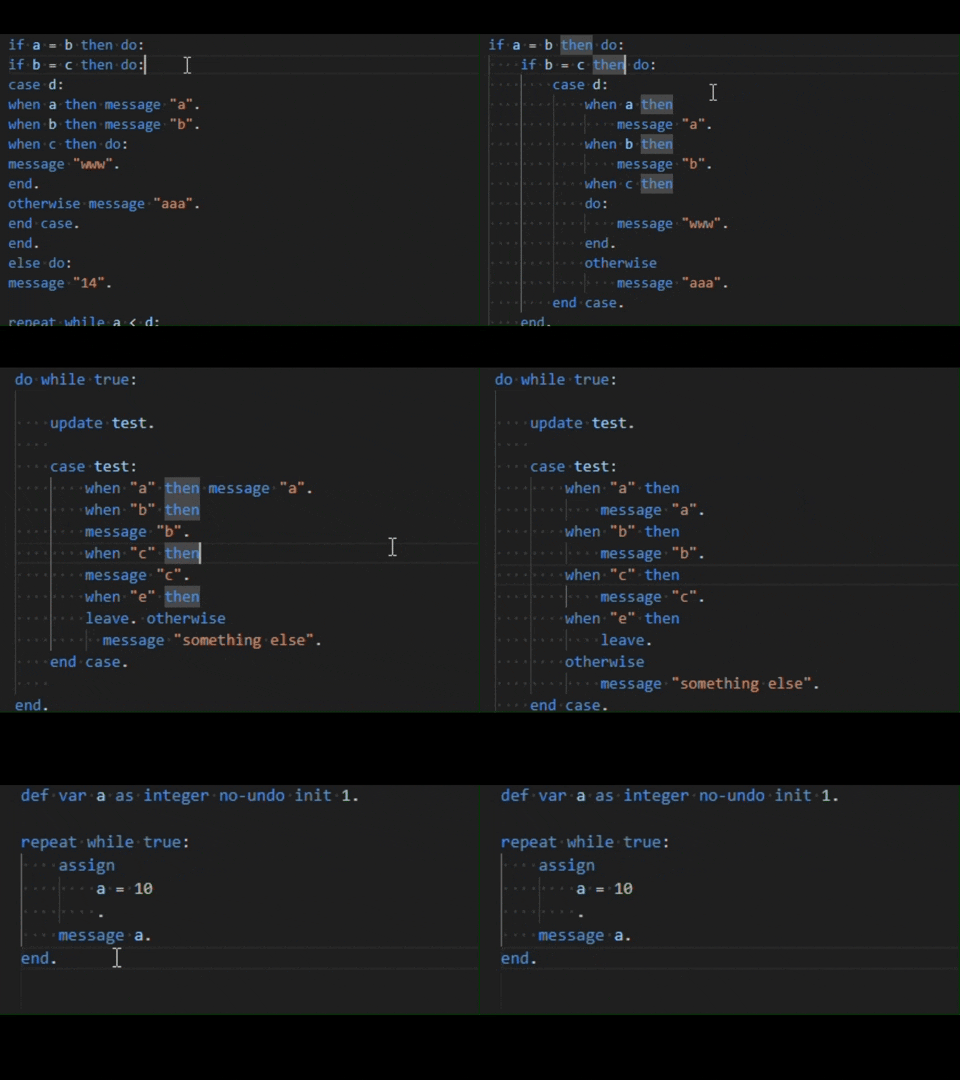
| Property Name | Type | Default | Values list | Description |
|---|---|---|---|---|
| assign formatting | boolean | true | true, false | Enable/disable ASSIGN statement formatting. |
| assign formatting assign location | string | New | New, Same | Should first assignment be located on a new line or the same line as the ASSIGN keyword |
| assign formatting align right expression | string | Yes | Yes, No | Should right expression be aligned by longest one |
| assign formatting end dot location | string | New aligned | New, New aligned, Same | Should end dot be located on a new line or the same line as the ASSIGN keyword |
| find formatting | boolean | true | true,false | Enable FIND formatting |
| for formatting | boolean | true | true,false | Enable FOR formatting |
| case formatting | boolean | true | true,false | Enable CASE formatting |
| case formatting then location | string | Same | New, Same | Should THEN clause be on a new line or the same line as the CASE keyword? |
| case formatting do location | string | Same | New, Same | Should DO block be on a new line or the same line as the THEN keyword |
| case formatting statement location | string | New | New, Same | Should the first statement in a WHEN block be on a new line or the same line |
| block formatting | boolean | true | true,false | Enable block formatting |
| if formatting | boolean | true | true,false | Enable IF formatting |
| if formatting then location | string | Same | New, Same | Should THEN clause be on a new line or the same line as the IF keyword |
| if formatting do location | string | Same | New, Same | Should DO block be on a new line or the same line as the THEN keyword |
| if formatting statement location | string | Same | New, Same | Should the first statement in an IF block be on a new line or the same line |
| temptable formatting | boolean | true | true,false | Enable TEMP-TABLE formatting |
| temptable formatting end dot location | string | Same | New, Same | Should end dot be located on a new line or the same line as the last TEMP-TABLE line |
| using formatting | boolean | true | true,false | Enable USING formatting |
| using formatting from propath | string | DoNothing | DoNothing, add, remove | Should 'from propath' be added or removed in USING statements automatically |
| body formatting | boolean | true | true,false | Enable BODY formatting |
| property formatting | boolean | true | true,false | Enable property formatting |
| if function formatting | boolean | true | true,false | Enable IF FUNCTION formatting |
| if function formatting add parentheses | string | No | Yes, No | Add parentheses around the expression |
| if function formatting else location | string | Same | New, Same | Should ELSE clause be on a new line or the same line as the IF FUNCTION keyword |
| enum formatting | boolean | true | true,false | Enable ENUM formatting |
| enum formatting end dot location | string | Same | New, Same | Should end dot be located on a new line or the same line |
| variable definition formatting | boolean | true | true,false | Enable DEFINE VARIABLE formatting |
| procedure parameter formatting | boolean | true | true,false | Enable PROCEDURE PARAMETER formatting |
| function parameter formatting | boolean | true | true,false | Enable FUNCTION PARAMETER formatting |
| function parameter formatting align parameter types | string | Yes | Yes, No | Align parameter types |
| array access formatting | boolean | true | true,false | Enable ARRAY ACCESS formatting |
| array access formatting add space after comma | string | Yes | Yes, No | Add space after comma |
| expression formatting | boolean | true | true,false | Enable EXPRESSION formatting |
| expression formatting logical location | string | New | New, Same | Should logical operators be on a new line or the same line as the expression |
| statement formatting | boolean | true | true,false | Enable STATEMENT formatting |
| show tree info on hover | boolean | true | true,false | Enable table view with tree info on hover |
Usage
Use default VSCode formatting commands:
- Format Document: Formats the entire ABL document.
SHIFT+ALT+F - Format Selection: Formats only the selected lines of code.
CTRL+K CTRL+F
Also, you can enable or disable formatting on save:
"editor.formatOnSave": true
Allowed file extensions:
- .p
- .cls
- .i
- .w
Overriding Settings:
For development reasons, we implemented a mechanism to override formatting settings for a specific file. You can also use this feature by adding a leading comment in your code file:
Example:
/* formatterSettingsOverride */
/* {
"AblFormatter.blockFormatting": true,
"AblFormatter.assignFormatting": true
} */
def var a as integer no-undo init 1.

repeat while true:
    assign
    a = 10.
    message a.
end.
For more examples you can check out our test directory
Debugging
We implemented debug mode for looking into tree-sitter issues. You can also enable it:
- First you have to format the document.
- Then you can enable debug mode by pressing Abl Formater button in the Status Bar.
- Hover on highlighted parts of code to get more information and see the tree view.

How to View Diff Between Preformatted and Formatted ABL Code Files in VSCode
Precondition: Disable VS Code auto save.
- Open the file you want to format.
- Open the Command Palette (Ctrl+Shift+P).
- Run "Compare Active File with Saved".
- In the right view format document or format selection.
- Check the diffs.
- If everything is OK, save the file (Ctrl+S). Otherwise return/undo (Ctrl+Z).
Contributing
If you wish to contribute, see our guidelines here.
License
This project is licensed under the APACHE 2.0 License - see the LICENSE file for details.
Sponsored by Baltic Amadeus