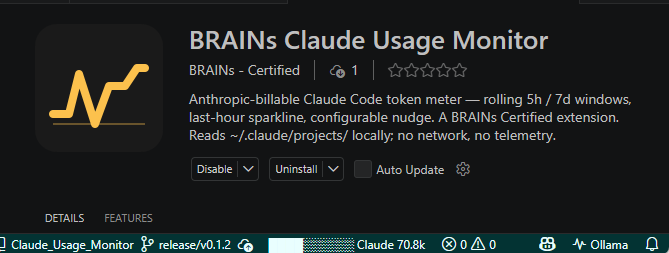
A VSCode extension that reads your local Claude Code transcripts and shows your rolling 5-hour and 7-day token usage, so you know when to start a fresh session. No network calls, no telemetry, no data leaves your machine.
Reliable, affirming, inclusive.
An Incubator project from BRAINS — built by neurodivergent minds, for neurodivergent people.
TL;DR
- Reads Claude Code's local transcript files (
~/.claude/projects/**/*.jsonl) — no network calls, no telemetry, no data leaves your machine.
- Shows a status bar fill bar for the rolling 5-hour session window, a rich hover card, and an activity-bar sidebar with last-hour usage, weekly totals, per-session breakdowns, current burn rate (tok/min plus projected ETA to your reference), and a model mix so you can see the Opus / Sonnet / Haiku split at a glance.
- Counts tokens the way Anthropic bills them (input + output + cache-create × 1.25 + cache-read × 0.10) and dedupes Claude Code's streamed-then-finalised duplicate writes, so the totals line up with the Claude.ai usage meter.
- Optional nudge notification when you cross a configurable threshold, with snooze and "start fresh chat" actions.
What it does
- Status bar fill bar — a block-character indicator (
██████░░░░ Claude 720k) that tracks your rolling 5-hour session usage against a configurable plan limit. Background escalates through the theme's warning and error states as you approach the cap.
- Hover card — appears when you mouse over the status bar. Shows the rolling 5-hour and 7-day windows with their own progress bars (Gold Light → BRAINS Gold → Gold Deep, with a log-scale overshoot tick when you go past the reference), a last-hour cumulative sparkline, current burn rate (tok/min plus ETA to reference), the in-window model mix, a breakdown of the current chat (cumulative tokens, last-turn input/output, cache hit rate), and your five most recently active sessions across all workspaces.
- Sidebar view — the same panel rendered as a VSCode activity-bar webview, so you can keep usage visible permanently instead of having to hover.
- Configurable nudge — a non-modal notification when the critical threshold is crossed, with Start fresh chat and Snooze this session actions. Five modes:
off, once-per-session, on-warning, on-critical, on-each.
Install
From the GitHub release: download the latest .vsix from Releases and run:
code --install-extension BRAINS-claude-usage-monitor-0.3.0.vsix
Reload the VSCode window to activate. The extension lights up on startup and watches ~/.claude/projects/ automatically.
From source:
npm install
npm run package
code --install-extension BRAINS-claude-usage-monitor-0.3.0.vsix --force
Settings
All settings live under claudeUsageMonitor.* and can be edited in VSCode Settings or settings.json.
| Setting |
Default |
What it does |
limits.sessionTokens |
null |
Plan cap for the rolling session window. When set, the status bar fill bar and "Session" hover row show a percentage. Set this to your Claude.ai plan's 5-hour quota (e.g. 15000000 for Max). |
limits.weeklyTokens |
null |
Plan cap for the rolling weekly window. Same idea — set to your plan's weekly Opus quota. |
limits.sessionWindowHours |
5 |
Length of the rolling session window in hours. Claude.ai uses 5. |
limits.weeklyWindowDays |
7 |
Length of the rolling weekly window in days. |
warningTokens |
100000 |
Legacy fallback. Status bar turns amber when cumulative cross this value (only used if limits.sessionTokens is null). |
criticalTokens |
160000 |
Legacy fallback. Status bar turns red when cumulative crosses this value. |
nudge.mode |
once-per-session |
One of off, once-per-session, on-warning, on-critical, on-each. Controls when the nudge notification fires. |
nudge.minIntervalMinutes |
30 |
Minimum gap between repeat nudges for the same session in on-* modes. |
nudge.suppressedSessions |
[] |
Session ids you have asked not to be nudged about again. Add via the Snooze this session action. |
refreshIntervalSeconds |
30 |
How often the hover card and sidebar refresh wall-clock fields (reset countdowns, "X ago" strings). Minimum 5. |
Suggested values for Claude Code Max on Opus with the 1M context window:
{
  "claudeUsageMonitor.limits.sessionTokens": 15000000,
  "claudeUsageMonitor.limits.weeklyTokens": 480000000,
  "claudeUsageMonitor.nudge.mode": "on-critical",
  "claudeUsageMonitor.nudge.minIntervalMinutes": 60
}
Adjust the weekly figure to whatever your plan's Opus weekly quota is in raw tokens (visible on the Claude.ai usage page).
How it works
The extension watches ~/.claude/projects/ — the directory where Claude Code writes per-session JSONL transcripts. Every record contains a message.usage block, and the extension:
- Parses each line tolerantly. Malformed lines and records without a
usage field are skipped.
- Dedupes by
message.id. Claude Code streams assistant responses and writes the same message to the transcript multiple times as it updates. The aggregator keeps each message.id only once.
- Computes Anthropic-billable totals. Raw
input + output + cache_create + cache_read heavily over-counts long-context sessions because cache reads dominate. Headline totals use Anthropic's standard cache-price weights — input × 1.00 + output × 1.00 + cache_create × 1.25 + cache_read × 0.10 — so the numbers match the Claude.ai usage meter.
- Aggregates across rolling windows. Tokens in the last 5 hours and 7 days are summed across every transcript on disk. Reset countdowns are computed as
oldest_in_window + window_length.
- Refreshes opportunistically. The watcher fires on transcript changes (~500 ms debounced) and a timer ticks every 30 seconds so countdowns and "X ago" strings stay live even when no chat is active.
Raw component totals (input, output, cache-create, cache-read) are preserved on every record, so the cache-hit percentage and last-turn input/output figures shown in the hover card stay accurate.
Privacy and safety
- The extension opens transcript files read-only and never writes to
~/.claude/projects/.
- No network calls of any kind. Nothing is sent to Anthropic, BRAINS, or any analytics endpoint.
- No telemetry. VSCode's own telemetry is unaffected; the extension itself emits none.
Development
npm install
npm run watch      # esbuild in watch mode
Press F5 in VSCode to open the Extension Development Host with the extension loaded.
npm test                # Vitest unit tests (192 tests)
npm run lint            # ESLint
npm run package         # build + vsce package → .vsix
npm run package:check   # fails if .vsix exceeds 1 MB
For manual verification steps, see test/e2e/MANUAL_CHECKS.md. An automated end-to-end smoke (local only): npm run test:e2e.
Changelog
Release notes are in CHANGELOG.md at the repo root.
Security
Vulnerabilities should be reported via GitHub Security Advisories on this repo, or to security@brainscertified.com. See SECURITY.md for the full policy.
BRAINS Certified · Gold
This repository carries the BRAINS Certified · Gold mark — the BRAINS standard for neuro-affirming, well-governed open source.

Gold means two things hold on main:
- Every standard check passes — OpenSSF Scorecard, CodeQL, Trivy, Gitleaks, Vale (BRAINS prose rules), readability, and Markdownlint.
- The ND-affirming governance files ship — Code of Conduct, Security policy, and Contributing guide.
See the full list of certified repositories in the BRAINS registry.
Contributing
See CONTRIBUTING.md and the Code of Conduct. The repo runs the BRAINS standard floor on every pull request — OpenSSF Scorecard, CodeQL, Trivy, Gitleaks, Dependabot, Vale (BRAINS prose rules), and a readability gate.


About this project
BRAINS Claude Usage Monitor is one of the tools BRAINS uses internally to keep our own Claude Code work observable and accountable. It was the first end-to-end build run through the BRAINS Build Platform, so the seventeen work packages, decisions log, and persona dispatch trail that produced it are part of the platform's dogfood history.
BRAINS is the global benchmark for neuro-affirming AI. We publish tools, research, and certifications grounded in a single design principle — that AI systems should be usable across the full range of human cognition, including the engineers who build them. Issues, suggestions, and pull requests are welcome.
License
MIT