
Releases for Azure DevOps
GitHub-style releases for Azure Repos: release notes from merged pull requests,
release pages in your project wiki, and release notes in Renovate pull requests.


Azure DevOps has tags, but no releases. This extension adds them:
- Release notes from merged pull requests. For a new tag, it collects the pull requests merged since the previous tag and groups them by Conventional Commits type: breaking changes, features, fixes and other. Each line names the author and links the pull request, as on GitHub. A
## Release notes section in a pull request description is included verbatim.
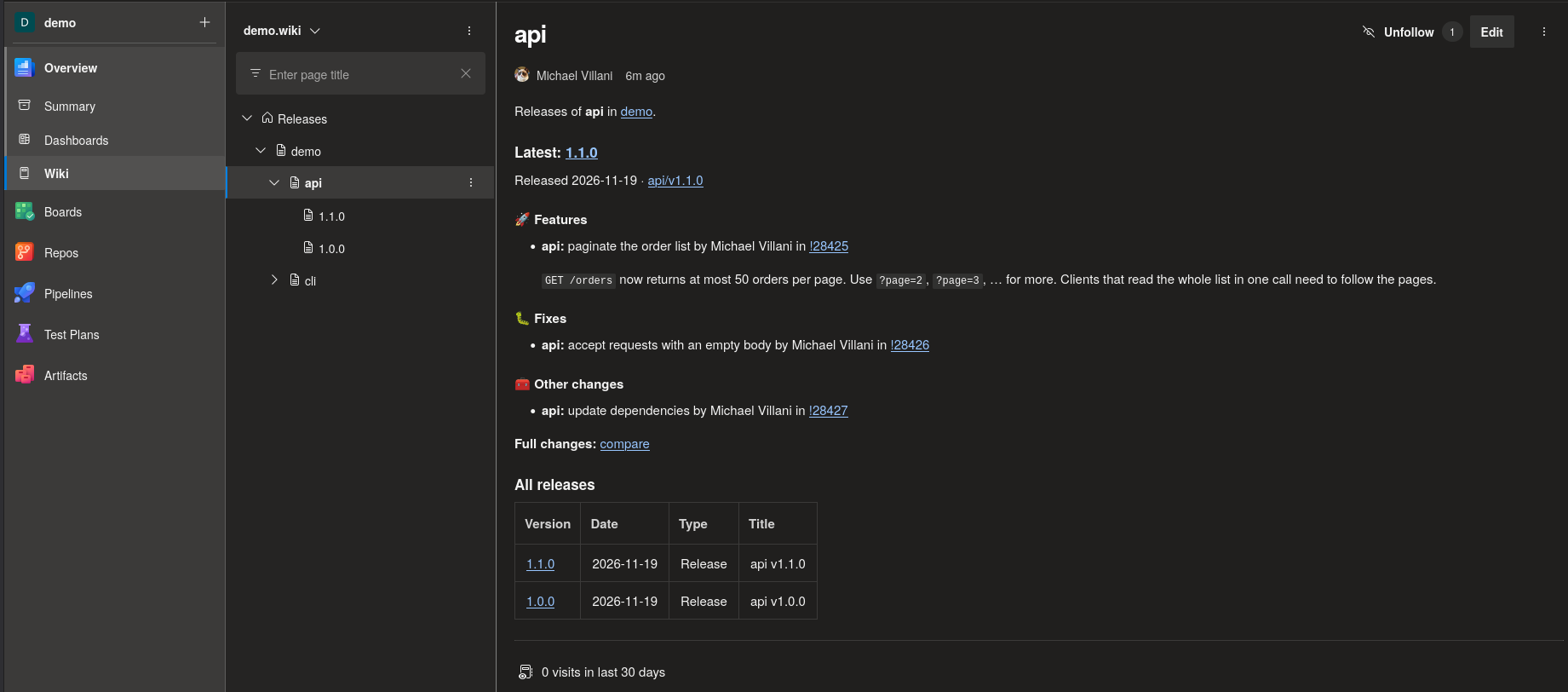
- Release pages in the project wiki. One page per release and an overview per package and repository. People can read them, and they live outside your source repositories.
- Release notes in Renovate pull requests. Each package gets a
releases.json in Renovate's custom datasource format, so Renovate pull requests for your internal packages carry release notes, like those for packages hosted on GitHub.
It works with monorepos (one tag series per package, e.g. tools/acme/v1.2.3) and needs no backend service: everything is stored in the project wiki's Git repository.
Install it from the Visual Studio Marketplace.
Contents
What you get
| Component |
Use it to |
| Releases page in Azure Repos |
browse releases, draft a release with generated notes and a new tag, edit or delete a release |
Pipeline task Publish release (PublishRelease@1) |
publish a release automatically after your pipeline creates a tag |
| CLI |
preview notes locally and backfill releases for existing tags |
All three share one core library and write the same data, so you can mix them.
Installation
The extension targets Azure DevOps Services. An organization administrator installs it from the Visual Studio Marketplace with Get it free, or requests it there for approval.
When installing, an organization administrator approves the extension's scope Code (read and write). The Releases page uses it to read repositories, create tags and write to the wiki.
Releases page
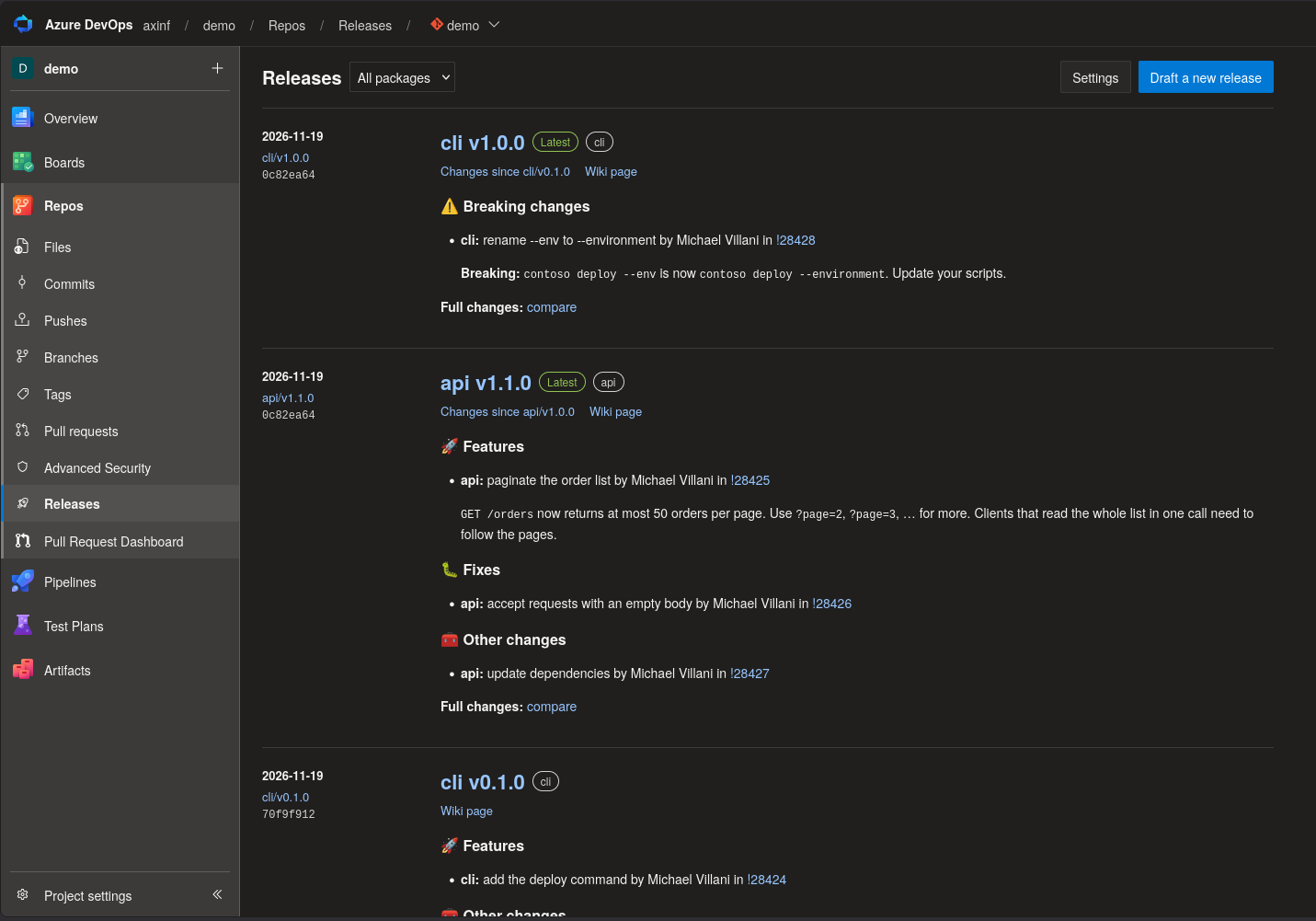
The extension adds Releases to the Repos menu. For the selected repository it shows:
The release list, newest first. Each release shows Latest and Pre-release badges, the rendered notes, and links to the tag, to the changes since the previous tag and to the wiki page. In monorepos you can filter by package.
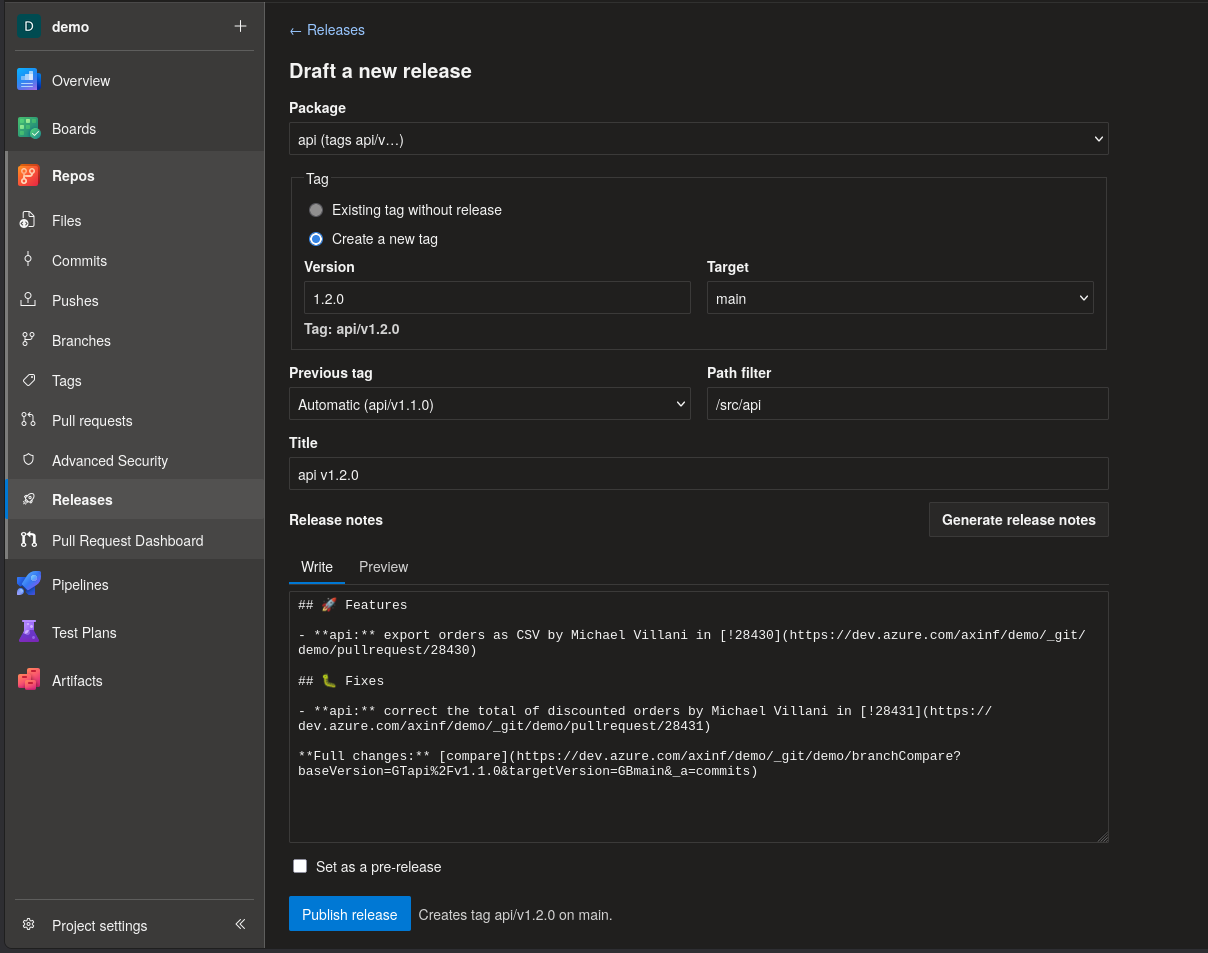
Draft a new release, as on GitHub:
- Choose the package and either an existing tag without a release or a new version. A new tag is created on the chosen branch when you publish, as a lightweight tag: annotated tags would need the broader scope
vso.code_manage.
- Select Generate release notes. The previous tag is detected automatically, and you can override it. For a new tag, the next version is proposed from the pull request titles:
feat → minor, fix → patch, ! → major. The title is filled in from the last part of the package name, e.g. acme v1.2.3.
- Edit the notes with a Markdown preview, mark the release as a pre-release if needed, and publish.
A page per release that you can link to directly. You can edit its title, notes and pre-release flag, or delete it. Deleting removes the release from the wiki and keeps the Git tag.
Settings per project: wiki project, wiki repository, branch and root page. The defaults are the project wiki, its default branch and the root page Releases. The project wiki is found automatically, also after a project rename.
The page acts as the signed-in user; see Permissions.
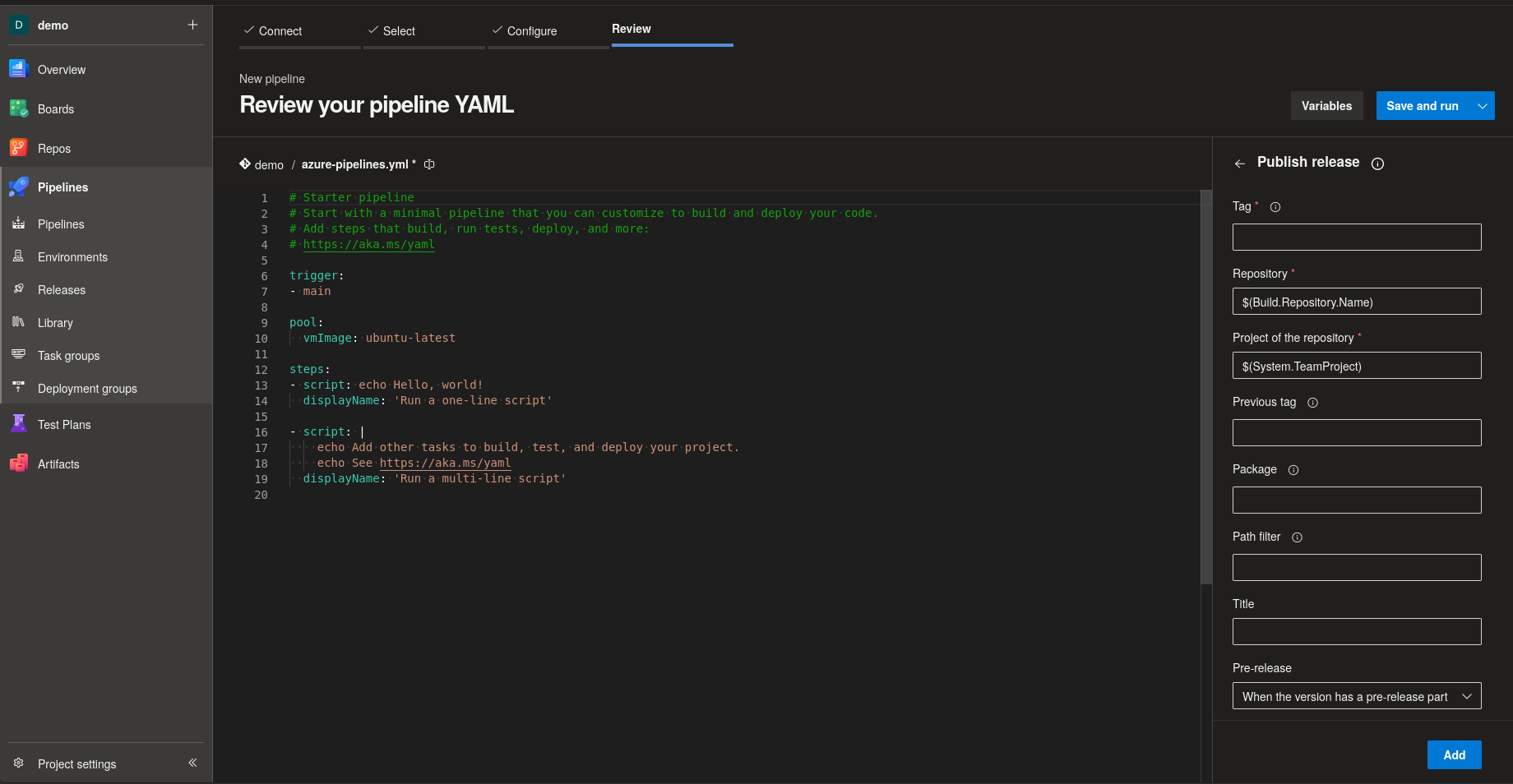
Pipeline task: Publish release
Add the task after the step that creates the tag:
- task: PublishRelease@1
  inputs:
    tag: tools/acme/v$(version)
    pathFilter: /src/tools/acme      # monorepos: only changes below this path
    # previousTag: tools/acme/v1.1.0 # default: detected
    # ifExists: skip                 # skip | fail | replace (default: skip, safe for re-runs)
    # wiki: MyProject.wiki           # default: the project wiki
    # dryRun: true                   # plan only: no tag, no wiki commit
The task runs with the job access token. It sets the output variables releaseVersion, releaseUrl and wikiCommitId, and attaches the release notes to the run summary.
Renovate
Define a custom datasource that reads a package's releases.json from the wiki repository, and point your dependencies at it:
{
  "customDatasources": {
    "acme": {
      "defaultRegistryUrlTemplate": "https://dev.azure.com/myorg/MyProject/_apis/git/repositories/MyProject.wiki/items?path=/.releases/MyRepo/{{packageName}}/releases.json&versionDescriptor.version=wikiMaster&$format=octetStream&api-version=7.1",
      "format": "json"
    }
  },
  "hostRules": [
    { "matchHost": "dev.azure.com", "hostType": "custom.acme", "token": "{{ secrets.ADO_TOKEN }}" }
  ]
}
- Host rule. Renovate registers its Azure DevOps platform token for the host type
azure and doesn't send it with custom datasource requests. The extra host rule supplies a token that can read the wiki repository.
- Existing dependencies. To keep a dependency's versions from its registry (e.g. a container registry) and only add release notes, use a package rule with
overrideDatasource: "custom.acme" and overridePackageName set to the package path.
- Notes per update. Renovate embeds the notes of the target version. It doesn't combine the notes of skipped intermediate versions, but each release page links the package's full history.
CLI
Use the CLI to preview release notes and to backfill releases for tags that existed before you installed the extension. It needs Node.js 20 or later:
git clone https://github.com/axiansinfoma/ado-releases.git && cd ado-releases
npm ci && npm run build
export ADO_TOKEN=...   # Microsoft Entra bearer token, or ADO_PAT=... for a personal access token

# print the notes a tag would get
node packages/cli/dist/cli.js notes --org https://dev.azure.com/myorg --project MyProject \
  --repository MyRepo --tag tools/acme/v1.2.3 --path /src/tools/acme

# plan a release without writing anything
node packages/cli/dist/cli.js publish --org https://dev.azure.com/myorg --project MyProject \
  --repository MyRepo --tag tools/acme/v1.2.3 --path /src/tools/acme --dry-run --out ./out

# publish releases for all existing tags of a package, oldest first, each dated by its tag
node packages/cli/dist/cli.js backfill --org https://dev.azure.com/myorg --project MyProject \
  --repository MyRepo --prefix tools/acme --path /src/tools/acme
--help lists all options.
How it works
source repository                project wiki repository (e.g. MyProject.wiki)
  tag tools/acme/v1.2.3  ─────►    /Releases.md                                  index of repositories
                                   /Releases/<repo>.md                           repository overview
                                   /Releases/<repo>/<package>.md                 package overview, latest notes
                                   /Releases/<repo>/<package>/1.2.3.md           one page per release
                                   /.releases/<repo>/<package>/releases.json     for Renovate
                                   /.releases/<repo>/<package>/index.json        all release records
- Packages. A tag
<prefix>/v<semver> belongs to the package <prefix>. A plain v<semver> tag belongs to a package named after the repository.
- Previous tag. By default, the previous tag is the highest tag of the same package below the new version. For a stable version, pre-release tags are skipped, so the notes of
1.2.0 cover everything since 1.1.0.
- Release date. A release is dated by its tag: the tagger date of an annotated tag, the commit date of a lightweight tag, or the publish time for a tag created with the release. Renovate gets this date as
releaseTimestamp, so publishing an old tag later doesn't make it look new.
- Atomic writes. Each publish is one commit to the wiki repository, made through the Git Pushes API. If the branch moved in the meantime, it retries.
- Rebuildable data. Each release page carries its record as hidden metadata, and all derived files can be rebuilt from
index.json. Files under /.releases/ don't appear in the wiki tree and use plain names, so other tools can build their URLs.
Permissions
| Who |
Needs |
For |
| Users of the Releases page |
Contribute on the wiki repository |
publishing, editing and deleting releases |
|
Create tag on the source repository |
creating a new tag from the page |
Pipeline task (build service identity <Project> Build Service (<org>)) |
Contribute on the wiki repository |
publishing releases |
|
Read on the source repository |
reading tags, commits and pull requests |
|
Create tag on the source repository |
only with the input createTagOnCommit |
Set permissions on the wiki repository under Project settings › Repositories › <Project>.wiki. If your project limits job access tokens to referenced repositories, reference the wiki repository in the pipeline, e.g. with a checkout step or uses: repositories.
Limitations
- Azure DevOps Services only; Azure DevOps Server isn't supported.
- Git repositories only, and only tags of the form
[<prefix>/]v<semver>.
- Deleting a release keeps its Git tag; delete the tag separately if needed.
- Renovate shows the notes of the target version only; see Renovate.
Privacy
The extension has no backend service and collects no data. It sends no telemetry and contacts no third-party service.
- The Releases page and the pipeline task call only your organization's Azure DevOps REST API, as the signed-in user or the pipeline's job identity.
- Release data (pages,
releases.json, index.json) is written to your project wiki's Git repository. Tags are written to your repositories. Nothing leaves your organization.
- The page stores its settings in the extension data service of your organization.
Contributing
Issues and pull requests are welcome. Report security issues privately, see SECURITY.md. CONTRIBUTING.md explains how to build, test and release, and AGENTS.md describes the structure and conventions.
License
Mozilla Public License 2.0

