Visual Synthesizer Shader Viewer Extension
A Visual Studio Code extension for previewing and debugging Visual Synthesizer 2 fragment shader (.frag) files.
Features
- Live Shader Preview: Real-time GPU rendering of your GLSL fragment shaders
- Parameter Controls: Interactive sliders for custom shader parameters defined in JSON metadata
- Auto-Reload: Automatically updates the preview when you save your shader file
- Color & Alpha Controls: Adjust color and alpha values in real-time
- Playback Controls: Play/pause and reset the shader animation
- FPS Counter: Monitor shader performance
- Error Display: Clear error messages for shader compilation issues
- Syntax Highlighting: Full GLSL colorization — types, builtin functions and variables, keywords, qualifiers, operators, preprocessor directives, and comments
- VS2-Aware Linting: Inline error diagnostics via
glslangValidator with full knowledge of Visual Synthesizer 2's runtime uniforms (time, resolution, color, alpha, texCoord, fragColor) — no false positives for VS2 shaders
Usage
Open any .frag shader file in VS Code
Use one of these methods to preview:
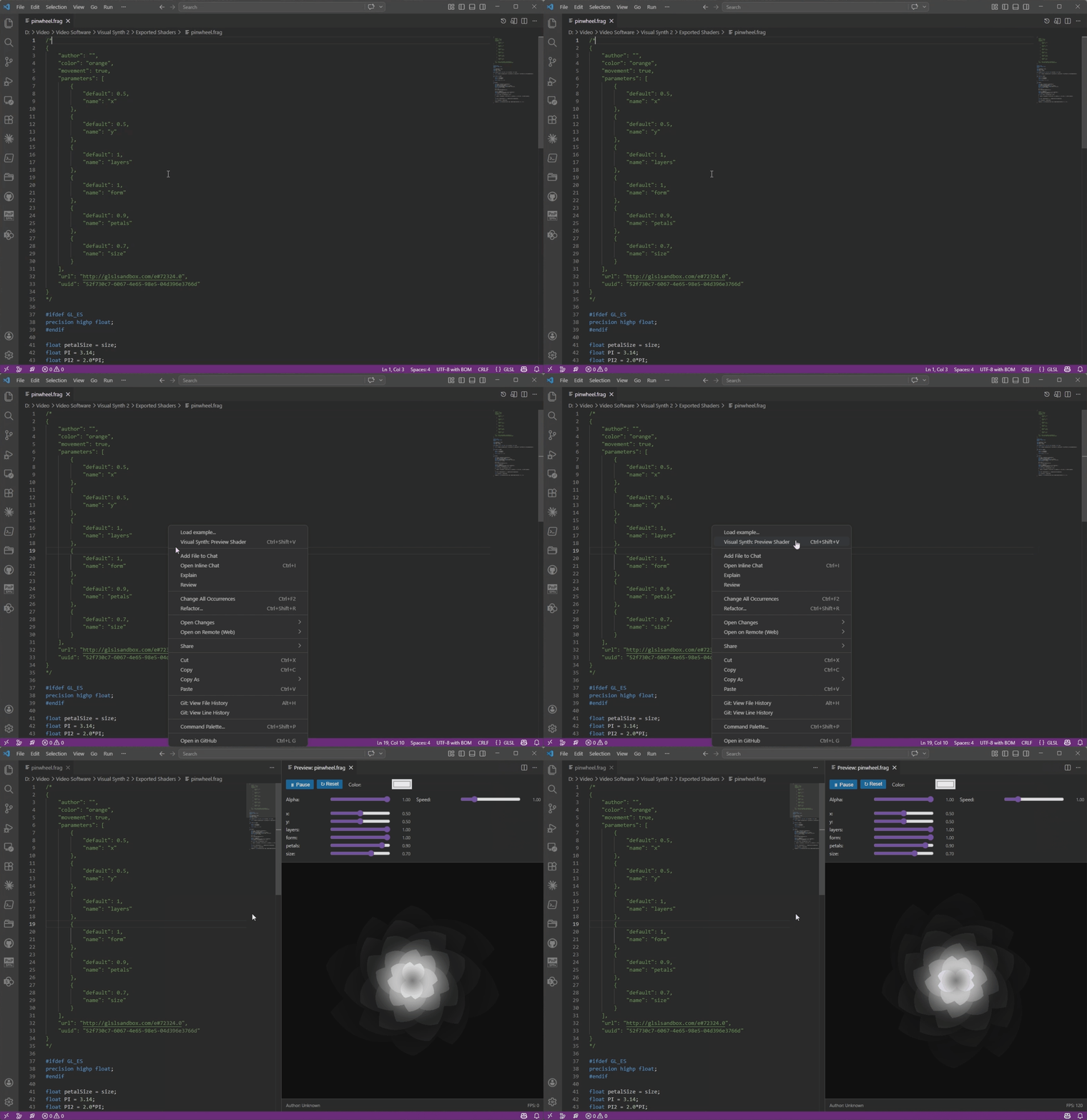
- Right-click in the editor and select "Visual Synth: Preview Shader"
- Click the preview icon in the editor title bar
- Press
Ctrl+Shift+V (or Cmd+Shift+V on Mac)
- Open the command palette (
Ctrl+Shift+P) and run "Visual Synth: Preview Shader"
The preview panel will open beside your editor with:
- Live shader rendering
- Interactive controls for all parameters
- Play/pause and reset buttons
- FPS counter
Installation
From VS Code Marketplace
- Open VS Code and go to the Extensions view (
Ctrl+Shift+X or Cmd+Shift+X on Mac)
- Search for Visual Synthesizer Shader Viewer
- Click Install
From VSIX
- Clone the repository and build the
.vsix file:
npm install
npm install -g @vscode/vsce
vsce package
- Install it:
- GUI: Extensions → ⋯ → Install from VSIX
- CLI:
code --install-extension visual-synthesizer-shader-viewer-x.x.x.vsix
From Source
- Clone or download this repository
- Open the folder in VS Code
- Run
npm install to install dependencies
- Run
npm run compile to build the extension
- Press
F5 to open a new VS Code window with the extension loaded
The extension expects Visual Synthesizer 2 compatible shaders with JSON metadata:
/*
{
  "author": "Your Name",
  "color": "white",
  "movement": true,
  "parameters": [
    {
      "name": "Speed",
      "type": "float",
      "default": 1.0,
      "min": 0.1,
      "max": 5.0
    }
  ],
  "url": "",
  "uuid": "unique-id-here"
}
*/

#ifdef GL_ES
precision highp float;
#endif

// Your shader code here
void main() {
    vec2 fragCoord = texCoord * resolution;
    // ... shader implementation
    fragColor = vec4(color, alpha);
}
The extension automatically provides these uniforms (matching Visual Synthesizer 2):
float time - Current time in secondsvec2 resolution - Canvas resolution in pixelsvec2 texCoord - Texture coordinates (0.0 to 1.0)vec4 color - Color value (controllable via UI)float alpha - Alpha value (controllable via UI)- Custom parameters defined in JSON metadata
Keyboard Shortcuts
Ctrl+Shift+V (or Cmd+Shift+V on Mac) - Preview shader
Troubleshooting
Shader doesn't render
- Check the error message displayed in the preview panel
- Ensure your shader has a valid
main() function
- Verify that all custom uniforms are correctly declared
Parameters don't appear
- Make sure your JSON metadata is properly formatted
- Parameters must be defined in the JSON header
- Check that parameter names match the uniform names in your shader
Preview doesn't update on save
- Ensure the file has a
.frag extension
- Try manually triggering the preview command again
Development
To contribute or modify the extension:
# Install dependencies
npm install

# Watch mode (auto-recompile on changes)
npm run watch

# Compile
npm run compile

# Test in development
# Press F5 in VS Code to launch Extension Development Host
Requirements
- Visual Studio Code 1.75.0 or higher
glslangValidator on your system PATH for linting (optional — ships with the Vulkan SDK); configure a custom path via visualSynthShaderViewer.glslangValidatorPath if needed
License
MIT
Author
Lisa Wagner (@avvla.music)
Created for Visual Synthesizer 2 shader development workflow.
Disclaimer: This extension is an independent community tool not affiliated with or endorsed by Imaginando, makers of Visual Synthesizer 2.

