Pi Code for VS Code


A visual VS Code wrapper around the Pi coding agent — built as a friendly UI for non-engineers and as a smooth landing pad for anyone moving over from Claude Code who wants the same familiar ergonomics, extra quality-of-life features, and the freedom to use any AI model behind the scenes.
What's new
0.73.0 — new models, clearer costs, and more reliable chats.
- Use GPT-6 Astra with an OpenAI API key or ChatGPT subscription, and DeepSeek V4.1 Flash with images and tools.
- Use your account's full Codex context allowance and see a yellow warning when a model enters a more expensive long-context tier.
- Get peak-aware DeepSeek spend estimates that include child agents and compaction, faster startup, and follow-up messages that stay queued during context compaction instead of being lost.
- Keep cache, thinking, account usage, attachments, and context visible in a compact, collapsible details bar that wraps instead of hiding information.
Open the Changelog tab or type /changelog in chat for all changes since
0.72.0. Each entry covers changes since the release directly below it;
if you skipped several releases, read those entries too.
Why Pi Code?
- Claude Code-style ergonomics. Chats are normal editor tabs — split, drag into another editor group, move into a separate window, restore across
Reload Window. Multiple chats run in parallel, each with its own history, file changes, and checkpoints.
- Bring your own model. Works with the major AI providers via API key, or sign in with your existing subscription — no separate setup, no second invoice.
- Web access and MCP servers out of the box. Web search, page/PDF/YouTube fetch, and any MCP server you declare in
.mcp.json work immediately after install. No CLI step — bundled extensions load from the VSIX without a global install step. Optionally import your Claude Code MCP servers with one checkbox.
- Plan-before-execute. Optional Plan Mode gives the agent persistent guidance to study change-heavy tasks, present a plan, and wait for your approval before executing — while answering simple questions directly.
- Semantic code navigation. Opt-in Language Server tools let the agent ask your existing language extension (C#, rust-analyzer, Pylance, TypeScript, gopls, clangd) for references, definitions, implementations, call hierarchy, and workspace symbols instead of guessing from grep.
- Made for non-engineers too. Inline diffs, per-turn checkpoints, image attachments, per-turn timing, and a per-chat ToDo make the agent legible — you can see exactly what it's doing and undo any step.
Features
Chat panels as editor tabs
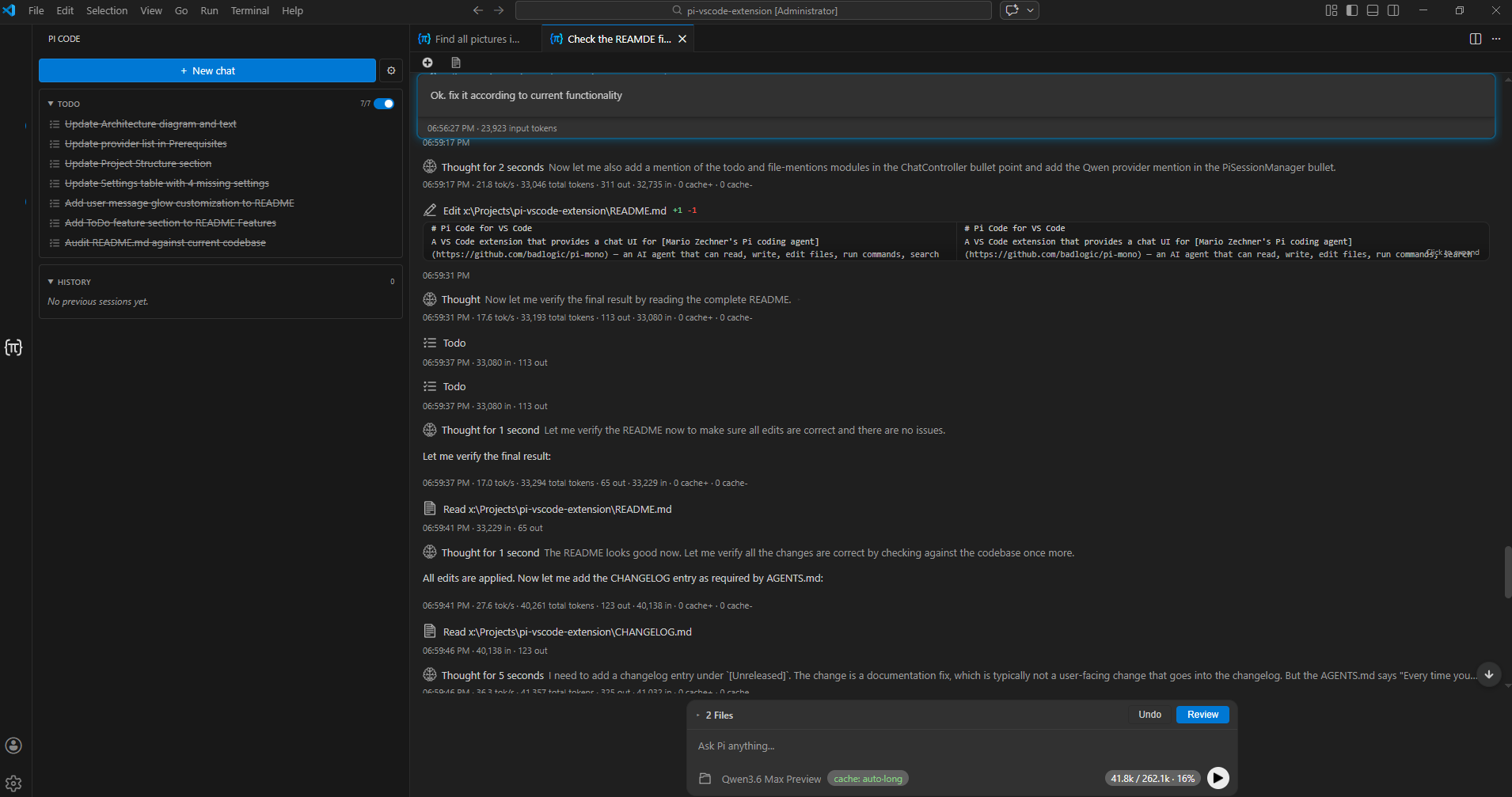
Each chat opens as a normal editor-area webview panel. Split the editor, drag the tab between groups, move it into a separate window, or close and reopen it from the launcher's history.
Multi-tab sessions
Run several agent sessions in parallel. Conversation history, tracked file changes, and checkpoint state are isolated per tab.
Every tool call (file reads/writes/edits, shell, glob/grep/find, web search, fetch, LSP semantic queries) renders as an expandable card with arguments and results, streamed in real time. A vertical timeline rail connects the icons on the left so it's easy to follow what the agent did across a long turn; hover any icon for a tooltip describing what the tool does.
The launcher sidebar has a Tools panel that lists every tool the active chat exposes to the model, with a checkbox per tool. Unchecking a tool hides it from the model on the next turn. Tools sharing a prefix (github_*, database_*, browser_*, …) are grouped into collapsible sections with per-group Enable / Disable buttons — one click removes a large tool group from the prompt when it is not needed. Named categories (Pi built-ins, Web, ToDo, MCP, Language Server) sit alongside prefix groups, and a filter box searches both tool names and descriptions. Copy / Paste buttons serialise the current selection to the clipboard so you can transplant a curated tool set between chats or between VS Code windows. DefaultForProject saves the active selection as the workspace project default — reuse the same curated tool set across every new chat in that project. Selection is per-chat and persists across Reload Window.
Inline diffs and rollback
File modifications are tracked automatically. Review unified diffs inline or open them in VS Code's native diff editor. Undo a single file or every change at once.
File Undo View
Optional always-visible bar above the prompt input that lists every file the agent has changed in the current chat, each row with Undo / Redo / Review buttons for one-click revert or diff-editor inspection. File-edit tracking always runs regardless — this bar just surfaces it up-front so pending changes stay in your eye-line. Per-chat toggle in the launcher sidebar; enable by default for new chats with pi-code.fileUndoView.defaultEnabled.
Checkpoints
Every user message creates a checkpoint. Roll the workspace back to any earlier turn, then redo to bring changes back. The conversation history is preserved so you can branch from any point.
Plan Mode
Per-chat toggle in the launcher sidebar (above ToDo) that prepends planning guidance to every prompt. Questions and information requests are answered directly; for code changes and multi-step work, the agent studies the relevant files, presents a plan, and stops until you approve it. If you object or ask for changes instead of approving, it revises the plan and waits again. Once approved it carries out the whole plan, and your next request starts a fresh plan-and-approve cycle. Plan Mode does not restrict tools, use execution phases, or require control markers. Disabled by default for new chats; enable it by default with pi-code.planMode.defaultEnabled.
Nine semantic-navigation tools that ask your active language extension instead of guessing from grep: find_references, document_symbols, goto_definition, hover, find_implementations, type_definition, workspace_symbols, call_hierarchy_incoming, and call_hierarchy_outgoing. Each tool returns authoritative (file, line, column) positions plus surrounding context, annotates results in external dependency sources (NuGet, cargo registry, node_modules) as [external], and accepts either positional or symbol-name addressing. Off by default — enable with pi-code.lsp.enabled for projects where semantic accuracy is worth the extra system-prompt footprint (large Unity / Rust / TS codebases with name collisions, partial classes, overloaded methods). Requires a language extension for each file's language; for C# call hierarchy specifically, install C# Dev Kit (the OmniSharp-only extension does not implement it).
Streaming with thinking
Watch the agent reason in real time with collapsible thinking blocks. Cycle through off, minimal, low, medium, high, xhigh, and max to control depth. max is natively supported by GPT-5.6 and adaptive Claude models; other models fall back to their closest supported level.
Per-turn and cumulative timing
Each assistant message footer shows the elapsed wall-clock time for that turn plus the cumulative active time across the chat (idle gaps excluded), alongside token usage. Completed tool calls carry their own duration, and each finished turn expands into a per-tool breakdown with call counts and totals. When a turn delegated work, the breakdown is split into four sections — orchestrator tools only, subagent tools only, the combined total, and per-run subagent time with its outcome — plus derived rows for model wait, child startup, context compaction, and time children spent queued for a concurrency slot.
Image attachments
Paste, drop, or pick images via the paperclip button. Previews stay in chat history; image-capable models receive them inline. Switching an image-bearing chat to a model without image support is safe — those images are replaced with a short placeholder for the requests that model sends, and the originals return once an image-capable model is selected again.
Workspace @ file mentions
Type @ to fuzzy-match files in your workspace. Mentions are highlighted in the input and sent to the agent as path references it can choose to inspect.
Claude project compatibility
Claude compatibility activates only when the workspace contains real Claude infrastructure such as CLAUDE.md, CLAUDE.local.md, .claude rules, skills or commands, nested resources, or a project-scoped Claude plugin. Ordinary projects receive no Claude-specific hooks or prompt content, and user-level Claude resources are considered only after a project marker activates compatibility.
Root, ancestor, local, explicitly imported, and directory-scoped instructions are injected as hidden context without spending read-tool calls. @file imports are contained to the workspace and limited to four recursive hops; generated, dependency, and build directories are excluded from nested discovery. Project-wide and path-scoped .claude/rules are applied when relevant. Project and activated user skills and legacy commands become native slash commands, while nested skills use directory-qualified names such as /apps/web:deploy and enter context only inside their scope. Claude tool names map only to capabilities already available through Pi, preserving the current agent, model, permissions, and MCP configuration. Run /claude-compat in an active Claude project to inspect what was loaded. Native AGENTS.md handling remains unchanged.
Projects with many scoped resources no longer trap the agent in resource-review retries: after three consecutive interruptions, the bridge lets tools run for the rest of that session while continuing to add resources to context. The chat and Pi Code output channel explain when this happens.
Message queuing and steering
Queue follow-up messages while the agent is streaming, compacting its context, or finishing a turn. They auto-send once the session is free, and can be edited or deleted while queued. Use Ctrl+Enter to steer an active response; during compaction it queues instead. The input placeholder explains when the agent is compacting.
Slash commands and skills
Type / to open a slash-command menu. Cross-client Agent Skills are discovered recursively from ~/.agents/skills/ and workspace .agents/skills/, including skills grouped in subdirectories; ordinary README.md files in skill folders are ignored. Pi Code also retains legacy ~/.pi/agent/skills/ and workspace .pi/skills/ discovery. In Claude-enabled projects, compatible project/user Claude skills and legacy .claude/commands are surfaced alongside them, with directory-scoped skills activated only when the agent works in their subtree.
Subagents
Per-chat opt-in toggle in the launcher sidebar (disabled by default) that gives the parent agent a subagent tool for delegating work to child agents. Named agents are discovered from user and trusted-project .agents/agents/*.md resources, Claude-compatible definitions, and bundled packages; the parent can also create ad-hoc roles on the fly. Each child runs with an exact cross-provider provider/id model constrained by the configured policy and allowlist, or explicitly inherits the parent model. Foreground children return inside the parent turn; background children run independently and post a compact result when they finish. The launcher's Subagents section shows every child spawned from the active chat with live status, elapsed time, and expandable results. For isolated background writes the parent reviews, applies, and cleans up the worktree diff — child agents never touch the project workspace directly. A child's turn budget is one model response including every tool call it makes, and the configured limit is used verbatim; a child approaching that budget is asked to wrap up one turn early, and one that is stopped anyway still returns the work it had produced. Children get the read-only Language Server tools whenever pi-code.lsp.enabled is on, and pi-code.subagents.allowChildBash additionally grants them bash (off by default). Tune concurrency, timeouts, and turn limits via pi-code.subagents.* settings.
Per-chat ToDo
Each chat has its own persistent task list the agent manages via a built-in todo tool — pending / in-progress / completed states, dependencies, and inline display in the launcher. Toggle per-tab on or off.
Codex subscription usage indicator
When using a Codex model with a ChatGPT subscription, the chat footer shows percent-used in the 5-hour and weekly windows, plus a per-turn delta on each assistant message.
Context usage and pricing warnings
The chat footer shows token usage and the selected model's context window. Its context chip turns yellow above the model's more expensive long-context threshold, with a tooltip naming the threshold and suggesting /compact to reduce context. The warning follows the model's price table, not a fixed token count. GPT-6 Astra on Codex has no long-context multiplier and does not show that warning; its direct OpenAI API tier still applies.
DeepSeek balance and spend
DeepSeek chats show the remaining USD balance, last-turn cost, and today's Pi Code spend. Last-turn and daily estimates use the corrected Flash and V4 Pro prices, including double peak-hour rates at 01:00–04:00 and 06:00–10:00 UTC, Monday to Friday. Daily spend includes parent turns, child-agent invocations, and context compactions; resumed, failed, and cancelled child runs contribute only the cost incurred during that invocation. The rate is chosen at turn start, so a turn spanning a pricing boundary can differ from the provider's per-request bill. The cumulative session cost remains the SDK's base-rate total.
Prompt cache retention controls
A cache: … chip in the footer chooses short / long / provider-aware auto so cached prefixes are kept around exactly as long as you need them.
Windows turn-completion notifications
Two opt-in toggles in the launcher sidebar, both off by default: Show Popup displays a native toast outside VS Code when an agent turn finishes, and Play Sound plays the standard Windows notification sound. Both use PowerShell and are currently Windows-only; non-Windows platforms log a notice instead.
Settings page with OAuth login
A dedicated settings panel handles API keys, default model, thinking level, ToDo behaviour, subagents, Claude compatibility controls, Raw Mode recording, performance diagnostics and prewarm, Claude Code MCP import, Language Server tools, file-mention indexing, and chat appearance. Provider credentials entered there are stored via VS Code's SecretStorage — never in settings.json. The same panel hosts OAuth sign-in for Anthropic Claude (Pro/Max), ChatGPT (Plus/Pro/Codex), GitHub Copilot, Gemini CLI, and Antigravity, with a manual paste-the-code fallback when the local OAuth callback can't be reached.
Bundled web access and MCP
web_search, fetch_content (web pages, GitHub, YouTube transcripts, PDFs, local videos), and get_search_content ship inside the extension as the bundled pi-web-access package. In automatic mode, search uses OpenAI when suitable and available, then falls back through Exa, Brave, Parallel, Tavily, Perplexity, and Gemini; Exa MCP works without an API key. The bundled pi-mcp-adapter picks up servers from .mcp.json / .pi/mcp.json automatically. Enable pi-code.mcp.importClaudeCode in settings to add a managed compatibility import that references your user-level Claude Code MCP servers — server definitions and credentials stay in your Claude config; only an import entry is written to Pi's global MCP config.
Chat renaming
Use the pencil button in a chat panel or type /name <new name> to rename a chat locally without contacting the model. The name is reused in the editor tab and launcher history. Renamed chats keep their full conversation history, tracked file changes, and checkpoint state.
Raw Mode (developer diagnostics)
Raw Mode records the complete unredacted stream of provider payloads and agent events for a chat session into a local JSONL file under VS Code global storage. Disabled by default — toggle pi-code.rawMode.enabled to start capturing for active and future chats. Capture is unbounded while enabled and may include system prompts, tool schemas and results, provider headers, model exchanges, and workspace file contents. Existing recordings persist on disk after you disable the setting; clear them per session or delete all Raw Mode data from Pi Code Settings, or delete the corresponding History entry to remove its recording. Open the Raw View with the Pi Code: Open Raw View for Active Chat command or the inspect icon in the chat toolbar.
Pi Code warms the SDK in the background at VS Code startup. Enable pi-code.prewarm.full to also initialize the full session without delaying registration of the launcher, commands, and restored panels. A chat opened before warm-up finishes may still need to wait. Stored API keys are read concurrently, and a provider that fails or times out during configuration no longer prevents the others from being configured.
Full prewarm uses extra memory and may fetch model metadata even in windows where you never use Pi Code. Enable pi-code.perf.enabled for local activation and session timing logs; their path is printed to the Pi Code output channel.
Getting Started
- Install the extension from the Marketplace.
- Open the Pi Code icon in the activity bar — that's the launcher sidebar with + New chat, Settings, history, and per-chat ToDo.
- Connect a provider in Settings (gear icon, top-right of the launcher):
- paste an API key for any supported provider, or
- click the Sign in button next to your subscription provider (Claude Pro/Max, ChatGPT Plus/Pro/Codex, GitHub Copilot, Gemini CLI, Antigravity) to authenticate via your browser.
- Click + New chat (
Ctrl+Shift+N). The chat opens as a regular editor tab — split, drag, or move it wherever you like.
- Pick a model with the picker at the bottom of the chat, then type your prompt and press Enter.
- While the agent works: review tool calls inline, queue follow-ups (Enter), or steer mid-stream (
Ctrl+Enter).
- Review and roll back: click Review on a diff to open VS Code's diff editor, or use the per-message checkpoint button to roll the workspace back to that turn.
- Optional: toggle Plan Mode above ToDo in the sidebar for unfamiliar codebases or risky refactors — the agent will study change-heavy work, present a plan, and wait for your approval before executing.
Supported Providers
API key: Anthropic, OpenAI, Google Gemini, DeepSeek, Azure OpenAI, Google Vertex, Amazon Bedrock, Mistral, Groq, Cerebras, xAI, OpenRouter, Vercel AI Gateway, Hugging Face, Fireworks, Kimi For Coding, MiniMax, Qwen (Alibaba DashScope), Z.ai (GLM).
Subscription (OAuth login): Anthropic Claude Pro/Max, ChatGPT Plus/Pro/Codex, GitHub Copilot, Google Gemini CLI, Google Antigravity.
GPT-6 Astra is available through both an OpenAI API key and a ChatGPT subscription via Codex. Direct OpenAI API context windows for GPT-5.4, GPT-5.5, GPT-5.6, and Astra are 1,050,000 tokens. Codex uses the maximum context returned by your own account's catalog, rather than assuming the same allowance for every plan.
DeepSeek V4.1 Flash supports images and tools and appears even when absent from the bundled catalog. Older Flash names routed to it receive matching image support and prices; V4 Pro keeps its own text-only capabilities and corrected prices. These compatibility corrections retire when the bundled catalog includes V4.1 Flash.
Keyboard Shortcuts
| Shortcut |
Action |
Ctrl+Shift+L (Cmd+Shift+L) |
Reveal the active chat panel, or focus the launcher if no chat is open |
Ctrl+Shift+N (Cmd+Shift+N) |
Open a new chat as an editor tab |
Enter |
Send prompt, or queue while streaming, compacting, or finishing a turn |
Ctrl+Enter (Cmd+Enter) |
Steer mid-generation; queue during compaction |
Escape |
Stop the current generation |
Commands
Main user-facing commands are available from the command palette (Ctrl+Shift+P):
- Pi Code: New Chat — open a fresh agent session as an editor tab
- Pi Code: New Agent Tab — open a fresh chat from the launcher or Command Palette
- Pi Code: Session History — reveal the launcher with previous sessions
- Pi Code: Stop Generation — abort the current streaming response
- Pi Code: Select Model — choose an AI model
- Pi Code: Toggle Thinking Level — cycle through thinking verbosity levels
- Pi Code: Focus Chat — reveal the active chat panel, or fall back to the launcher
- Pi Code: Open Settings — open the Pi Code settings page
- Pi Code: Open Raw View for Active Chat — open the Raw Mode diagnostic viewer for the active chat
- Pi Code: Run Subagent Smoke Test — (developer) validate subagent lifecycle, worktree isolation, and policy enforcement
Settings
Settings can be configured through the dedicated settings page (gear icon in the launcher) or via VS Code's standard settings editor.
| Setting |
Type |
Default |
Description |
pi-code.apiProvider |
string |
"" |
Provider whose API key the Settings page is currently managing. Runtime provider is chosen by the selected model — this only picks the key slot to edit. |
pi-code.defaultModel |
string |
"" |
Default model ID for new sessions |
pi-code.thinkingLevel |
string |
off |
Default thinking level (off, minimal, low, medium, high, xhigh, max) |
pi-code.allowedTools |
string[] |
[] |
Restrict which tools the agent can use. Empty = allow all. |
pi-code.fileMentions.enabled |
boolean |
true |
Enable @ file mentions in chat input |
pi-code.fileMentions.useDefaultExcludes |
boolean |
true |
Use built-in exclude patterns for @ mention indexing |
pi-code.fileMentions.exclude |
string[] |
[] |
Extra glob patterns to exclude from @ mention suggestions |
pi-code.fileMentions.maxSuggestions |
number |
30 |
Maximum @ mention suggestions to show |
pi-code.fileMentions.configPath |
string |
.pi/file-mentions.json |
Workspace-relative config file for @ mention indexing |
pi-code.planMode.defaultEnabled |
boolean |
false |
Enable prompt-guided Plan Mode for new chats by default; the agent waits for your approval before executing, but tools are never restricted |
pi-code.fileUndoView.defaultEnabled |
boolean |
false |
Show the File Undo View (Undo / Redo / Review bar above the prompt) by default for new chats |
pi-code.todo.defaultEnabled |
boolean |
true |
Enable the per-chat ToDo for new chats by default |
pi-code.todo.promptGuidelines |
string |
(multiline) |
Prompt guidelines for the ToDo tool |
pi-code.subagents.defaultEnabled |
boolean |
false |
Expose the subagent delegation tool to new chats by default. Each chat keeps its own opt-in state. |
pi-code.subagents.defaultModel |
string |
"" |
Default child model in canonical provider/id format. Empty = use agent definition then parent model. |
pi-code.subagents.allowedModels |
string[] |
[] |
Exact provider/id models allowed for child agents. Empty = allow all configured models. |
pi-code.subagents.allowInvocationModelOverride |
boolean |
true |
Allow the parent to select an exact child provider/model in a subagent tool call. |
pi-code.subagents.allowChildBash |
boolean |
false |
Grant child agents the bash tool. Off by default — worktree isolation bounds a child's file edits, not what a shell can reach. |
pi-code.subagents.defaultMaxTurns |
number |
60 |
Default maximum turns for a foreground child agent. No upper cap. One turn is one model response including every tool call it makes. |
pi-code.subagents.defaultTimeoutMinutes |
number |
30 |
Default execution timeout in minutes for a child agent (1–120). |
pi-code.subagents.maxConcurrentGlobal |
number |
4 |
Maximum child agents running across all Pi Code chats (1–16). |
pi-code.subagents.maxConcurrentPerChat |
number |
2 |
Maximum child agents from one parent chat (1–8). |
pi-code.mcp.importClaudeCode |
boolean |
false |
Import user-level Claude Code MCP servers via a managed compatibility entry. Server definitions and credentials remain in Claude config. |
pi-code.claudeCompat.enabled |
boolean |
true |
Master switch for Claude Code compatibility; disable to bypass all Claude bridge logic regardless of workspace mode |
pi-code.claudeCompat.mode |
string |
auto |
Per-workspace Claude compatibility mode: auto (detect), on (force), or off (bypass) |
pi-code.lsp.enabled |
boolean |
false |
Expose Language Server tools (find_references, goto_definition, hover, etc.) to the agent. Opt-in; requires a language extension per file's language. |
pi-code.rawMode.enabled |
boolean |
false |
Record complete unredacted provider payloads and agent events to local global-storage JSONL; existing recordings persist after disabling |
pi-code.perf.enabled |
boolean |
false |
Record activation and session-bring-up timings to a local JSONL file for troubleshooting slow startup |
pi-code.prewarm.full |
boolean |
false |
Initialize the full Pi session in the background at startup without waiting to finish activation; uses extra memory and may fetch model metadata |
pi-code.userMessageGlowColor |
string |
#00aaff |
Glow colour around user messages in the chat |
pi-code.userMessageGlowOpacity |
number |
40 |
Glow opacity, 0–100 |
API keys are managed through the settings page and stored via VS Code's SecretStorage, never in settings.json.
Privacy
Provider API keys and OAuth tokens entered in Pi Code settings are stored in VS Code's SecretStorage, never in settings.json or a plaintext file. Network requests go only to providers and services you configure or invoke, including enabled MCP servers and bundled web tools. Optional web-search credentials can be supplied separately through ~/.pi/web-search.json. Opt-in managed config writes, such as the Claude Code MCP import, are explicit in their setting. No telemetry or usage data of any kind is sent to the publisher.
Raw Mode: When pi-code.rawMode.enabled is on, Pi Code mirrors complete unredacted provider payloads and agent events for each chat session to a local JSONL file under VS Code global storage. Recordings may contain sensitive data such as system prompts, tool schemas and results, provider headers, model exchanges, and workspace file contents. Pi Code does not upload the recording; the captured exchanges still use the providers and services you configured. Capture is unbounded while enabled, and existing recordings persist after the setting is disabled. Clear one session or all Raw Mode data from Pi Code Settings, or delete the corresponding History entry. Raw Mode is disabled by default.
Credits
Pi Code embeds Mario Zechner's Pi coding agent SDK.
License
MIT. Source code, contribution guidelines, architecture notes, and changelog: GitHub repository.

