Claude Code Telemetry


An open-source VS Code dashboard for your Claude Code subscription. See your 5-hour and weekly limits with predicted reset times, per-turn token counts and USD spend calculated from Anthropic's published pricing, usage forecasts to your projected exhaustion point, and the full historical timeline — all without the editor ever calling an API itself.
The extension is a passive reader of ~/.claude/usage-log.txt, which is populated by a small Stop hook that the extension can install for you. All data stays on your machine.
This started as an open-source side project for friends and coworkers who use Claude Code daily. It turned out useful enough that publishing it more broadly seemed worth doing.
Features
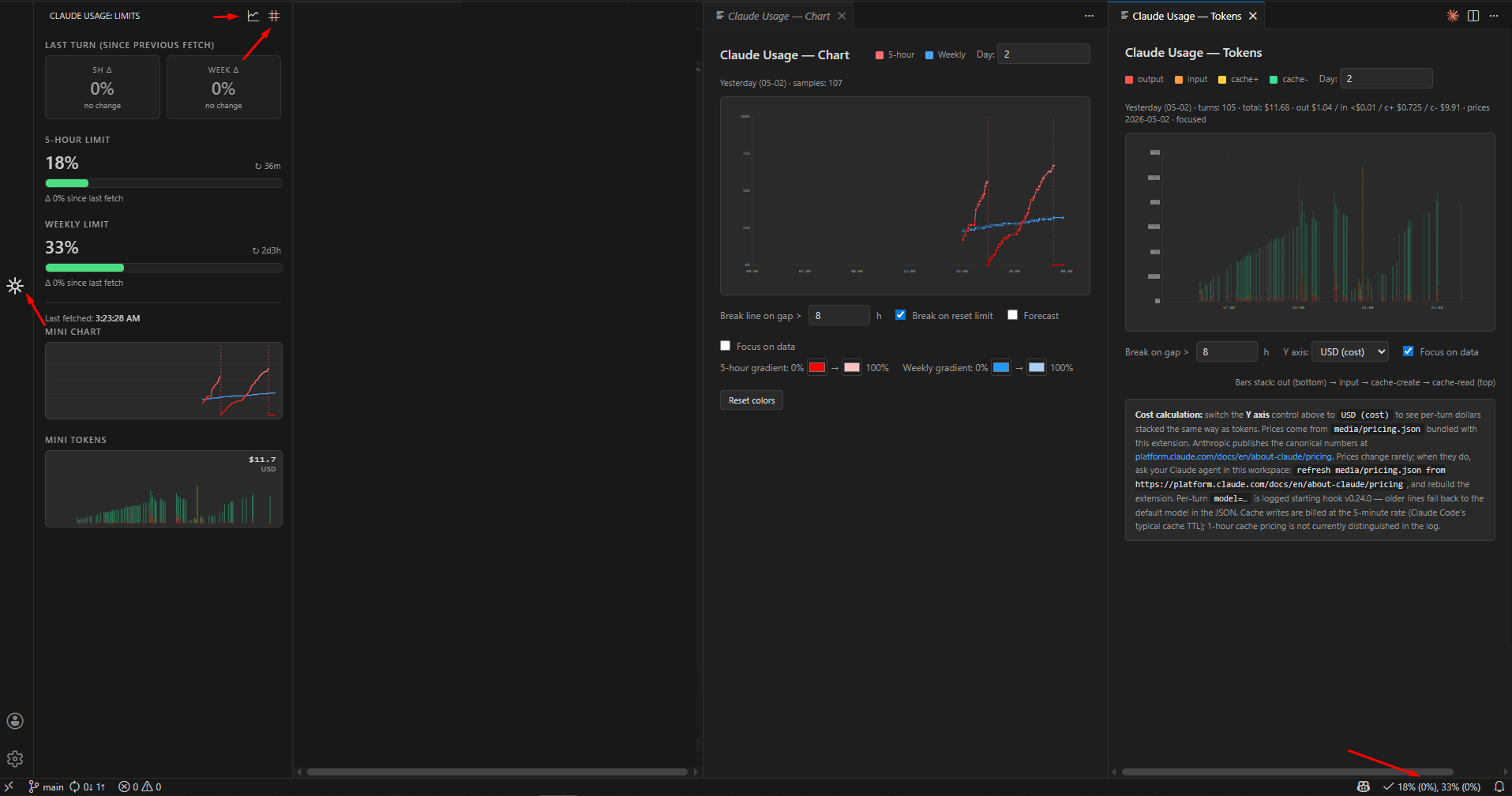
- Sidebar view with:
- Live 5-hour limit, weekly limit, and last-turn delta cards.
- Per-turn and per-window USD cost (computed locally from a bundled
pricing.json).
- "New window" indicator when the parser detects a 5h/weekly window flip between two fetches (no more bogus
+56% deltas across windows).
- Mini limits chart and mini tokens chart, both clickable to open the matching full-size panel.
- Settings dropdown at the bottom for sidebar-controlled toggles (USD annotations, VS Code theme skin, ignore bugged API data).
- Status bar indicator:
<icon> NN% (+ΔN%), MM% (+ΔM%) — shows (reset) instead of a number when a new window just started.
- Limits chart panel with:
- Free-form day-range input (
1, 2, 7, (3), 1-7, 3-7).
- Gradient lines whose color saturates from "almost empty" to "almost out".
- Vertical markers for actual and predicted limit resets, including parser-flagged window flips.
- Suppressed bugged-API readings shown in magenta with an explanatory tooltip (when "Ignore bugged API data" is on).
- Day-boundary verticals when the window spans more than one day.
- Optional linear forecast to the projected exhaustion point.
- "Focus on data" zoom that crops empty leading/trailing time.
- Optional VS Code theme skin (off = locked dark palette).
- Drag-to-select a range to see total Δ for both windows over the selection.
- User-configurable colors for both gradients (persisted across reloads).
- Tokens chart panel with:
- Stacked bars per turn — input, output, cache-write, cache-read — with semantic colors.
- Y-axis modes: linear tokens, log tokens, USD cost (per-turn dollar amount using the bundled pricing table).
- Same range syntax, gap break, focus-on-data, day-boundary verticals, and drag-to-select range summary as the limits chart.
- Tooltip shows tokens, USD, and the model used for that turn.
- Daily summary view (markdown) with per-day spend totals, peaks, and reset counts.
- Bundled Stop hook with one-click installation. The extension can deploy, update, and register the hook in
~/.claude/settings.json for you. The hook reads the local transcript file to capture per-turn token counts and the model id, so cost calculations stay accurate without any extra network calls.
Screenshots
Requirements
- Claude Code installed and signed in (
/login). The extension reads ~/.claude/.credentials.json indirectly through the Stop hook — never directly.
- Node.js on
PATH. The Stop hook is a small Node script invoked by Claude Code on each Stop event. If Node isn't installed, the sidebar offers a one-click Install Node.js button (opens nodejs.org) before letting you set up the hook.
- VS Code 1.85+.
- Tested on Windows. The Stop hook is plain Node and should work on macOS / Linux as well, though paths in the documentation use Windows separators.
Installation
After install, run Developer: Reload Window (the command palette is Ctrl+Shift+P / Cmd+Shift+P). VS Code does not auto-reload extensions on update.
Setting up the Stop hook
After install, the extension prompts on first activation:
Claude Usage Monitor: install Stop hook so the plugin can track API usage?
Pick Install hook. The extension will:
- Detect Node.js on your machine (refusing to register a dead command if it isn't there).
- Copy the bundled hook script to
~/.claude/hooks/.
- Add an entry under
hooks.Stop[] in ~/.claude/settings.json, using the absolute path to your node executable so the hook works regardless of which shell Claude Code uses to spawn hooks.
If anything fails — Node missing, no permission to write ~/.claude/, settings.json contains JSON the plugin can't parse — the sidebar shows an inline diagnostic panel with the exact reason and the next action you should take. No silent failures.
Make a single turn in Claude Code; the log file ~/.claude/usage-log.txt will start populating, and the sidebar will show usage immediately.
If you already have your own Stop hook that writes to the same log file (in the parser-compatible format), the prompt is suppressed to avoid double API calls. You can still run Claude Usage: Install Stop hook manually.
Quick start
- Install extension and reload window.
- Click the Claude Usage icon in the Activity Bar.
- If prompted, install the Stop hook.
- Run a turn in Claude Code.
- Click the line-chart icon in the sidebar header (or run
Claude Usage: Show chart) to open the limits chart, or the numeric icon next to it (or Claude Usage: Show tokens chart) for the tokens chart.
Settings
| Setting |
Default |
Description |
claudeUsage.logPath |
~/.claude/usage-log.txt |
Override path to the usage log file. Empty = auto-detect. |
Chart options (day range, gap, gradient colors, forecast, focus, Y-axis mode, etc.) live inside each chart panel and persist across reloads. Sidebar-only toggles (USD annotations, VS Code theme skin) live in the settings dropdown at the bottom of the sidebar.
Commands
All commands are available via Ctrl+Shift+P / Cmd+Shift+P.
| Command |
Description |
Claude Usage: Refresh now |
Re-read the log immediately. |
Claude Usage: Show chart |
Open the limits chart in a side panel. |
Claude Usage: Show tokens chart |
Open the per-turn tokens / cost chart in a side panel. |
Claude Usage: Show daily summary |
Markdown table of per-day spend. |
Claude Usage: Open usage-log.txt |
Open the raw log file. |
Claude Usage: Open pricing.json |
Open the bundled per-model pricing table used for USD calculations. |
Claude Usage: Show plugin log |
Open the extension's diagnostic Output channel. |
Claude Usage: Install Stop hook |
Deploy and register the bundled hook. |
Claude Usage: Update Stop hook to bundled version |
Overwrite an outdated registered hook with the bundled one. |
Claude Usage: Remove Stop hook |
Unregister the hook (with optional script delete). |
Claude Usage: Show hook status |
Modal showing hook installation status. |
Claude Usage: Show hook invocation log |
Open the per-fire diagnostic log written by the hook. |
Claude Usage: Install Node.js (open nodejs.org) |
Open the Node.js download page in your browser. |
Claude Usage: Recheck Node.js installation |
Re-probe node after installing it without reloading VS Code. |
Claude Usage: Open Claude settings.json |
Open ~/.claude/settings.json in an editor tab. |
How it works
Claude Code  ── Stop event ──▶  Stop hook (Node script)  ──appendFileSync──▶  ~/.claude/usage-log.txt
                                       │                                              │
                                       ▼                                              ▼
                              GET /api/oauth/usage                            VS Code extension reads it
                              (Anthropic OAuth API)                           (fs.watch + parser)
The extension itself never opens an HTTP connection. Only the Stop hook reaches out, and it does so once per assistant turn (event-driven, not polled). When the hook fails to reach the API (timeout, 429, network), it falls back to writing the most recent valid percent values, so the timeline doesn't lose the point.
Privacy
- The extension does not make any network requests.
- The Stop hook makes a single GET request to
https://api.anthropic.com/api/oauth/usage per assistant turn, using your own OAuth token from ~/.claude/.credentials.json. Nothing else is sent. No telemetry.
- The hook also reads the local Claude Code transcript (
transcript_path, passed to it on the Stop event) to extract per-turn token counts and the model id. This read is purely local — the transcript is not sent anywhere.
- All historical data is stored locally in plain text at
~/.claude/usage-log.txt. The file is append-only and never rotated or deleted by the extension. You can inspect, copy, or delete it at any time.
- A small per-fire diagnostic log lives at
~/.claude/claude-usage-monitor-hook.invocations.log; it self-rotates past 100 KB.
- Chart and sidebar UI state lives in VS Code's per-extension
webviewState and globalState — also entirely local.
Troubleshooting
Sidebar / chart shows "no-log" or "empty-log".
Either the Stop hook isn't installed, or no turn has fired yet. Run Claude Usage: Show hook status to verify, and Claude Usage: Install Stop hook if needed. Then make any turn in Claude Code.
I installed a new version but nothing changed.
VS Code does not reload installed extensions automatically. Run Developer: Reload Window. If a chart panel was open, close and reopen it.
Chart says "Invalid range" for an obvious input like 1.
Open and re-open the chart panel after a reload. If the issue persists, uninstall and reinstall the extension to reset persisted webview state.
Hook installed but the log file is never created.
The most common cause is a stale Claude Code session that was already running before the hook was registered. Fully close Claude Code (or the IDE) and reopen, then make any turn.
If the file still isn't appearing, run Claude Usage: Show hook invocation log. Each Stop event appends one line there with the hook's status. If the log doesn't exist or hasn't grown after a turn, Claude Code isn't calling the hook — verify with Claude Usage: Show hook status.
Sidebar says "Node.js not found".
The Stop hook is a Node.js script. Click Install Node.js in the panel, install Node 18+, then click Recheck. If Recheck still says missing after the install, run Developer: Reload Window so VS Code picks up the updated PATH.
The Stop hook doesn't seem to fire on every turn.
Some turn types (interruptions, certain agent loops) may not trigger a Stop event. The extension is resilient to gaps and rate-limit failures, so missing the occasional turn is fine.
Two Stop hooks are writing to the log.
If you already had a hook before installing ours, both will run on each Stop, doubling API calls. Use Claude Usage: Remove Stop hook to drop ours, or remove the older one from ~/.claude/settings.json manually.
Source code
Source, contribution guide and detailed development notes live on GitHub.
Changelog
See CHANGELOG.md.
License
See LICENSE.

