AVE NuGet Manager




A NuGet package manager for your whole .NET solution, in a VS Code panel. Search, install, update, audit for vulnerabilities and edit nuget.config — without hand-editing a .csproj or memorising dotnet flags.
Works in VS Code, Cursor, Windsurf, Kiro, VSCodium and other forks. The only requirement is the .NET SDK on PATH.
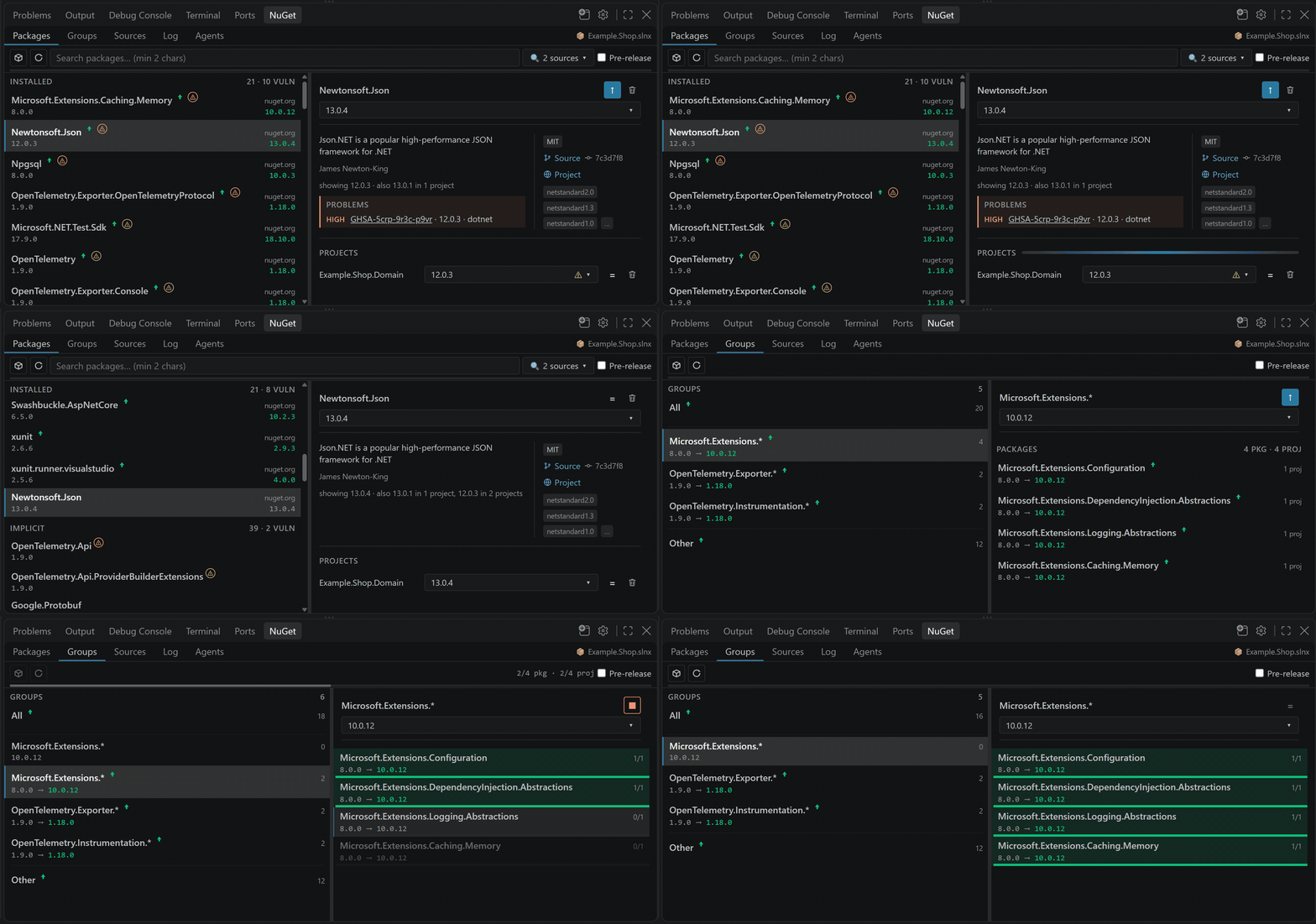
Why
Visual Studio has a package manager window. VS Code has a terminal. Everything below is what that difference costs on a real solution:
| Without it |
With AVE NuGet Manager |
dotnet list package --outdated in every project, then read the text output |
One list of every package in every project, with ↑ where a newer version exists |
Remember to run --vulnerable now and then |
⚠ marks kept in sync after every install, with the advisory explained in the details panel |
dotnet add package per id, per project — and a failed restore leaves the repo half-bumped |
Update a package family or the whole solution in one pass, with automatic rollback on NU1605 |
Find which nuget.config in the chain actually wins, then edit XML |
The resolved chain in one editor: sources, credentials, API keys, packageSourceMapping |
| A bump changes the package's licence and nothing reports it |
Problems names both licences before you install, and a batch update asks before the first write |
| "Is this bump safe?" — read the release notes yourself |
A bundled agent skill that collects the release notes for every changed package and drafts a breaking-changes review |
No account, no sign-in, no telemetry: the extension shells out to your local dotnet and nothing else. It stays usable under High Contrast themes and Windows forced colors, which most webview panels do not.
Install
| Editor |
Where |
| VS Code |
VS Code Marketplace — or search AVE NuGet Manager in the Extensions view |
| Cursor, Windsurf, VSCodium, Gitpod, Eclipse Theia |
Open VSX — the registry those editors use by default, so the same search works there |
| Air-gapped or a specific build |
Download the .vsix from Releases and run Extensions: Install from VSIX… |
Both registries carry the same build from the same tag.
Quick start
- Open a folder containing a
.sln, .slnx, .csproj or .fsproj.
- Open the NuGet tab in the Panel — or run NuGet: Management from the Command Palette.
- Pick a scope when asked: the solution, a single project, or Manage all N projects in this folder for a folder of loose projects with no solution file.
dotnet runs only after you open the panel, so the extension costs nothing until you use it.
Features
Packages — everything installed, in one place
Installed, implicit and transitive packages, plus catalog search. The details panel shows the current restore graph, and Problems explains anything wrong with a row: a vulnerability advisory, a blocked update, or a ∅ mark for an installed id that matches no <packageSourceMapping> pattern on any source — the failure that would otherwise only appear as a broken dotnet restore.
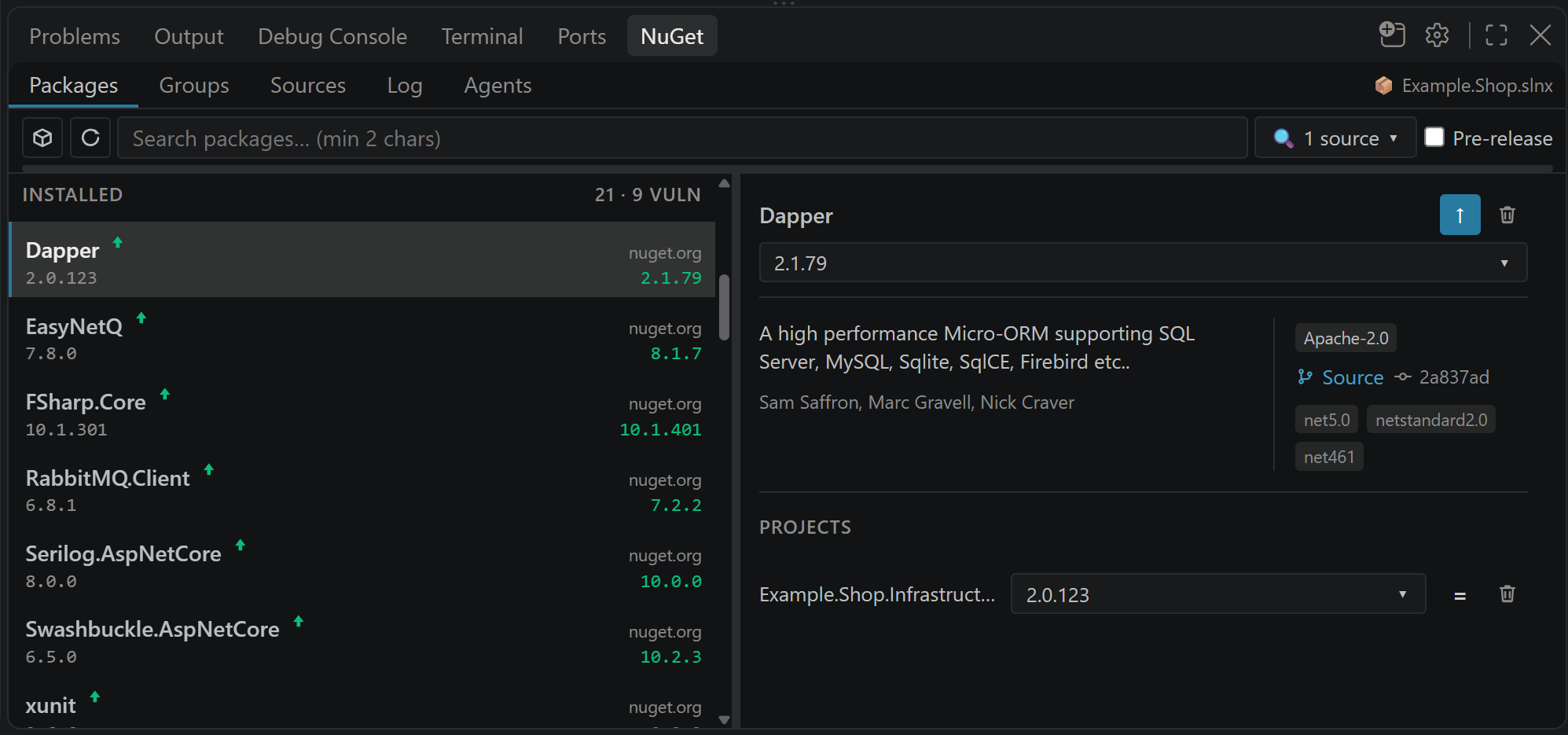
Groups — bump a family or the whole solution
Update All, a package family (Microsoft.Extensions.*, OpenTelemetry.*, …) or Other, with a Stop button while it runs. Packages that fail one at a time only because a sibling ProjectReference needs them bumped together are detected and applied in one --no-restore pass, then validated with a single restore at the end — instead of every item in the batch failing and rolling back individually.
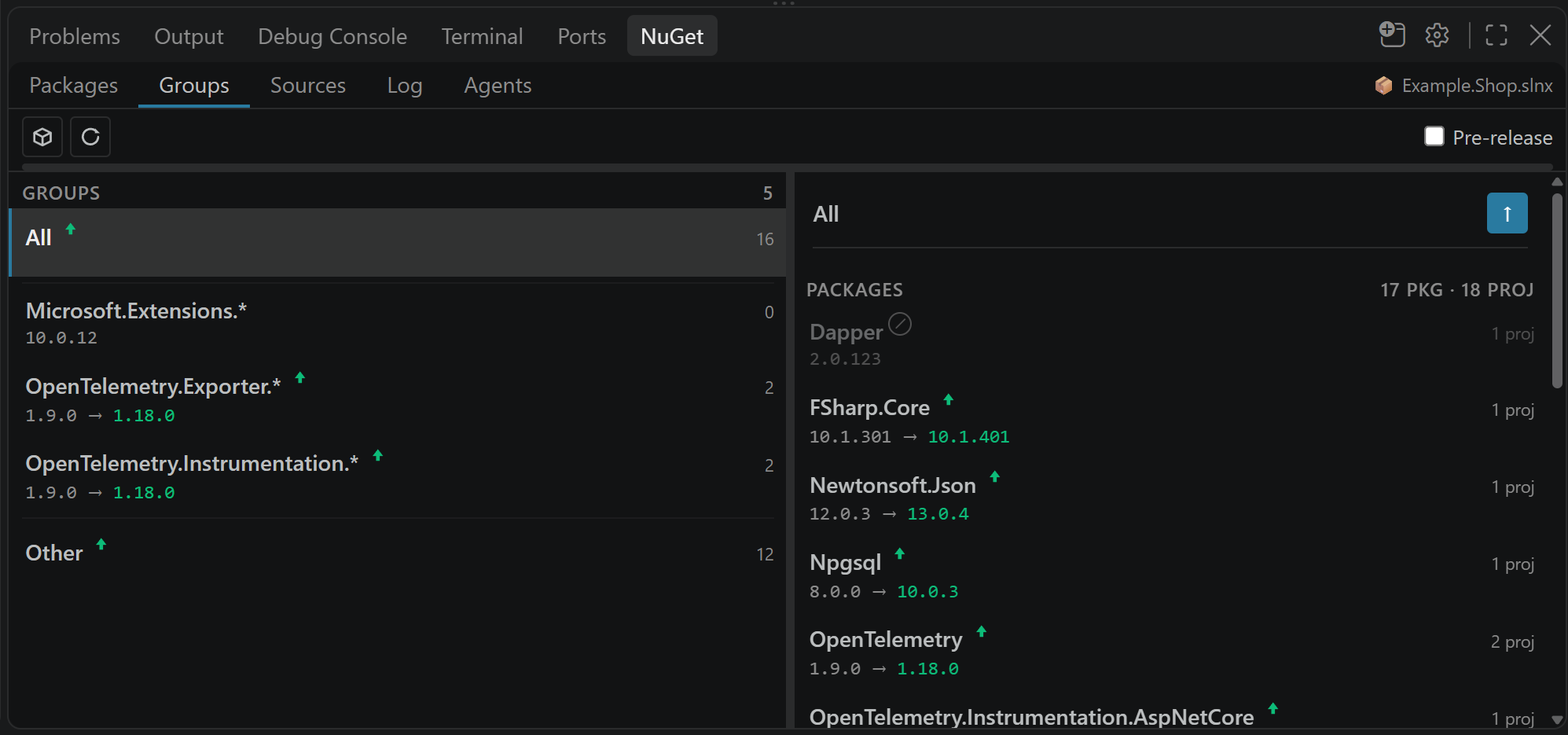
Vulnerabilities — checked, not guessed
Marks come from dotnet list package --vulnerable and follow the restore graph, so a package you only pull in transitively is still flagged. averenium.nugetManager.vulnerabilityScript can add findings from your own source (an internal feed, a corporate scanner) over a simple JSON protocol — see docs/vulnerability-script.md.
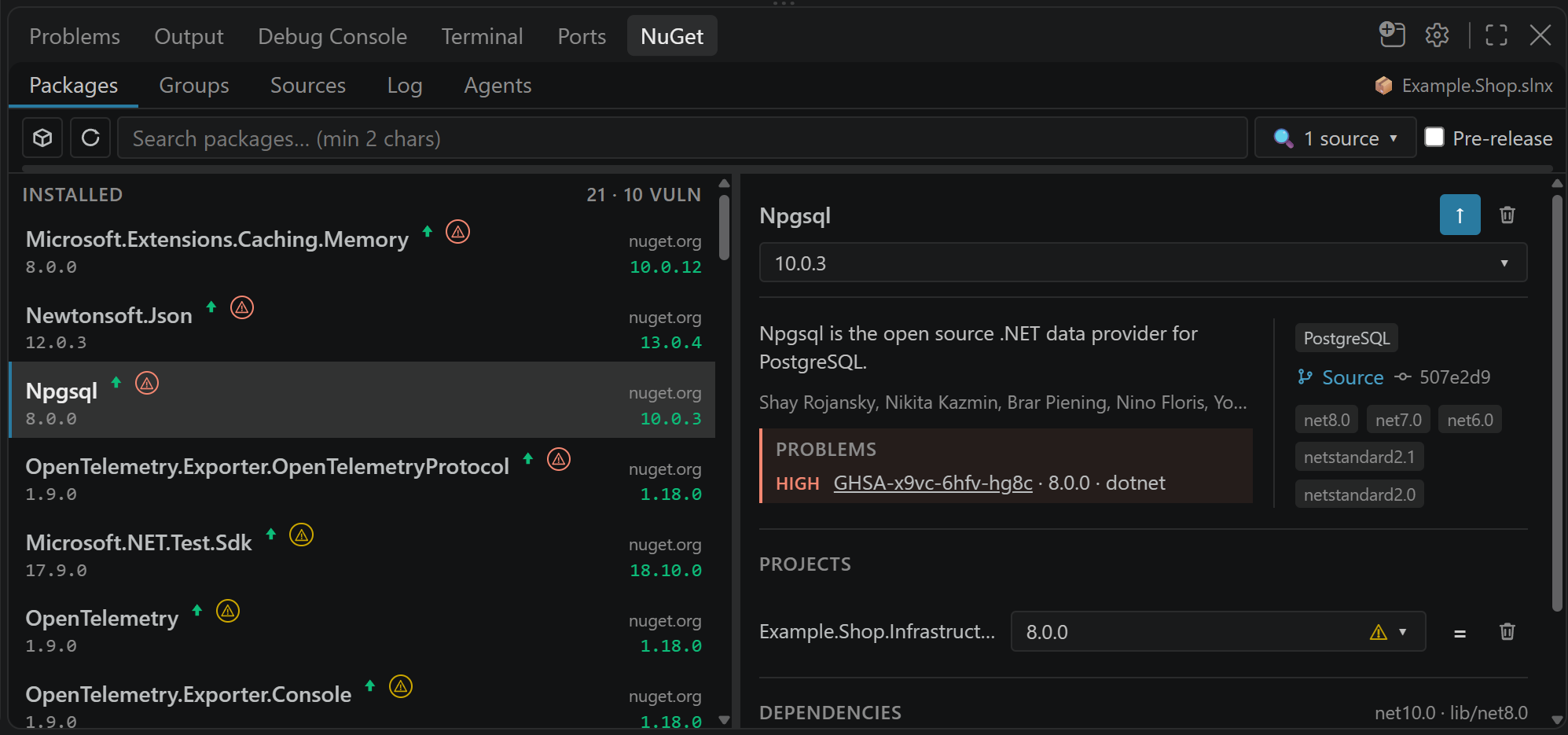
Licences — a bump can change one, and nothing else says so
A version bump can move a package from one licence to another. Restore succeeds, dotnet list package --outdated is silent, and the manifest diff shows a version number. SixLabors.ImageSharp states Apache-2.0 through 2.x and carries a split licence — commercial for a range of uses — from 3.x: taking that major on an "update all" acquires a licensing obligation with no warning anywhere in the process.
When the version you select declares a different licence from the one installed, the details panel says so in Problems, naming both — Apache-2.0 → LICENSE (file). A licence shipped as a file inside the package is the stronger case, because it is one this extension cannot name or read; it is marked as something to open rather than summarised.
A batch update asks before the first write instead of after the last. The confirmation lists every package in the set whose licence would move, and any row can be left out while the rest of the batch goes ahead. If the feeds cannot answer in time there is no question and the update proceeds, with the skip recorded in the Log — a batch you asked for is never held up by something that could not be established.
Two things it deliberately does not do. It never calls a change safe, an improvement or acceptable: those are readings of the licences themselves, and this is a package manager. And a version that merely adds an alternative — MIT becoming MIT OR Apache-2.0 — is not reported at all, since the terms you already comply with are still offered; only a change that takes something away, replaces the licence, or moves it into a file is worth interrupting you for.
Needs averenium.nugetManager.experimentalHttpCatalog, below: the licence of a version you have not installed exists only on the feed, and dotnet package search does not return it at any verbosity.
Multi-targeting — a version per framework, not one for all
A project that targets several frameworks can pin a package to a different version in each — net9.0 held on 9.x while net10.0 moves through 10.x — whether the condition sits on the <ItemGroup> or on the <PackageReference> itself. Plain dotnet add package cannot respect that: with no --framework the CLI rewrites every conditional group to the one version, so the net9.0 pin silently lands on a 10.x package and neither the restore nor the diff says a word.
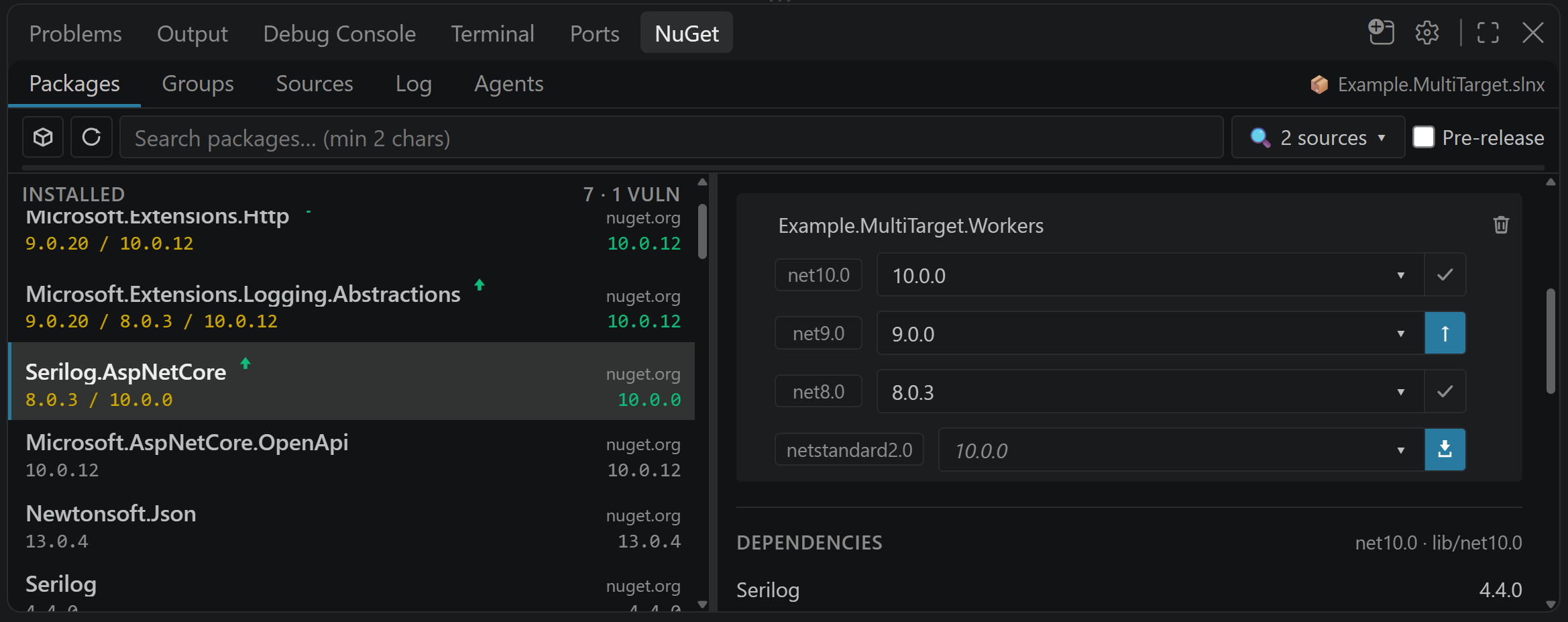
Here each framework is its own row, with its own current version, its own picker and its own update target computed inside its own major line — the net9.0 row proposes 9.x even when 10.x is out. Applying one writes that conditional group and nothing else. The picker still lists every version, so crossing a line stays possible; it just asks first and names what it would cross. A framework the package is missing from gets a row too, offering to add it there alone.
If the project holds one unconditional reference and you want a single framework moved, that is a split rather than an update — the reference is rebuilt as one conditional group per framework, the one you picked at the new version and the rest exactly where they were.
Sources — the whole nuget.config chain
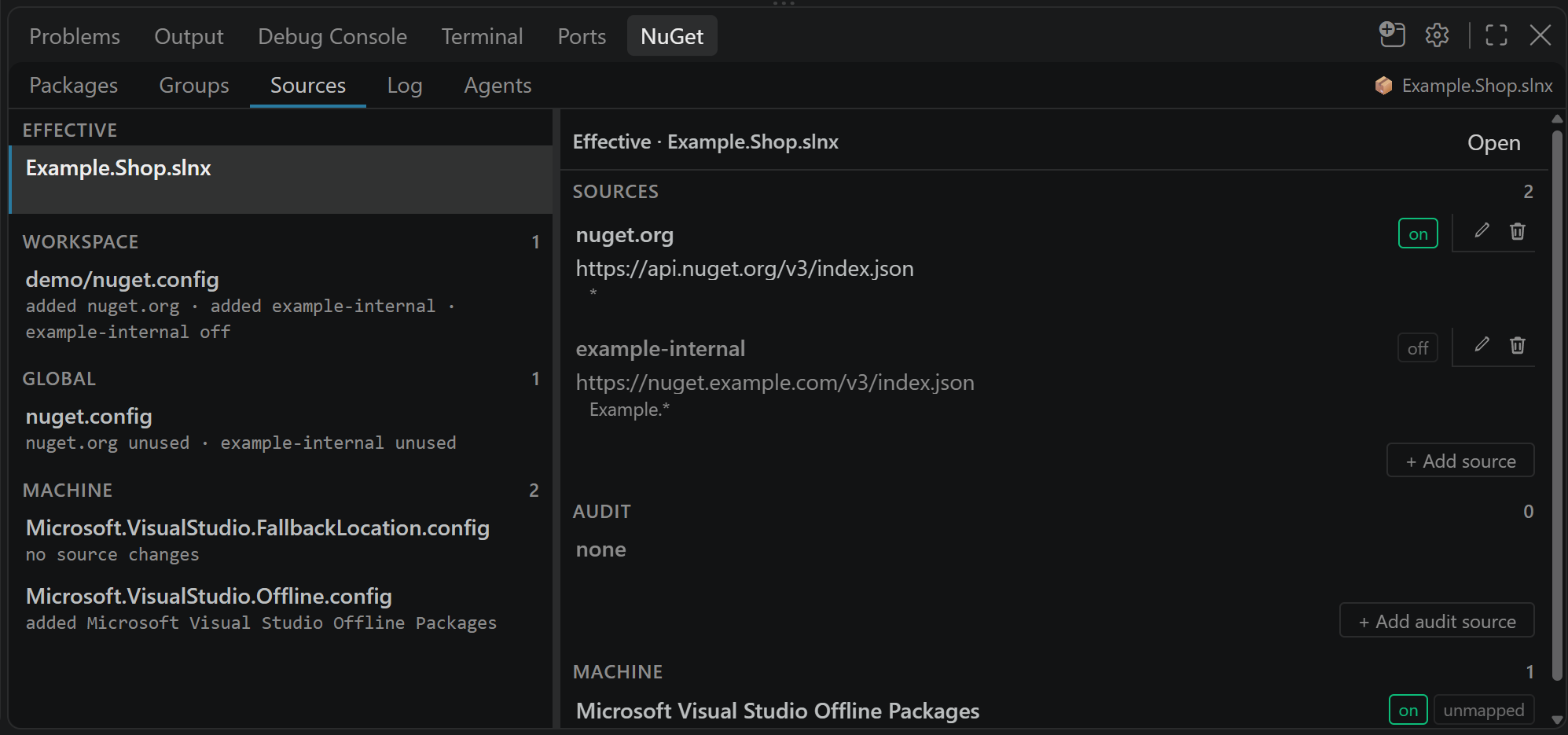
Toggle sources on and off, edit credentials, API keys and HTTP flags, and manage packageSourceMapping patterns per source (comma-separated, e.g. Example.*, Internal.*) — across the machine, user and repository configs at once, without opening any of them.
Agent skill — review a bump before you take it
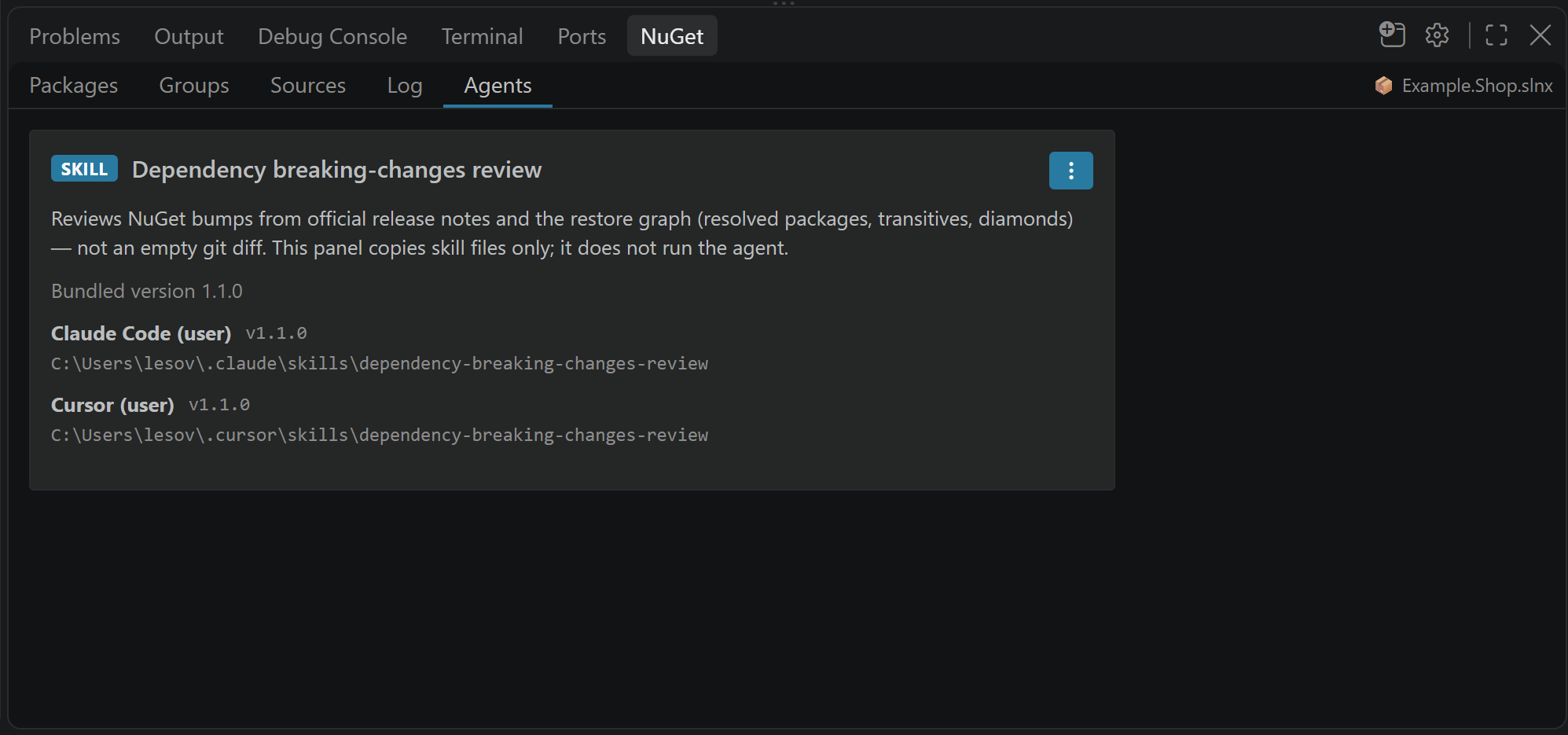
The panel installs packages; it does not judge whether a bump is safe. The Agents tab installs a Dependency breaking-changes review skill for Cursor, Claude Code or Kiro. Its bundled script reads your pending manifest diff, restores the dependency graph and collects every changed package's release notes, so the agent reviews real upstream notes instead of guessing. Details: docs/agent-skill.md.
Block updates — pin what must not move
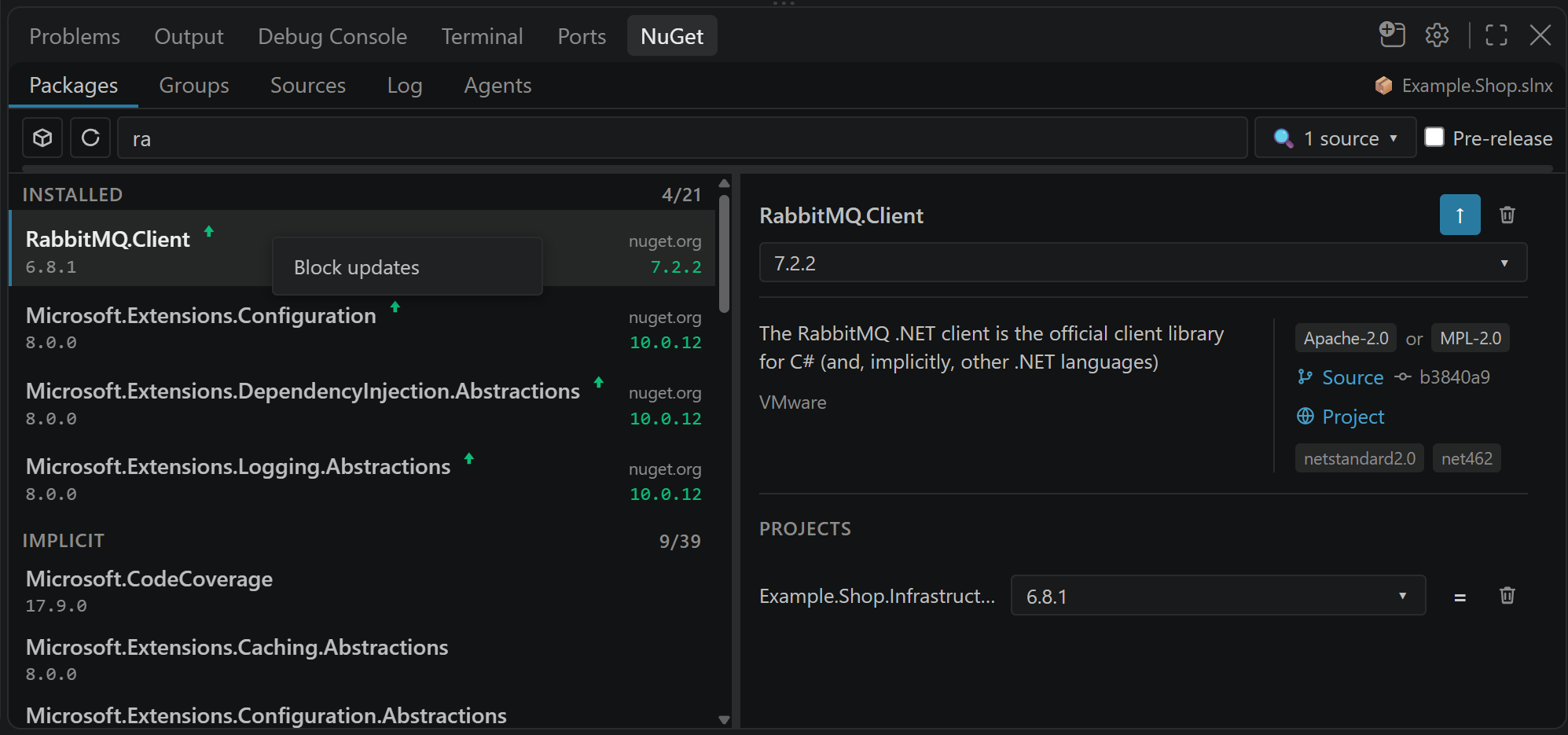
Right-click a package in Packages or a Groups preview and choose Block updates. The row keeps a ⊘ mark, batch updates skip it, and a click on ↑ only explains that it is pinned. The list lives in .vscode/settings.json (averenium.nugetManager.blockedPackages), so the pin is shared with the repository rather than living on one machine.
This is for the bump you already know you cannot take yet — RabbitMQ.Client 6.x to 7.x while half your libraries are still built against 6.x is the standing example. NuGet version ranges are minimums, so a restore of that bump succeeds without a warning and breaks at runtime instead; a pin is what stops it from being taken by an "update all" on a Friday.
Log and Trace — a bug report worth filing
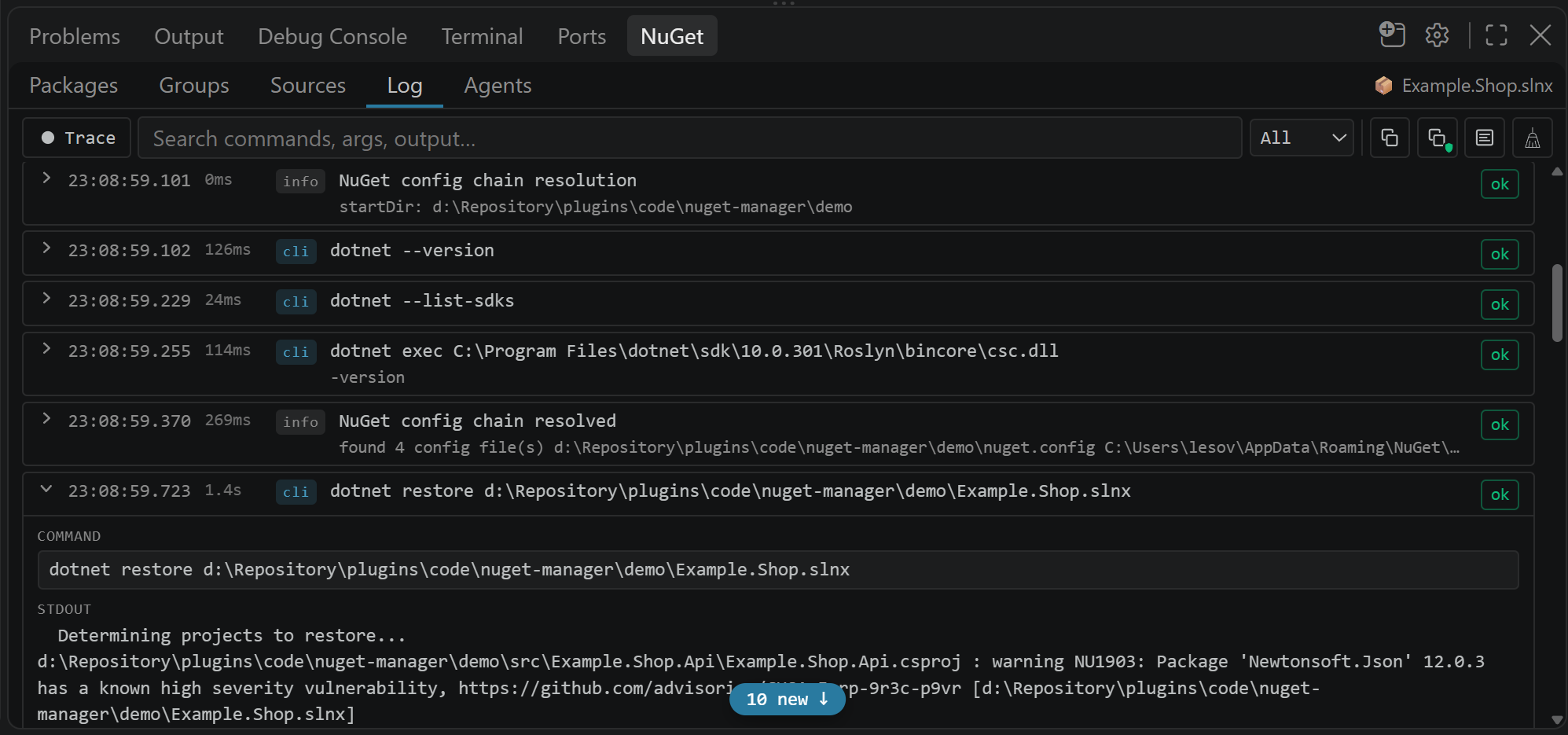
Every dotnet command the extension ran, with the full output, a failure-aware summary and a clickable NU-code chip. ● Trace records a sanitised zip — workspace paths, host name, project names and credentials replaced — that you can attach to a GitHub issue without leaking anything about your repository.
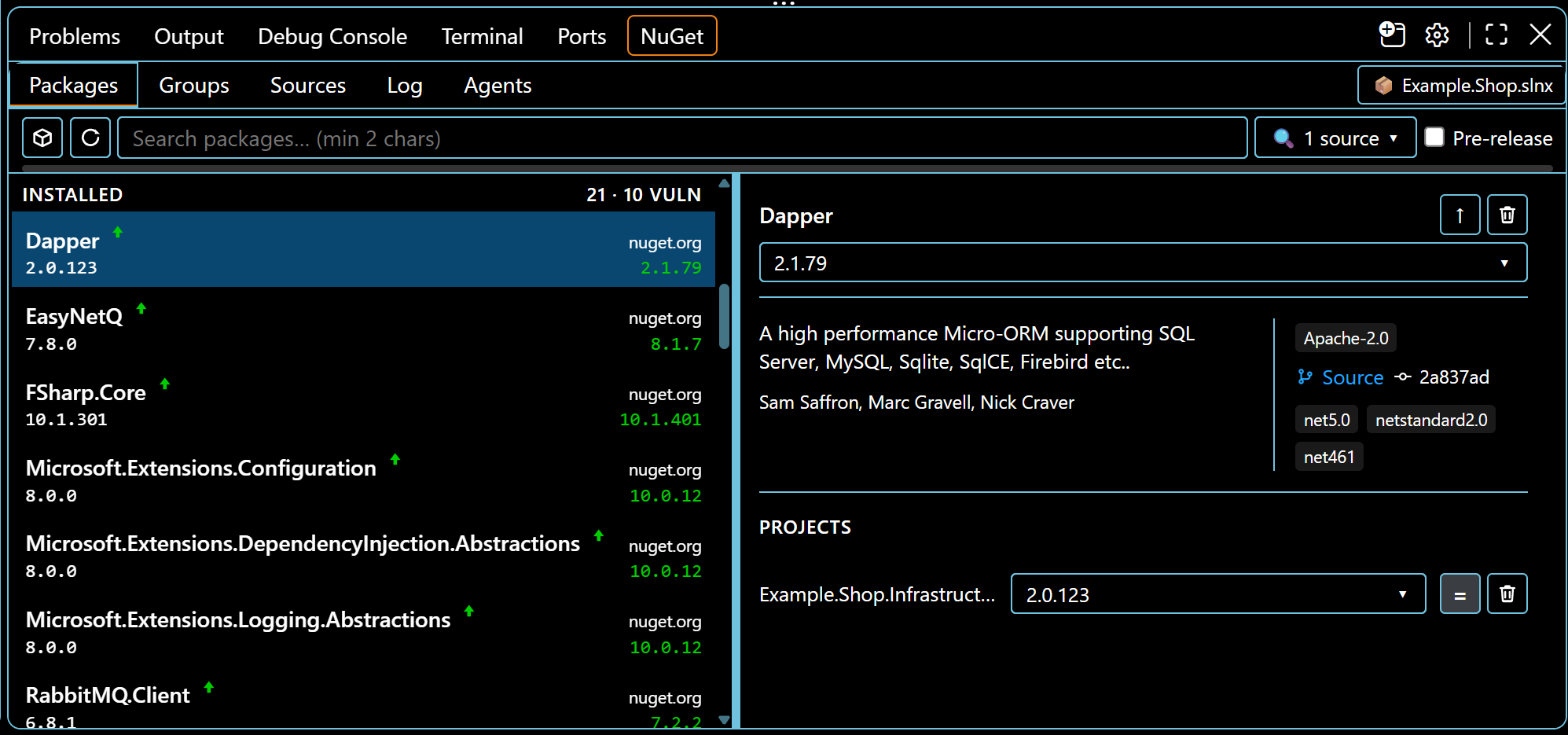
High Contrast — usable, not just installable
Every button, tab and status mark (↑ / ⊘ / ⚠ / ∅) keeps a real border or
outline under VS Code's High Contrast themes and Windows forced colors,
instead of relying on a colour swap that those modes discard. Hover is a visible
outline change rather than a background tint, so a control never disappears into
an identically-coloured background, and the marks are fixed-coordinate SVG icons
rather than Unicode glyphs, so they stay centred and legible at any font.
Where the panel lives
Drag the view title bar (or View: Move View) to the sidebar, the secondary sidebar or the panel. Open in New Window hosts the same UI as an editor tab in its own window. The gear opens this extension's settings.
You can also reach it from the Explorer context menu on a .sln / .slnx / .csproj / .fsproj, and switch scope by clicking the solution or project name in the panel's tab bar.
Settings
The gear on the NuGet title bar (or NuGet: Open Settings) opens them.
| Setting |
Default |
|
averenium.nugetManager.includePrerelease |
false |
Pre-release versions in search and "latest". |
averenium.nugetManager.dotnetConcurrency |
4 |
Max parallel dotnet processes (list, search, enrich, install, remove, restore). |
averenium.nugetManager.onFailedUpdate |
rollback |
After a failed restore (NU1605): roll back the project file, or keep the version and show Rollback. |
averenium.nugetManager.vulnerabilityScript |
"" |
Optional script adding extra vulnerability findings (JSON on stdin/stdout). See docs/vulnerability-script.md. |
averenium.nugetManager.blockedPackages |
[] |
Workspace package ids that must not change version. Right-click a row to block or unblock. |
averenium.nugetManager.experimentalHttpCatalog |
false |
Read versions, details, search and advisories from the feed over HTTP instead of the CLI. Every step falls back to the CLI, so switching it off restores the previous behaviour exactly. Licence comparison needs it. |
Requirements and limits
- The .NET SDK must be on
PATH; VS Code 1.85 or newer.
- The CLI is the default backend: ↑, Groups and the version list use feed latest from
dotnet package search, without checking whether that version is compatible with the frameworks the project targets. The Current Dependencies tree is the restore graph of the installed version. Reading the feed directly is available behind experimentalHttpCatalog and off until you turn it on.
- Groups will not target
Microsoft.CodeAnalysis.* above the Roslyn version bundled with the active SDK. Packages still lists nuget.org latest and asks before an over-cap upgrade.
- Scope is
.csproj / .fsproj in the first workspace folder — a solution, a project, or a folder of loose projects.
packages.config projects are skipped. Legacy non-SDK .csproj using PackageReference is updated in the XML, then restored.- Removing a source does not clean up its now-orphaned
packageSourceMapping, credentials or disabledPackageSources entries elsewhere in the chain.
Contributing
Bugs and feature requests: GitHub Issues. A Trace zip attached to the report is the fastest path to a fix. Implementation notes live in docs/.
If the extension saves you time, a rating on the VS Code Marketplace or a star on Open VSX helps other .NET developers find it.
License
MIT — see LICENSE.

