Dep-Man • Dependency Manager



Analyze and update package dependencies directly in Visual Studio Code.
Real-time dependency health monitoring with inline indicators, hover details, and one-click updates.





- Features — Sidebar Overview, Settings, CodeLens, Batch Update, Problems Panel, Hover, Multi-File, Folder Exclusion
- Supported Ecosystems — npm, pip, uv, Conda, pub
- Commands — Command Palette & keyboard shortcuts
- Configuration — Settings & GitHub Token
- Privacy & Security
Features
Sidebar Overview
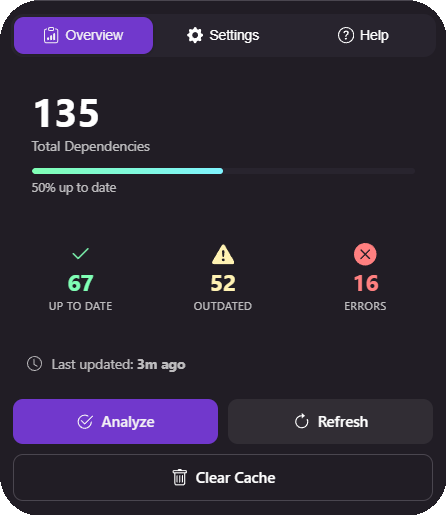
Monitor your project's dependency health from the Activity Bar. The Overview tab shows total dependencies, a progress bar, and stat cards for up-to-date, outdated, and error counts — with quick action buttons to analyze, refresh, or clear cache.
|
|
|
Advanced Settings
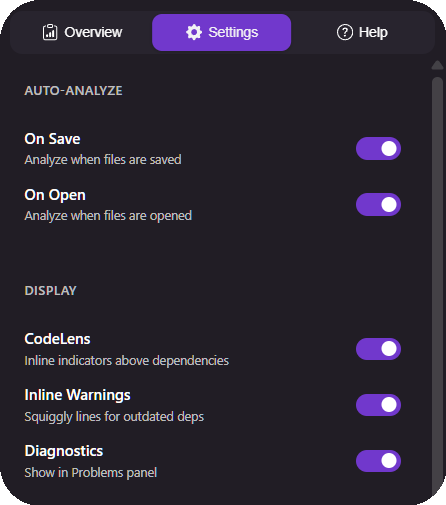
Fine-tune how analysis is performed and displayed. Toggle CodeLens indicators, inline warnings, diagnostics, auto-analysis behavior, folder exclusions, and configure a GitHub token for private repos — all from the integrated settings tab.
|
CodeLens & Inline Warnings
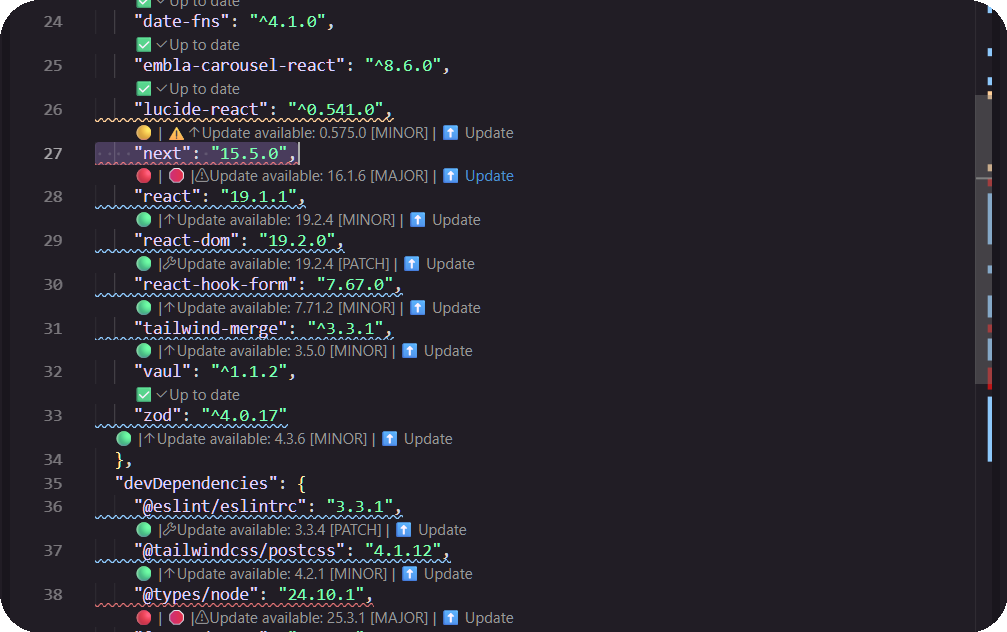
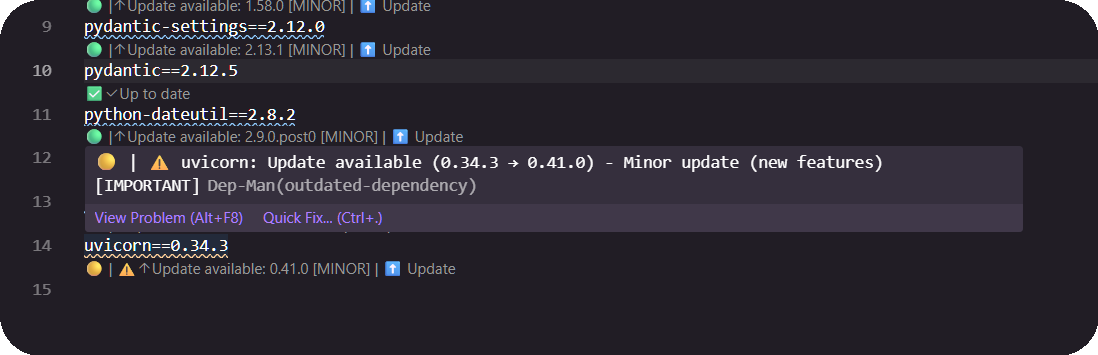
See the status of every dependency right in your editor — green for up-to-date, yellow for outdated, and red for errors. Inline squiggly lines highlight issues instantly.
|
|
|
Problems Panel Integration
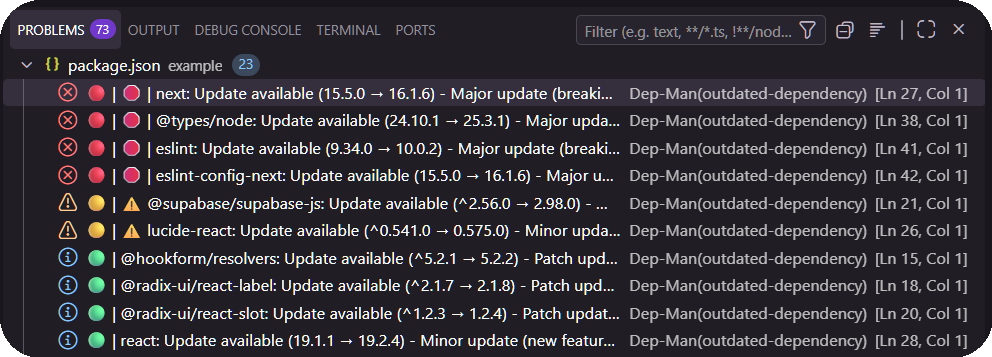
Outdated and problematic dependencies appear directly in VS Code's Problems panel, so you never miss an issue.
|
Hover Details
Hover over any dependency to see a rich tooltip with version info, severity badges, update type (MAJOR / MINOR / PATCH), and quick links to documentation and registry.
|
|
|
Multi-File Support
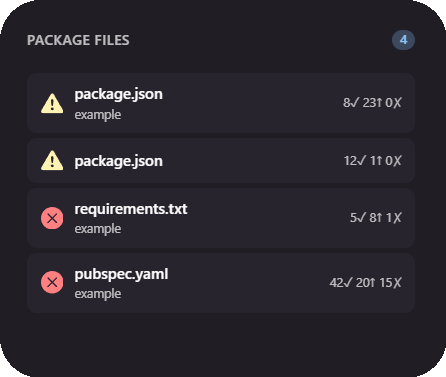
Handles supported package files across your workspace — package.json, requirements.txt, pyproject.toml, environment.yml/environment.yaml, and pubspec.yaml — all at once.
|
Smart Folder Exclusion
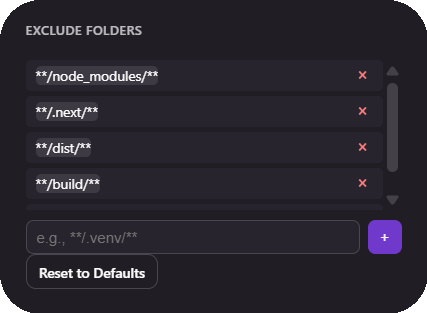
Configure which folders to skip during analysis with an embedded workspace folder picker or manual entries. Automatically excludes node_modules, dist, build, vendor, virtual environments (venv, .venv), monorepo caches (.pnpm-store, .turbo, .nx), and build outputs.
|
|
Batch Update
A summary banner at the top of every package file shows total outdated dependencies broken down by type — 🛑 MAJOR, ⚠️ MINOR, and 🟢 PATCH.
Use [⬆️ Full Update] to update everything at once, or [🛡️ Safe Update] to apply only minor and patch versions, skipping major releases that may contain breaking changes.
Supported Ecosystems
| Ecosystem |
File |
Package Manager |
| Node.js |
package.json |
npm |
| Python |
requirements.txt |
pip |
| Python / uv |
pyproject.toml |
uv |
| Python / Conda |
environment.yml, environment.yaml |
Conda + pip |
| Flutter/Dart |
pubspec.yaml |
pub |
- uv: Dep-Man reads PEP 621 dependencies from
[project], optional dependency groups, and [dependency-groups]. Dependency status is resolved through PyPI. Git, local-path, and tool.uv.sources dependencies are not analyzed.
- Conda YAML: Dep-Man reads only packages inside the
pip: subsection. Native Conda channel packages are intentionally skipped because they are not PyPI packages.
Commands
Access via Command Palette (Ctrl+Shift+P / Cmd+Shift+P):
| Command |
Description |
| Dep-Man: Analyze Dependencies |
Analyze the active package file |
| Dep-Man: Analyze Workspace |
Analyze all package files in workspace |
| Dep-Man: Full Update |
Update all outdated packages, including major versions |
| Dep-Man: Safe Update |
Update only minor and patch versions, skipping major releases |
| Dep-Man: Show Analysis |
Open detailed analysis webview |
| Dep-Man: Configure GitHub Token |
Set token for private repos / higher rate limits |
Keyboard Shortcuts
| Shortcut |
Action |
Ctrl+Alt+A (Cmd+Alt+A on Mac) |
Analyze Dependencies |
Ctrl+Alt+U (Cmd+Alt+U on Mac) |
Full Update |
Configuration
| Setting |
Default |
Description |
depman.apiEndpoint |
https://api.depman.cloud |
API endpoint URL |
depman.autoAnalyzeOnSave |
true |
Auto-analyze on file save |
depman.autoAnalyzeOnOpen |
true |
Auto-analyze on file open |
depman.showCodeLens |
true |
Show inline CodeLens indicators |
depman.showDiagnostics |
true |
Show issues in Problems panel |
depman.showInlineWarnings |
true |
Show inline squiggly line warnings |
depman.excludeFolders |
node_modules, .next, dist, build, .git, .venv, venv, vendor, .output, out, .pnpm-store, .yarn, .turbo, .nx, .cache, coverage, .dart_tool |
Folders to exclude from analysis |
GitHub Token
For private repositories or to increase API rate limits (60/hour → 5,000/hour), configure a GitHub token via the Command Palette: Dep-Man: Configure GitHub Token. Tokens are stored securely using VS Code's SecretStorage.
Privacy & Security
- No telemetry — the extension doesn't collect or send usage data
- Local parsing — file analysis happens entirely on your machine
- Encrypted tokens — GitHub tokens stored in VS Code's SecretStorage
- HTTPS only — all API communication is encrypted
- Open-source API — the backend at
api.depman.cloud is public and auditable: depman-api
Links
Made with ☕ by Avenca Digital
| |

