PortPilot for VS Code
What is running on your ports, which project and coding agent it belongs to, and what was left behind. No setup, no app registry: PortPilot sees every dev server already running and works out the rest.
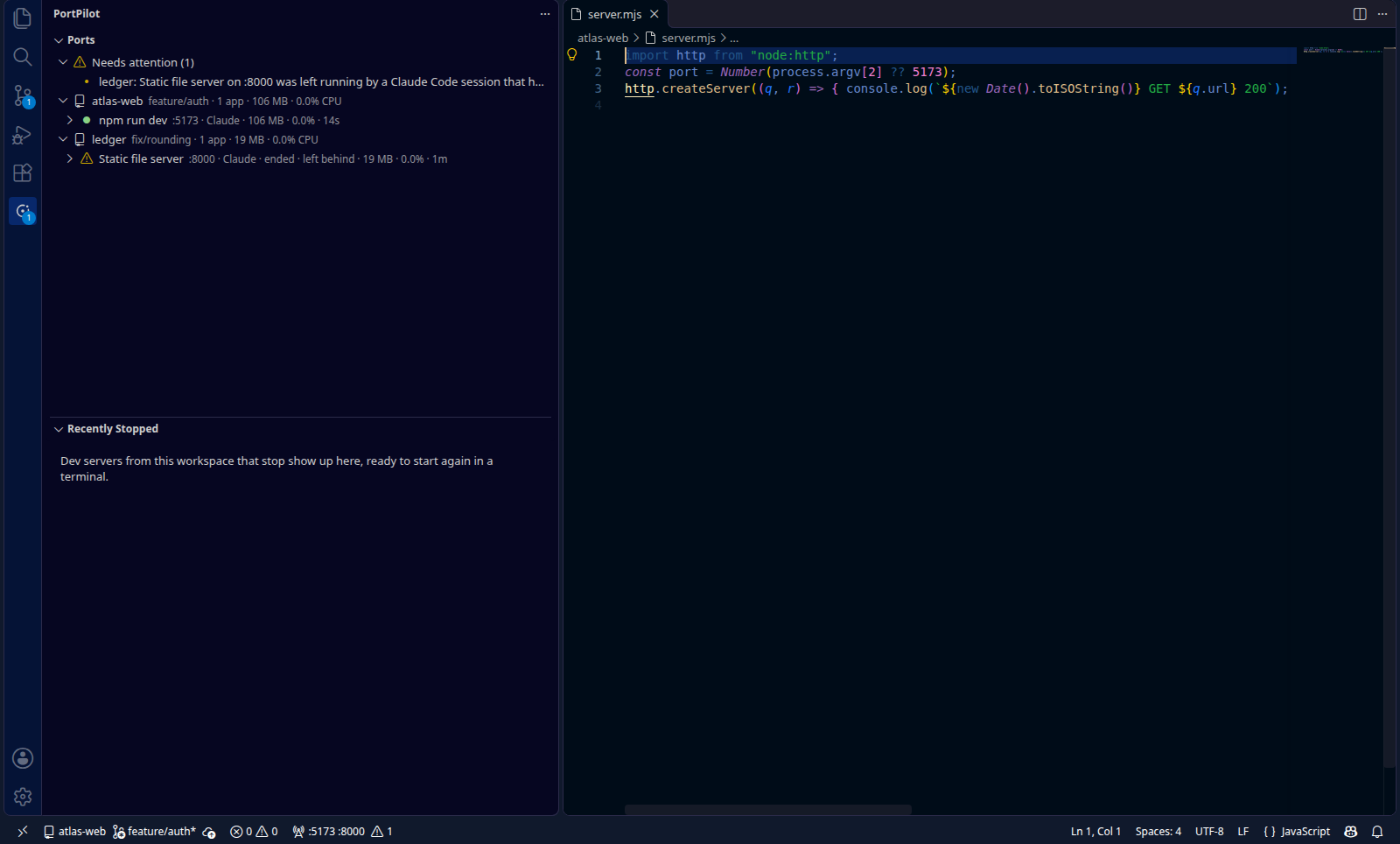
What it does
- Apps, not ports. The overview shows one line per app: a dev server with its watcher and workers, a database, a container. Each has a name you'd recognise (Vite dev server, Django dev server, npm run dev), its memory and CPU, its uptime, and the agent that started it. Totals are shown per project, and Needs attention lists what's wrong in plain sentences. Switch to All ports for the full table.
- Every port, grouped by project. Each process's working folder is matched to its git repository, branch and worktree, so ports show up under atlas-web · feature/auth rather than as a wall of PIDs. Editors, language servers and build daemons are hidden unless you ask for them.
- Knows which agent started what. A server started by Claude Code, Codex, Gemini CLI, Aider, Cursor Agent or opencode, through any shell command, is tagged with that agent. No special launcher needed.
- Finds what an agent left behind. When a session ends but its dev server keeps the port, the row says left behind. Clean up stops all of them, for one project or every project.
- Tells you when a server stops, and starts it again. If a dev server in this workspace goes down, you get a toast with Start Again. It reruns the same command from the same folder in a terminal. Stopped servers stay in Recently Stopped.
EADDRINUSE, answered where you see it. "address already in use :3000" in the terminal becomes a link to who holds the port, with stop, open, output, health, and find a free port instead.
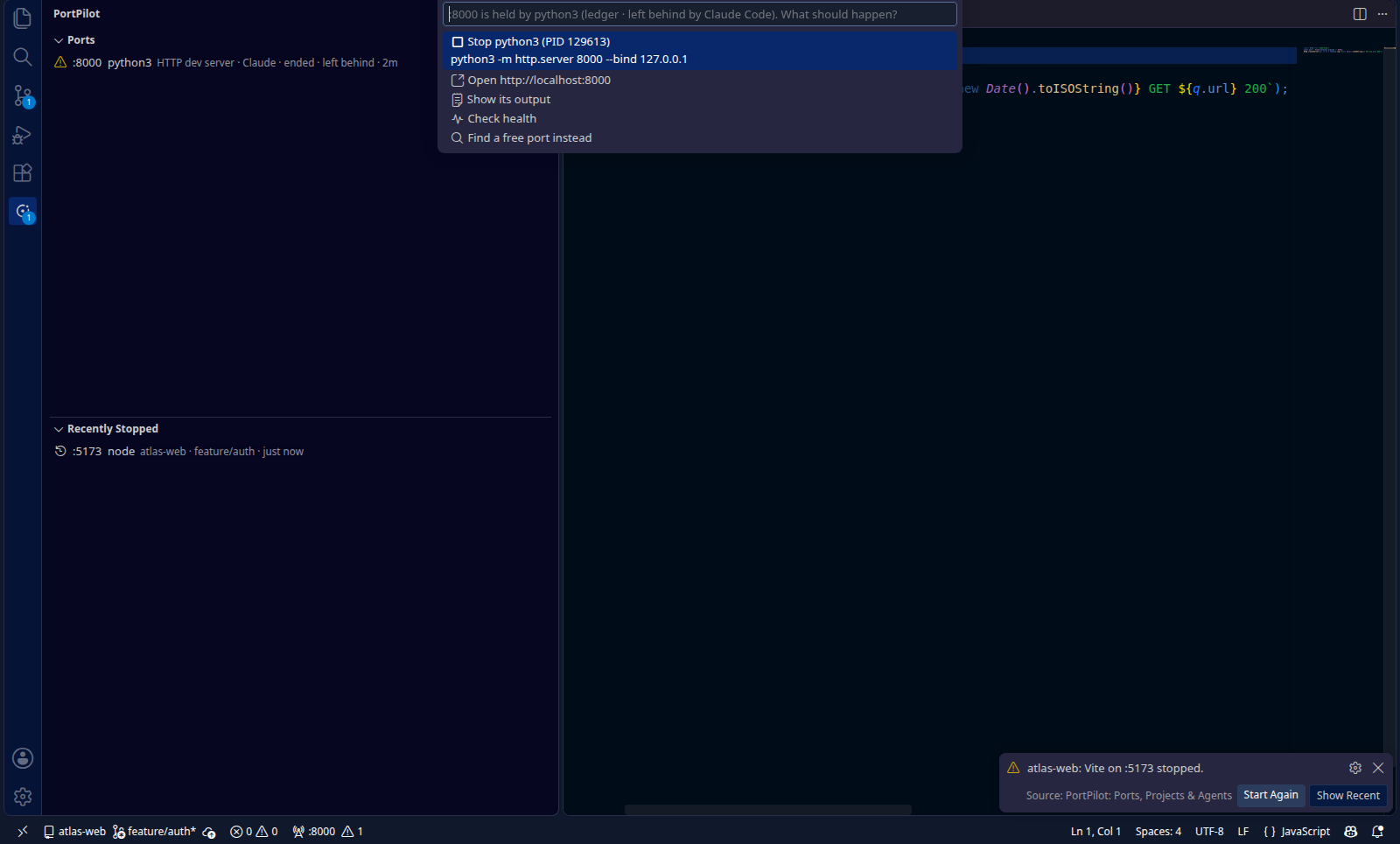
- Per port: open in browser, show output (from a redirected log file or the systemd journal), check health (HTTP status and latency), copy the URL or PID, and stop it (it asks first). Each row shows the runtime (Node.js, Python, Go, Java, database, Docker, …) and how long it has been up.
- Status bar: this workspace's ports, plus a warning count for anything left behind.
- For agents too. PortPilot's MCP server is offered to agents in VS Code (e.g. Copilot agent mode). PortPilot: Set Up Claude Code Integration adds a session-end hook, a guard that stops Claude starting a second copy of a dev server that is already running, a status line, and the MCP server.
Light by design
There is no runtime to install and no background service. While the window is focused, the extension keeps one small native process running (bundled for your platform). It reads the OS's socket tables directly, in about a millisecond per scan, and uses about 0.3% of one CPU core and 12 MB of memory. When the window loses focus, the process exits.
Settings
| Setting |
Default |
|
portpilot.view |
overview |
ports shows one row per endpoint instead of apps. |
portpilot.scope |
workspace |
all shows every listening port on the machine. |
portpilot.notifyOnStop |
true |
Toast with Start Again when a workspace dev server stops. |
portpilot.notifyOnStart |
false |
Toast when a new server starts listening in the workspace. |
portpilot.showTooling |
false |
Show editors, language servers and build daemons. |
portpilot.ignorePorts |
[] |
Ports never to show. |
portpilot.hideSystemPorts |
true |
With scope: all, hide ports below 1024. |
portpilot.refreshSeconds |
3 |
|
portpilot.statusBar |
true |
|
portpilot.registerMcpServer |
true |
|
portpilot.cliPath |
|
Use a specific portpilot binary. |
PortPilot is also a desktop app (Windows, macOS, Linux), a terminal app, and a JetBrains plugin: github.com/Atrix21/port-pilot.
| |

