Intellisense Click CSS
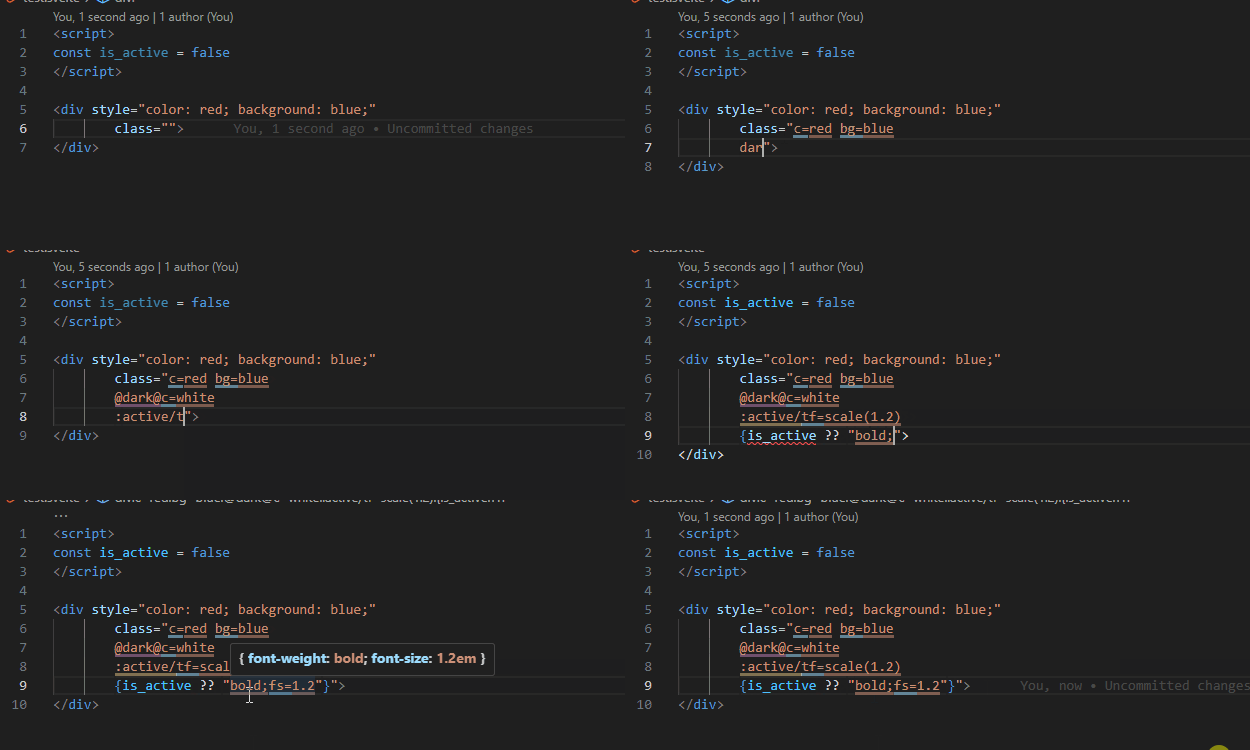
Editor support for Click CSS, which lets you write CSS — declarations, selectors and media queries — in the class attribute, compiled in the browser with no build step.
- Hover preview — the CSS a class compiles to, without leaving the markup
- Syntax highlighting — media query, selector, property and value underlined apart
- Autocomplete — shorthands for properties, values and media conditions
Works in any file the parser can find a class="..." in — HTML, Vue, Svelte, Angular, Alpine.js, HTMX, Astro, JSX and TSX (React, Preact, Solid, Qwik, Stencil), Razor (ASP.NET Core MVC, Razor Pages and Blazor), Pug (including Vue <template lang="pug">), Markdown, and server templates such as PHP, Blade, ERB, Twig, Jinja, Liquid, Handlebars and Hugo. Markup in JavaScript or TypeScript is picked up from html and svg tagged templates (Lit), templates marked with an html comment, and Angular template strings.
In Razor files, @ is written @@ (@@md@@display=flex), as Razor requires; previews read it as the page renders it, and media condition completions insert @@…@@.
If your project edits the shorthand tables in click-css.js, mirror them under the click-css.custom.shorthand_for_properties, click-css.custom.shorthand_for_values and click-css.custom.shorthand_for_media_condition settings so previews and completions match. Previews always use px as the default unit.
Requires VS Code 1.100 or newer.
winget upgrade --id Microsoft.VisualStudioCode
Documentation · Changelog

