hipercampo — memory viewer for VS Code
See and explore an agent's hipercampo memory without leaving the editor. The viewer is
local-first: it opens no network connection and never accesses SQLite directly. It calls
the hipercampo CLI, which already enforces contexts, migrations and isolation.
The extension follows the language configured in VS Code. English is the fallback and
Spanish is fully localized. Leer en español.
Open the viewer
- Select Hipercampo in the status bar to open a wide editor panel.
- Select the hipercampo graph icon in the Activity Bar to use the complete sidebar view.
- Or run hipercampo: view memories from the Command Palette.
The viewer watches the .db and .log files, so visible data refreshes automatically
while agents remember, retrieve and make decisions.
What it shows
The nine views expose the memory instead of reducing it to a flat note list:
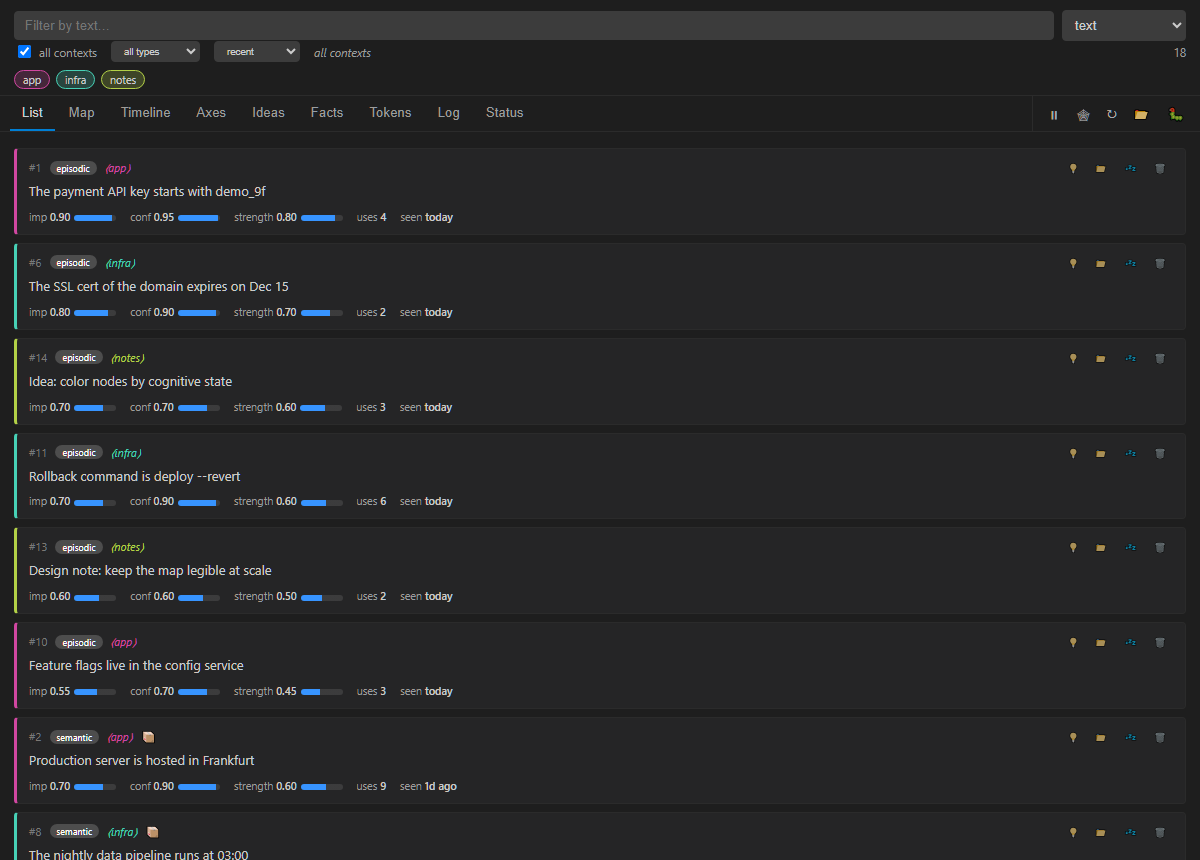
- List — memory text, kind, importance, reliability, strength, uses and last access.
Actions can discover connections, move context, forget, wake or permanently delete.
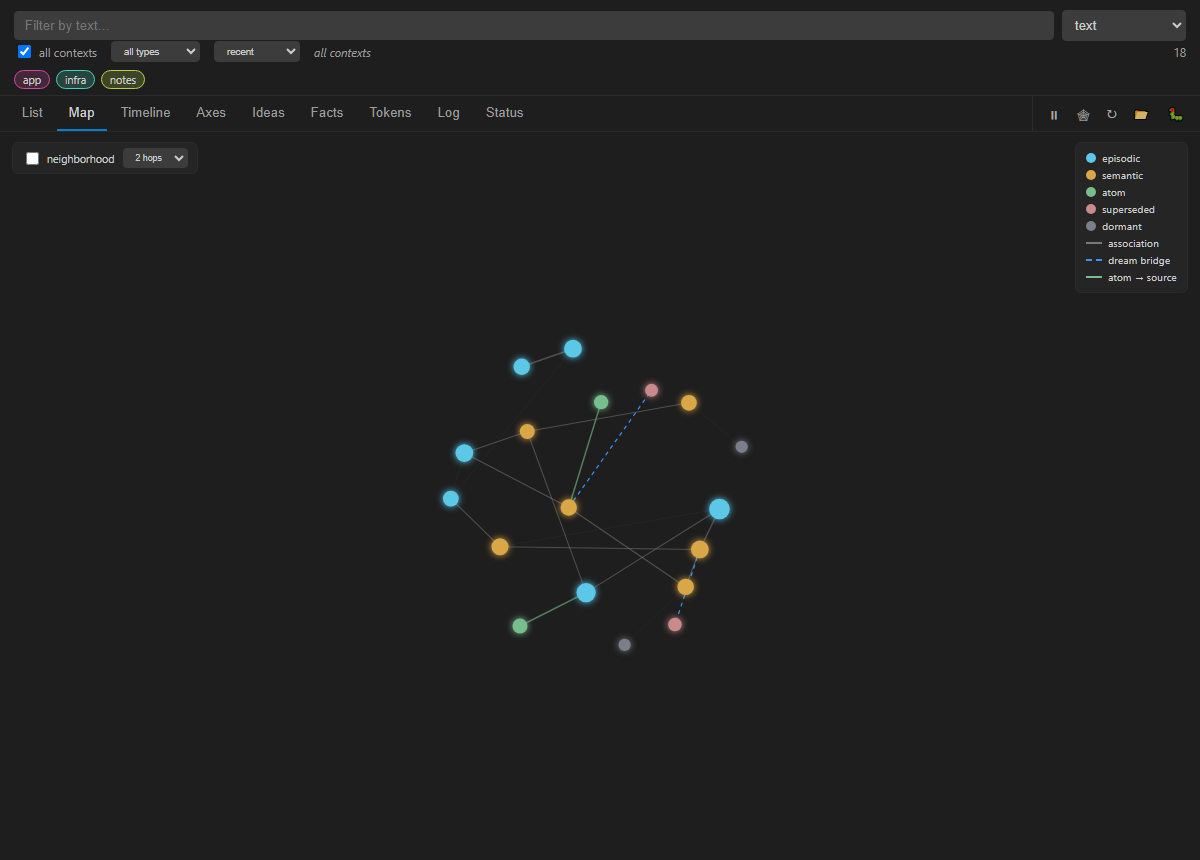
- Map — the associative graph, including navigation links, dream bridges and atoms
connected to their source. Nodes can be dragged, zoomed and inspected.
- Timeline — recent access and strength, including memories close to dormancy.
- Axes — importance × reliability, with strength encoded by size.
- Ideas — explicit hypotheses produced by bridges between distant memories.
- Facts — structured subject/predicate/object/time/source records and their history.
- Tokens — estimated context cost, savings, budgets and injection history.
- Log — live, structured decisions from recall, remember, sleep, forget and hooks.
- Status — CLI, database, schema, memory, MCP processes and audit-log health.
Search and curation
- Text filters the loaded memories instantly and never abstains.
- Recall, recall auto and recall nav query memory like an agent. Result cards
explain score components, navigation mode and visited-node cost.
- Muse surfaces indirect and dormant connections for exploration.
- Context chips filter every view. Memories can be moved to an existing or new context.
Forgetting is reversible: it only makes a memory dormant. Permanent deletion is physical,
irreversible and always requires modal confirmation before the CLI performs the purge.
Requirements
Install hipercampo first:
pip install --pre hipercampo
If hipercampo is not on the PATH inherited by VS Code, the extension automatically tries
python -m hipercampo.cli, python3 -m hipercampo.cli and py -m hipercampo.cli. You can
also set an explicit command.
Settings
| Setting |
Default |
Purpose |
hipercampo.command |
hipercampo |
Executable, full path or python -m hipercampo.cli. |
hipercampo.dbPath |
empty |
Memory .db file (HIPERCAMPO_DB); empty uses the CLI default. |
hipercampo.namespace |
empty |
Context (HIPERCAMPO_NAMESPACE). |
hipercampo.allNamespaces |
true |
Show the whole file instead of one context. |
Development
cd editor
npm install
npm test
npx playwright install chromium
npm run test:e2e
Open editor/ in VS Code and press F5 to launch an Extension Development Host.
Marketplace release instructions are in PUBLISHING.md.
npm test compiles and checks the manifest/localisation contract. npm run test:e2e
executes the standalone webview in Chromium, including rendering, filters, the map,
extension messages and stored-markup escaping. CI runs both with npm run test:all.
Data boundary
All reads and mutations go through public CLI commands such as graph, status, tokens,
log, facts, recall, muse, reclassify, dormant and purge. Audit output stays on
stderr, leaving stdout as machine-readable JSON. The webview has a restrictive CSP and no
remote dependencies.

