
RizomaDB — Database Client for VS Code
All your databases, one place. Free.

RizomaDB is a multi-engine database client for VS Code. Connect to 25 engines from one screen, run queries in each engine's own language, explore and edit data in place with changes you review and apply in a single transaction, and keep production safe with policies and an audit trail.
Apache-2.0 · no telemetry · no accounts · no locked features.
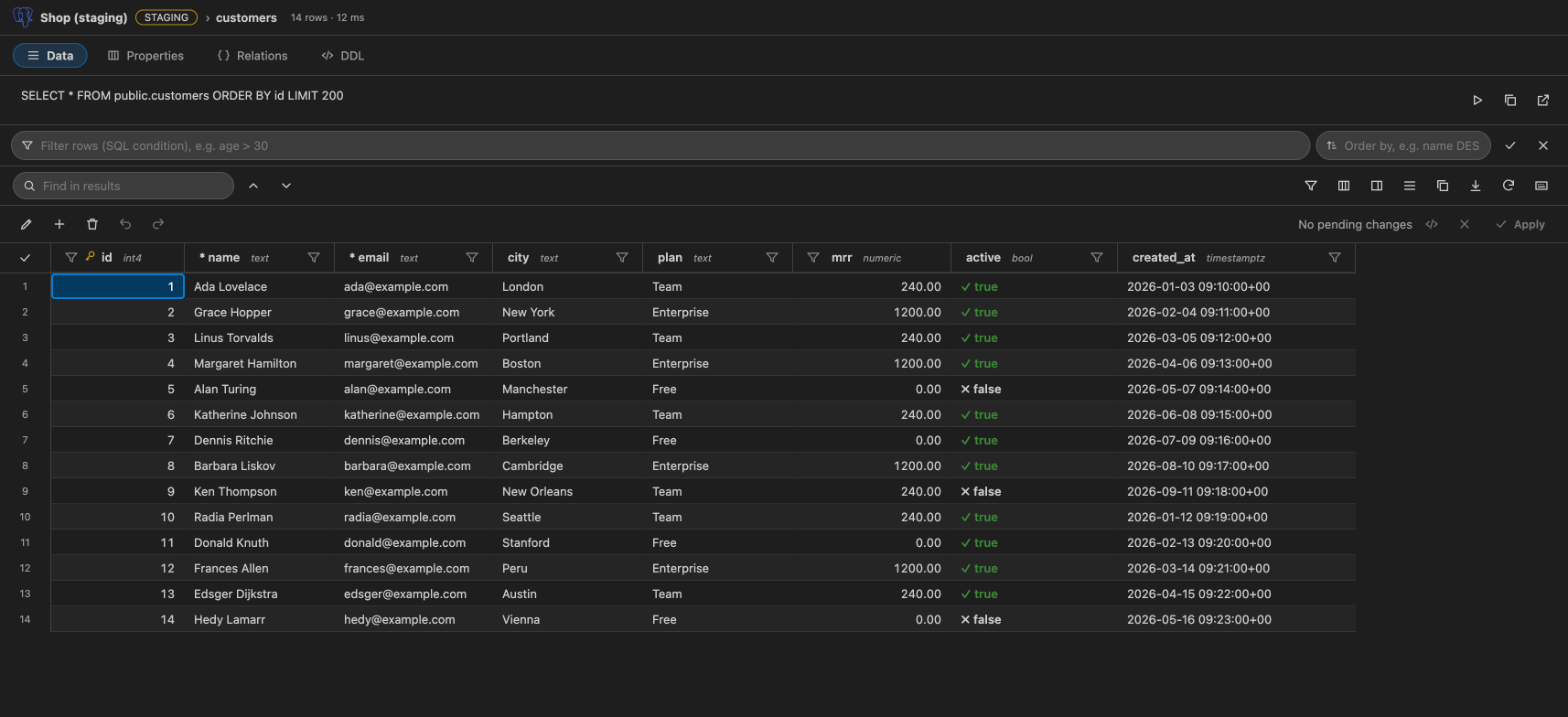
Screens in this page are shown with sample data.
Highlights
- 25 engines, one interface: PostgreSQL, MySQL, MariaDB, SQL Server, Oracle, SQLite, MongoDB, Redis, Elasticsearch, Neo4j, ClickHouse, DynamoDB, Firestore, Cassandra, Trino, InfluxDB and more.
- A results grid built for exploring: sort, filter in the rows or in the database, resize and hide columns, record panel, column statistics, copy or save as CSV, TSV, JSON or Markdown.
- Safe editing: double-click a cell, review the exact SQL, apply everything in one transaction. Conflicts are detected before anything is written.
- Safe by default: read-only production, confirmations, layered policies where the strictest rule wins, column masking and a local audit log.
- Private: no telemetry and no network calls of its own. Passwords live only in VS Code's secret storage.
- Accessible: keyboard reachable, WCAG 2.2 AA checked with axe in light and dark themes.
- English and Spanish interface, plus an interactive guide inside the extension.
Connect to any engine
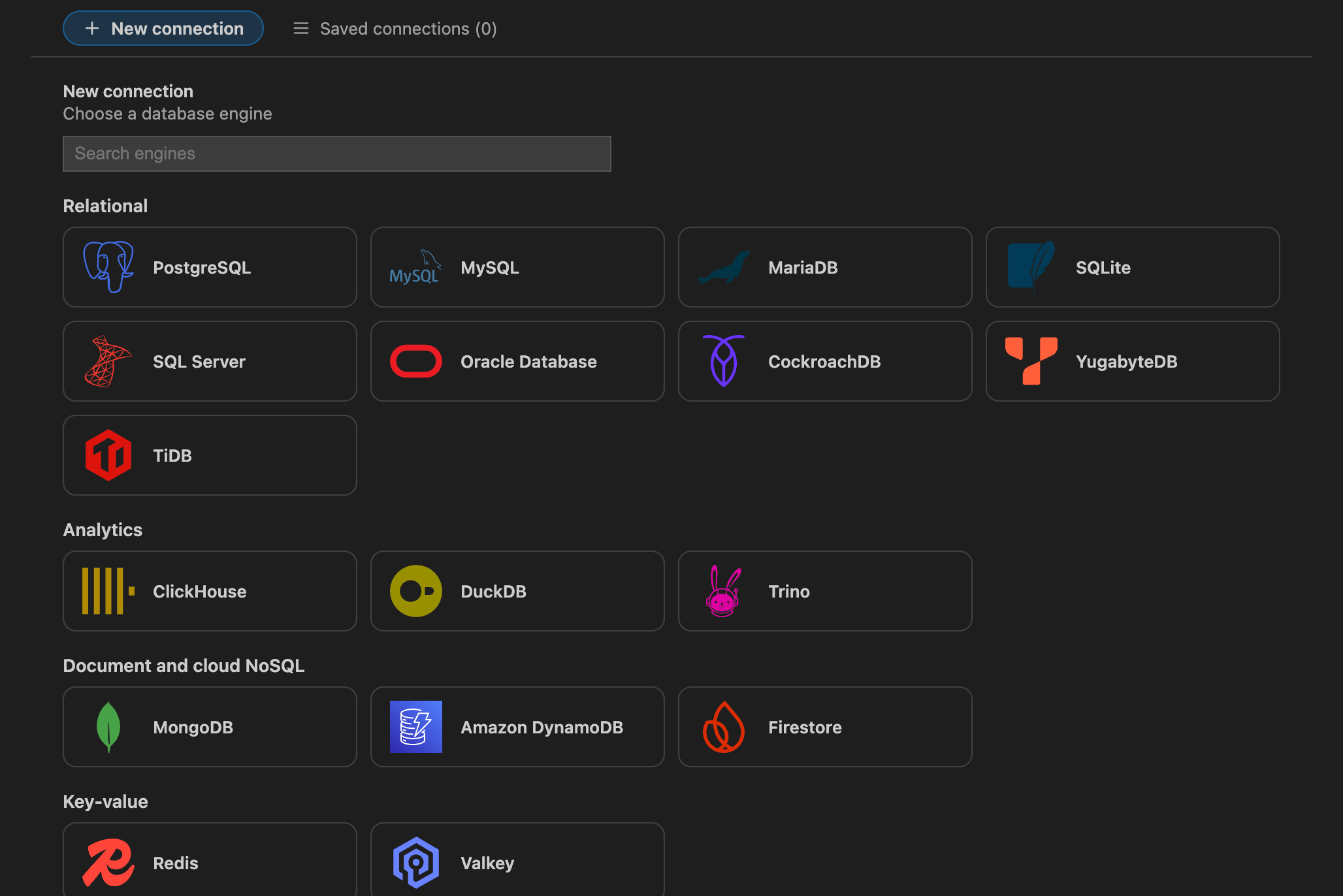
Click the RizomaDB icon, press +, and pick your engine by its logo. The form already has the usual host, port and user for that engine. Add the password, choose an environment (dev, staging, prod or your own), and test the connection.
- Environments with protection:
prod is read-only by default and staging asks before every write.
- SSH tunnels (including jump hosts with strict host-key checking), HTTP and SOCKS5 proxies.
- Shared catalogs without secrets for teams, and encrypted connection files you can send safely.
- Paste a JDBC URL (Oracle, PostgreSQL, MySQL, SQL Server and more) to fill the form, or import connections from URIs,
~/.pgpass, ~/.my.cnf, DBeaver and SQLTools.
Query in each engine's language
Open RizomaDB: New Query and write SQL, Mongo shell, Redis commands, Cypher, Elasticsearch REST requests, CQL, Flux, PartiQL or Firestore JSON. Every statement gets a Run button; Ctrl/⌘+Enter runs the one under the cursor.
- Run all, Explain, parameters (
:name, $1, ?), statement highlighting.
- Build a query without typing SQL: pick a table, columns, conditions and order.
- Notebooks (
.sqlnb): SQL cells with their results, saved as plain JSON.
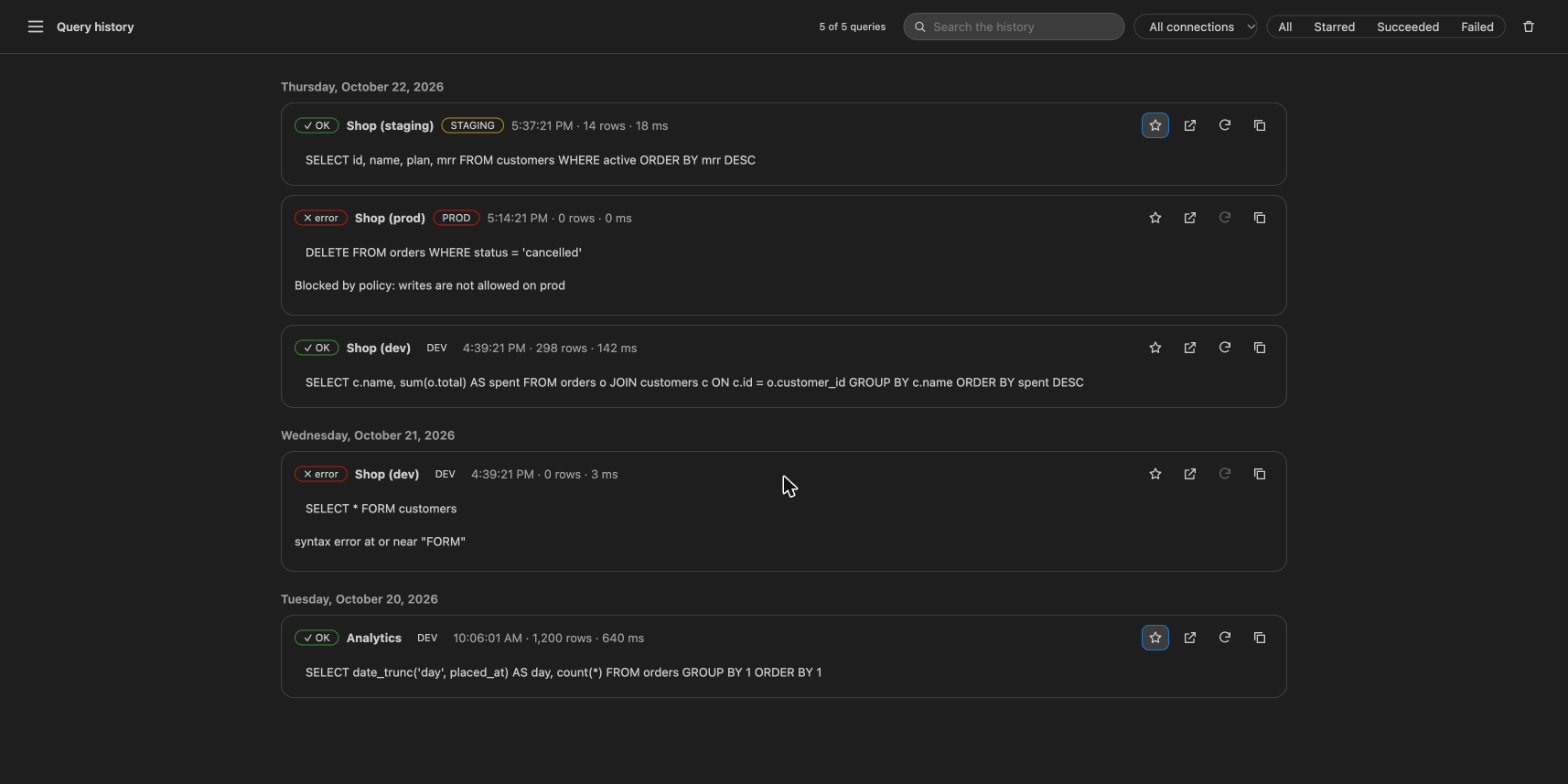
- Query history you can search, filter and re-run, with starred favourites.
Explore and edit data
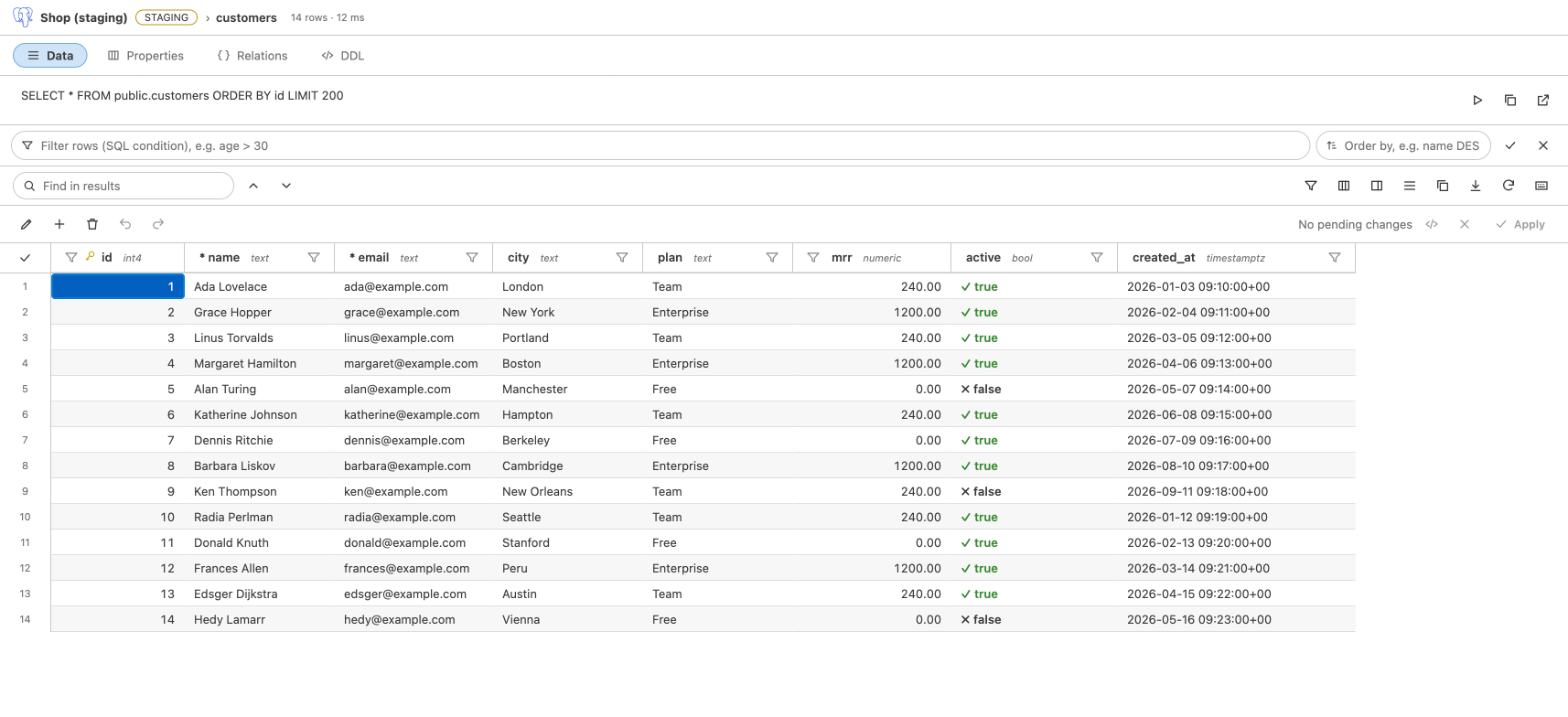
Open a table and the rows appear in a grid designed for it: tabs for Data, Properties, Relations and DDL, an editable query line, and a filter bar that changes the statement in the database so paging and editing keep working.
Edit in place, review, then apply
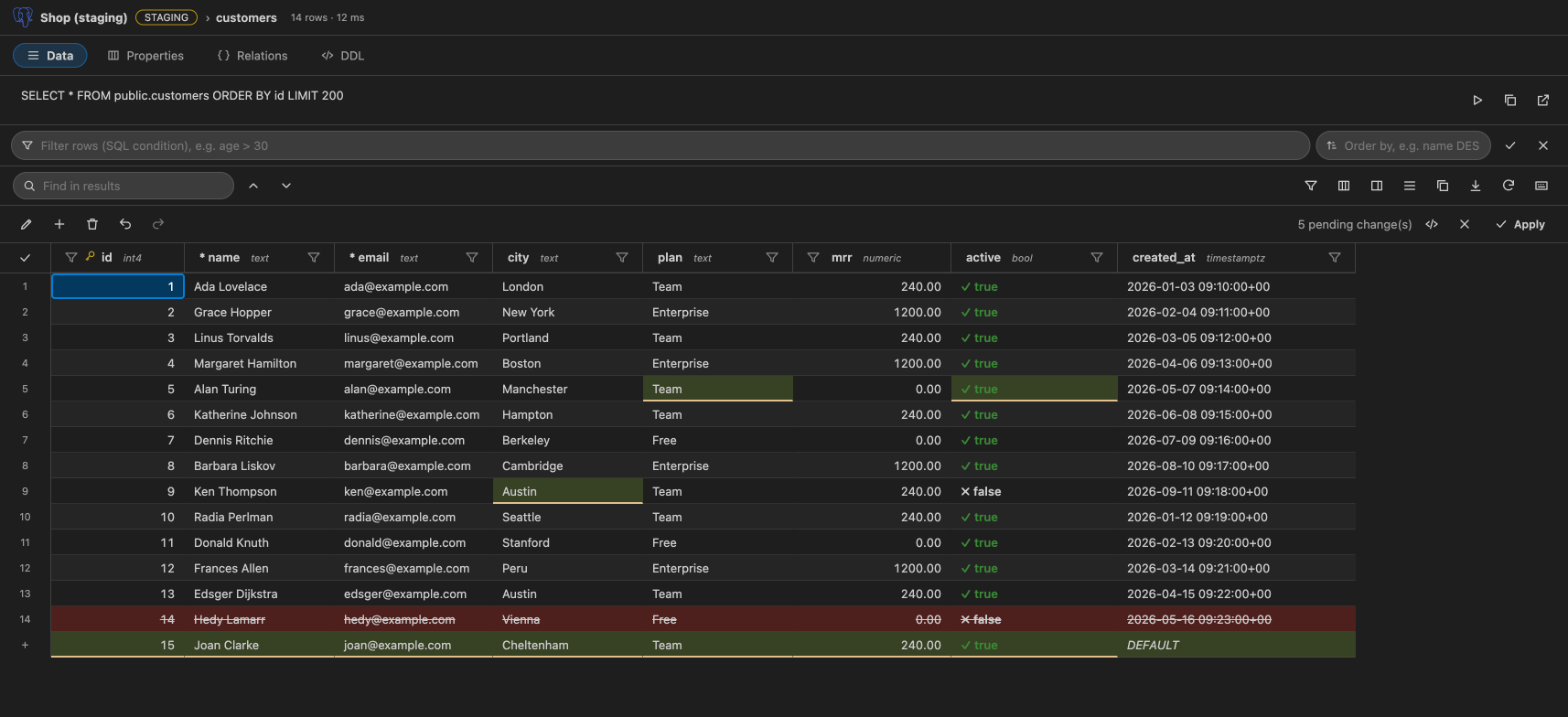
Double-click a cell (or press Enter or F2). Changes wait as pending changes: edited cells are highlighted, deleted rows are struck through and new rows are tinted. Review the exact SQL, undo or redo, then press Apply: everything runs in one transaction, and production asks for confirmation first.
- Paste from a spreadsheet straight into the grid (one undo step; nothing is applied if any cell is invalid).
- Conflict detection: if someone else changed the row, nothing is written.
- Column menu: rename, change type, NOT NULL, default, add or drop a column, with the exact DDL shown first.
- Paging with Load more, and an optional primary-key paging mode for large tables on SQLite, PostgreSQL, MySQL, SQL Server and Oracle.
Light, dark and high contrast
RizomaDB uses your VS Code theme variables, so it follows whatever theme you use.
Understand and design your schema
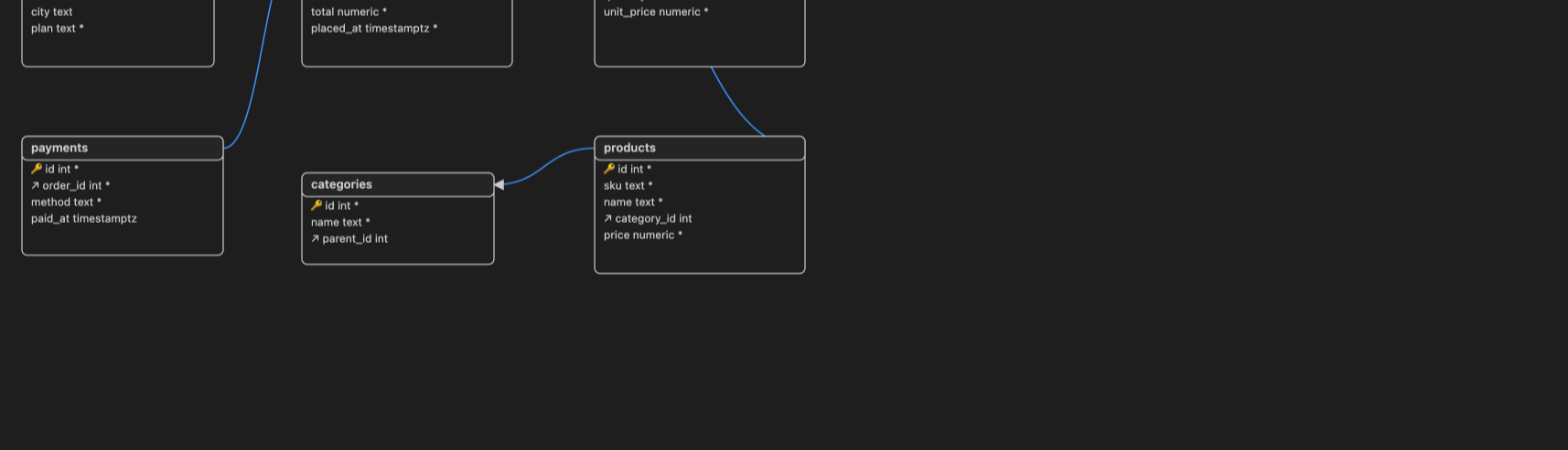
- ER diagrams drawn from your foreign keys.
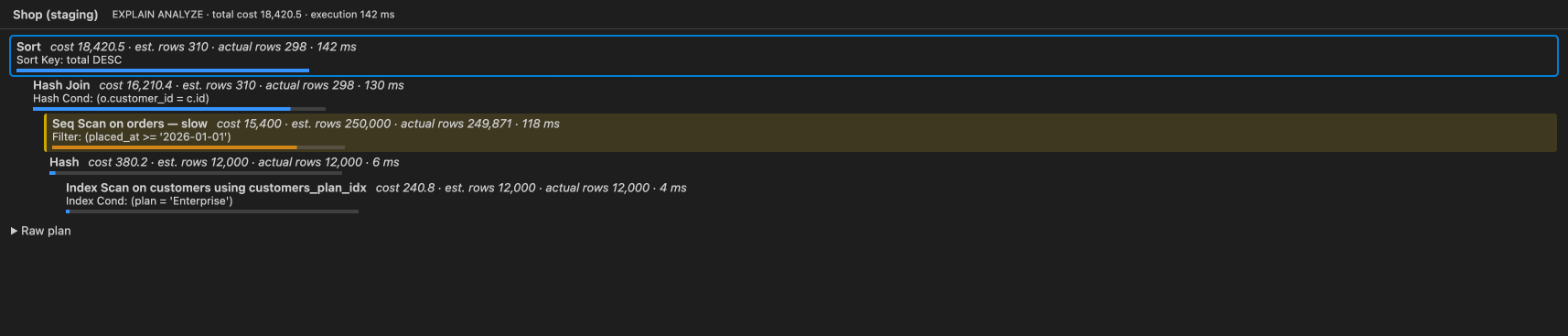
- Explain plans as a tree with costs, row estimates and the slow nodes highlighted.
- Table designer with a DDL preview before anything runs.
- Schema compare, snapshots and generated schema documentation.
- Suggestions for missing foreign-key indexes.
Move and generate data
Import and export data, backup and restore (using pg_dump, mysqldump, mongodump and friends found on your PATH), data compare and sync, and test-data generation.
Govern and audit
- Layered policies (built-in, team, project, user) where the strictest result always wins.
- One policy and audit point for every statement the extension runs: editor, grid, imports, schema tools and notebooks.
- Column masking, approval prompts, row and time limits.
- A local audit log (JSONL) with literals removed by default, with a viewer and export.
- A read-only user script generator for PostgreSQL, MySQL/MariaDB, ClickHouse and Redis, so read-only is guaranteed by the server too.
Make it yours
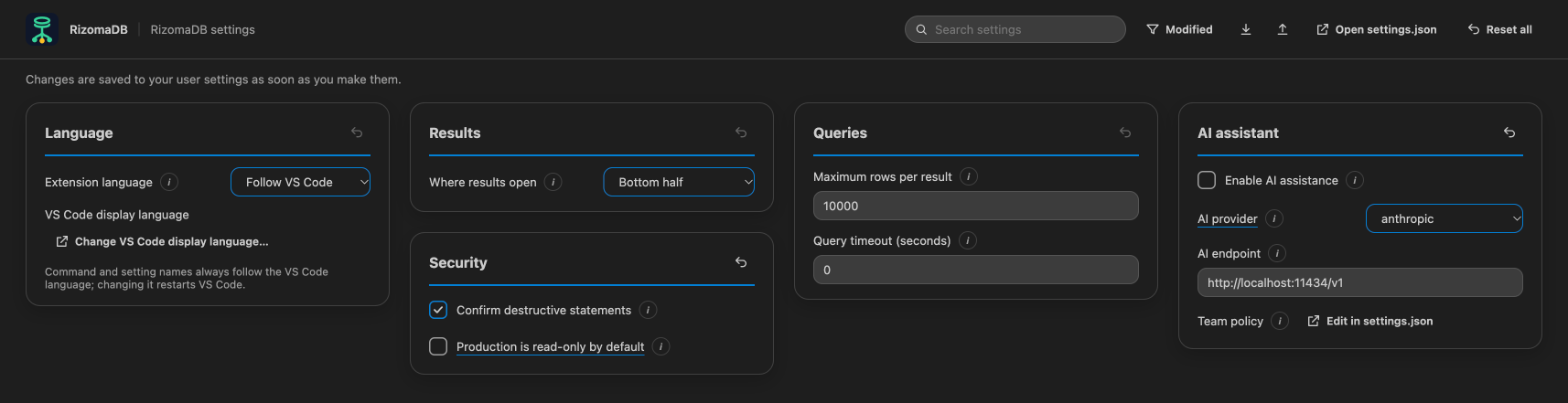
Open RizomaDB: Open Settings for a screen with every setting: language, where results open, rows per page, environments, confirmations, history and more. Changes are saved as you make them.
Supported engines
| Family |
Engines |
| Relational |
PostgreSQL, MySQL, MariaDB, SQLite, SQL Server, Oracle, CockroachDB, YugabyteDB, TiDB |
| Analytics |
ClickHouse, DuckDB¹, Trino |
| Document |
MongoDB |
| Key-value |
Redis, Valkey |
| Search |
Elasticsearch, OpenSearch |
| Graph |
Neo4j, HydraDB (experimental) |
| Cloud NoSQL |
Amazon DynamoDB, Google Cloud Firestore |
| Time series |
InfluxDB 2, InfluxDB 3 |
| Wide-column |
Apache Cassandra, ScyllaDB |
Every engine above was tested against a real server or an official emulator running locally (DynamoDB Local, the Firestore emulator). What each engine supports differs: row editing, for example, works for SQL engines and MongoDB. See the capability matrix.
¹ DuckDB uses a native library that is not in this package. Download the rizomadb-<platform>.vsix for your system from the GitHub release if you need DuckDB.
Getting started
- Install the extension and click the RizomaDB icon in the activity bar.
- Press + (or run RizomaDB: New Connection), choose your engine and fill in the form.
- Expand the connection, click a table to open its rows, or run RizomaDB: New Query.
- Run RizomaDB: Open the Guide for a step-by-step tour with buttons that do each step for you.
Useful commands (open the command palette and type "RizomaDB"): New Connection, New Query, Open Table Data, Open Query History, Build a Query…, Design Table, Show ER Diagram, Compare Schemas, Import Data…, Export Data…, Back Up Database…, Open Settings.
Keyboard and accessibility
RizomaDB is designed to be used without a mouse. In the grid: arrows move between cells, Enter or F2 edits, Ctrl/⌘+Z / Y undo and redo, Ctrl/⌘+F finds, Alt+Enter opens the record panel. Every screen is checked with axe in light and dark themes and has been walked through with a screen reader on macOS, Windows and Linux by the project owner. There is no independent accessibility audit yet; please report anything that is hard to reach.
Privacy and security
- No telemetry, no accounts, no update checks. A test fails if the extension opens a network connection of its own when it starts.
- Secrets only in VS Code's secret storage: never in settings, history, logs or the audit log.
- Webviews run with a strict content-security policy and validated messages.
- The optional AI assistant is off by default and, when enabled, sends only the schema to the endpoint you configure, after you confirm. There is also an optional read-only MCP server.
Found a security problem? See the security policy.
Known limits
This version is honest about what it has not verified:
- Real cloud accounts have never been tested (AWS, Google Cloud, MongoDB Atlas, managed PostgreSQL/MySQL services). Try a read-only user or a throwaway database first.
- Redshift, Snowflake and BigQuery are not implemented.
- HydraDB is experimental, and some engines are read-only in the grid.
The full list is in the acceptance checklist.
Requirements
VS Code 1.100 or later. The extension also installs in VSCodium, Cursor and Windsurf with their own --install-extension, but those editors are not tested.
Learn more
Licensed under Apache-2.0.
| |

