
AnFavorites





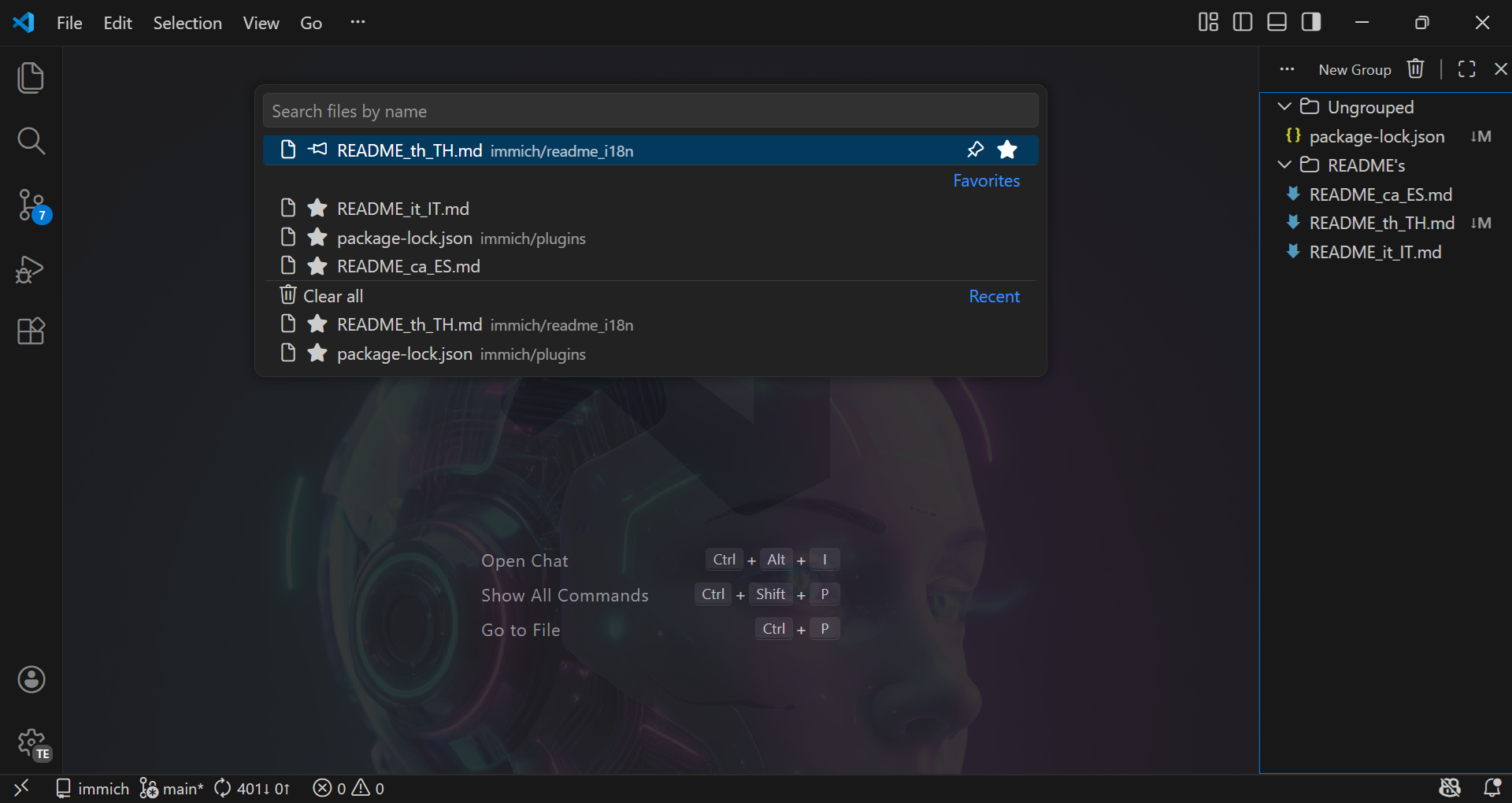
AnFavorites is an extension that optimizes your file workflow by providing instant, centralized access to your most important files with a single keyboard shortcut (Ctrl+Alt+F).
It also allows you to visually manage your pinned items, categorize them into folders, and use AnFavorites as a fast, native search tool within your development environment.
If you work with multiple environments (like Cursor or Windsurf), your favorites will automatically sync across IDEs sharing the same workspace—ensuring you never lose track of what's truly important.
🚀 Key Features
- ⚡ Native Quick Open (
Ctrl+Alt+F): A lightning-fast custom picker unifying recent searches, pinned files, and global Ripgrep-powered searches across the workspace.
- 📂 Smart Groups & Organization: Manage and group your files seamlessly with full Drag & Drop support in the AnFavorites sidebar tree view.
- 🔄 IDE Syncronization: Share favorites between VS Code, Cursor, Windsurf, or any IDE working on the same workspace out-of-the-box.
- 📌 Pin & Prioritize: Pin your most critical files directly to the root of your favorites view so they are always 1-click away.
- 🧿 Interactive .gitignore Manager: Intelligently manage exclusions using our built-in
.gitignore rules manager to keep your UI lightning-fast.
- 🪟 Advanced Window Controls: Native integration to open your favorites in Floating Windows or Editor Splits straight from Quick Open.
- 🧩 Multi-root Workspace Support: Efficient file categorization that understands and organizes files relative to multi-root workspace folders.
- 🔍 Configurable Exclusions: Easily ignore messy folders (
node_modules, .git, .venv) from searches natively.
- 🌐 Dual Language: Completely localized out-of-the-box for English and Spanish (
en / es).
🛠️ Installation
You can install the extension directly from the Visual Studio Marketplace:
- Open VS Code.
- Go to the Extensions view (
Ctrl+Shift+X).
- Search for
AnFavorites.
- Click Install.
(Requires VS Code 1.86.0 or higher)
⌨️ Commands
| Command |
Action |
AnFavorites: Quick Open (anfavorites.quickOpen) |
Launch the central search and navigation picker (Ctrl+Alt+F). |
AnFavorites: Manage .gitignore Files (anfavorites.manageGitignore) |
Enable or disable specific workspace .gitignore files visually. |
AnFavorites: Configure Keybindings (anfavorites.configureKeybindings) |
Easily set custom shortcuts for extension functions. |
AnFavorites: Clear Extension Cache (anfavorites.clearCache) |
Clear internal search indexes and runtime cache. |
AnFavorites: View Release Notes (anfavorites.openReleaseChanges) |
Relaunch the visual walkthrough for the latest update. |
⚙️ Extension Settings
AnFavorites provides extensive options to suit your workflow. Open VS Code Settings (Ctrl+,) and search for AnFavorites:
UI & Layout
| Setting |
Description |
Default |
anfavorites.language |
Forcibly set Extension Language. |
auto |
anfavorites.multiroot.separation |
Organize files in multi-root workspaces (none, groups, ungrouped, or both). |
none |
anfavorites.quickOpen.pathDetailLocation |
Placement of file paths in Quick Open (description or detail). |
description |
anfavorites.quickOpen.showPathWhen |
When to show file paths (always or onConflict). |
onConflict |
Search & Operations
| Setting |
Description |
Default |
anfavorites.search.exclusions |
A glob list of files/folders to hide during workspace searches. |
[**/node_modules/**,...] |
anfavorites.quickOpen.actions.openToSide |
Use the Split Editor feature natively. |
true |
anfavorites.quickOpen.actions.openInNewWindow |
Use Floating Window features natively. |
false |
Limits & Capacities
| Setting |
Description |
Default |
anfavorites.limits.maxPinned |
Maximum number of files allowed to be pinned directly. |
3 |
anfavorites.limits.quickOpen.maxFavorites |
How many favorite files populate the Quick Open initial view. |
3 |
anfavorites.limits.quickOpen.maxRecentFiles |
How many recent files populate the Quick Open initial view. |
3 |
Storage & Diagnostics
| Setting |
Description |
Default |
anfavorites.storage.shareAcrossIdes |
Syncs workspace favorites across all compatible IDEs running the workspace. |
true |
anfavorites.releaseNotifications.preference |
Controls update release notifications behavior (show or never). |
show |
anfavorites.logging.level |
Verbosity of internal operational logs (debug, info, warn, error). |
info |
💻 Development & Contributing
We believe in the power of open source! This project is 100% community-driven and contributions, issues, and feature requests are very welcome.
Quick Start
# Clone the repository
git clone https://github.com/nicolasalarconrapela/an-favorites.git

# Install dependencies
npm install

# Compile the extension (use "npm run watch" for active development)
npm run compile
Press F5 in VS Code to open a new Extension Development Host window.
VSIX packaging contract
The extension is packaged with vsce package and a strict .vscodeignore whitelist.
dist/bootstrap/extension.js contains the bundled runtime for app dependencies such as fuse.js, ignore, marked, and bundled transitive code like minimatch.@vscode/ripgrep remains external inside the .vsix, together with the minimal transitive runtime packages it declares (https-proxy-agent, proxy-from-env, yauzl, agent-base, debug, buffer-crc32, fd-slicer, ms, pend).npm run validate:vsix inspects the generated .vsix and fails if any other extension/node_modules/** entry is present.
📄 License
This project is licensed under the MIT License - see the LICENSE file for details.
Made with ❤️ by AnAppWiLos.

