VS Code extension + monorepo: Github-Copilot-ToolBox on GitHub · License: MIT · VS Code Marketplace: amitchorasiya.github-copilot-toolbox · Extension version: 1.0.17 · JetBrains plugin: com.amitchorasiya.github.copilot.toolbox (see also JetBrains plugin README) · Plugin version: 0.1.3
Project site (GitHub Pages): copilottoolbox.layai.co — static pages in docs/; install CTAs for VS Code and JetBrains IDEs, aligned with this README for 1.0.17 / 0.1.3.
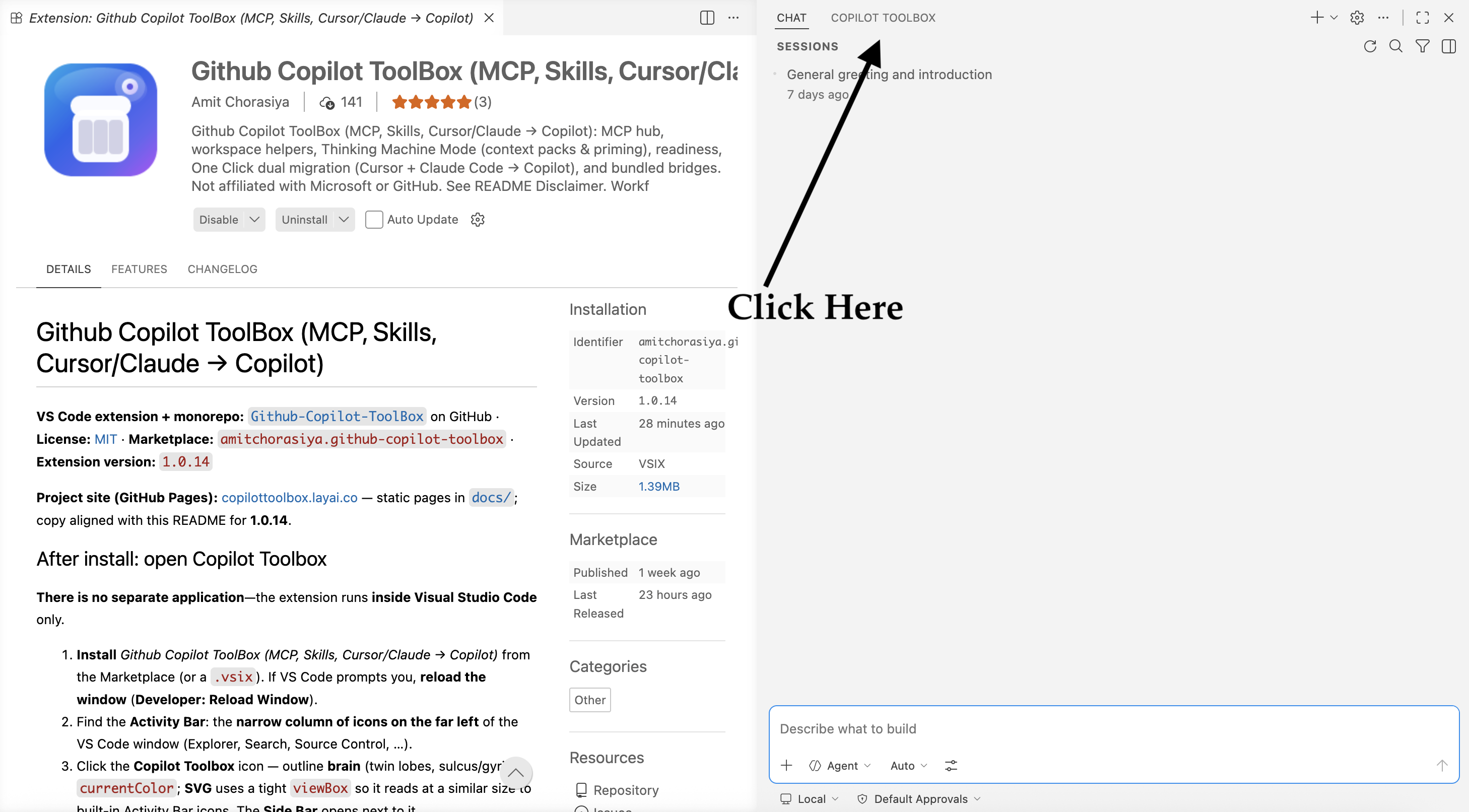
There is no separate application—the extension runs inside Visual Studio Code only.
- Install Github Copilot ToolBox (MCP, Skills, Cursor/Claude → Copilot) from the Marketplace (or a
.vsix). If VS Code prompts you, reload the window (Developer: Reload Window).
- Find the Activity Bar: the narrow column of icons on the far left of the VS Code window (Explorer, Search, Source Control, …).
- Click the Copilot Toolbox icon — outline brain (twin lobes, sulcus/gyri),
currentColor; SVG uses a tight viewBox so it reads at a similar size to built-in Activity Bar icons. The Side Bar opens next to it.
- In the Side Bar, click MCP & skills. That opens the hub (webview) with tabs Intelligence, MCP, Skills, Workspace, and Awesomeness (Awesome Copilot: Chat prompt + CLI shortcuts)—that is the main surface for MCP, skills, and setup flows. The tab row uses emoji labels and a distinct tint per section (chart colors);
aria-label on each tab is the plain name for screen readers. If you dock the hub in the secondary sidebar (beside Copilot Chat), the container title is Copilot Toolbox—the same short label as the Activity Bar entry.
Don’t see the icon? Press Ctrl+Shift+P (Windows/Linux) or ⌘⇧P (macOS), type GitHub Copilot Toolbox, run any listed command (that wakes the extension UI), or run Developer: Reload Window, then repeat steps 2–4.
In plain terms: Copilot only works as well as the setup around it—but that setup is usually scattered across files, machines, and habits. Github Copilot ToolBox (MCP, Skills, Cursor/Claude → Copilot) is one dedicated Copilot Toolbox in VS Code or JetBrains IDEs (same hub): you can see what’s configured, standardize how teams move to Copilot (including from Cursor), and give Chat better context while each developer still chooses what to share.
For engineering teams, that means:
- Faster path from Cursor or Claude Code to Copilot — guided actions to port MCP, sync rules or
CLAUDE.md, migrate .cursor/skills or .claude/skills, merge project .mcp.json, and scaffold a memory bank (One Click can run both migration tracks together).
- Discover and add servers and skills from one hub — browse catalogs, see what’s already installed, fewer raw config edits.
- A single checklist view — workspace vs personal setup, local skill folders, rules, instructions, and memory bank so the repo matches what you think you shipped.
- Smarter context for Chat — structured “context packs” and readiness flows, with explicit choices so teams stay aligned on what Copilot is allowed to see.
One Click Setup and Thinking Machine Mode
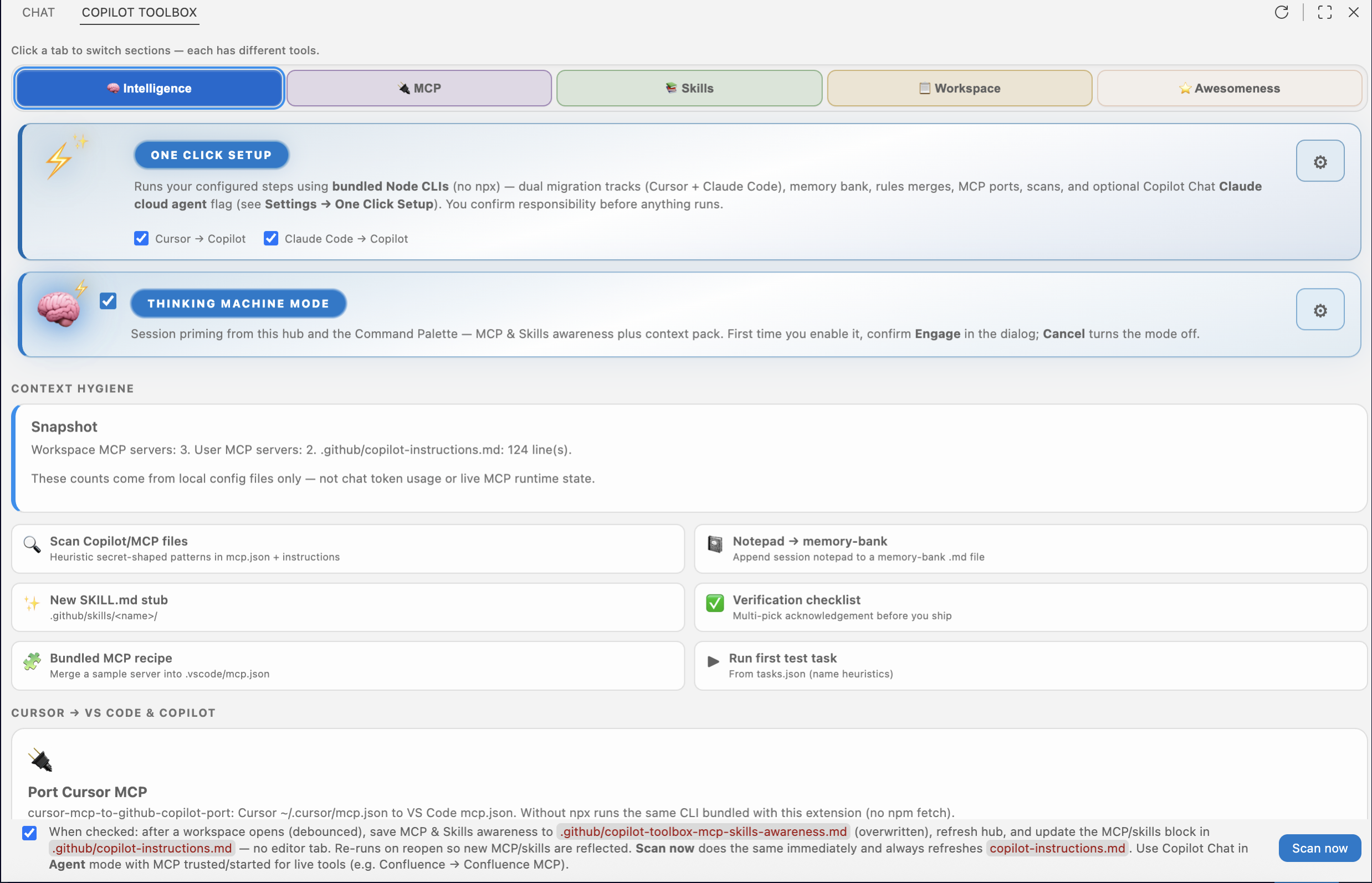
These are the two highlighted cards at the top of the hub’s Intelligence tab (after Copilot Toolbox → MCP & skills).
One Click Setup
What it does: After you accept the responsibility warning, it runs the automated sequence you configured under Settings → Copilot Toolbox → One Click Setup. By default both migration tracks are on: Cursor → Copilot (Cursor MCP port, rules, .cursorrules, .cursor/skills → .agents/skills) and Claude Code → Copilot (CLAUDE.md → copilot-instructions.md, .claude/skills → .agents/skills, workspace .mcp.json → VS Code mcp.json). Then GitHub Copilot memory bank init (Cursor --cursor-rules only when the Cursor track is on), MCP & Skills awareness scan, readiness, config scan, optional Copilot Chat toggles (Claude cloud agent, Copilot CLI + Chat User settings), optional npm install -g @github/copilot (default on; terminal prints npm bin -g for PATH — PowerShell on Windows), a best-effort New Copilot CLI Session command, and optional auto-scan. The confirmation modal can skip Copilot CLI + Chat for that run only. GitHub Copilot Chat session type Local vs Copilot CLI is chosen in Chat’s footer or palette — not by the # Toolbox context chip. Cursor bridge CLIs run via bundled node …/cli.mjs (no npx network fetch).
Why it matters: “Make this repo Copilot-ready” shouldn’t depend on who read which doc. One Click encodes your team’s playbook once; anyone can run the same steps and review the same terminals and file changes.
Thinking Machine Mode
What it does: A master switch for session priming: optional MCP & Skills awareness (writes under .github/) plus a context pack for Copilot Chat, with separate settings for confirmations and pack defaults. The first time you turn it on, VS Code shows Engage (sci-fi confirmation); Cancel turns the mode off. Unchecking the mode clears the acknowledgment so Engage appears again next time you enable it. You can also prime from the Command Palette when the mode is on.
Why it matters: Copilot Chat is only as good as the context you give it. Thinking Machine Mode makes “refresh what this repo knows about MCP, skills, and workspace shape” a deliberate, repeatable action instead of an ad-hoc copy-paste.
Table of contents
What’s in this repo
| Deliverable |
Purpose |
| Github Copilot ToolBox (MCP, Skills, Cursor/Claude → Copilot) |
VS Code extension: MCP & skills hub, workspace kit, Intelligence (Cursor + Claude Code bridge rows, context packs, readiness, MCP/Skills awareness under .github, auto-scan, One Click dual tracks with bundled bridge CLIs and extension-side Claude merges) |
| github-copilot-toolbox-intellij |
IntelliJ IDEA plugin (preview): same hub HTML as VS Code in JCEF (hub-body.html exported from hubWebviewDocument.ts). Export injects --vscode-* theme fallbacks into :root before derived tokens (JCEF has no VS Code theme bridge), prepends an acquireVsCodeApi shim wired to copilotBridgePost, and adds JetBrains-only layout CSS. Build: npm run package:intellij from repo root; after editing the hub TS, run npm run export:hub-for-intellij. Details: INTEGRATION.md |
| copilot-toolbox-kit |
Optional TypeScript library package (private npm package) for shared helpers — scaffold only; wire into the extension with file: or npm workspaces if you use it |
| memory-bank/ |
Optional project memory files for you and Copilot (not required to build the extension) |
| packages/cursor-mcp-to-github-copilot-port/ |
Placeholder README for the MCP port CLI layout; the CLI is published separately on npm |
| docs/ |
GitHub Pages marketing site (copilottoolbox.layai.co): screenshots and copy aligned with this README; install CTAs for VS Code Marketplace and JetBrains Marketplace (search Github Copilot ToolBox). Light/Dark in the header stores the choice in the browser’s localStorage (key cpltb_theme_v1 — site UX only, not a credential). |
The extension does not replace GitHub Copilot or Cursor; it helps you align configs and see what’s configured (MCP servers, local SKILL.md trees, instructions files). Deeper settings, keybindings, and troubleshooting: packages/github-copilot-toolbox/README.md.
See the real UI (screenshots)
Images below use absolute raw.githubusercontent.com URLs (not repo-relative paths) so they render reliably on GitHub and when the README is repackaged for the Marketplace.
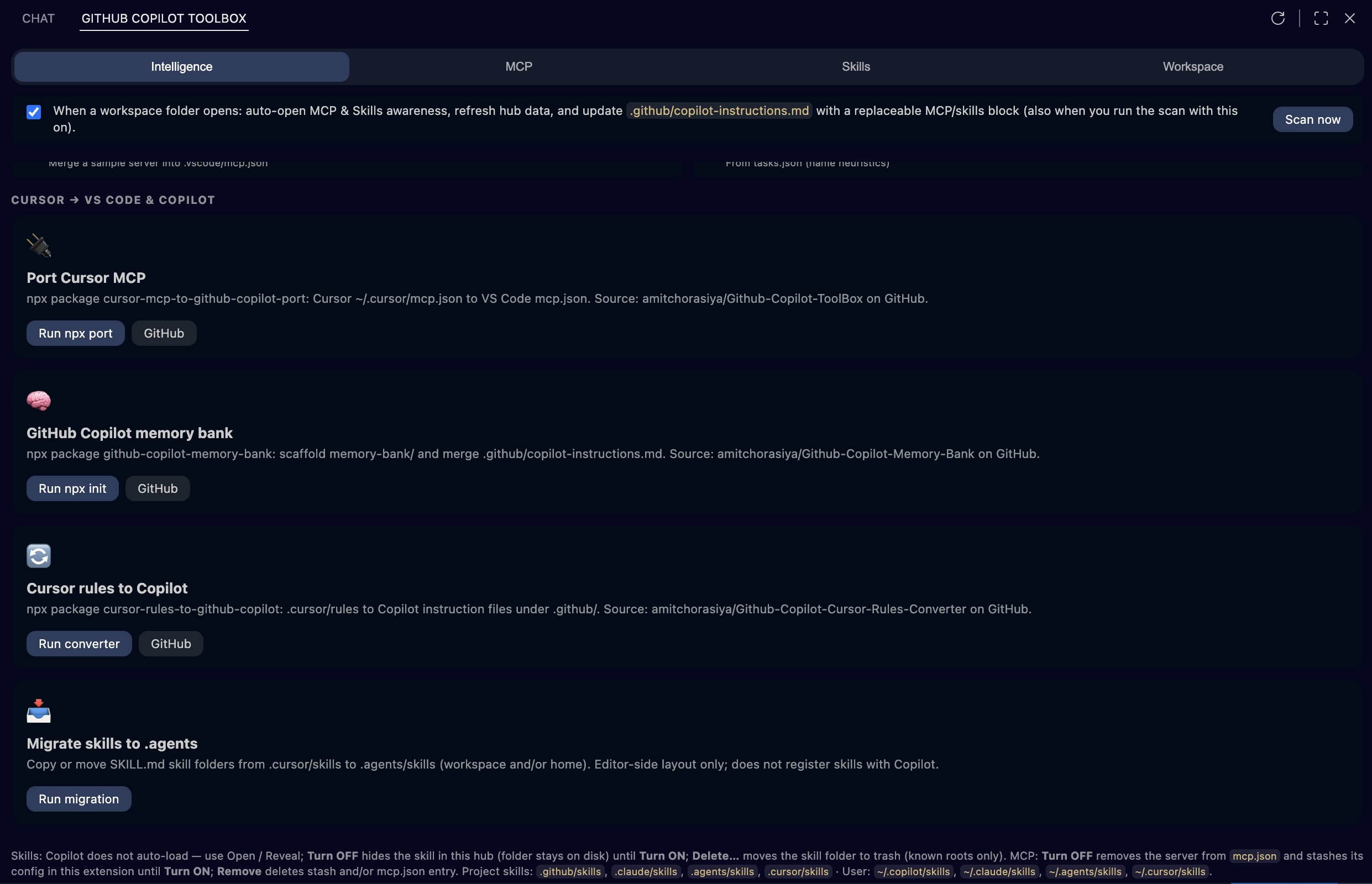
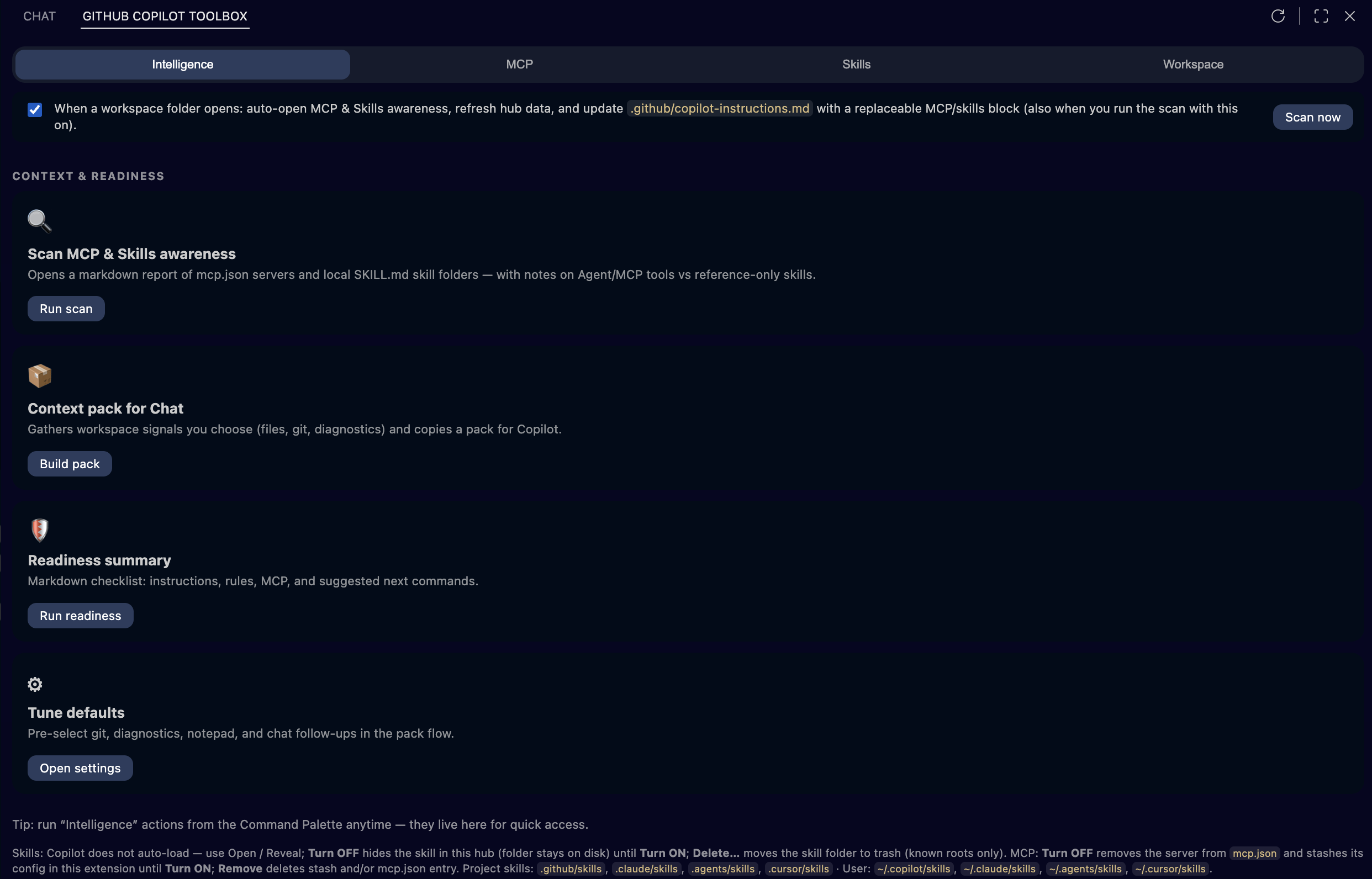
These are actual VS Code UI captures from the extension—what users see on screen. How to open the hub (Activity Bar → Copilot Toolbox → MCP & skills) is at the top: After install: open Copilot Toolbox. Most hub shots below are high-resolution (~2.5k width) so labels stay readable in README and on the project site.
Intelligence (hub): Cursor → Copilot and Claude Code → Copilot bridge rows (MCP, rules, memory bank, CLAUDE.md, .mcp.json, skills), then context pack, readiness, MCP & Skills scan.
MCP: installed workspace/user servers and registry browse.
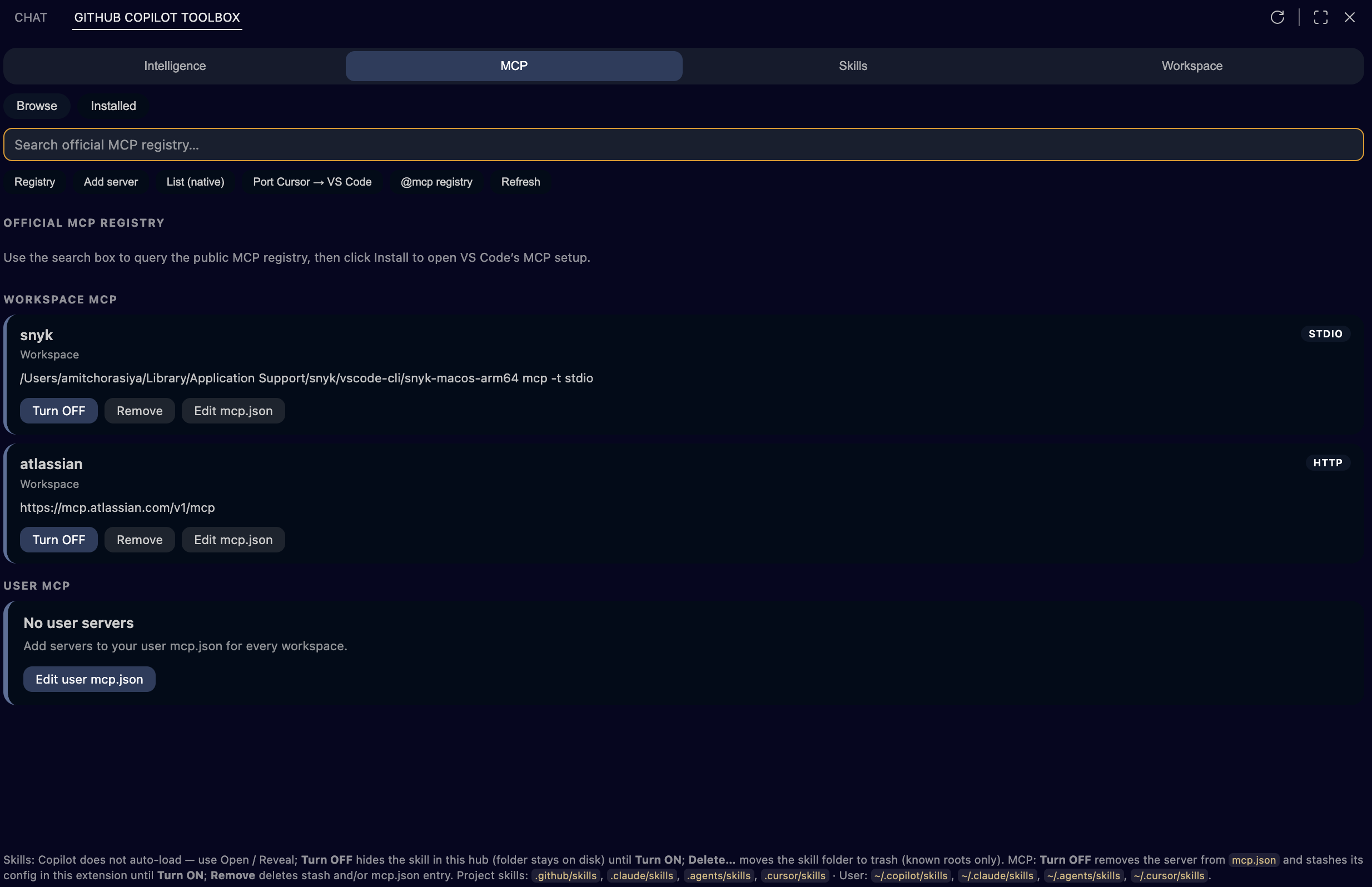
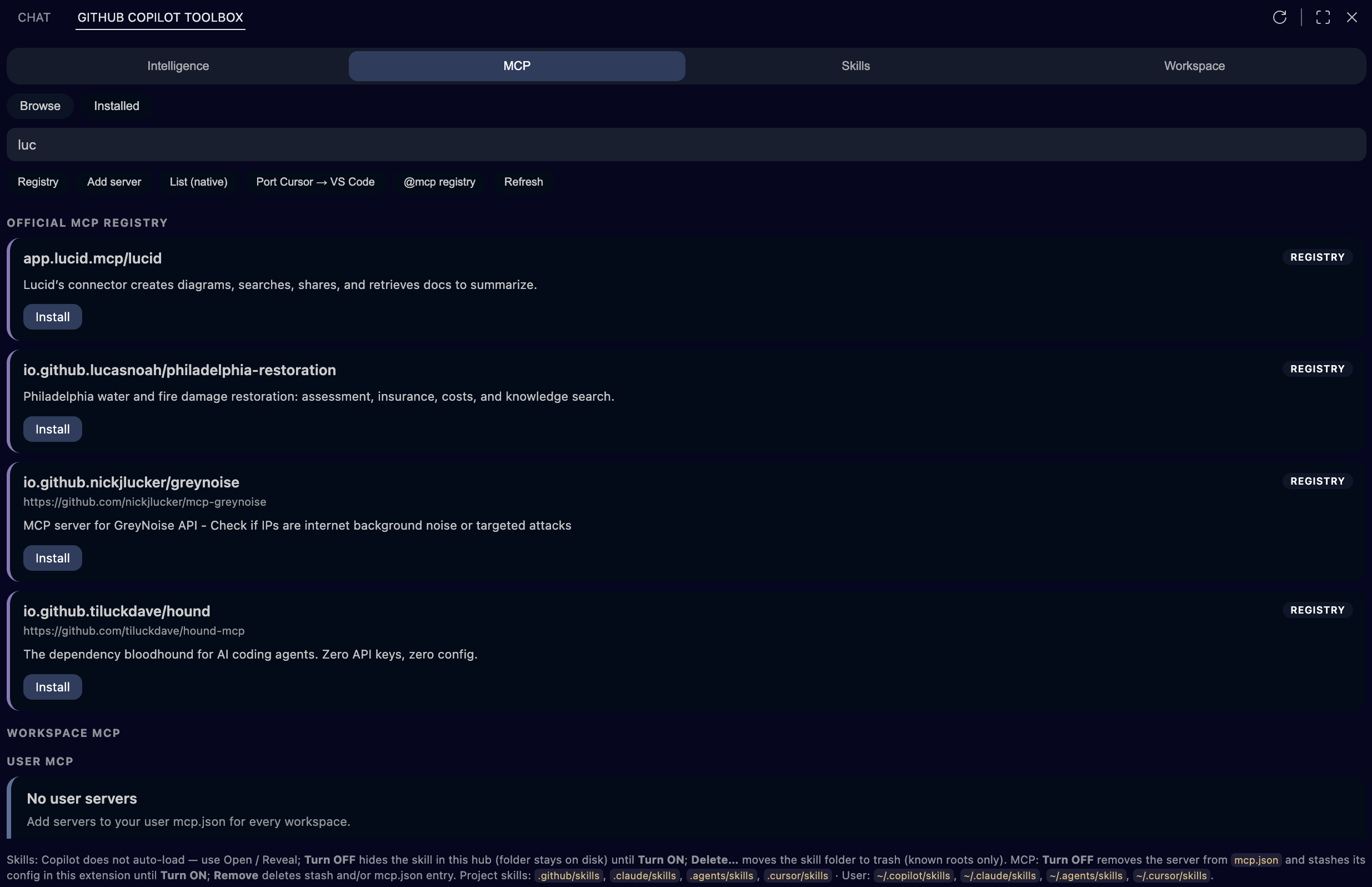
Skills: catalog (skills.sh) and local installed SKILL.md trees.
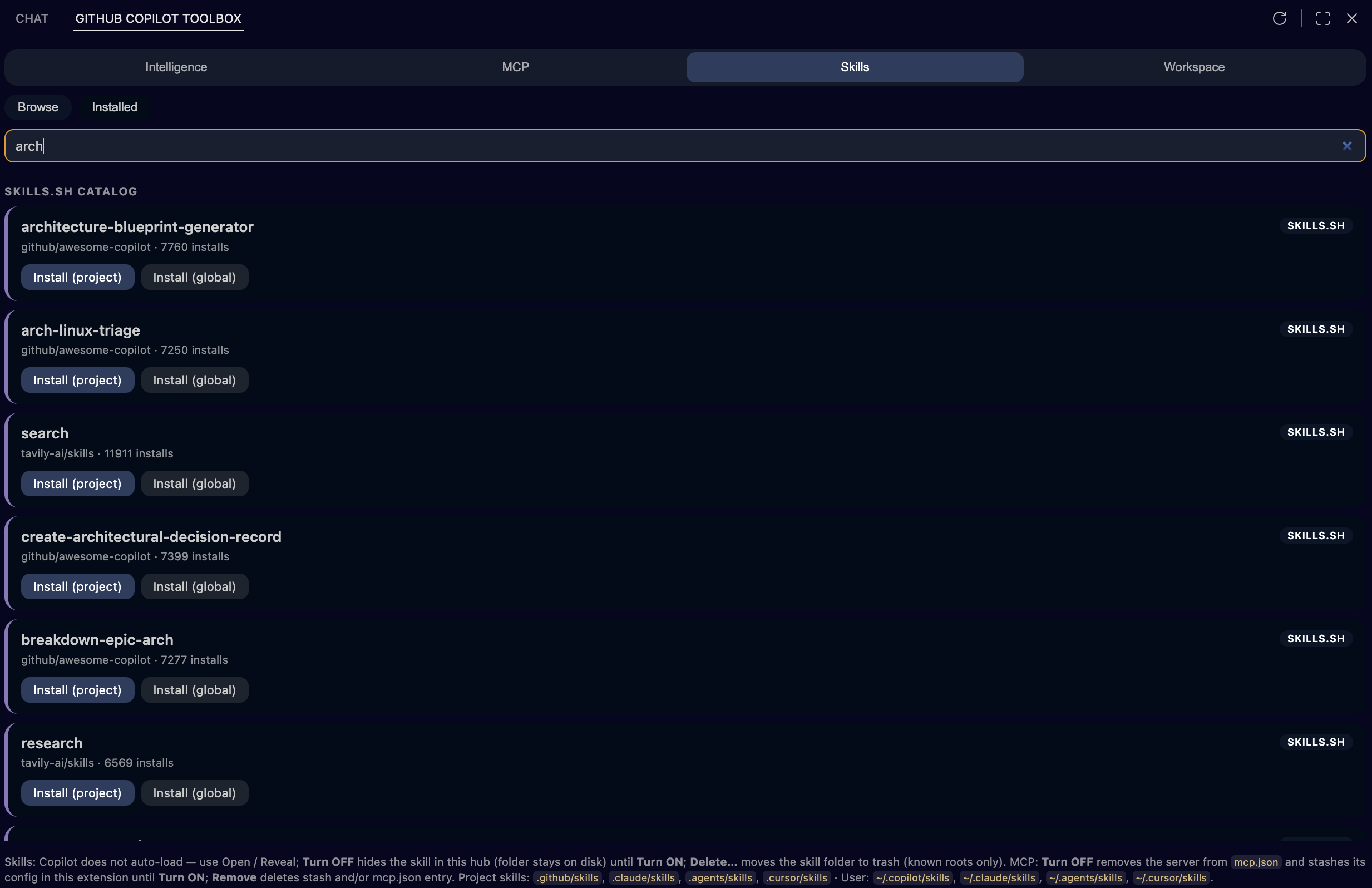
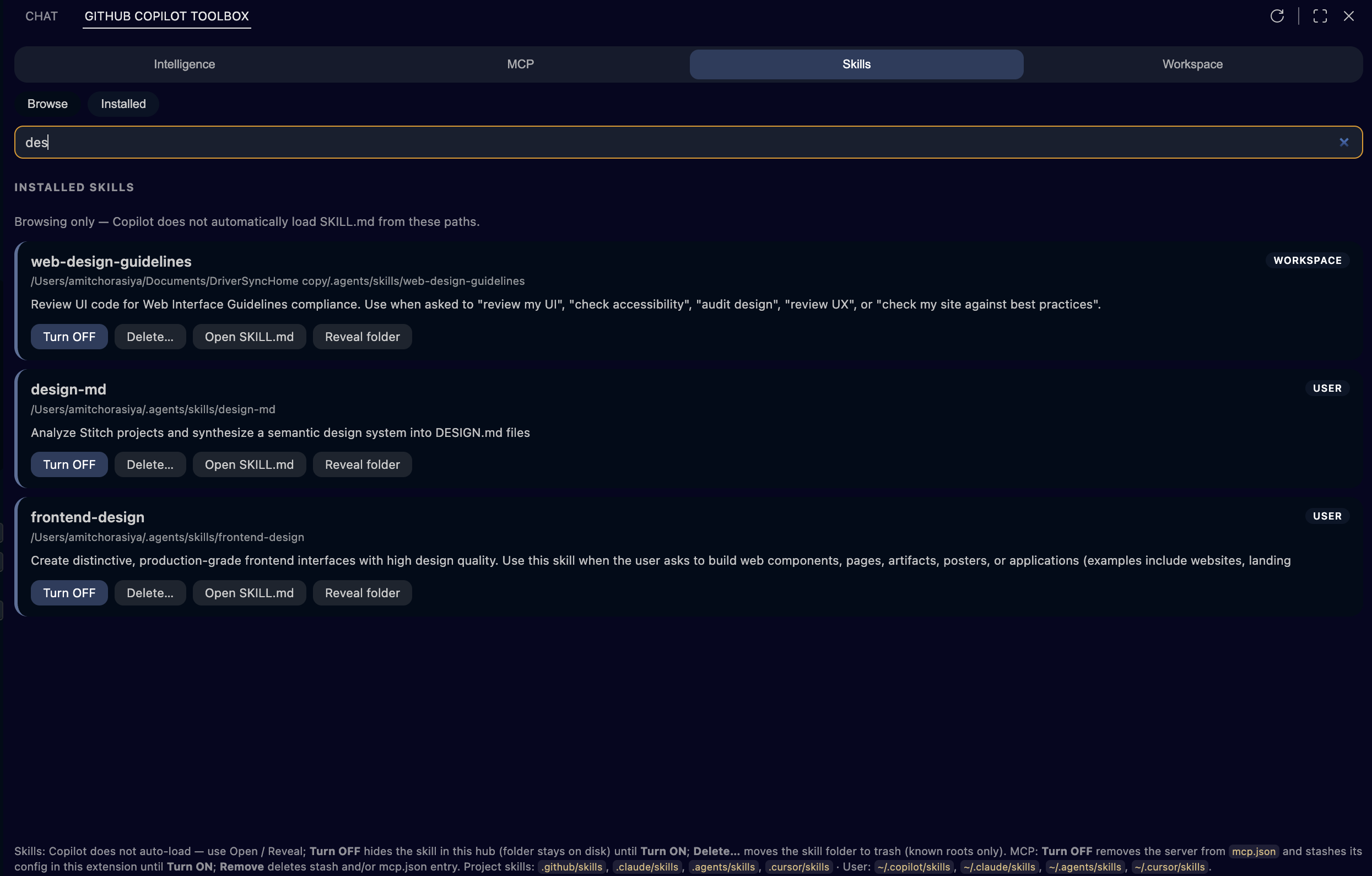
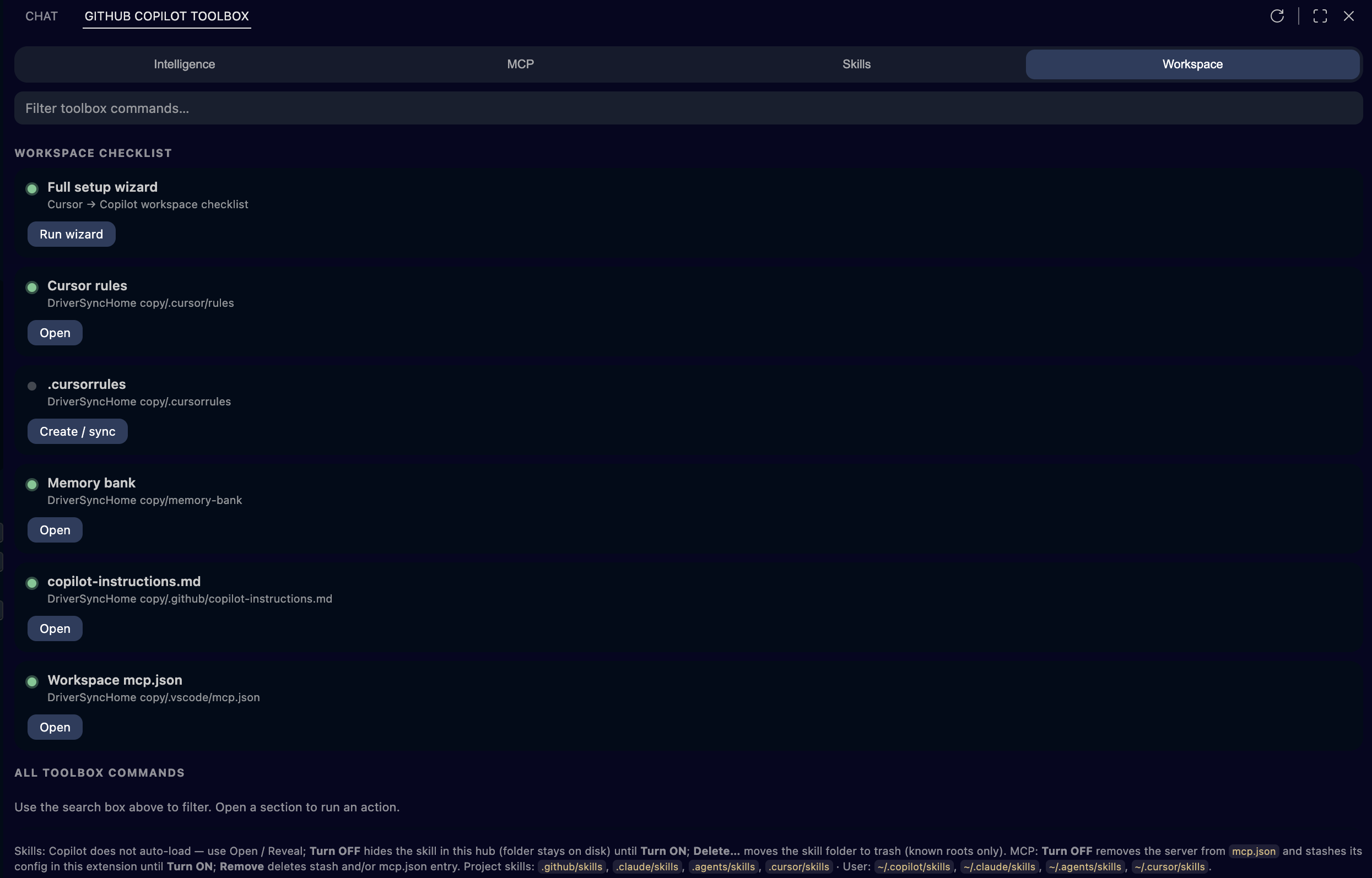
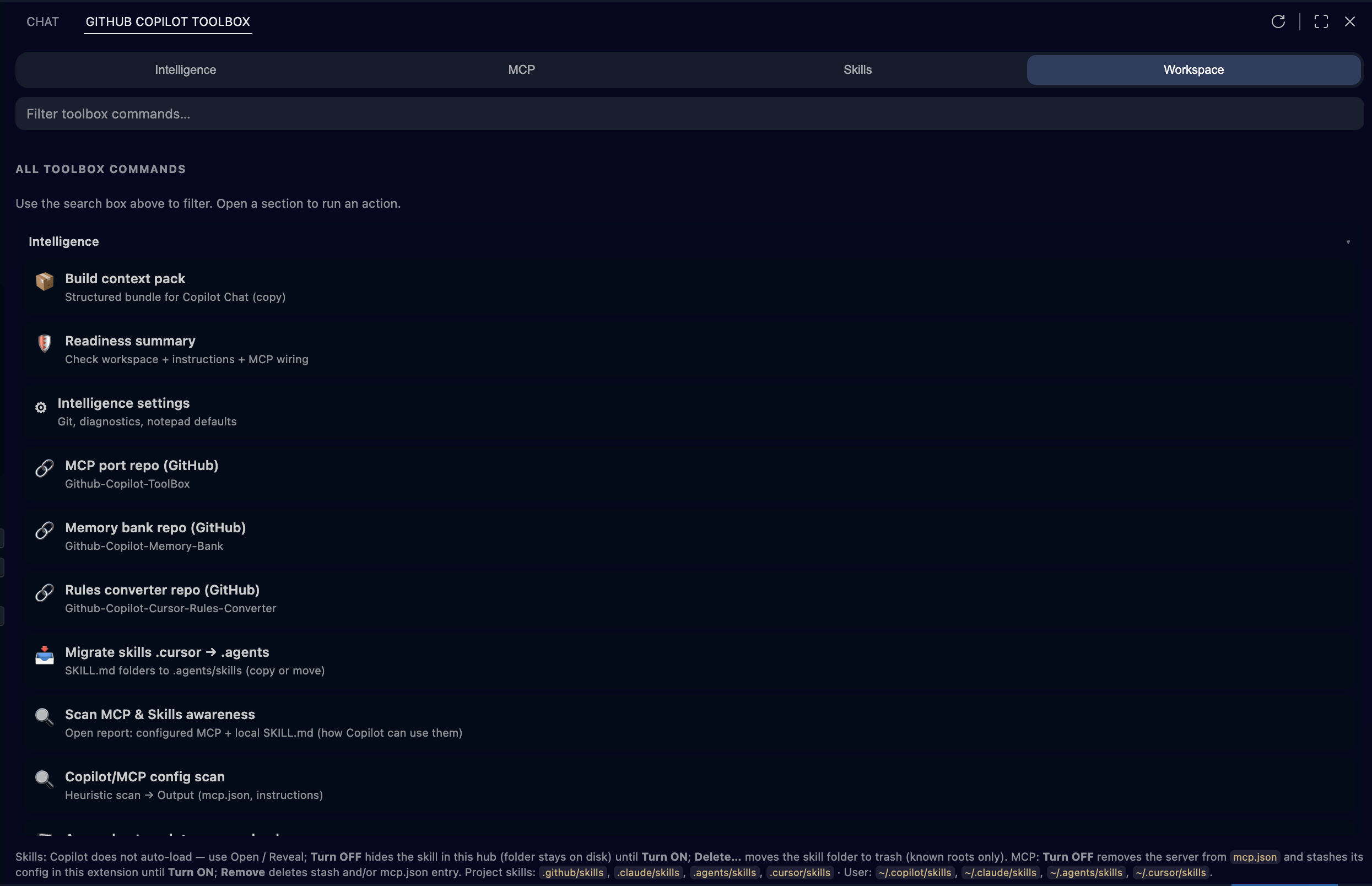
Workspace checklist and Intelligence hub (context hygiene).
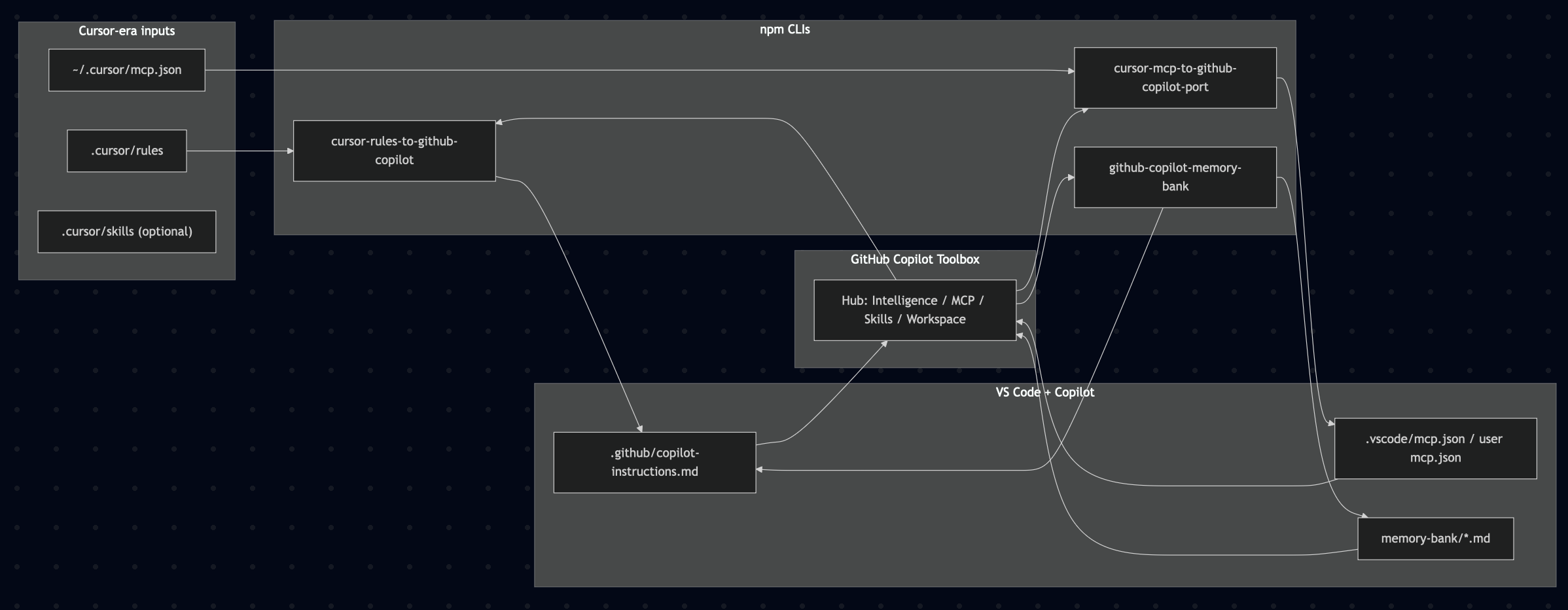
Reference diagram (exported map of Cursor vs Copilot surfaces; not a live UI capture).
Open the MCP & skills hub from the Side Bar after you click Copilot Toolbox in the Activity Bar (see After install: open Copilot Toolbox at the top of this README). The same hub can be opened from the secondary sidebar when that view is enabled; its views container title is Copilot Toolbox (not the long Marketplace name). The hub is organized into tabs, a Browse / Installed switch (where applicable), a search field, optional MCP chips, and a footer legend.
Main tabs (top)
In the webview, each tab shows an emoji and a section color (tinted active/hover states); aria-label uses the plain tab name. The table uses plain names only (five tabs: Intelligence, MCP, Skills, Workspace, Awesomeness).
| Tab |
Purpose |
| Intelligence |
Cursor → VS Code & Copilot and Claude Code → VS Code & Copilot bridge rows, Context hygiene tiles, Context & readiness actions, plus auto-scan controls. Default tab. |
| MCP |
Browse official registry search or Installed workspace + user servers from mcp.json. |
| Skills |
Browse skills.sh catalog or Installed local folders that contain SKILL.md under standard roots. |
| Workspace |
Workspace checklist (One Click Setup, rules, memory bank, instructions, mcp.json) and All toolbox commands (searchable tiles). |
| Awesomeness |
Awesome Copilot — copy a Chat prompt for Copilot to help pick CLI plugins, Copilot CLI shortcuts (install, register marketplace, CLI session), and links to the catalog / repo (search stays on the website). |
Browse vs Installed (MCP and Skills only)
| Sub-tab |
Purpose |
| Browse |
Search remote catalog (MCP registry or skills.sh). Extra chip row appears on MCP → Browse. |
| Installed |
Filter and manage what is already on this machine / in this workspace (mcp.json servers or discovered skill folders). |
One Click Setup card (Intelligence tab, top)
| Control |
What it does |
| One Click Setup (pill-shaped primary button) |
Modal: you accept responsibility for all changes. Then runs the configured automated flow using bundled Node CLIs (no npx). See Settings → One Click Setup. |
| Cursor → Copilot / Claude Code → Copilot checkboxes |
Toggle runCursorToCopilotTrack and runClaudeCodeToCopilotTrack (both default on). |
| ⚙ |
Opens Settings filtered to copilot-toolbox.oneClickSetup. |
Thinking Machine Mode card (Intelligence tab, top)
| Control |
What it does |
| Checkbox |
Toggles copilot-toolbox.thinkingMachineMode.enabled (Workspace when a folder is open, else User). First enable per cycle shows Engage; unchecking clears acknowledgment so Engage can appear again. |
| ⚙ |
Opens Settings filtered to copilot-toolbox.thinkingMachineMode. |
Background MCP & Skills auto-scan (Intelligence tab, bottom bar)
| Control |
What it does |
| Checkbox (long label about workspace open) |
Toggles copilot-toolbox.intelligence.autoScanMcpSkillsOnWorkspaceOpen. When on: after a workspace opens (debounced), writes MCP & Skills awareness under .github/, refreshes the hub, and updates the replaceable MCP/skills block in .github/copilot-instructions.md. Persists to Workspace when a folder is open, otherwise User. |
| Scan now |
Runs the awareness flow immediately and refreshes the hub. |
Search box
Hidden on Intelligence. On other tabs it filters: registry / skills.sh results (Browse), installed MCP servers or skills (Installed), or toolbox command tiles (Workspace).
MCP chip row (MCP → Browse only)
| Chip |
What it does |
| Registry |
Opens VS Code’s native MCP registry UI (workbench.mcp.browseServers). |
| Add server |
Opens VS Code’s flow to add MCP configuration (workbench.mcp.addConfiguration). |
| List (native) |
Lists servers in the MCP UI (workbench.mcp.listServer). |
| Port Cursor → VS Code |
Runs the cursor-mcp-to-github-copilot-port npx bridge to map Cursor config into VS Code mcp.json. |
| Refresh |
Reloads hub data from disk and config. |
Intelligence → Context hygiene
| Area |
What it does |
| Snapshot (callout) |
Read-only counts: active workspace MCP servers, active user MCP servers, and whether .github/copilot-instructions.md exists (with line count). Clarifies this is file-based, not live Agent runtime. |
| Scan Copilot/MCP files |
Heuristic scan for secret-shaped patterns in mcp.json and instruction files; results go to Output. |
| Notepad → memory-bank |
Append session notepad content into a memory-bank/**/*.md file (preview, then write). |
| New SKILL.md stub |
Creates .github/skills/<name>/SKILL.md starter. |
| Verification checklist |
Multi-pick acknowledgement checklist before you ship. |
| Bundled MCP recipe |
Merges a sample server from bundled recipes into .vscode/mcp.json. |
| Run first test task |
Runs a tasks.json task (prefers a test-like name, else the first task). |
Intelligence → Cursor → VS Code & Copilot (hero cards)
| Card / button |
What it does |
| Run npx port (Port Cursor MCP) |
Runs GitHubCopilotToolBox.portCursorMcp → npx cursor-mcp-to-github-copilot-port. Without npx runs the same CLI bundled with the extension (no npm fetch). |
| GitHub (same card) |
Opens the port CLI repo in the browser. |
| Run npx init (GitHub Copilot memory bank) |
Runs initMemoryBank → npx github-copilot-memory-bank (scaffold memory-bank/, merge instructions). |
| GitHub |
Memory bank repo. |
| Run converter (Cursor rules to Copilot) |
Runs syncCursorRules → npx cursor-rules-to-github-copilot. |
| GitHub |
Rules converter repo. |
Run migration (Migrate skills to .agents) |
Runs migrateSkillsCursorToAgents — copy/move .cursor/skills → .agents/skills (workspace and/or user). |
Intelligence → Claude Code → VS Code & Copilot (hero cards)
| Card / button |
What it does |
| Run merge (Merge CLAUDE.md) |
Runs mergeClaudeMdIntoCopilotInstructions — replaceable block in .github/copilot-instructions.md. |
Choose target… (Port workspace .mcp.json) |
Runs portClaudeProjectMcp — merge project mcpServers/servers into VS Code mcp.json. |
| Run migration (Migrate Claude skills) |
Runs migrateSkillsClaudeToAgents — .claude/skills → .agents/skills. |
| Memory bank |
Same initMemoryBank / memoryBankWithoutNpx as the Cursor row (shared Copilot scaffold). |
Intelligence → Context & readiness (hero cards)
| Button |
What it does |
| Run scan |
Opens the MCP & Skills awareness markdown report (configured servers + local SKILL.md paths + how Agent/MCP differs from on-disk skills). |
| Build pack |
Context pack quick picks → markdown for Copilot Chat (files, optional git/diagnostics, etc.). |
| Run readiness |
Markdown readiness summary (instructions, rules, MCP, suggested next steps). |
| Open settings |
Filtered Intelligence-related settings (copilot-toolbox.intelligence.*). |
MCP → Browse (registry results)
| Control |
What it does |
| Install (on a registry card) |
Installs that server entry into your MCP config via the extension. |
| Load more results |
Paginates registry search. |
MCP → Installed (each server card)
| Button |
What it does |
| Turn OFF |
Removes the server from mcp.json and stashes its JSON in extension storage until you Turn ON. |
| Turn ON |
Restores stashed config into mcp.json. |
| Remove |
Deletes stash and/or the mcp.json entry (after confirmation). |
| Edit mcp.json |
Opens workspace or user mcp.json in the editor (native MCP commands). |
Skills → Browse (skills.sh catalog)
| Button |
What it does |
| Install (project) |
Runs npx skills add targeting project skill roots (per skills.sh flow). |
| Install (global) |
Same for user skill roots. |
Skills → Installed (each skill card)
| Button |
What it does |
| Turn OFF |
Hides that skill in the hub only (extension state); folder stays on disk. |
| Turn ON |
Shows it again in the hub. |
| Delete… |
Moves the skill folder to trash if it lives under a known skill root (confirmation). |
| Open SKILL.md |
Opens the skill’s SKILL.md. |
| Reveal folder |
Reveals the skill folder in the OS file explorer / sidebar. |
Workspace → Workspace checklist (each row)
| Button |
What it does |
| One Click Setup |
runOneClickSetup — configurable automated flow (legacy workspaceSetupWizard opens the same with a short explanation). |
| Open |
Opens the target file or folder when it already exists. |
| Create / sync |
Runs the associated command to create or sync that artifact when missing. |
Use the search box to filter. Each tile runs one command (same as Command Palette). Groups and actions:
Intelligence: Build context pack · Readiness summary · Intelligence settings · MCP port repo (GitHub) · Memory bank repo (GitHub) · Rules converter repo (GitHub) · Migrate skills .cursor → .agents · Merge CLAUDE.md → instructions · Port workspace .mcp.json · Migrate .claude/skills → .agents · Scan MCP & Skills awareness · Copilot/MCP config scan · Append notepad → memory-bank · Create SKILL.md stub · Verification checklist · Apply bundled MCP recipe · Run first test task.
Chat & session: Open Copilot Chat · Session notepad · Copy notepad · Composer tips hub · Inline chat (Cursor-style).
Rules & instructions: Cursor vs Copilot reference · Translate @-mentions · Append .cursorrules · Open instruction file… · Create .cursorrules template · Sync Cursor rules → Copilot · Merge CLAUDE.md into Copilot instructions.
MCP & bridges: Open workspace mcp.json · Open user mcp.json · Port Cursor MCP (npx / bundled) · Port workspace .mcp.json (Claude Code style) · Toggle MCP discovery · Add server (native).
Workspace setup: One Click Setup · Init memory bank.
Docs & environment: Copilot billing / usage · Environment sync checklist.
Summarizes skill search roots, Turn OFF/ON/Delete behavior for skills, and Turn OFF/Remove behavior for MCP—so expectations are explicit without opening docs.
The MCP & skills and Workspace kit views expose a Refresh action in the view title to reload lists and webview state.
Why it exists
- Different formats: Cursor uses
~/.cursor/mcp.json and mcpServers; VS Code + Copilot expect mcp.json with a servers object and stdio / http types. Claude Code projects often keep CLAUDE.md and a workspace .mcp.json (mcpServers or servers)—the extension can merge those into .github/copilot-instructions.md and VS Code mcp.json.
- Different “skills” story: Local
SKILL.md folders are useful for humans and for tools that read them; Copilot does not automatically ingest arbitrary skill folders—the extension lists them for browse / open and documents that in the UI.
- One sidebar: Open workspace and user MCP, run port/sync/memory-bank CLIs, Cursor and Claude Code migration actions, and Intelligence flows without hunting commands.
Quick start (extension)
git clone https://github.com/amitchorasiya/Github-Copilot-ToolBox.git
cd Github-Copilot-ToolBox/packages/github-copilot-toolbox
npm install
npm run compile
From the monorepo root (after dependencies are installed under the package above):
npm run compile    # same as npm run compile --prefix packages/github-copilot-toolbox
npm test
Run in VS Code: open this repository → Run and Debug → Run Extension: Github Copilot ToolBox (see .vscode/launch.json).
Install the extension
VS Code
- Marketplace: Github Copilot ToolBox — or install by id:
code --install-extension amitchorasiya.github-copilot-toolbox
- From VSIX: build with
npm run package inside packages/github-copilot-toolbox/, then Install from VSIX… in VS Code.
JetBrains (IntelliJ IDEA, etc.)
- Marketplace: search Github Copilot ToolBox (plugin id
com.amitchorasiya.github.copilot.toolbox), then install from the IDE Plugins UI.
- From ZIP: build with
npm run package:intellij from the repo root; see IntelliJ plugin (ZIP).
Requirements: VS Code 1.99+, GitHub Copilot, Node.js 18+ for npx bridges (Node 22+ for official GitHub Copilot CLI npm install per GitHub docs). Git on PATH for optional Intelligence “include git” (Windows: Git for Windows).
Claude Code (Anthropic): This extension helps migrate repo artifacts (CLAUDE.md, .claude/skills, .mcp.json) toward Copilot — it does not sign you in to Anthropic’s Claude Code extension or CLI. Installing the Claude Code VS Code extension or the claude CLI still requires that product’s login when prompted; CLI auth and extension auth are not automatically the same.
These work alongside the extension; the Intelligence hub links to their repos and can run several via npx.
Claude Code → Copilot helpers (CLAUDE.md merge, workspace .mcp.json merge, .claude/skills migration) are implemented in the extension — not separate npm packages.
Repository layout
.
├── LICENSE                          # MIT (applies to repo contents; see package LICENSEs)
├── README.md                        # This file
├── package.json                     # Monorepo scripts: compile, test, package:extension, export:hub-for-intellij, package:intellij
├── packages/
│   ├── github-copilot-toolbox/      # VS Code extension — publish VSIX / Marketplace from HERE
│   │   ├── LICENSE                  # MIT (bundled in .vsix)
│   │   ├── package.json
│   │   ├── scripts/export-hub-for-intellij.mjs
│   │   ├── src/
│   │   └── README.md
│   ├── github-copilot-toolbox-intellij/   # JetBrains plugin (JCEF hub + Kotlin parity)
│   ├── copilot-toolbox-kit/               # Optional shared TS package (private npm)
│   └── cursor-mcp-to-github-copilot-port/   # Placeholder for optional vendored CLI
├── memory-bank/                     # Project docs for agents / Copilot
├── docs/                            # GitHub Pages site — theme toggle uses localStorage key cpltb_theme_v1; `npm run serve:site`
├── screenshots/                     # README and docs: UI captures (incl. 00 access walkthrough) + reference diagram
└── .github/workflows/               # extension-ci.yml (VS Code), intellij-ci.yml (Gradle plugin)
Development
cd packages/github-copilot-toolbox && npm installnpm run compile — TypeScript → out/npm test — Vitest (unit tests for Intelligence helpers, skills, etc.)- F5 — extension host
Tech stack (extension): TypeScript, VS Code API ^1.99, Vitest. See packages/github-copilot-toolbox/README.md for settings, keybindings, and caveats (#file: vs Add context, etc.).
IntelliJ plugin: JDK 21, Gradle IntelliJ Platform — see packages/github-copilot-toolbox-intellij/README.md. When you change hubWebviewDocument.ts, run npm run export:hub-for-intellij (or npm run package:intellij from the repo root to export + build the plugin).
CI
IntelliJ plugin (ZIP)
From the monorepo root:
npm run package:intellij
This runs export:hub-for-intellij (compile + write hub-body.html) and ./gradlew buildPlugin in packages/github-copilot-toolbox-intellij/. The plugin ZIP is under packages/github-copilot-toolbox-intellij/build/distributions/. Install with Settings → Plugins → ⚙ → Install Plugin from Disk…. See packages/github-copilot-toolbox-intellij/README.md.
Publishing (VSIX / Marketplace)
Always use packages/github-copilot-toolbox/ as the extension root (matches repository.directory in that package.json).
cd packages/github-copilot-toolbox
npm install
npm run compile
npm run package          # stages monorepo README (+ screenshot URLs) for Marketplace, then vsce package
# npx vsce publish       # when you are logged in to the publisher (from this directory)
The .vsix README is the monorepo root README.md (same content as on GitHub), with image paths rewritten to raw.githubusercontent.com so the Marketplace page shows screenshots. packages/github-copilot-toolbox/README.md is restored after each package run for repo browsing and holds packaging notes, troubleshooting, and migration details.
From monorepo root (after npm install in packages/github-copilot-toolbox/): npm run package or npm run vsce:package or npm run package:extension — all run the same packaging script. Do not run npx @vscode/vsce package in the repo root: the root package.json is not the extension manifest and has no engines.vscode, so vsce errors out.
The LICENSE file in packages/github-copilot-toolbox/ is included in the VSIX for Marketplace compliance.
Configuration & commands
Commands use GitHubCopilotToolBox.*. Settings use copilot-toolbox.* (avoids the Settings UI splitting “GitHub” into two words). On first load after upgrade, legacy GitHubCopilotToolBox.* setting values migrate into copilot-toolbox.*.
Notable settings (see extension README for the full list):
copilot-toolbox.npxTag, useInsidersPathscopilot-toolbox.intelligence.* (context pack defaults, auto-scan MCP & Skills on workspace open, etc.)copilot-toolbox.oneClickSetup.* (One Click Setup — General migration tracks, Memory Bank, Rules, Skills, Claude Code, MCP, Follow-ups; use string enums where provided instead of conflicting checkboxes)copilot-toolbox.thinkingMachineMode.* (Thinking Machine Mode — master switch, priming scan/instructions merge, context pack defaults)copilot-toolbox.translateWrapMultilineInFence
Open filtered settings: Command Palette → Intelligence: open related settings (or search copilot-toolbox in Settings UI).
Security & privacy
- MCP configs may contain paths, env vars, or secrets. Treat
mcp.json as sensitive; do not commit secrets.
- Hub webview
postMessage: The MCP & skills hub only handles messages whose event.origin is the VS Code webview host (vscode-webview://…) or the IntelliJ JCEF synthetic origin (http://github.copilot.toolbox), so arbitrary postMessage from other frames is ignored.
- The extension starts terminals for
npx bridges and may spawn git for optional Intelligence sections—only run servers and commands you trust.
- skills.sh / registry features call public HTTP APIs; review network use in corporate environments.
- Dev dependencies: The extension package lists npm
overrides in packages/github-copilot-toolbox/package.json to pin patched transitive versions where safe (e.g. picomatch, brace-expansion under glob). @vscode/vsce must keep minimatch@3 — minimatch@10 breaks vsce package. See CHANGELOG.md for CVE-related notes.
Contributing
Issues and PRs are welcome. Please:
- Run
npm run compile and npm test under packages/github-copilot-toolbox/ before submitting.
- Keep changes focused; match existing TypeScript and doc style.
License
This repository is released under the MIT License. See LICENSE. The VS Code extension package includes its own packages/github-copilot-toolbox/LICENSE for distribution in .vsix.
Disclaimer
Independence and trademarks. This monorepo is independent community tooling. It is not affiliated with, endorsed by, sponsored by, or maintained by Microsoft, GitHub, Cursor, OpenAI, Anthropic, or other vendors of products named in this documentation. Visual Studio, Visual Studio Code, GitHub, GitHub Copilot, Cursor, and other product names may be trademarks of their respective owners. For Microsoft’s naming and branding expectations around VS Code, see the official Visual Studio Code brand guidelines.
Software warranty. Code is released under the MIT License. The license applies “AS IS”, without warranties of any kind, and limits liability—read the full license text shipped with the software.
No professional services. Documentation and the extension are not security audits, legal review, or architecture sign-off. Your team remains responsible for MCP servers, skills, credentials, npx packages, and what you send to AI features.
Third parties. The extension can run npx bridges, open registry or catalog UIs, and edit local config files. npm packages, MCP servers, catalogs, and editor or Copilot features are third-party; this project does not control their behavior, availability, or terms. Evaluate them before you install, connect, or execute them.
Your data and configs. You are responsible for backups, secrets hygiene, and compliance with your employer’s and vendors’ policies when using AI tooling and automation.

