Claude Code doesn't ship with a control panel. This is it.
You're using Claude Code but you can't see what MCP servers are active, which skills are loaded, whether your teammates' config matches yours, or what your agents are doing. Setup lives in scattered dotfiles and tribal knowledge. Claude Code ToolBox gives you one visual hub to manage it all — plus multi-agent teams that debate, plan, and code together.
2,000+ installs · VS Code extension 1.0.43 · JetBrains plugin 0.6.20 · macOS, Windows, Linux · MIT
Install: VS Code Marketplace · vscode: deep link · JetBrains: Search Marketplace · jetbrains:// install (opens IDE) · IntelliJ sources & build
New: AntiVibe Safety Guards — destructive commands + domain whitelisting + supply chain protection + privacy
AntiVibe Safety Guards installs Claude Code hooks that block (or warn on) destructive shell commands (rm -rf, git push --force, git reset --hard, DROP TABLE, curl | sh, and 30+ more patterns), enforce domain whitelisting for all web requests (prevents data exfiltration to unknown domains), and block installation of known-compromised packages (event-stream, node-ipc, colors, faker, ua-parser-js, peacenotwar, es5-ext). Uses a triple-confirmation flow: 1st attempt blocks silently, 2nd attempt instructs Claude to ask the user for permission, 3rd attempt allows if user confirmed. Pre-configured defaults ship out of the box, but you can fully customize: add/remove destructive patterns, switch between block/warn mode, add your internal domains to the allowlist, edit the supply chain blocklist, or flip to blocklist mode. Enable via the hub toggle or command palette.
A fourth Privacy Guard (on by default) opts you out of non-essential traffic to Anthropic — telemetry, error reporting, /feedback, session quality surveys, and bug reports — by managing seven env vars in the env block of ~/.claude/settings.json. Inference is never touched: your prompts still go to whichever provider you configured (Bedrock, Vertex, Foundry, or the Anthropic API). Note that the umbrella CLAUDE_CODE_DISABLE_NONESSENTIAL_TRAFFIC switch also turns off auto-updates and release notes, so update Claude Code through your package manager. Disabling the guard removes only the vars it manages, leaving the rest of your env intact.
Token Optimization — reduce token usage 30-60%
The Intelligence tab now includes Token Optimization — a single toggle that activates six coordinated techniques to slash Claude Code token costs: project dependency map (structural awareness without trial-and-error reads), verbosity control (4 levels merged into CLAUDE.md), read deduplication (session-aware mtime+size tracking), .claudeignore (gitignore-style skip patterns), CLI output compression (command-specific filters for git, npm, test runners), and context budget watchdog (tiered alerts at 70/85/95%). All hooks are advisory-only (never block), secure by default (restrictive file permissions, path traversal protection, ReDoS guards), and cleanly reversible via Disable.
Includes a CLAUDE.md Analyzer that detects oversized sections, duplicate content, and estimates per-section token cost with actionable recommendations.
🤝 Agentic Teams — skill-backed agents, long-term memory, swarm dispatch + multi-agent debate
The 🤝 Agentic Teams tab (now the second tab) makes Claude Code think in a team. Specialised agents debate a design, produce a plan you review and approve, then execute — with a live color-coded transcript, per-turn tokens + cost, and persisted plan.md / decision.md per run.
- One-click native Agent Teams setup — "Install starter pack" now sets
CLAUDE_CODE_EXPERIMENTAL_AGENT_TEAMS=1 automatically and prompts you to reload. Agents and teams are written to ~/.claude/agents/ and ~/.claude/teams/ where Claude Code discovers them natively.
- Reset button (full uninstall) — removes all agents, teams, and slash commands installed by the ToolBox from both user and workspace scope, and disables the env var. Clean slate in one click.
- Agent Dashboard with cost estimation — live cards for every Claude Code session on your machine. Token-based cost estimates for external sessions (no more
$0.00).
- Skill-backed agents — point any agent to a SKILL.md instead of a freeform prompt. Radio choice: Custom prompt vs Use skill (dropdown of all discovered skills). Runtime resolves skill content with inline prompt as fallback.
- Per-agent long-term memory — agents learn from interactions and retain knowledge across runs. Memory stored as
<agent>.memory.md alongside the agent file. Global toggle to bulk-enable/disable for all agents.
- Eight collaboration protocols — native-task, round-robin, handoff, orchestrator, parallel fan-out, debate + judge, plan-then-code (with your approval gate), converge (parallel → cross-pollinate → synthesize).
- Swarm dispatch — every team is a slash command. Creating or editing a team auto-generates a
/command that dispatches all agents in parallel via the Task tool (swarm pattern). No separate command editing needed.
- 7 preset teams —
debate-team, plan-team, review-team, security-team, sdlc-plan-then-code, refactor-team, spec-team — installed with the starter pack, each with its own swarm /command.
- 10-agent SDLC starter pack — product-manager, architect, security-reviewer, backend-dev, frontend-dev, qa-test-engineer, code-reviewer, devops, tech-writer, and UI/UX designer (reviews Figma designs, proposes layouts, flags a11y). All default to (inherit caller default) model.
- MCP reads Claude Code native config — hub, registry install, awareness scan, and port all read/write
~/.claude.json and .mcp.json directly. One Click merges from both Cursor and VS Code/Copilot MCPs with case-insensitive dedup.
- Collapsible sections — all major sections across all tabs collapse/expand for quick navigation.
- Full IntelliJ parity — the JetBrains plugin ships the complete Agentic Teams runtime (Kotlin port of all 8 protocols, agent/team/command CRUD, live transcript, approval gate).
- Cross-platform — macOS, Windows, Linux.
Skip to the full walkthrough: Agentic Teams — multi-agent planning & debate.
IDE support
| IDE |
Status |
Install |
| Visual Studio Code |
Shipping — full MCP & skills hub |
Marketplace · id amitchorasiya.cloude-code-toolbox-vscode |
| JetBrains (IntelliJ IDEA, PyCharm, …) |
Shipping — full MCP & skills hub + Agentic Teams (all 8 protocols, agent/team/command CRUD, live transcript, approval gate); build with ./gradlew buildPlugin (JDK 21) or install from Marketplace / ZIP |
Marketplace search · jetbrains://… |
See also: IntelliJ package README.
There is no separate desktop app for the VS Code experience—that extension runs inside Visual Studio Code. The JetBrains build is a separate plugin install; see the table above.
- Install from the Marketplace (search for the listing title Claude Code ToolBox (MCP, Skills, Cursor/Copilot → Claude)) or from a
.vsix. If VS Code prompts you, reload the window (Developer: Reload Window).
- Find the Activity Bar: the narrow column of icons on the far left of the VS Code window (Explorer, Search, Source Control, …).
- Click the Claude Code ToolBox icon added by this extension. The Side Bar opens next to it.
- In the Side Bar, click MCP & skills. That opens the hub (webview) with tabs Intelligence, MCP, Skills, and Workspace—that is the main surface for MCP, skills, and setup flows.
Don’t see the icon? Press Ctrl+Shift+P (Windows/Linux) or ⌘⇧P (macOS), type Claude Code ToolBox, run any listed command (that wakes the extension UI), or run Developer: Reload Window, then repeat steps 2–4.
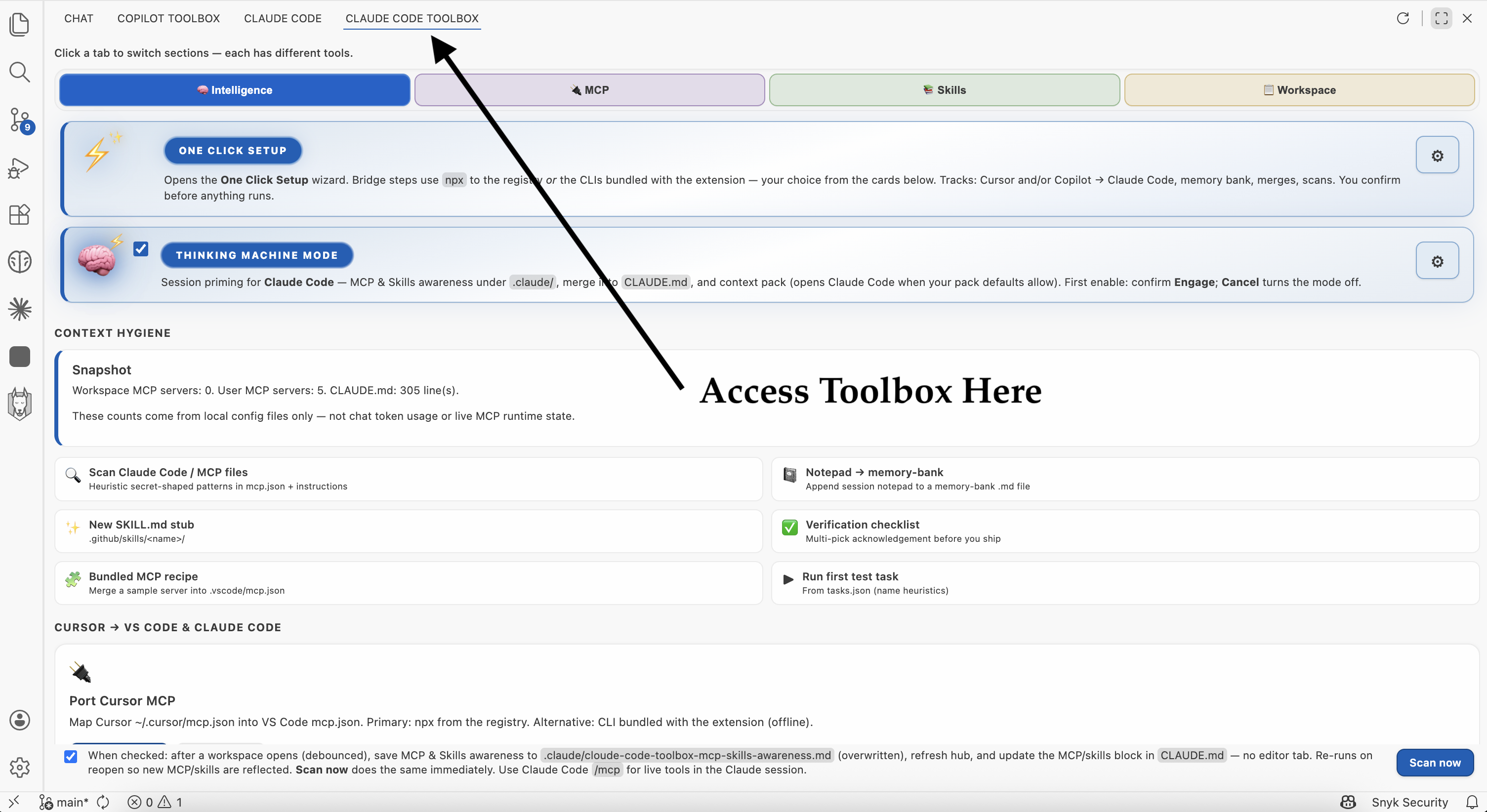
In plain terms: Claude Code only works as well as the setup around it—but that setup is usually scattered across files, machines, and habits. Claude Code ToolBox is one dedicated toolbox in VS Code (and a JetBrains plugin with full feature parity): you can see what’s configured, standardize how teams adopt Claude Code (including from Cursor and optional GitHub Copilot → Claude Code migration), and give Claude Code better context while each developer still chooses what to share.
For engineering teams, that means:
- Faster path from Cursor (and optional Copilot) to Claude Code — guided actions to port MCP, sync rules into
CLAUDE.md, scaffold memory-bank/, and migrate skills.
- Discover and add servers and skills from one hub — browse catalogs, see what’s already installed, fewer raw config edits.
- A single checklist view — workspace vs personal setup, local skill folders, rules,
CLAUDE.md, legacy Copilot instructions if present, and memory bank so the repo matches what you think you shipped.
- Smarter context for Claude Code — structured context packs and readiness flows, with explicit choices so teams stay aligned on what the model is allowed to see.
One Click Setup and Thinking Machine Mode
These are the two highlighted cards at the top of the hub’s Intelligence tab (after Cloude Code ToolBox → MCP & skills).
One Click Setup
What it does: After you accept the responsibility warning, it runs the automated sequence you configured under Settings → Claude Code ToolBox → One Click Setup (migration tracks: Cursor → Claude Code and optional GitHub Copilot → Claude Code, each toggled separately). That usually includes porting Cursor MCP into VS Code mcp.json, Claude-oriented memory bank init, Cursor rules → CLAUDE.md, optional merge of .github/copilot-instructions.md into CLAUDE.md, optional Copilot skills → .agents, optional .cursorrules merge, skills .cursor → .agents migration, MCP & Skills awareness (under .claude/) with optional block in CLAUDE.md, readiness summary, Claude Code / MCP config scan, optional Claude Code settings check, optional auto-scan enablement, and auto-enables Token Optimization. AntiVibe Safety Guards must be enabled separately. Bridge steps run via bundled node …/cli.mjs inside the extension (no npx network fetch for that path).
Why it matters: “Make this repo Claude-ready” shouldn’t depend on who read which doc. One Click encodes your team’s playbook once; anyone can run the same steps and review the same terminals and file changes.
Important: After One Click Setup completes, you will be prompted to close and reopen VS Code. Hooks require a fresh VS Code window to take effect.
Thinking Machine Mode
What it does: A master switch for session priming: optional MCP & Skills awareness (writes under .claude/) plus a context pack for Claude Code, with separate settings for confirmations and pack defaults. The first time you turn it on, VS Code shows Engage (sci-fi confirmation); Cancel turns the mode off. Unchecking the mode clears the acknowledgment so Engage appears again next time you enable it. You can also prime from the Command Palette when the mode is on.
Why it matters: Claude Code is only as good as the context you give it. Thinking Machine Mode makes “refresh what this repo knows about MCP, skills, and workspace shape” a deliberate, repeatable action instead of an ad-hoc copy-paste.
Token Optimization
What it does: A single toggle (Intelligence tab, right below One Click Setup) that activates six techniques to reduce Claude Code token usage by 30-60%:
Project dependency map — Scans workspace files, parses imports/exports (TypeScript, JavaScript, Python, Go), builds a directed dependency graph, and outputs .claude/project-map.md (~1000 tokens). Claude uses this to navigate directly to the right file instead of reading randomly.
Verbosity control — Four levels (normal, concise, minimal, json-only) merged as instructions into CLAUDE.md via idempotent HTML comment markers. Default concise mode: 1-3 sentences, no meta-commentary, diff-style code changes only.
Read deduplication — Python PreToolUse hook tracks file reads per session in a temp cache. Warns when re-reading unchanged files within a configurable time window (default 5 min). Uses mtime+size for change detection.
.claudeignore — Gitignore-style pattern file (20+ default patterns) advising Claude to skip irrelevant files: node_modules, lock files, build output, minified assets, coverage, VCS internals. Hook warns but never blocks.
CLI output compression — Python PostToolUse hook compresses verbose output. Command-specific filters for git status/diff/log, npm/yarn/pnpm, jest/vitest/pytest. Generic deduplication: repeated lines collapsed to {line} (x{count}). Configurable max lines (default 50).
Context budget watchdog — Subscribes to session context data, fires tiered alerts at configurable thresholds (default 70%, 85%, 95%) with actionable prompts (run /compact, start new session).
Supplementary tools:
- CLAUDE.md Analyzer — Parses CLAUDE.md into sections, estimates tokens per section, detects oversized (>500 tokens) and duplicate (>80% Jaccard overlap) sections, outputs recommendations.
- Create .claudeignore — Generates a starter file with sensible defaults.
- Status command — Shows current configuration, hook installation state, project map freshness.
Security hardening: All temp files use restrictive permissions (0o700 directories, 0o600 files). Session IDs are regex-sanitized against path traversal. Pattern lengths are bounded to prevent ReDoS. Numeric config values are clamped before interpolation into hook scripts. Settings.json writes use atomic rename with restrictive modes.
14 granular settings under claude-code-toolbox.tokenOptimization.* — enable/disable each technique independently.
Note: After enabling Token Optimization (or Safety Guards), restart VS Code for hooks to take effect. The extension will prompt you automatically.
Table of contents
What’s in this repo
| Deliverable |
Purpose |
| Claude Code ToolBox |
VS Code extension: MCP & skills hub, workspace kit, Intelligence (context packs, readiness, MCP/Skills awareness under .claude/, optional CLAUDE.md merge, auto-scan on folder open, .cursor→.agents skill migration), bundled bridge CLIs and optional npx from the hub |
| claude-code-toolbox-intellij |
JetBrains Platform plugin — MCP & skills hub + Agentic Teams (all 8 protocols, CRUD, live transcript, approval gate) |
| memory-bank/ |
Optional project memory files for you and Claude Code (not required to build the extension) |
| packages/cursor-mcp-vscode-port/ |
Placeholder README for the MCP port CLI layout; the CLI is published separately on npm |
The extension does not replace Claude Code or Cursor; it helps you align configs and see what’s configured (MCP servers, local SKILL.md trees, instructions files). Deeper settings, keybindings, and troubleshooting: packages/claude-code-toolbox/README.md.
See the real UI (screenshots)
These are actual VS Code UI captures from the extension—what users see on screen. How to open the hub (Activity Bar → Claude Code ToolBox → MCP & skills) is at the top: After install: open Claude Code ToolBox (VS Code). Most hub shots below are high-resolution (~2.5k width) so labels stay readable in README and on the static site sources in /docs (GitHub Pages from that folder; gallery images load from raw.githubusercontent.com on main, same pattern as Github-Copilot-ToolBox). See Pages setup for the public URL and optional custom domain.
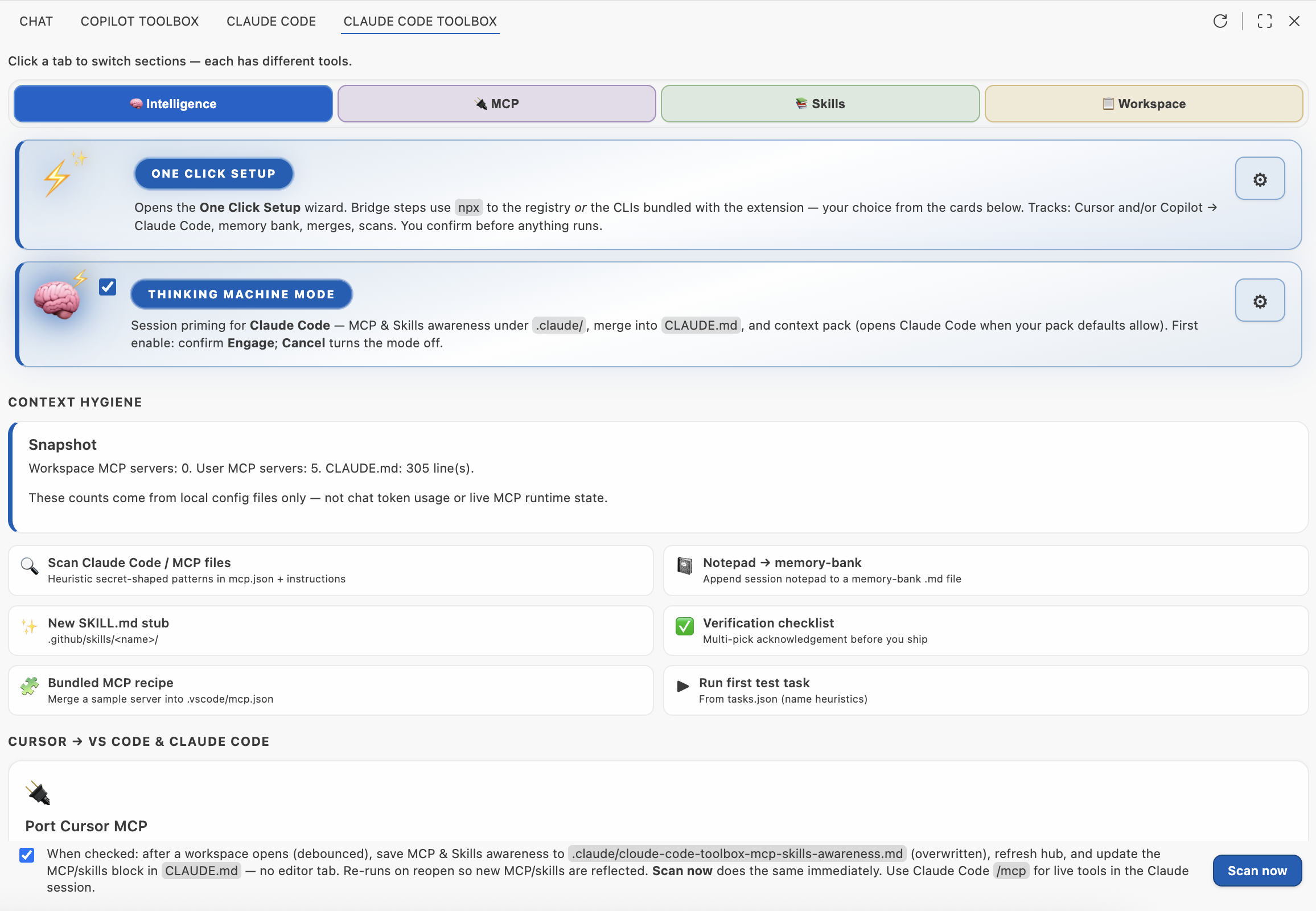
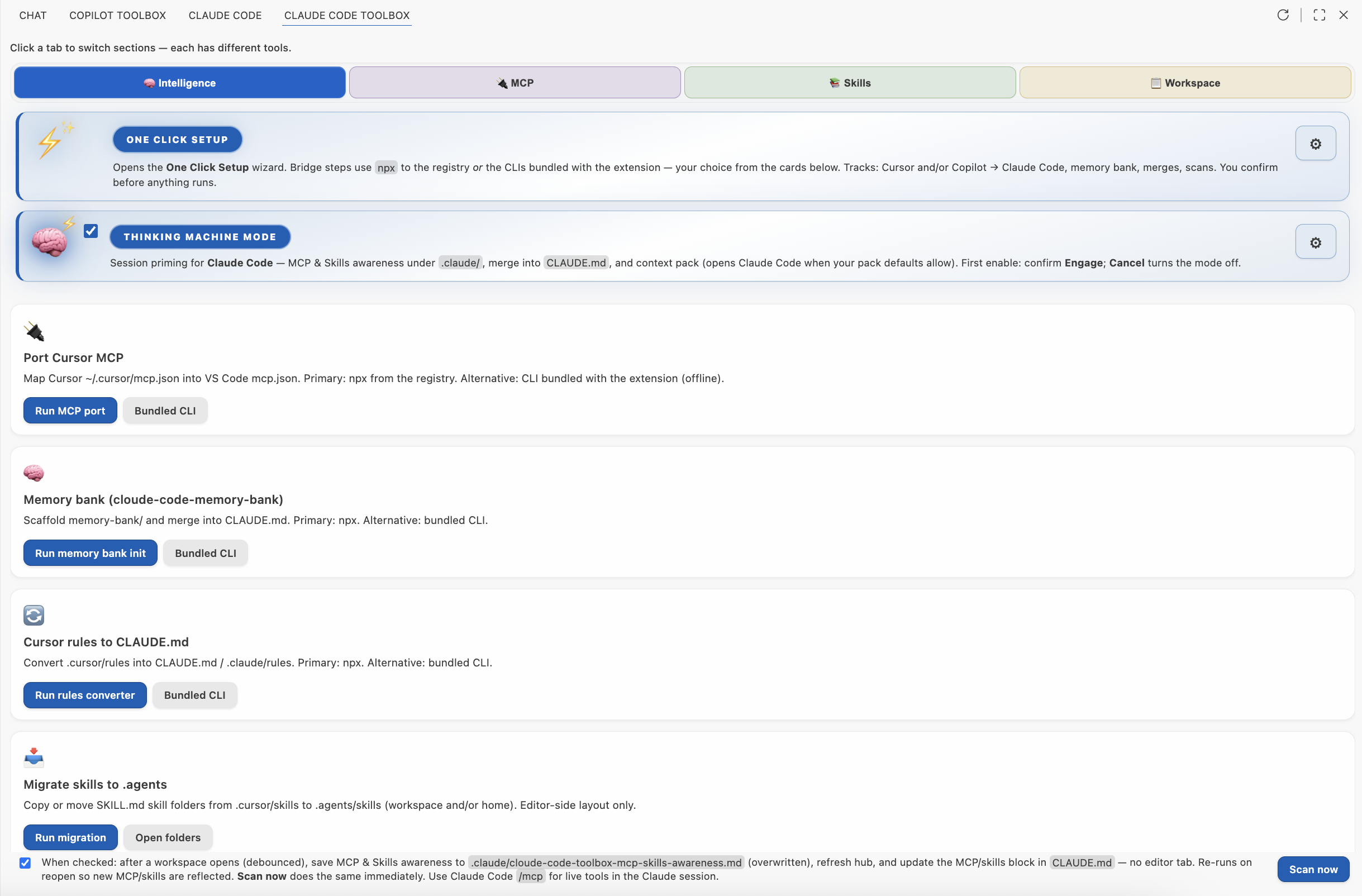
Intelligence (hub): Port Cursor → VS Code + Claude Code (MCP, rules, memory bank), then broader bridges, context pack, readiness, MCP & Skills scan.
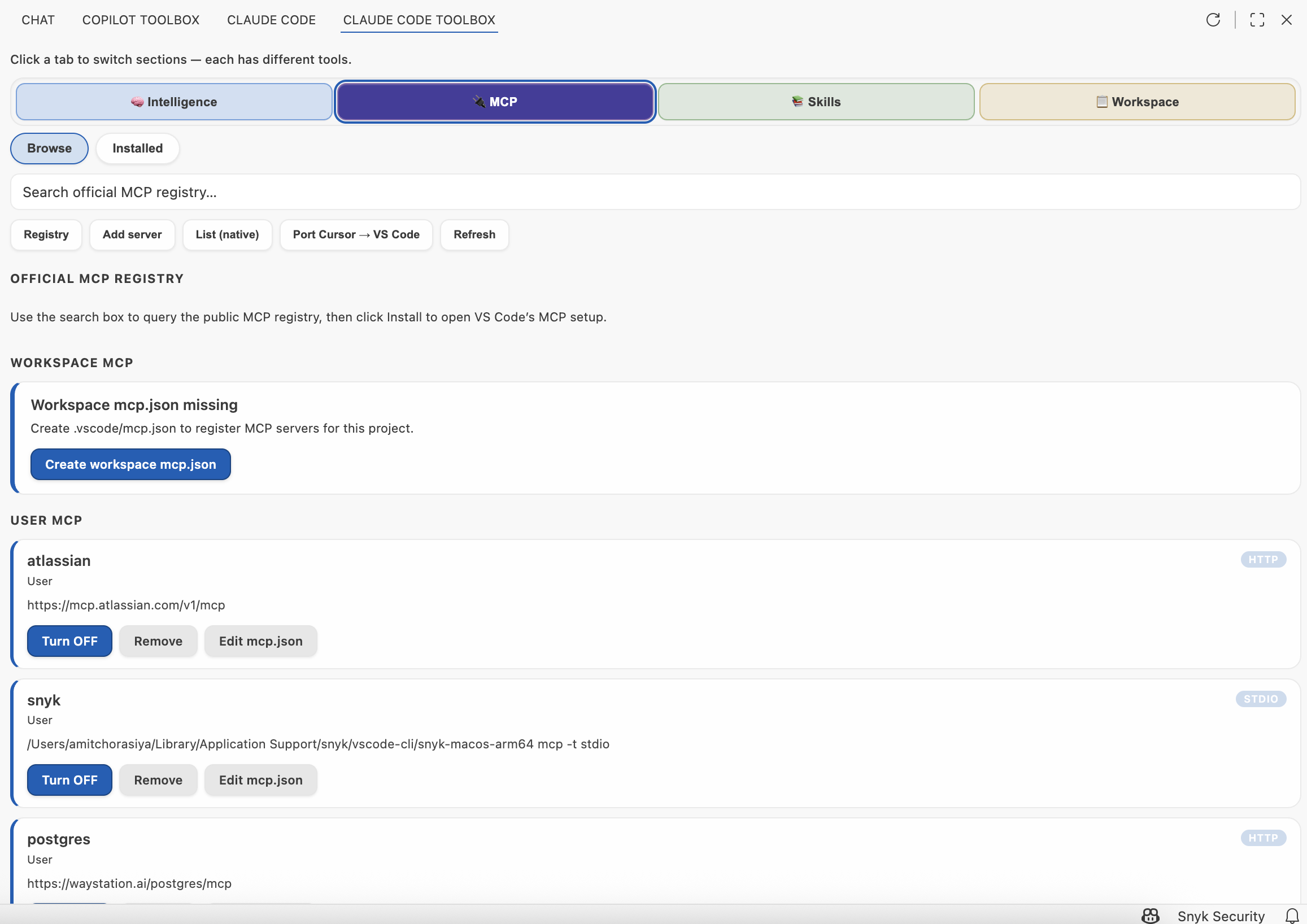
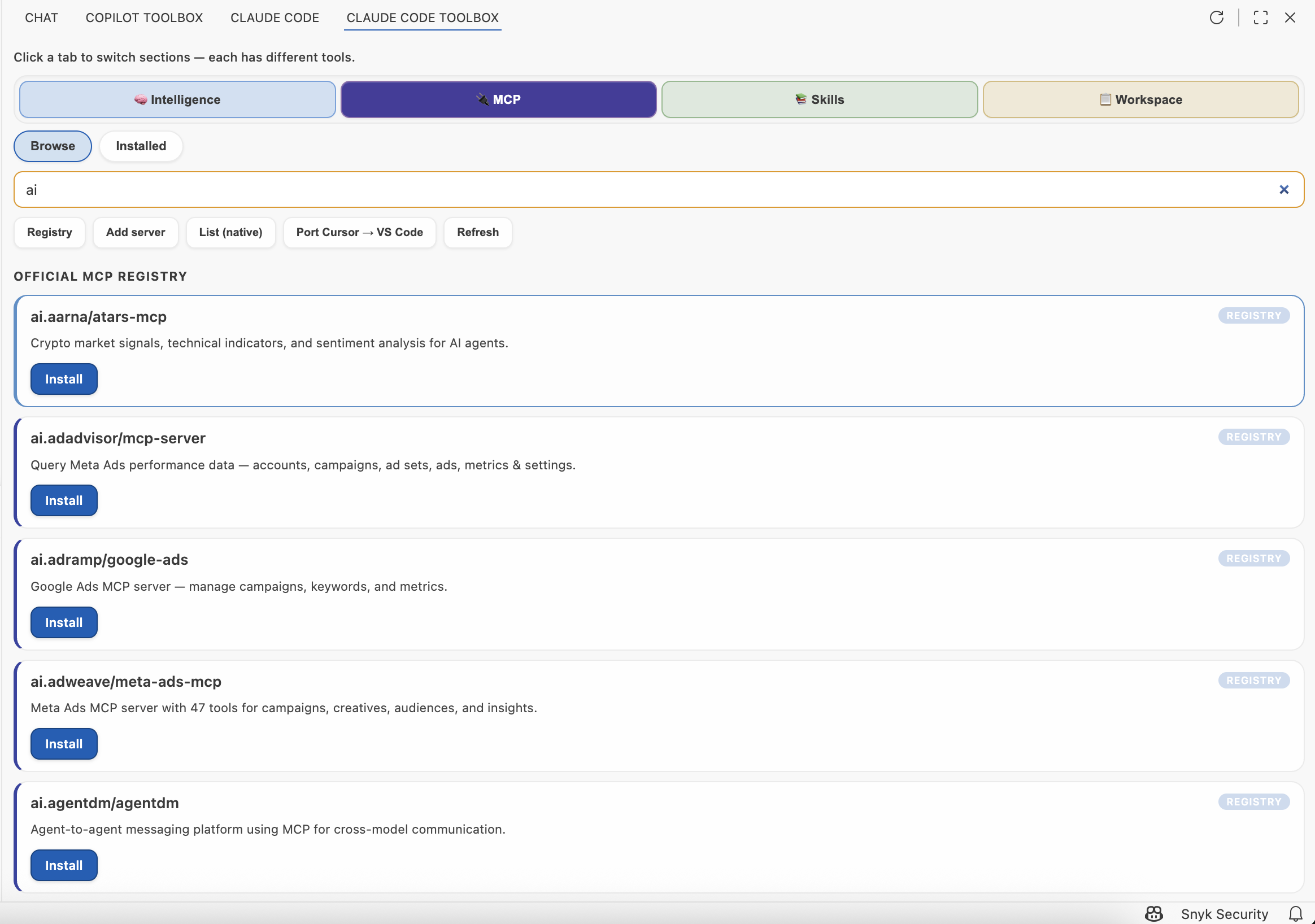
MCP: installed workspace/user servers and registry browse.
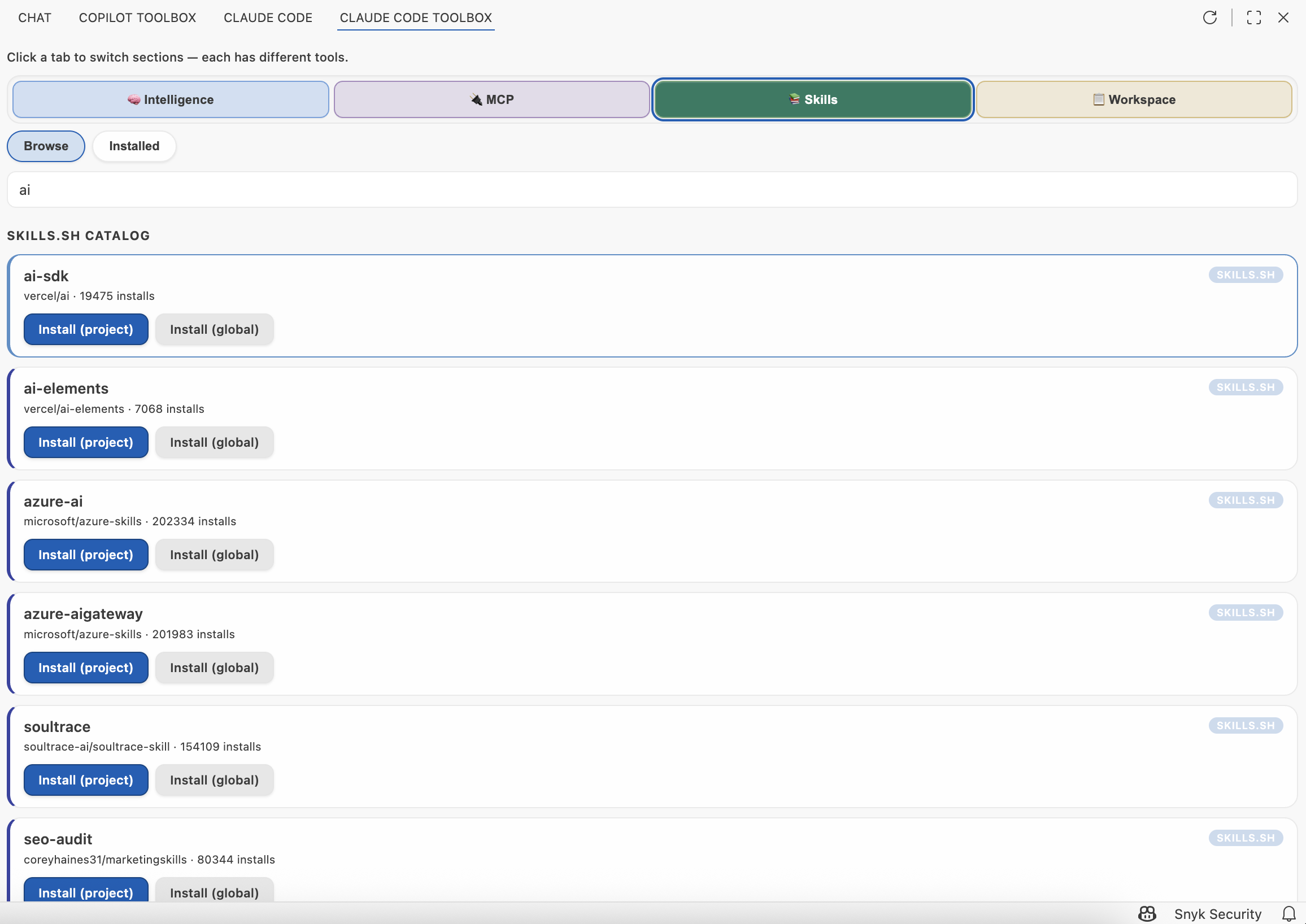
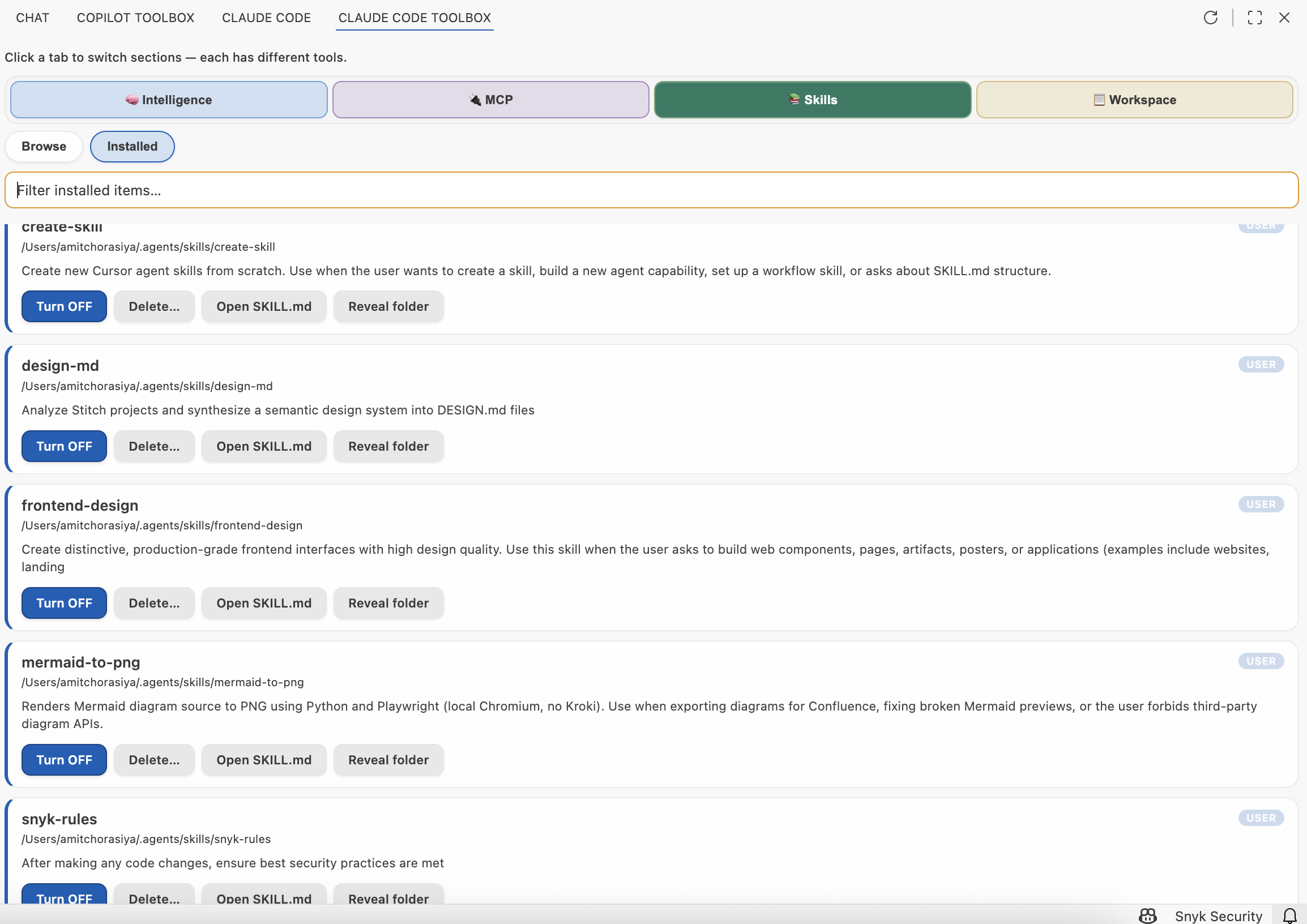
Skills: catalog (skills.sh) and local installed SKILL.md trees.
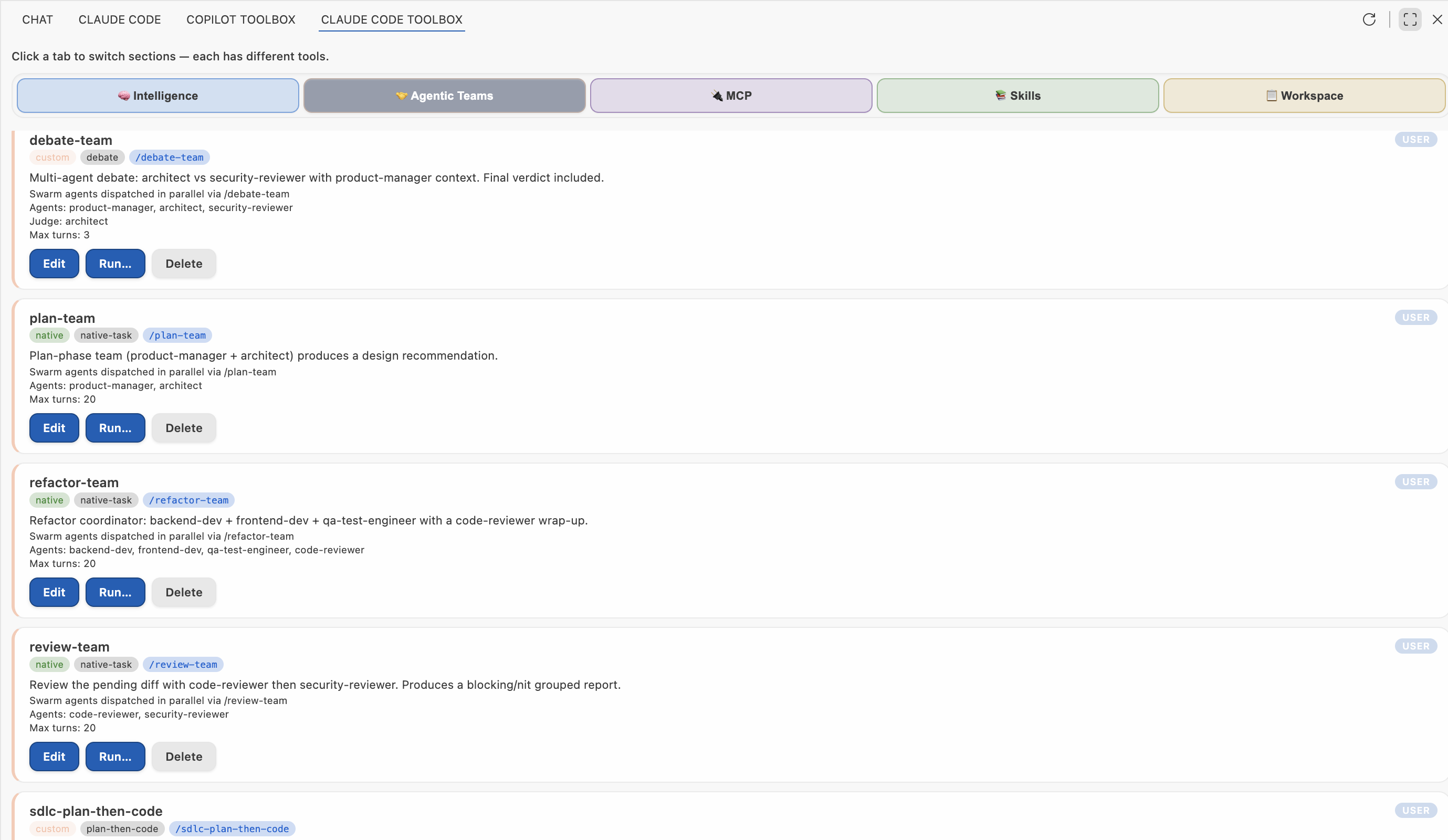
Agentic Teams: orchestrated workflows with debate, planning, and review protocols. One-click Run dispatches agents in parallel.
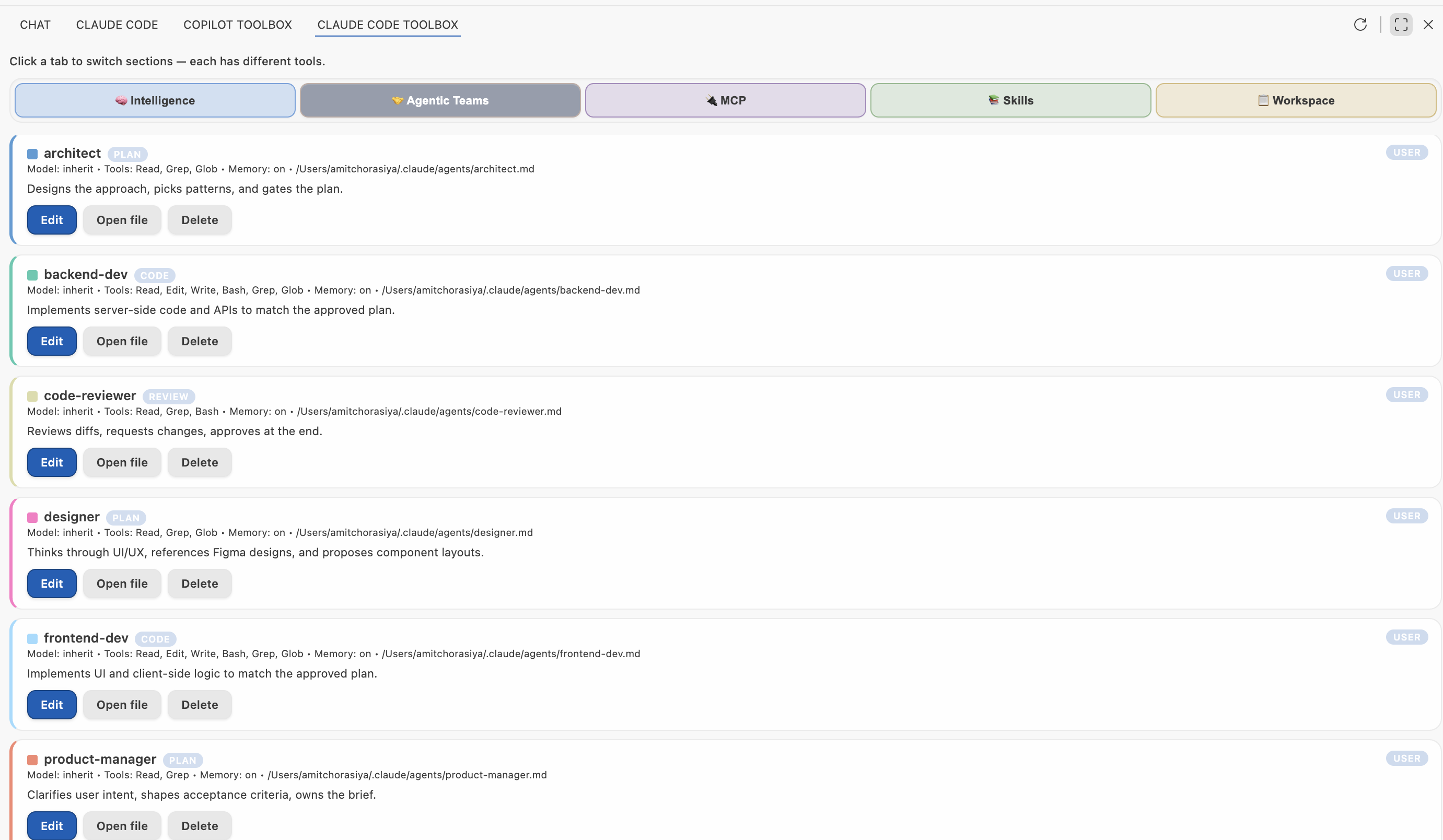
Agents: 10-agent SDLC starter pack with role-based specialization, skill-backed prompts, and per-agent long-term memory.
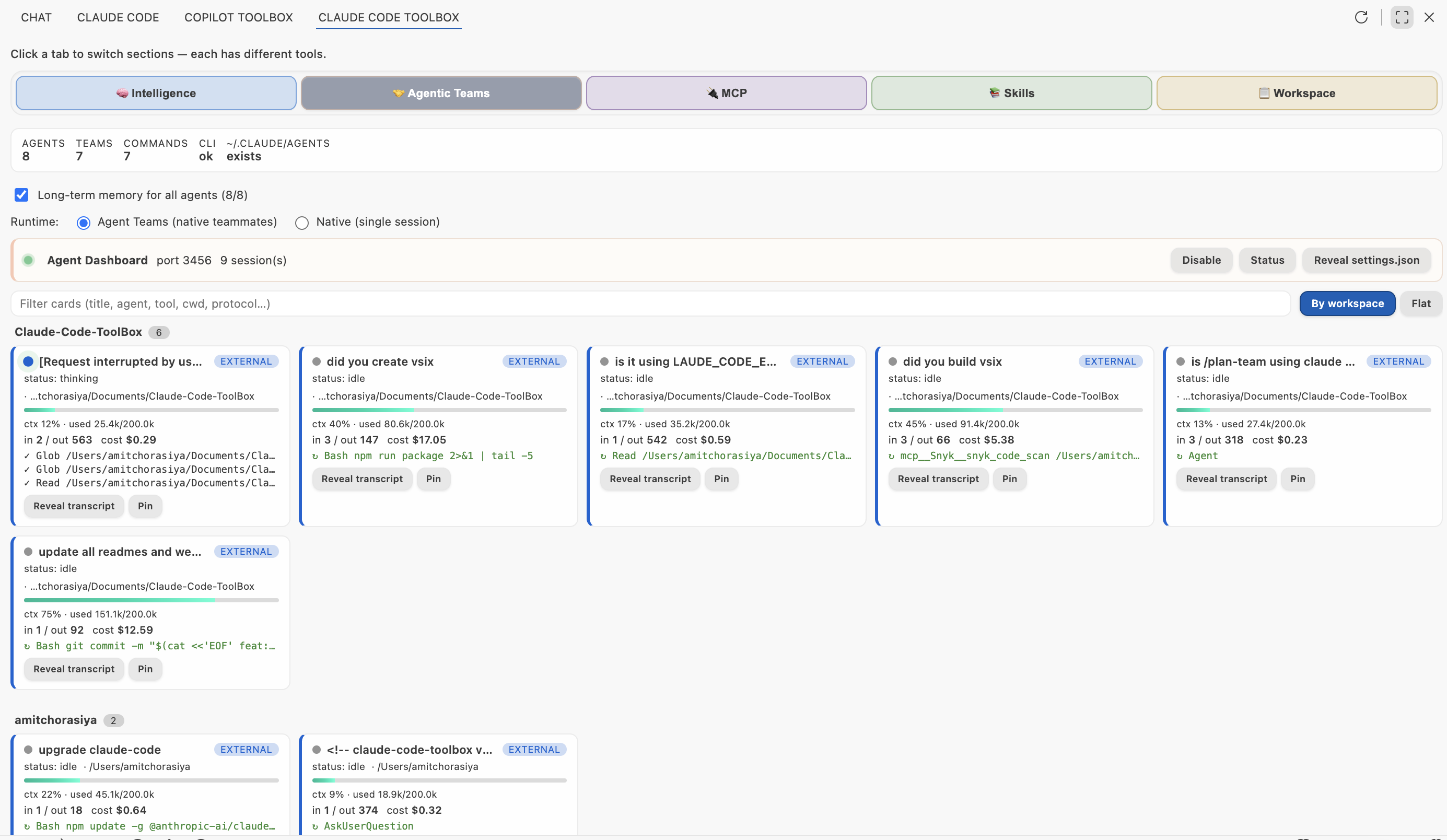
Agent Dashboard + Long-Term Memory: live visibility for every Claude Code session on your machine. Token-based cost estimates, context fill, tool feed, grouped by workspace. LTM enabled for all agents.
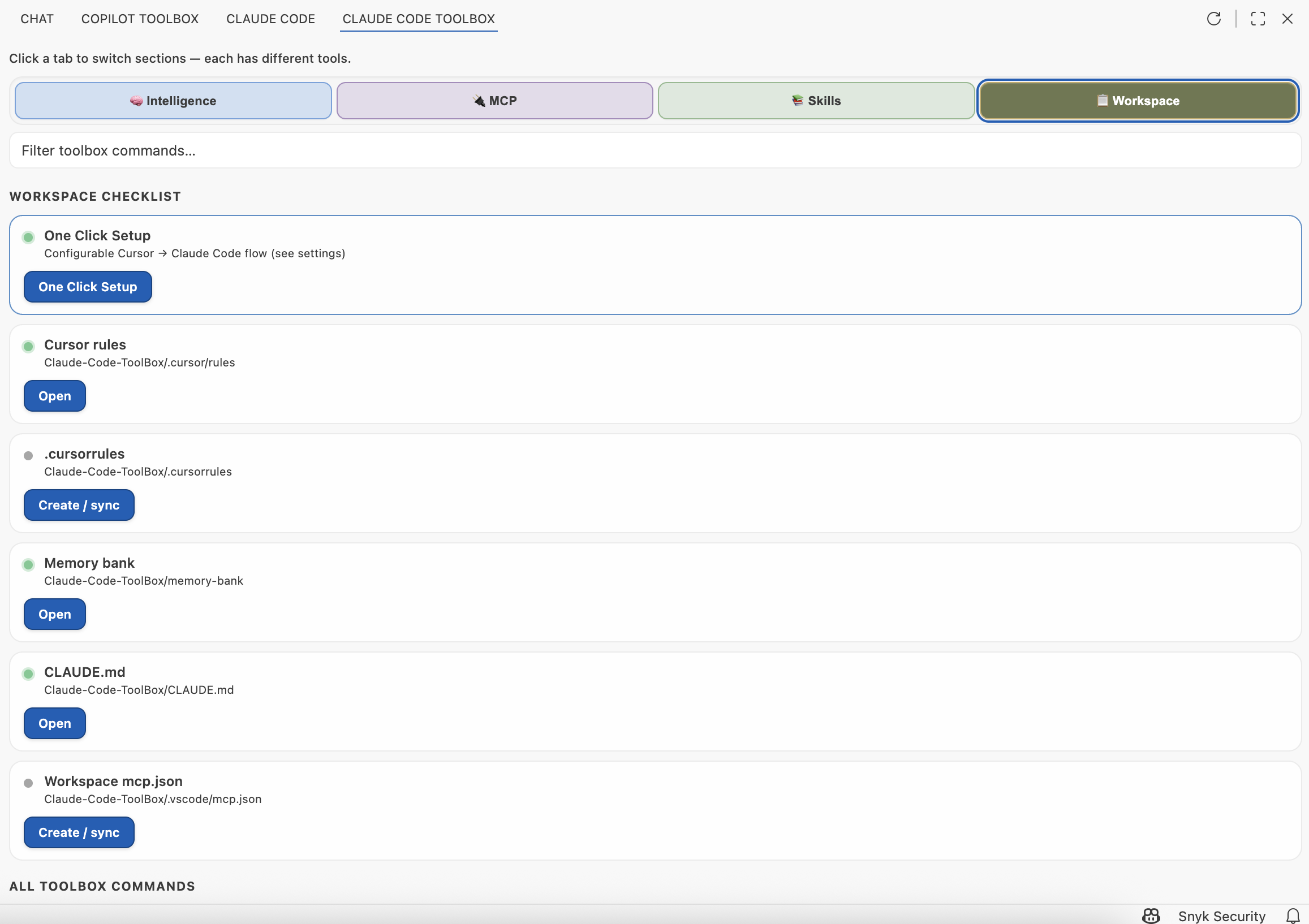
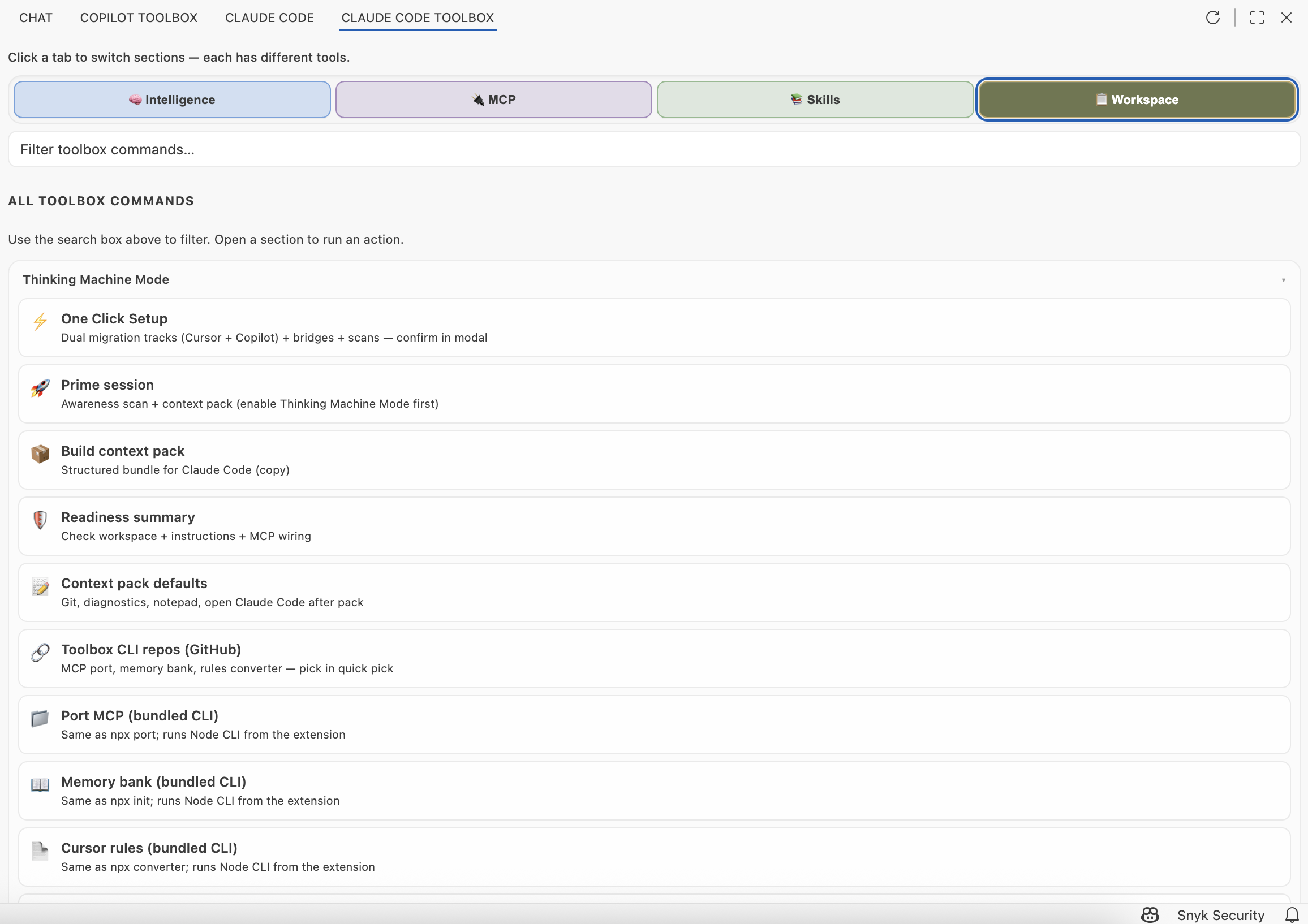
Workspace checklist and Intelligence hub (context hygiene).
Reference diagram: there is no exported PNG in screenshots/ right now. Regenerate from diagrams/mermaid-copilot-map.mmd with the Mermaid CLI (or any local exporter) and save as screenshots/mermaid-claude-map.png if you want this image back in the README.
Open the MCP & skills hub from the Side Bar after you click Claude Code ToolBox in the Activity Bar (see After install: open Claude Code ToolBox (VS Code) at the top of this README). The hub is organized into tabs, a Browse / Installed switch (where applicable), a search field, optional MCP chips, and a footer legend.
Main tabs (top)
| Tab |
Purpose |
| Intelligence |
Bridges (Cursor → Claude Code; optional GitHub Copilot → Claude Code), Context hygiene tiles, Context & readiness actions, plus auto-scan controls. Default tab. Sections are collapsible. |
| 🤝 Agentic Teams (2nd tab) |
Multi-agent planning & debate — subagent CRUD with skill-backed agents (point to SKILL.md) and per-agent long-term memory (global toggle), team composition, 8 collaboration protocols incl. debate (+ judge), plan-then-code (with your approval gate), and converge (parallel → cross-pollinate → synthesize), swarm dispatch (every team auto-generates a /command dispatching all agents in parallel), opt-in Agent Dashboard, SDLC starter pack (9 agents + 7 preset teams). Sections are collapsible. See the Agentic Teams section below. |
| MCP |
Browse official registry search or Installed workspace + user servers from mcp.json. Sections are collapsible. |
| Skills |
Browse skills.sh catalog or Installed local folders that contain SKILL.md under standard roots. Sections are collapsible. |
| Workspace |
Workspace checklist (One Click Setup, rules, memory bank, CLAUDE.md, mcp.json) and All toolbox commands (searchable tiles, already collapsible). |
Browse vs Installed (MCP and Skills only)
| Sub-tab |
Purpose |
| Browse |
Search remote catalog (MCP registry or skills.sh). Extra chip row appears on MCP → Browse. |
| Installed |
Filter and manage what is already on this machine / in this workspace (mcp.json servers or discovered skill folders). |
One Click Setup card (Intelligence tab, top)
| Control |
What it does |
| One Click Setup (pill-shaped primary button) |
Modal: you accept responsibility for all changes. Then runs the configured automated flow using bundled Node CLIs (no npx). See Settings → One Click Setup. |
| ⚙ |
Opens Settings filtered to cloude-code-toolbox.oneClickSetup. |
Thinking Machine Mode card (Intelligence tab, top)
| Control |
What it does |
| Checkbox |
Toggles claude-code-toolbox.thinkingMachineMode.enabled (Workspace when a folder is open, else User). First enable per cycle shows Engage; unchecking clears acknowledgment so Engage can appear again. |
| ⚙ |
Opens Settings filtered to cloude-code-toolbox.thinkingMachineMode. |
Background MCP & Skills auto-scan (Intelligence tab, bottom bar)
| Control |
What it does |
| Checkbox (long label about workspace open) |
Toggles claude-code-toolbox.intelligence.autoScanMcpSkillsOnWorkspaceOpen. When on: after a workspace opens (debounced), writes MCP & Skills awareness under .claude/, refreshes the hub, and updates the replaceable MCP/skills block in CLAUDE.md. Persists to Workspace when a folder is open, otherwise User. |
| Scan now |
Runs the awareness flow immediately and refreshes the hub. |
Search box
Hidden on Intelligence. On other tabs it filters: registry / skills.sh results (Browse), installed MCP servers or skills (Installed), or toolbox command tiles (Workspace).
MCP chip row (MCP → Browse only)
| Chip |
What it does |
| Registry |
Opens VS Code’s native MCP registry UI (workbench.mcp.browseServers). |
| Add server |
Opens VS Code’s flow to add MCP configuration (workbench.mcp.addConfiguration). |
| List (native) |
Lists servers in the MCP UI (workbench.mcp.listServer). |
| Port Cursor → VS Code |
Runs the cursor-mcp-vscode-port npx bridge to map Cursor config into VS Code mcp.json. |
| Refresh |
Reloads hub data from disk and config. |
Intelligence → Context hygiene
| Area |
What it does |
| Snapshot (callout) |
Read-only counts: active workspace MCP servers, active user MCP servers, and whether CLAUDE.md exists (with line count). Clarifies this is file-based, not live Agent runtime. |
| Scan MCP / instruction files |
Heuristic scan for secret-shaped patterns in mcp.json and instruction files; results go to Output. |
| Notepad → memory-bank |
Append session notepad content into a memory-bank/**/*.md file (preview, then write). |
| New SKILL.md stub |
Creates .github/skills/<name>/SKILL.md starter. |
| Verification checklist |
Multi-pick acknowledgement checklist before you ship. |
| Bundled MCP recipe |
Merges a sample server from bundled recipes into .vscode/mcp.json. |
| Run first test task |
Runs a tasks.json task (prefers a test-like name, else the first task). |
Intelligence → Cursor → VS Code + Claude Code (hero cards)
| Card / button |
What it does |
| Run npx port (Port Cursor MCP) |
Runs ClaudeCodeToolBox.portCursorMcp → npx cursor-mcp-vscode-port. |
| GitHub (same card) |
Opens the port CLI repo in the browser. |
| Run npx init (Claude-oriented memory bank) |
Runs initMemoryBank → npx cloude-code-memory-bank (scaffold memory-bank/, merge instructions). |
| GitHub |
Memory bank repo. |
| Run converter (Cursor rules to CLAUDE.md) |
Runs syncCursorRules → npx cursor-rules-to-claude. |
| GitHub |
Rules converter repo. |
Run migration (Migrate skills to .agents) |
Runs migrateSkillsCursorToAgents — copy/move .cursor/skills → .agents/skills (workspace and/or user). |
Intelligence → Context & readiness (hero cards)
| Button |
What it does |
| Run scan |
MCP & Skills awareness: saves .claude/claude-code-toolbox-mcp-skills-awareness.md, prompts with Open report / shortcuts, and updates the replaceable MCP/skills block in CLAUDE.md when merge rules apply (interactive hub run, workspace auto-scan, or One Click–forced merge). |
| Build pack |
Context pack quick picks → markdown for Claude Code (files, optional git/diagnostics, etc.). |
| Run readiness |
Markdown readiness summary (instructions, rules, MCP, suggested next steps). |
| Open settings |
Filtered Intelligence-related settings (cloude-code-toolbox.intelligence.*). |
MCP → Browse (registry results)
| Control |
What it does |
| Install (on a registry card) |
Installs that server entry into your MCP config via the extension. |
| Load more results |
Paginates registry search. |
MCP → Installed (each server card)
| Button |
What it does |
| Turn OFF |
Removes the server from mcp.json and stashes its JSON in extension storage until you Turn ON. |
| Turn ON |
Restores stashed config into mcp.json. |
| Remove |
Deletes stash and/or the mcp.json entry (after confirmation). |
| Edit mcp.json |
Opens workspace or user mcp.json in the editor (native MCP commands). |
Skills → Browse (skills.sh catalog)
| Button |
What it does |
| Install (project) |
Runs npx skills add targeting project skill roots (per skills.sh flow). |
| Install (global) |
Same for user skill roots. |
Skills → Installed (each skill card)
| Button |
What it does |
| Turn OFF |
Hides that skill in the hub only (extension state); folder stays on disk. |
| Turn ON |
Shows it again in the hub. |
| Delete… |
Moves the skill folder to trash if it lives under a known skill root (confirmation). |
| Open SKILL.md |
Opens the skill’s SKILL.md. |
| Reveal folder |
Reveals the skill folder in the OS file explorer / sidebar. |
Workspace → Workspace checklist (each row)
| Button |
What it does |
| One Click Setup |
runOneClickSetup — configurable automated flow (legacy workspaceSetupWizard opens the same with a short explanation). |
| Open |
Opens the target file or folder when it already exists. |
| Create / sync |
Runs the associated command to create or sync that artifact when missing. |
Use the search box to filter. Each tile runs one command (same as Command Palette). Groups and actions:
Intelligence: Build context pack · Readiness summary · Intelligence settings · MCP port repo (GitHub) · Memory bank repo (GitHub) · Rules converter repo (GitHub) · Migrate skills .cursor → .agents · Scan MCP & Skills awareness · MCP / instruction config scan · Append notepad → memory-bank · Create SKILL.md stub · Verification checklist · Apply bundled MCP recipe · Run first test task.
Chat & session: Open Claude Code · Session notepad · Copy notepad · Composer tips hub · Inline chat (Cursor-style).
Rules & instructions: Cursor vs Claude Code reference · Translate @-mentions · Append .cursorrules · Open instruction file… · Create .cursorrules template · Sync Cursor rules → CLAUDE.md.
MCP & Cursor bridges: Open workspace mcp.json · Open user mcp.json · Toggle MCP discovery · Add server (native).
Workspace setup: One Click Setup · Init memory bank.
Docs & environment: Claude Code account / pricing · Environment sync checklist.
Summarizes skill search roots, Turn OFF/ON/Delete behavior for skills, and Turn OFF/Remove behavior for MCP—so expectations are explicit without opening docs.
The MCP & skills and Workspace kit views expose a Refresh action in the view title to reload lists and webview state.
Agentic Teams — multi-agent planning & debate
New in 1.0.17; skill-backed agents + long-term memory in 1.0.28. The 🤝 Agentic Teams tab (now the second tab for faster access) turns the hub into a multi-agent planning & debate workbench on top of Claude Code's native subagent format. Agents can be backed by SKILL.md files and have per-agent long-term memory that persists learnings across runs (with a global toggle to bulk-enable). Specialised agents argue a design, produce a plan for you to approve, and then execute the approved plan with a live color-coded transcript. Every team is a slash command (swarm dispatch). All sections are collapsible for quick navigation. Everything is opt-in. Full IntelliJ parity ships in 0.6.20.
TL;DR — three ways to use it
- Click Run on a team in the Agentic Teams tab → watch agents debate live, approve the plan, let the code phase run. Transcript +
plan.md + decision.md are saved under <ws>/.claude/runs/.
cmd/ctrl+alt+p → Plan with Agent Team… — parallel to Claude Code's built-in /plan; captures your editor selection as context.- Type
/debate-team or /plan-team inside any claude session — swarm dispatch sends all agents in parallel via the Task tool, then synthesizes. Works from a terminal, JetBrains, or anywhere Claude Code runs.
Agent Teams — what ships
- Agent CRUD using Claude Code's native YAML-frontmatter
.md format. Agents live in ~/.claude/agents/ (user scope) or <workspace>/.claude/agents/ and are immediately invokable from any claude session via the Task tool. Skill-backed agents: point an agent to a SKILL.md file instead of a freeform prompt (radio: Custom prompt vs Use skill with dropdown). Per-agent long-term memory: agents learn from interactions and retain knowledge as <agent>.memory.md alongside the agent file. A global memory toggle in the summary strip bulk-enables/disables for all agents.
- SDLC starter pack — 9 ready-made agents:
product-manager, architect, security-reviewer, backend-dev, frontend-dev, qa-test-engineer, code-reviewer, devops, tech-writer. Each gets a role tag (plan, code, review), model default, and tool whitelist.
- 7 preset teams (JSON under
~/.claude/teams/) — debate-team, plan-team, review-team, security-team, sdlc-plan-then-code, refactor-team, spec-team — installed with the starter pack, each auto-generating a swarm /command.
- 8 collaboration protocols driven by the Toolbox orchestrator:
native-task — single claude session picks subagents via the Task tool.round-robin — agents speak in order, each sees the previous N messages.handoff — each agent ends with HANDOFF: <name> to route the next turn.orchestrator — one lead agent explicitly routes work to specialists (ROUTE: <name>).parallel-fan-out — all agents answer in parallel, then one synthesizes.debate — N rounds of disagreement, then a judge agent writes decision.md.plan-then-code — plan agents produce <plan>...</plan> → you approve or edit → code agents execute against the approved plan → optional judge review.converge — all agents think in parallel (diverge), see each other's work and refine (cross-pollinate, N rounds), judge synthesizes a cohesive plan → you approve or edit → code agents execute → optional judge review.
- Swarm dispatch — every team is a slash command. Creating or editing a team auto-generates a
/command that dispatches all agents in parallel via the Task tool (swarm pattern). No separate command editing needed — team cards show the linked /slug pill and "Swarm agents dispatched in parallel" badge.
- Live color-coded transcript with pulsing status, tokens + cost + projected-cost, tool-call feed, approve-plan modal, Stop button.
- Cost guardrails — soft breach shows a "Stop now" toast; hard breach auto-aborts internal runs.
- Run artifacts — every run appends JSON lines to
<ws>/.claude/runs/<id>/transcript.jsonl plus optional plan.md / decision.md.
Agent Dashboard — watch every Claude Code session live (opt-in)
When enabled, the Agentic Teams tab shows a card for every running Claude Code session on your machine — including sessions you start in a terminal or another VS Code window. Each card displays:
- Pulsing status dot (
running, thinking, awaiting_permission, idle, error).
- Current tool + target file (
Edit → src/foo.ts).
- Context-window fill bar, tokens in/out, USD cost + rolling projection.
- Last-3 tool-call feed (
✓ Read, ↻ Edit, ✗ Bash).
- Inline "needs approval" badge when Claude is waiting on a permission prompt.
How it works (disclosed in the Enable card before any write): the Toolbox drops ~/.claude/agent-dock-hook.py into your home directory, registers 5 hook events (PreToolUse, PostToolUse, Stop, SubagentStop, PermissionRequest) in ~/.claude/settings.json (atomic, dedup, reversible via Disable), and starts an HTTP listener on 127.0.0.1:3456 (configurable). It also tails ~/.claude/projects/<session>.jsonl. No telemetry — nothing leaves your machine.
Phase 2 polish: swim-lane grouping by workspace, search/filter, cost-cap warnings, foreign-hook detection (warns if another agent-dock-style tool is also installed).
Swarm slash commands (bridge into native chat)
Seven preset teams ship as swarm slash commands — each dispatches all team agents in parallel via the Task tool, then synthesizes results. No VS Code UI needed:
| Command |
Agents |
What it does |
/debate-team <topic> |
product-manager, architect, security-reviewer |
Parallel perspectives → synthesis with disagreement resolution. |
/plan-team <task> |
product-manager, architect |
Parallel planning perspectives → unified plan. |
/review-team |
code-reviewer, security-reviewer |
Parallel code + security review → merged findings. |
/security-team <change> |
security-reviewer |
OWASP-focused threat model. |
/sdlc-plan-then-code <task> |
product-manager, architect, backend-dev, frontend-dev |
Full SDLC swarm → cohesive implementation plan. |
/refactor-team <target> |
backend-dev, frontend-dev, qa-test-engineer, code-reviewer |
Parallel refactor proposals → merged edit sequence + test plan. |
/spec-team <idea> |
product-manager, architect |
PRD + technical addendum in parallel → unified spec. |
Files land in ~/.claude/commands/*.md (user scope) or <workspace>/.claude/commands/*.md; each carries a marker so Uninstall removes only ours (foreign files stay). Commands are auto-created when you create or edit a team — no separate install step. The starter pack installs all 7 teams and their swarm commands together.
Entry points (Agentic Teams tab + commands)
- Hero button —
Enable Claude Agent Teams (scaffolds ~/.claude/agents/, optionally installs the starter pack, writes preset teams, installs eligible slash commands).
- Run… button on each team card — opens a prompt input, dispatches the team through the chosen protocol, streams events into the live transcript.
- Plan with Agent Team… (
cmd/ctrl+alt+p) — parallel to Claude Code's built-in /plan; captures the editor selection as context.
- Smart router —
Claude Code ToolBox: Smart router — pick workflow for a prompt classifies intent (plan/debate/single) and dispatches.
- Auto-pair (default off) — when an external Claude session's first prompt looks like planning ("plan", "design", "sdlc"…), a toast offers to mirror it through your default debate team.
Everything above works on macOS, Windows, and Linux — and in both VS Code and JetBrains (IntelliJ, PyCharm, etc.). The IntelliJ plugin ships a full Kotlin port of all 8 protocols, agent/team/command CRUD, ProcessBuilder-based ClaudeSpawn, RunBus, RunRegistry, and the approval gate. Paths use path.join + os.homedir() (TS) / System.getProperty("user.home") (Kotlin); the hook server binds 127.0.0.1 (IPv4) to avoid Windows localhost IPv6 resolution; atomic writes fall back to copyFile + unlink if fs.rename hits an ENOENT race on macOS FSEvents.
Why it exists
- Different formats: Cursor uses
~/.cursor/mcp.json and mcpServers; VS Code expects workspace/user mcp.json with a servers object and stdio / http types (used by VS Code MCP and related tooling, including Claude Code workflows in the editor).
- Different “skills” story: Local
SKILL.md folders are useful for humans and for tools that read them; Claude Code does not automatically load arbitrary skill folders—the extension lists them for browse / open and documents that in the UI.
- One sidebar: Open workspace and user MCP, run port/sync/memory-bank CLIs, and run Intelligence flows without hunting commands.
Quick start (extension)
git clone https://github.com/amitchorasiya/Cloude-Code-ToolBox.git
cd Cloude-Code-ToolBox/packages/claude-code-toolbox
npm install
npm run compile
From the monorepo root (after dependencies are installed under the package above):
npm run compile    # same as npm run compile --prefix packages/claude-code-toolbox
npm test
Run in VS Code: open this repository → Run and Debug → Run Extension: Claude Code ToolBox (see .vscode/launch.json).
Install the extension
- Marketplace: search for Claude Code ToolBox (MCP, Skills, Cursor/Copilot → Claude) (the public listing name) or install by id:
code --install-extension amitchorasiya.cloude-code-toolbox-vscode
- In VS Code after install: the Activity Bar and commands still show Claude Code ToolBox (short UI label).
- From VSIX: build with
npm run package inside packages/claude-code-toolbox/ — outputs cloude-code-toolbox-vscode-<version>.vsix in that same folder — then Install from VSIX… in VS Code.
If you had the old Marketplace id amitchorasiya.cloude-code-toolbox: that slug is permanently reserved after the listing was removed; this repo now publishes as amitchorasiya.cloude-code-toolbox-vscode (install the new id above—your settings under cloude-code-toolbox.* are unchanged).
Requirements: VS Code 1.99+, Claude Code extension, Node.js 20+ for bundled CLIs and optional npx bridges. Git on PATH for optional Intelligence “include git” (Windows: Git for Windows).
These work alongside the extension; the Intelligence hub links to their repos and can run several via npx.
| npm package |
Role |
GitHub |
cursor-mcp-vscode-port |
Port Cursor mcp.json → VS Code mcp.json |
Claude-Code-ToolBox |
claude-code-memory-bank |
Scaffold memory-bank/ + merge into CLAUDE.md |
Claude-Code-ToolBox |
cursor-rules-to-claude |
Generate CLAUDE.md + .claude/rules from .cursor/rules |
Claude-Code-ToolBox |
Repository layout
.
├── LICENSE                          # MIT (applies to repo contents; see package LICENSEs)
├── README.md                        # This file
├── package.json                     # Private monorepo helper scripts (compile / test / package:extension / rebuild:extensions)
├── scripts/
│   └── rebuild-extensions.sh        # One-shot: VSIX + IntelliJ ZIP (see npm run rebuild:extensions)
├── packages/
│   ├── claude-code-toolbox/         # VS Code extension — publish VSIX / Marketplace from HERE
│   │   ├── LICENSE                  # MIT (bundled in .vsix)
│   │   ├── package.json
│   │   ├── src/
│   │   └── README.md
│   ├── claude-code-toolbox-intellij/  # JetBrains plugin — Gradle; ./gradlew buildPlugin → ZIP under build/distributions/
│   ├── cursor-mcp-vscode-port/      # Vendored MCP port CLI (`npx` name: cursor-mcp-vscode-port)
│   ├── cursor-mcp-to-github-copilot-port/  # Legacy folder name only; use cursor-mcp-vscode-port
│   ├── claude-code-memory-bank/     # Vendored memory-bank + `CLAUDE.md` merge CLI
│   └── cursor-rules-to-claude/      # Vendored Cursor rules → `CLAUDE.md` CLI
├── memory-bank/                     # Project docs for agents / Claude Code
├── docs/                            # Static landing site for GitHub Pages (`npm run serve:site`)
├── screenshots/                     # README and docs: UI captures (`00-toolbox-access` … `08-…`; diagram export optional)
└── .github/workflows/               # extension-ci.yml → multi-OS build + tests
Development
cd packages/claude-code-toolbox && npm installnpm run compile — TypeScript → out/npm test — Vitest (unit tests for Intelligence helpers, skills, etc.)- F5 — extension host
Rebuild both artifacts (.vsix + IntelliJ .zip): from the monorepo root, npm run rebuild:extensions (runs scripts/rebuild-extensions.sh: compile, tests, export hub HTML for IntelliJ, npm run package, npm run package:intellij). Set REBUILD_SKIP_TESTS=1 for a faster run without Vitest.
Tech stack (extension): TypeScript, VS Code API ^1.99, Vitest. See packages/claude-code-toolbox/README.md for settings, keybindings, and caveats (#file: vs Add context, etc.).
CI
- VS Code extension:
.github/workflows/extension-ci.yml — triggers on packages/claude-code-toolbox/**, root package.json, or that workflow file.
- IntelliJ plugin:
.github/workflows/intellij-ci.yml — triggers on packages/claude-code-toolbox-intellij/** or that workflow file; runs ./gradlew buildPlugin on Ubuntu with JDK 21.
- Matrix: Ubuntu, Windows, macOS —
npm install, npm run compile, npm test, verifies out/extension.js exists.
Publishing (VSIX / Marketplace)
Always use packages/claude-code-toolbox/ as the extension root (matches repository.directory in that package.json).
cd packages/claude-code-toolbox
npm install
npm run compile
npm run package          # stages monorepo README (+ screenshot URLs) for Marketplace, then vsce package
# npx vsce publish       # when you are logged in to the publisher (from this directory)
The .vsix README is the monorepo root README.md (same content as on GitHub). Screenshot images use absolute raw.githubusercontent.com/.../main/screenshots/… URLs so they render on GitHub, the Marketplace, and anywhere else the README is shown; npm run package appends a cache-busting ?v= (from the extension version) to those image URLs for the packed .vsix. Other relative repo links in the staged README are turned into absolute GitHub URLs before packaging. packages/claude-code-toolbox/README.md is restored after each package run. Do not use package:extension-readme-only for a real publish—that skips this flow and README images break.
From monorepo root: npm run package:extension (after npm install in the package directory).
The LICENSE file in packages/claude-code-toolbox/ is included in the VSIX for Marketplace compliance.
Configuration & commands
Commands use ClaudeCodeToolBox.*. Settings use claude-code-toolbox.* (stable namespace in VS Code Settings). On first load after upgrade, legacy ClaudeCodeToolBox.* setting values migrate into claude-code-toolbox.*.
Notable settings (see extension README for a concise table):
claude-code-toolbox.npxTag, embeddedBridgeNodeExecutable, useInsidersPathsclaude-code-toolbox.tokenOptimization.* (Token Optimization — verbosity level, project map config, read deduplication window, output compression max lines, .claudeignore, context budget thresholds, CLAUDE.md merge toggle)claude-code-toolbox.intelligence.* (context pack defaults, auto-scan MCP & Skills on workspace open, session notepad / open Claude Code after pack, etc.)claude-code-toolbox.oneClickSetup.* (One Click Setup — includes Migration tracks migrateFromCursor / migrateFromGitHubCopilot, plus Memory Bank, Rules, Skills, MCP, Follow-ups, and optional Copilot instruction/skills merge settings)claude-code-toolbox.thinkingMachineMode.* (Engage dialog, priming, awareness, context pack when the mode is on)claude-code-toolbox.translateWrapMultilineInFence
Open filtered settings from the Command Palette (titles match VS Code exactly):
- Claude Code ToolBox: Thinking Machine Mode — open related settings →
claude-code-toolbox.intelligence
- Claude Code ToolBox: Thinking Machine Mode — open Thinking Machine settings →
claude-code-toolbox.thinkingMachineMode
- Claude Code ToolBox: Thinking Machine Mode — open One Click Setup settings →
claude-code-toolbox.oneClickSetup
You can also search claude-code-toolbox in the Settings UI. Note: Many toolbox commands are grouped under the Thinking Machine Mode — prefix in the palette even when they are general Intelligence actions—search Claude Code ToolBox to see the full list.
Security & privacy
- MCP configs may contain paths, env vars, or secrets. Treat
mcp.json as sensitive; do not commit secrets.
- The extension starts terminals for
npx and bundled Node bridges, edits mcp.json, CLAUDE.md, .claude/, and related paths, and may spawn git for optional Intelligence sections—only run servers and commands you trust.
- skills.sh / registry features call public HTTP APIs; review network use in corporate environments.
Contributing
Issues and PRs are welcome. Please:
- Run
npm run compile and npm test under packages/claude-code-toolbox/ before submitting.
- Keep changes focused; match existing TypeScript and doc style.
License
This repository is released under the MIT License. See LICENSE. The VS Code extension package includes its own packages/claude-code-toolbox/LICENSE for distribution in .vsix.
Disclaimer
Independence and trademarks. This monorepo is independent community tooling. It is not affiliated with, endorsed by, sponsored by, or maintained by Microsoft, GitHub, Cursor, OpenAI, Anthropic, or other vendors of products named in this documentation. The Claude Code ToolBox name is an independent project brand and is not the Anthropic Claude product or service. Visual Studio, Visual Studio Code, GitHub, Cursor, Anthropic, Claude, and other product names may be trademarks of their respective owners. For Microsoft’s naming and branding expectations around VS Code, see the official Visual Studio Code brand guidelines. Third-party workflow inspiration is credited in packages/claude-code-toolbox/NOTICE.
Software warranty. Code is released under the MIT License. The license applies “AS IS”, without warranties of any kind, and limits liability—read the full license text shipped with the software.
No professional services. Documentation and the extension are not security audits, legal review, or architecture sign-off. Your team remains responsible for MCP servers, skills, credentials, npx packages, and what you send to AI features.
Third parties. The extension can run npx bridges, open registry or catalog UIs, and edit local config files. npm packages, MCP servers, catalogs, and editor or Claude Code features are third-party; this project does not control their behavior, availability, or terms. Evaluate them before you install, connect, or execute them.
Your data and configs. You are responsible for backups, secrets hygiene, and compliance with your employer’s and vendors’ policies when using AI tooling and automation.

