CodeCity 3D Viewer

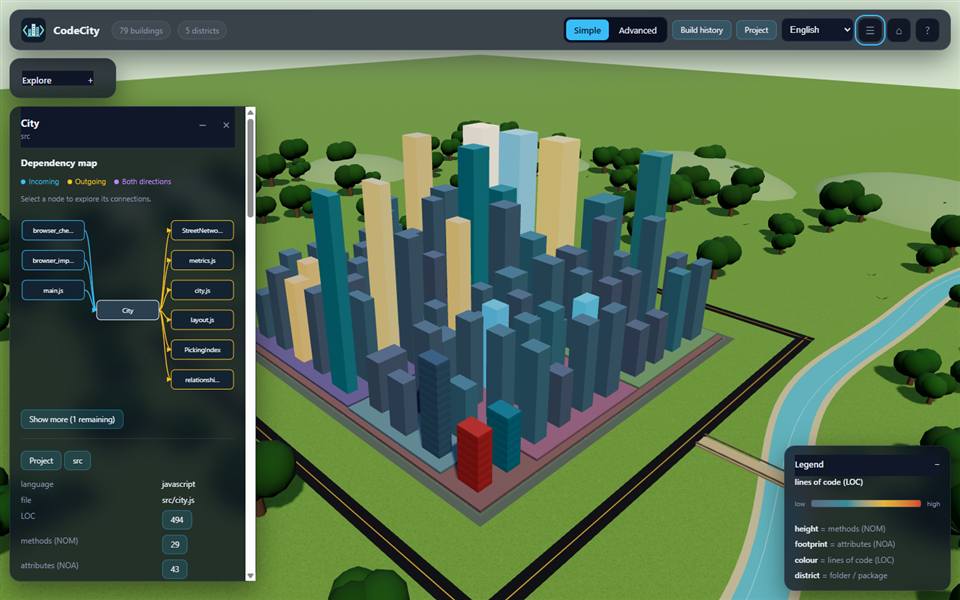
Explore any codebase as an interactive 3D code city without leaving VS Code.
Classes and modules become buildings, folders become districts, imports
become streets, and metrics such as methods (NOM), attributes (NOA) and
lines of code (LOC) become height, footprint and colour. CodeCity scans the
source directly, so no compilers, build steps, Python, or project dependencies
are required.
Features
- Integrated 3D tab — analyze the current workspace and explore its city in
a VS Code editor tab.
- External browser option — open the same view in your default browser.
- Activity-bar view — click the CodeCity icon in the Activity Bar to pick a
language and open the city for the current project.
- Language selection — English, Spanish, French, German, Chinese, Japanese,
Arabic and Persian, with right-to-left support.
- Editor integration — click a building or member to jump straight to its
source line in VS Code, Cursor or the system default editor.
- History and comparison — play the project's Git history and compare a
selected commit with the current model.
- Exclusions — hide folders, files, classes or patterns and rescan.
- Offline and private — everything runs locally; no source code or metrics
ever leave your machine.
Getting started
- Open a folder or workspace in VS Code.
- Click the CodeCity icon in the Activity Bar (or press
Ctrl+Shift+P and
run CodeCity: Open 3D View).
- In the Activity Bar view, choose a Language and Open in target, then
click Open CodeCity.
You can also right-click a folder in the File Explorer and choose
CodeCity: Open 3D View, or use the $(globe) CodeCity item in the status bar.
Commands
| Command |
ID |
Description |
| CodeCity: Open 3D View |
codecity.open |
Analyze the current folder and open its 3D code city in a VS Code tab. |
| CodeCity: Open in External Browser |
codecity.openInBrowser |
Analyze the current folder and open its 3D code city in your default browser. |
Both commands are available from the Command Palette and the Explorer/editor
context menus.
Settings
| Setting |
Default |
Values |
Description |
codecity.target |
webview |
webview, browser |
Where CodeCity opens: an integrated VS Code tab or an external browser window. |
codecity.language |
en |
en, es, fr, de, zh, ja, ar, fa |
Interface language for the 3D view. |
Activation events
The extension activates lazily, only when it is needed:
onCommand:codecity.open — when CodeCity: Open 3D View runs.onCommand:codecity.openInBrowser — when CodeCity: Open in External Browser runs.
The Activity Bar view activates the extension when you open it.
Runtime status and how it works
When you open CodeCity, the extension launches a bundled, self-contained Node
analysis server:
- It listens on
127.0.0.1 (loopback only) on a random free port, so it is not
reachable from other machines.
- It performs a read-only scan of the selected folder and serves the 3D view
to the VS Code webview or your browser.
- The server stops automatically when the extension is deactivated or VS Code
closes.
No code, file contents, or metrics are uploaded anywhere. See the
full guide for
the analysis model and its limits.
Supported languages
JavaScript, TypeScript/TSX, Python, Java, C, C++, C#, Go, Rust and Qt (.ui)
are parsed with bundled Tree-sitter grammars. Other source files are still shown
as buildings with estimated metrics.
Requirements
- VS Code 1.85.0 or newer.
- No other dependencies: the analysis runtime is bundled with the extension.
Troubleshooting
- The tab is blank. Reload the window (
Developer: Reload Window) and open
CodeCity again. The 3D view needs the local server; if it did not start, an
error notification appears.
- "Open in editor" does nothing. Make sure VS Code's
code command is on
your PATH (run Shell Command: Install 'code' command in PATH), or choose
System Default as the editor.
- The port is in use. CodeCity asks the operating system for a free port
automatically, so this is normally not an issue.
Uninstall
Remove the extension from the Extensions view, or run:
code --uninstall-extension Amin-Tz.codecity
To uninstall the standalone command-line tool, see the
project README.
License
MIT

