Find and organize local Codex sessions in VS Code, then continue them in the official Codex interface.
An independent open-source extension maintained by Allen. It is not an OpenAI product. Version 0.5.2 is a pre-release for macOS Apple Silicon. Other platforms have not completed device testing. See the validation record for the scope of available evidence.
Preview
Screenshots use the actual sidebar with synthetic projects and sessions. They contain no personal workspace data.
| Activity · Dark theme |
Projects · Light theme |
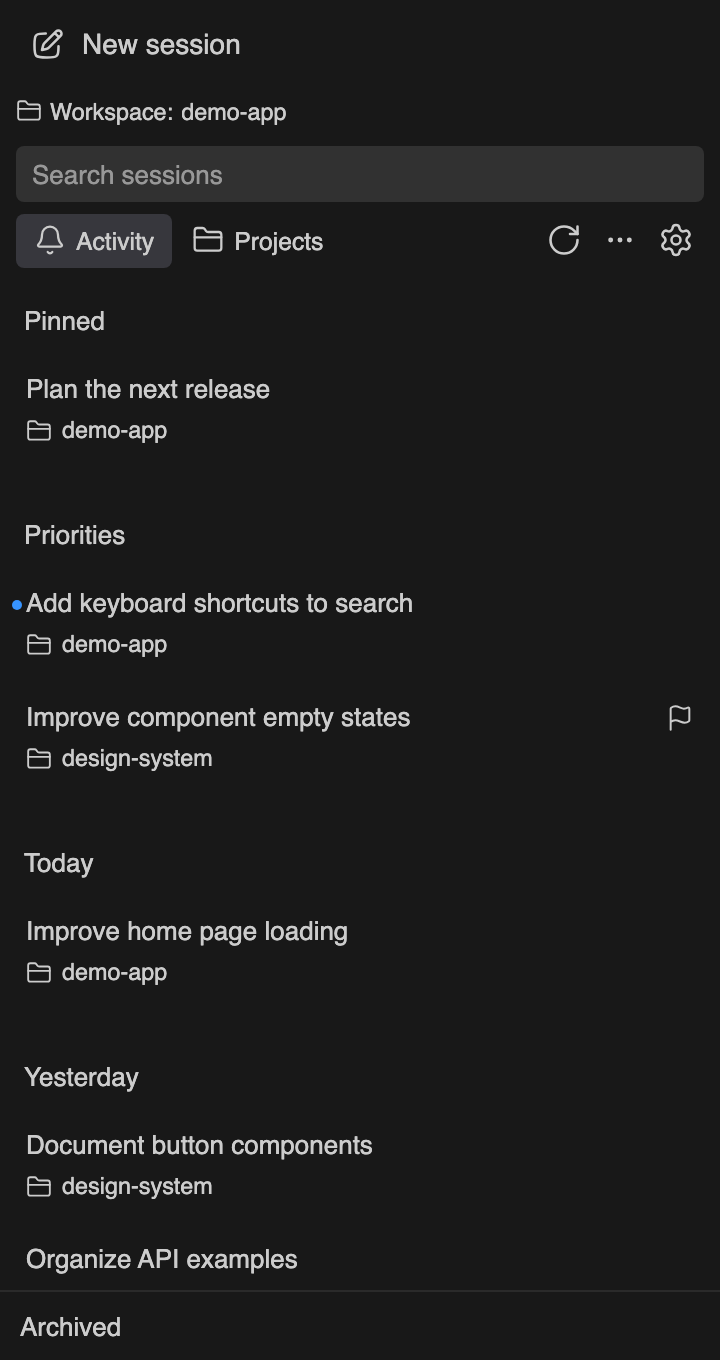 |
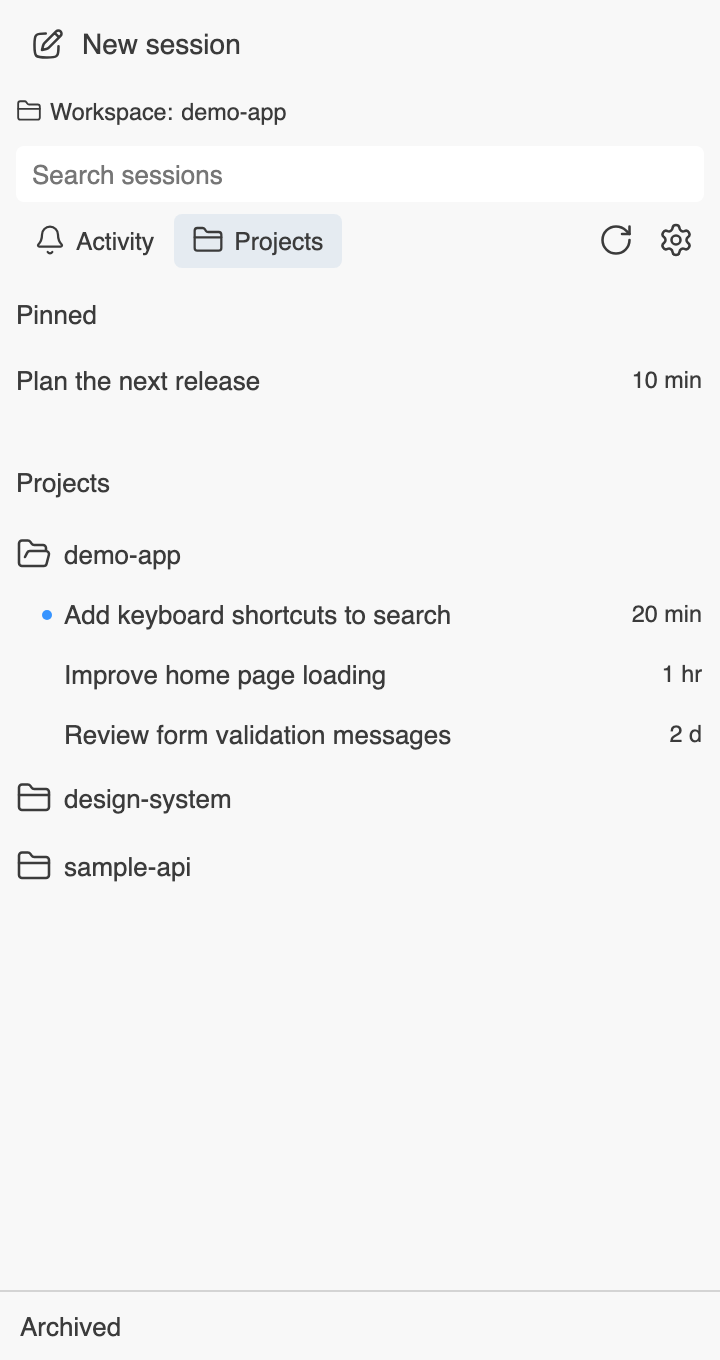 |
Features
- Find sessions: group by activity date or project; search loaded titles, project names, paths, and session IDs.
- Organize your list: pin, mark unread, set manual priority, and customize project display names. Rename, archive, and restore through the local Codex interface.
- Continue a conversation: double-click or press Enter to open the official Codex sidebar; use the context menu for an editor tab or the session's workspace.
- Choose your language: English by default, with Simplified Chinese available in the sidebar settings.
- Stay lightweight: local resources, VS Code themes and chat fonts, keyboard navigation, and no additional runtime dependencies.
- Enable optional reminders: completion notifications can use the operating system, VS Code, or remain off. Notification integration requires explicit setup.
Installation
Requirements: macOS Apple Silicon, VS Code 1.95 or later, and a configured official Codex extension. Use a trusted local workspace.
Find Codex Session Sidebar in the Extensions Marketplace, confirm the publisher is Allen (publisher ID AllenZh), and select the pre-release version. Alternatively, obtain the VSIX from GitHub Releases and run Extensions: Install from VSIX in VS Code.
- Select the C/S activity bar icon to open Codex: Sessions.
- Single-click to select; double-click or press Enter to open. New Session opens the official interface without sending a message.
- Use the settings menu to choose the opening gesture, editor/sidebar location, workspace behavior, and language.
The executable path defaults to automatic detection of a standalone Codex CLI or the program bundled with the official extension. If detection fails, install the official extension or set localCodexSessions.executablePath, then refresh. End users do not need to install Node.js separately.
Language
The sidebar and runtime messages default to English. Change Language in the sidebar settings, or set localCodexSessions.language to en or zh-CN in VS Code settings. Command Palette entries and VS Code setting labels remain in English. The language setting is shared across workspaces in the current VS Code configuration.
Migrating from a local preview
The early allen-local.codex-session-sidebar preview has a different extension identifier. Disable its notification integration and disable the old extension before installing the Marketplace version, so both sidebars do not run together. Codex conversations remain available. Pins, unread markers, and project display names are extension-local state and do not migrate automatically. You can retain the previous VSIX and state for rollback.
After upgrading within the same publisher, run Developer: Reload Window in relevant windows. Version 0.5.2 does not consume unfinished handoffs from the old protocol; retry manually after the five-minute expiry.
Working with sessions
Activity groups sessions by Today, Yesterday, and earlier dates. Each row shows a title and project. Pinned and Priority sections can be hidden independently without removing their markers. Unread or manual priority does not mean the official task is running or awaiting approval.
Projects puts the current project first. Each group initially shows five sessions and can expand. Its menu can change the display name or reveal the folder in Finder. A display name does not rename the directory or the official Codex project. Search covers loaded metadata, not conversation bodies.
Opening another workspace: choose the session's directory window, the current window, or cancel. The target window must trust the project and enable both extensions. A handoff expires after five minutes and can be claimed once by matching windows. Failed or interrupted opens are not replayed automatically; retry manually.
Archive and restore: expand the archive section at the bottom to load it. Failed loads can be retried. Opening an archived session asks to restore it first. Archiving can affect official child sessions; stop running work in the official interface first. Restoring a parent does not guarantee that all child sessions are restored.
Session links: codex://threads/<session-id> uses the system's Codex protocol handler, which typically opens the Codex app. It is not a public sharing URL and does not guarantee opening VS Code.
Completion notifications
Open the sidebar's notification settings or run Codex Sessions: Configure Completion Notifications. Enabling integration updates notify in the current CODEX_HOME/config.toml after confirmation and saves the previous callback. Existing callbacks continue to run. Installing the extension alone does not change this configuration. Reload relevant VS Code windows after enabling or disabling integration so the official background process reads the change.
Reminders report completion of a main session's current response and include the project name, without prompt or response text. Child-session completion does not trigger a reminder. Delivery is limited to matching projects or windows with that session open, with duplicate suppression across windows. A reminder does not establish that the user's broader task has been accepted or completed.
The macOS package includes a native notification helper; Homebrew is not required. Visible notifications and actual clicks have been tested in an isolated VS Code window, with one callback and one target URI receipt. Session data and the target receiver were test fixtures. Opening a real conversation in the official Codex interface after a notification click and installation on a clean machine remain unverified. Permissions, Focus mode, and system settings affect display. An explicit system API failure falls back to a VS Code notification. Run Codex Sessions: Test System Notification to try delivery, or choose VS Code notifications.
Before uninstalling, run “Codex Sessions: Disable Notifications and Restore Previous Configuration.” Turning reminders off or uninstalling the VSIX alone does not remove integration under CODEX_HOME/session-sidebar-notifications/. Disabling restores the previous value only while the configuration still belongs to this extension. External changes are preserved and reported for manual review.
Data and compatibility
- The webview loads local resources only, without external pages, CDNs, or telemetry. Titles are rendered as plain text.
- Queries, renames, and archives use the local
codex app-server --stdio process. The extension does not edit conversation JSONL or SQLite files directly and has no session deletion feature.
- It runs as the current user and uses the current
CODEX_HOME. The official App Server and extension retain their own account and network behavior; a local sidebar does not make those programs fully offline.
- Notification events contain session IDs, turn IDs, directories, and timestamps. Old valid events are cleaned up; malformed files are retained and inspected less frequently. Extension diagnostics omit conversation bodies, titles, and request parameters.
- Opening sessions relies on an internal URI of the official extension, not a stable public API. Official updates may require compatibility changes. Windows, Linux, Intel Macs, SSH, WSL, and containers are outside this release's tested platform scope.
- The list depends on the official index. Unindexed history files are not imported, and the extension does not repair damaged indexes. After a write timeout, refresh to inspect the result before retrying.
Development
Use Node.js 20 or later and Python 3.9 or later. Rebuilding the macOS helper also requires Xcode Command Line Tools. Playwright and official vsce are pinned development dependencies and are excluded from the runtime package.
npm ci
npm run browser:install
npm run check
npm test
npm run test:browser
npm run package
python3 scripts/verify-package.py
python3 scripts/export-source.py
npm run package uses official vsce to produce a darwin-arm64 pre-release VSIX and verifies it against an explicit release allowlist. Public-source export uses a separate reviewed file list. See validation and contributing for runtime and window tests.
The macOS helper is built from pinned terminal-notifier sources with a recorded patch and checksums. Run bash scripts/build-macos-notifier.sh to rebuild it. The helper contains arm64 and x86_64 code and uses an ad-hoc signature; it is not Developer ID signed or notarized. Binary architecture support does not establish platform acceptance.
Feedback and license
Issues · Changelog · Security reporting
Project code is licensed under MIT. Third-party assets retain their original licenses; see third-party notices.

