AI Journal for VS Code
Document how you used AI and commit it alongside your code, without leaving Source Control.
AI Journal adds a guided form to VS Code's Source Control view. Before you commit, it asks which AI tool you used, what you asked it, how accurate it was, how you checked its answers and what you learned. Your answers are saved as structured JSON in the commit message, so your Git history records your code and how you used AI to write it.
Project site · Web version of AI Journal · Author: Ali Shakiba

Features
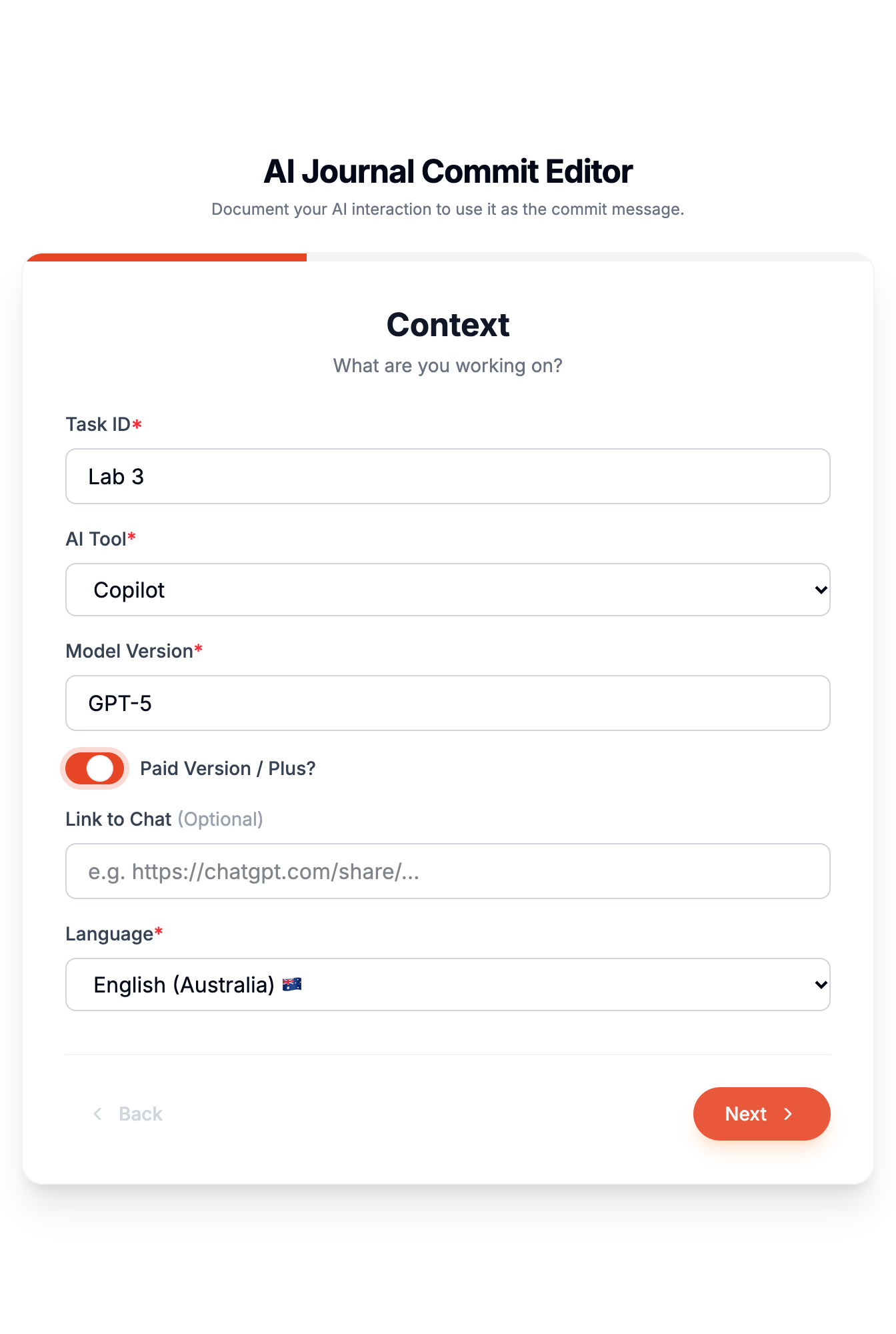
- Commit with AI Journal. A button in the Source Control title bar opens a step-by-step form: context, interaction log and reflection. Your entry becomes the commit message.
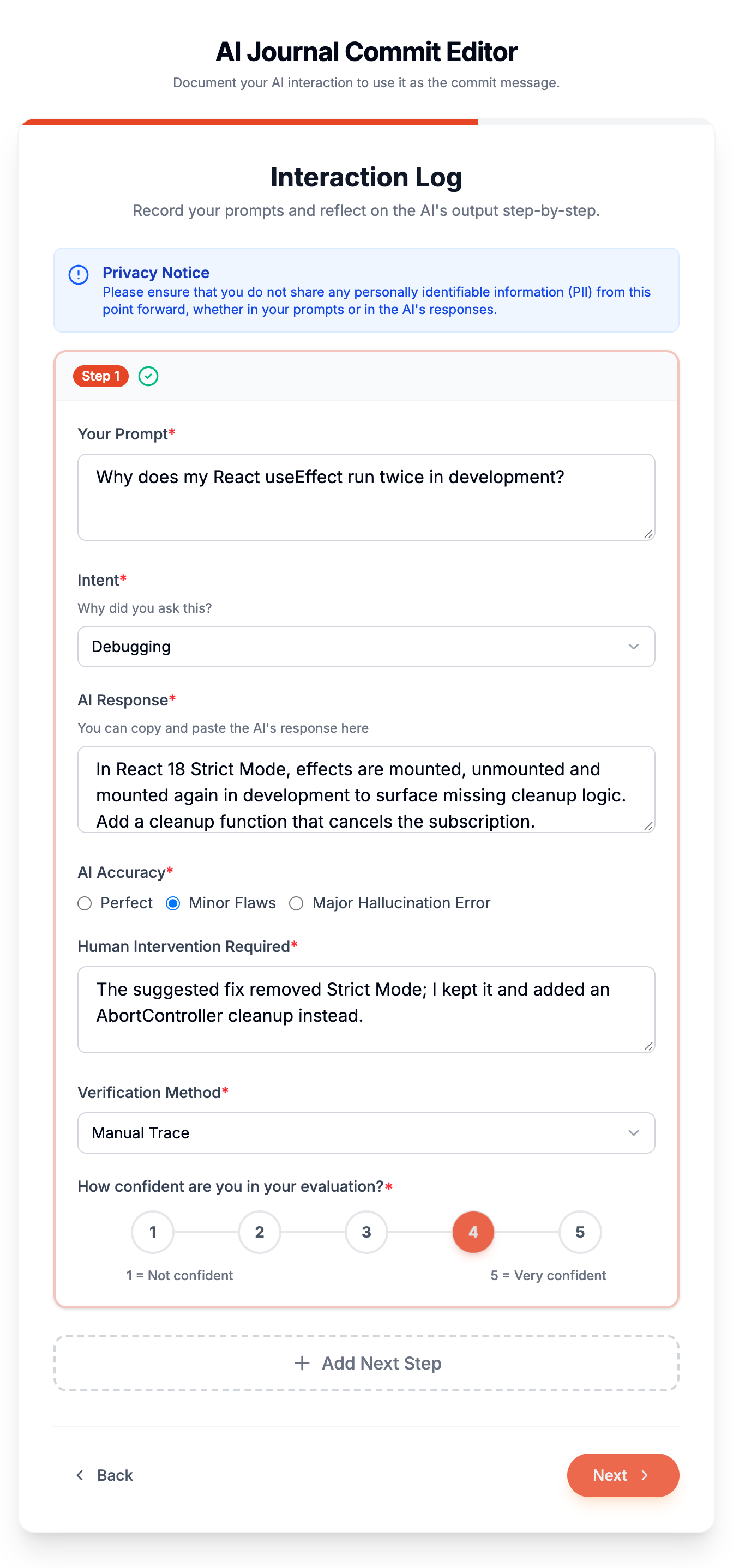
- Record each prompt. For every prompt, record why you asked it, what the AI answered, how accurate the answer was, what you changed and how you verified it.
- Autofill from a chat. Paste a shared Gemini or Copilot link, or upload a Cogniti conversation export (.xlsx), to fill in the interaction log automatically.
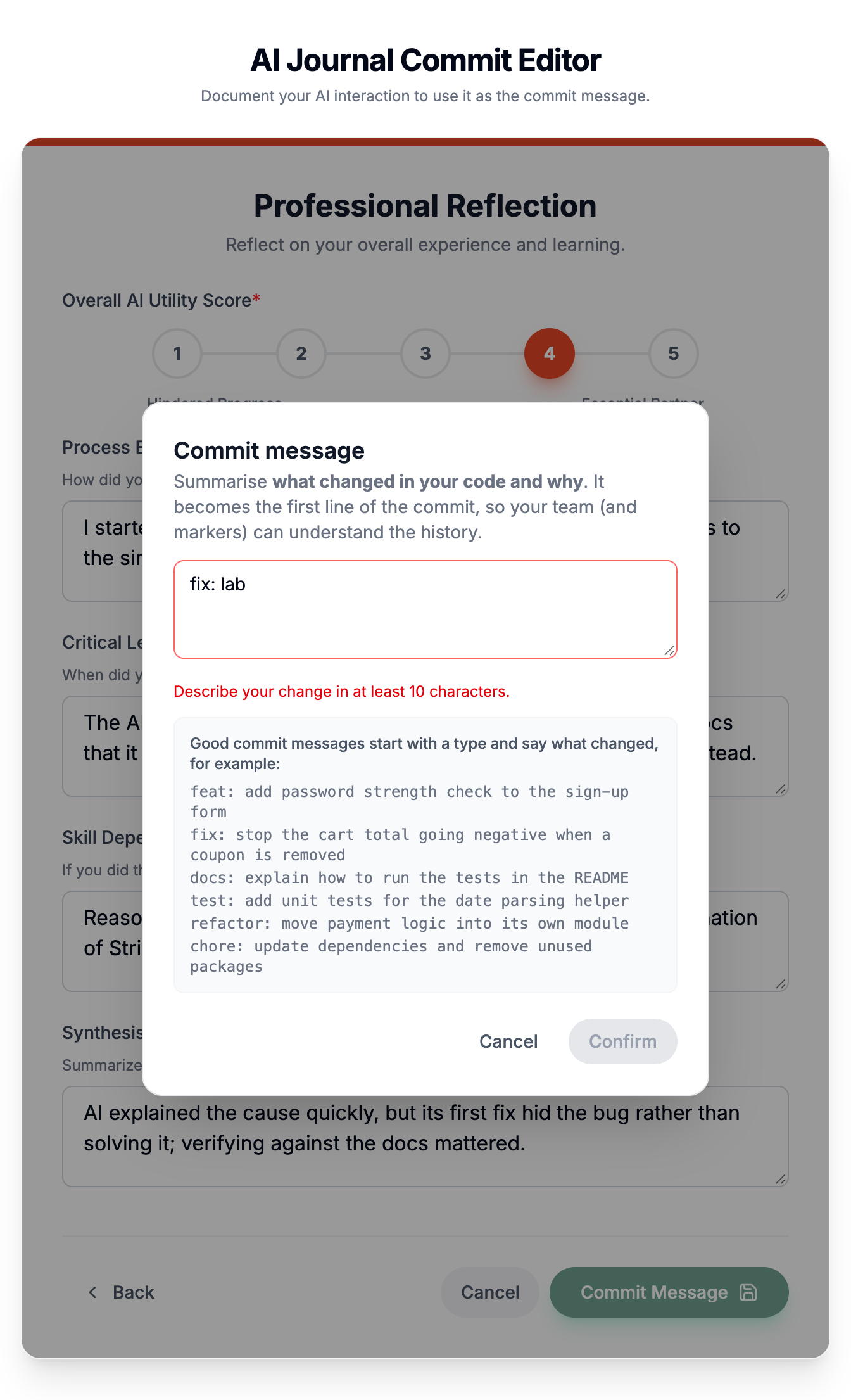
- Write a real commit message. You write your own commit message, with examples such as
feat: … and fix: … shown as a guide.
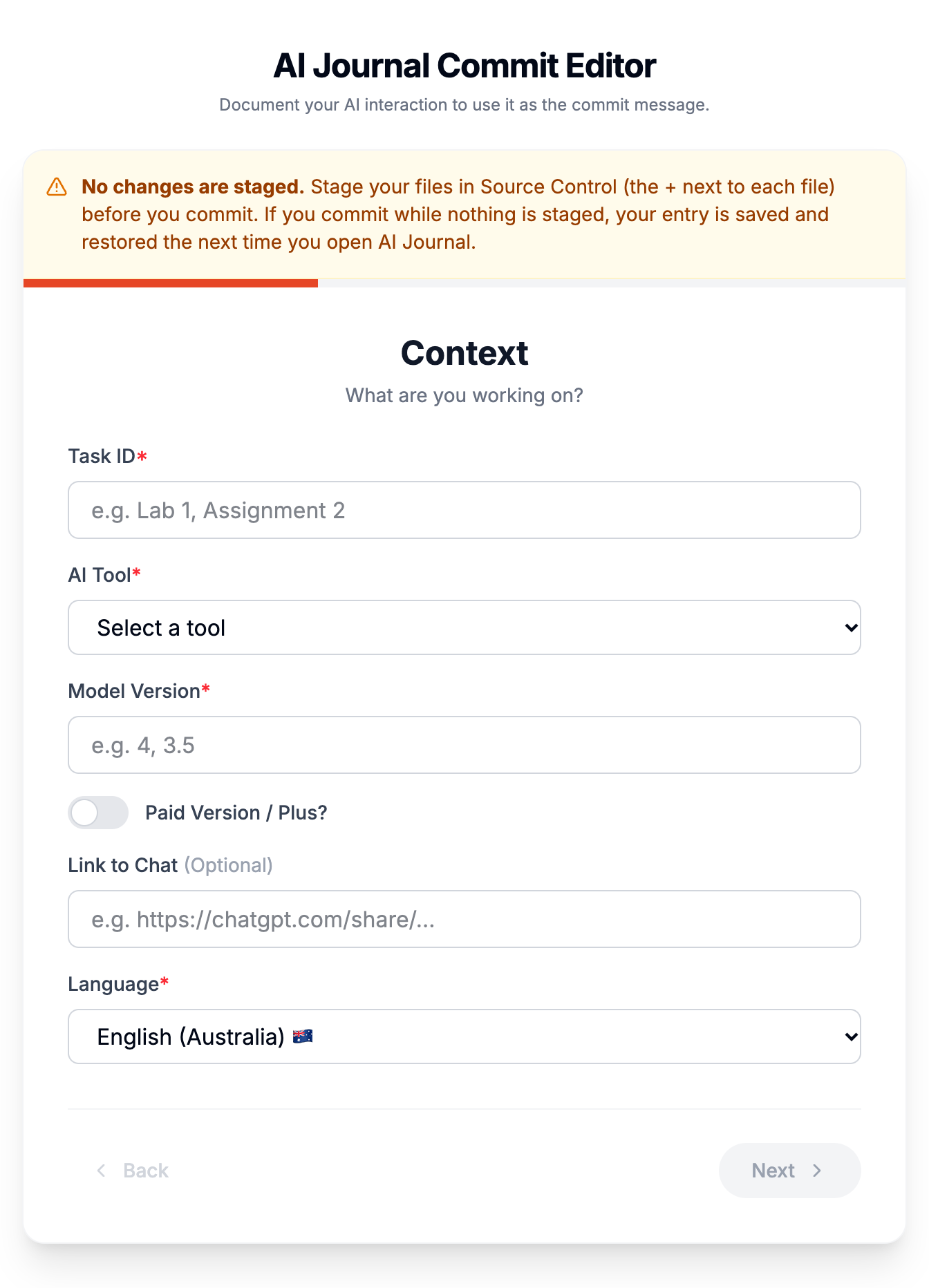
- Don't lose your work. The button only works when you have staged changes. If your changes get unstaged before you commit, your entry is saved and restored the next time you open the form.
- Snapshot with AI Journal. Saves all your current work to a new
aijournal_<timestamp> branch, then puts you back on your branch exactly as you left it.
- Customise the form (instructors). Choose which screens and fields appear, list your own options, prefill values and add conditional questions. All of this is set in one JSON schema that you can share with a class.
Getting started (students)
- Make your changes, then stage the files you want to commit (the + next to each file in Source Control).
- Click the Commit with AI Journal (pencil) button in the Source Control title bar.
- Fill in each screen. Required fields are marked with a red asterisk (*), and Next becomes available once they are complete.
- On the last screen, click Commit Message. Write a short message describing your change, then click Confirm.
Your staged files are committed with your journal entry attached. The first line is your commit message, and the JSON entry follows it.
Screenshots
| Interaction log |
Commit message |
 |
 |
| Context |
Nothing staged |
 |
 |
Run AI Journal: Customise Form Schema from the Command Palette and choose one of the following:
- Create schema file in this repository. Writes the built-in form to
.aijournal/form-schema.json. Commit this file to your starter repository so every student gets the same form. This is the recommended option for a class.
- Copy default schema into workspace settings or user settings. Stores the schema in
settings.json under promptLogger.formSchema.
When a schema file exists, it is used ahead of the settings. Changes take effect straight away, even in a form that is already open. Schema files under .aijournal/ get autocomplete and validation. If a schema is invalid, students see a warning and the built-in form is used.
Example schema
{
  "id": "elec5308-2026",            // written to every entry as schemaId
  "version": 1,                     // written as schemaVersion
  "commitMessage": {
    "minLength": 10,
    "examples": ["feat: add password strength check to the sign-up form", "fix: ..."]
  },
  "screens": [
    {
      "id": "context",
      "title": "Context",
      "description": "What are you working on?",
      "fields": [
        { "key": "course", "type": "text", "hidden": true, "default": "ELEC5308" },
        { "key": "taskId", "type": "select", "label": "Task", "required": true, "options": ["Lab 1", "Lab 2"] },
        { "key": "tool", "type": "select", "label": "AI Tool", "required": true, "optionsFrom": "aiAgentOptions" },
        { "key": "customTool", "type": "text", "label": "Specify Tool", "required": true, "showIf": { "field": "tool", "equals": "Other" } }
      ]
    }
  ]
}
Screens
Each screen has an id, a title, an optional description and a list of fields. Set "hidden": true on a screen to skip it. Its fields are still written to the entry, but they only ever contain their default, or "" if they have none. Values the student entered earlier are never used for them. The built-in form hides its Identity screen (Student ID and Group ID) this way. To remove those fields from the entry completely, delete the screen.
Field types
| Type |
Use |
text, textarea, url |
Free text |
select, radio |
Choose one option |
combobox |
Choose an option or type your own |
checkbox |
Yes / no |
likert |
Rating scale (min, max, minLabel, maxLabel) |
group |
Repeating items, each with its own fields (minItems, itemLabel, addLabel) |
conversationUpload |
Fills a group from a Cogniti .xlsx export (target, promptField, responseField) |
notice |
Static information box (not saved) |
Field options
| Option |
Effect |
key |
Name of the field in the entry. Dotted keys such as metaReflection.synthesis create nested objects. |
label, help, placeholder |
Text shown to the student |
required |
The student must fill the field in before moving on |
default |
Prefilled value |
readOnly |
Shown, but can't be changed |
hidden |
Not shown; its default is saved |
remember |
Remembers the student's last answer for next time |
options / optionsFrom |
Fixed list, or a named list: aiAgentOptions, intentOptions (from settings) or languages |
presets |
Picking an option also sets other fields, e.g. { "Cogniti.ai": { "modelVersion": "GPT-5.2" } } |
showIf |
Shows the field only when a condition holds: { "field", "equals" \| "notEquals" \| "in" \| "notIn" \| "filled" }, or an array of conditions. Inside a group, the item's own fields are checked first. |
autofetch (groups) |
{ "linkField": "link", "promptField": "prompt", "responseField": "response" } fills the group from a shared Gemini or Copilot link |
Commit message rules
Students must write their own commit message. commitMessage.minLength sets the minimum length (default 10). commitMessage.examples replaces the examples shown under the box, and a message that just repeats an example is rejected.
What gets saved
Every field defined in the schema appears in the entry. A field left blank, or hidden by showIf, is saved as "". Each item in a group lists every sub-field. The entry also includes id and createdAt, plus schemaId and schemaVersion when the schema sets them. Because every entry has the same set of keys, journals from a whole class can be analysed together.
Commands
| Command |
Description |
| Commit with AI Journal |
Opens the journal form and commits your staged changes. Available only when changes are staged. |
| Snapshot with AI Journal |
Commits all current work to a new aijournal_<timestamp> branch and restores your branch afterwards |
| AI Journal: Customise Form Schema |
Creates a schema file, or copies the built-in schema into your settings |
Settings
| Setting |
Default |
Description |
promptLogger.schemaFile |
.aijournal/form-schema.json |
Schema file, relative to the repository root. Used whenever it exists. |
promptLogger.formSchema |
{} |
Schema written inline in settings. Leave it empty to use the built-in form. |
promptLogger.intentOptions |
built-in list |
Options for fields with "optionsFrom": "intentOptions" |
promptLogger.aiAgentOptions |
built-in list |
Options for fields with "optionsFrom": "aiAgentOptions" |
Privacy
- Your journal entry is saved only in your Git commit message (once you commit) and in VS Code on your computer.
- Unfinished drafts, and entries waiting for staged changes, are stored locally in VS Code.
- The extension collects no telemetry.
- Autofetch sends the shared chat link you paste to our pilot parsing service (
shared-chat-parser.vercel.app) to read the conversation. It does not collect any data and may not work properly. Use it only for chats you are happy to share, and leave the link empty if you'd rather type your prompts in by hand.
- Don't include personal information in your prompts or in the AI's responses.
Requirements
- VS Code 1.90 or later
- The built-in Git extension enabled, and a folder that is a Git repository
About
AI Journal is part of the Beyond Declaration project, which explores how students can document and reflect on their use of generative AI rather than just declare it. A web version is available for logging AI use outside VS Code.
Created by Ali Shakiba. Report issues and suggestions on GitHub.
License
AI Journal is free software, licensed under the GNU General Public License v3.0.

