🚀 Project Selector
Lightweight JetBrains-style project switcher for VS Code
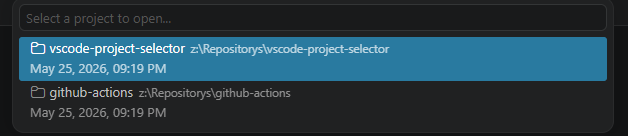
Switch recent projects via status bar or Ctrl+Alt+P — just like in IntelliJ IDEA, WebStorm, or PyCharm.
✨ Features
📌 One-Click Project Switching
A prominent project name in the status bar (bottom-left) with dropdown icon. Click it or press Ctrl+Alt+P to open the switcher.
🪟 JetBrains-style Open Dialog
When switching projects, you'll see the familiar prompt:
"Do you want to open this Project in this Window or in a new Window?"
Choose between:
- Current Window — Replace your current workspace
- New Window — Open in a separate VS Code window
💾 Remember My Choice
Like JetBrains, you can check "Remember my choice" and the extension will skip the dialog next time.
⚙️ Configurable Settings
| Setting |
Type |
Default |
Description |
projectSelector.defaultBehavior |
string |
"ask" |
"ask", "currentWindow", or "newWindow" |
projectSelector.rememberChoice |
boolean |
false |
Skip the dialog and use the saved behavior |
projectSelector.showHeaderBar |
boolean |
true |
Show/hide the project name in the status bar |
projectSelector.maxRecentProjects |
number |
20 |
Max recent projects in the switcher |
⌨️ Keyboard Shortcut
Ctrl+Alt+P (Windows/Linux) / Cmd+Alt+P (Mac) — Opens the project switcher- Also available in the command palette as
Project Selector: Switch Project
🚀 Usage
- Install the extension
- Look at the bottom-left — you'll see your project name with a dropdown icon
- Click it or press
Ctrl+Alt+P to see your recent projects
- Select a project and choose how to open it
That's it! Just like JetBrains, but in VS Code.
⚡ Lightweight
- Zero dependencies — only the VS Code API
- No SQLite — uses VS Code's built-in
globalState for storage
- No background processes — only activates when you click or press the shortcut
- Small footprint — just a few KB
🛠️ Development
git clone https://github.com/alexanderkoch/vscode-project-selector.git
cd vscode-project-selector
npm install
npm run compile
Press F5 in VS Code to launch an Extension Development Host.
📦 Package
npm run package
🤝 Contributing
I welcome contributions! Feel free to:
- 🐛 Open Issues — Bug reports, feature requests, or questions
- 🔀 Submit Pull Requests — Improvements, fixes, or new features
- 💡 Share Ideas — Discussions and suggestions are always appreciated
⚠️ Note: This project is my original work. While contributions via forks and PRs are welcome, please do not directly copy or redistribute this extension without attribution. Respect the MIT license terms.
📝 Changelog
See CHANGELOG.md for the full version history.
🙏 Credits
Built with ❤️ by Alexander Koch
I would really appreciate it if you check out my website for updates, news, and other projects I'm working on!
👉 https://www.alexanderkoch.dev/
📄 License
MIT — see LICENSE for details.
Copyright © 2026 Alexander Koch. All rights reserved.

