Skip to content
| Marketplace
Sign in
Visual Studio Code>Other>AriadnaNew to Visual Studio Code? Get it now.
Ariadna

Ariadna

Alexander Batalschikov

|
6 installs
| (1) | Free
Tree view bookmarks extension for code analysis and documentation
Installation
Launch VS Code Quick Open (Ctrl+P), paste the following command, and press enter.
Copied to clipboard
More Info

Ariadna

Yet another tree view bookmarks extension for code analysis and documentation.

Overview

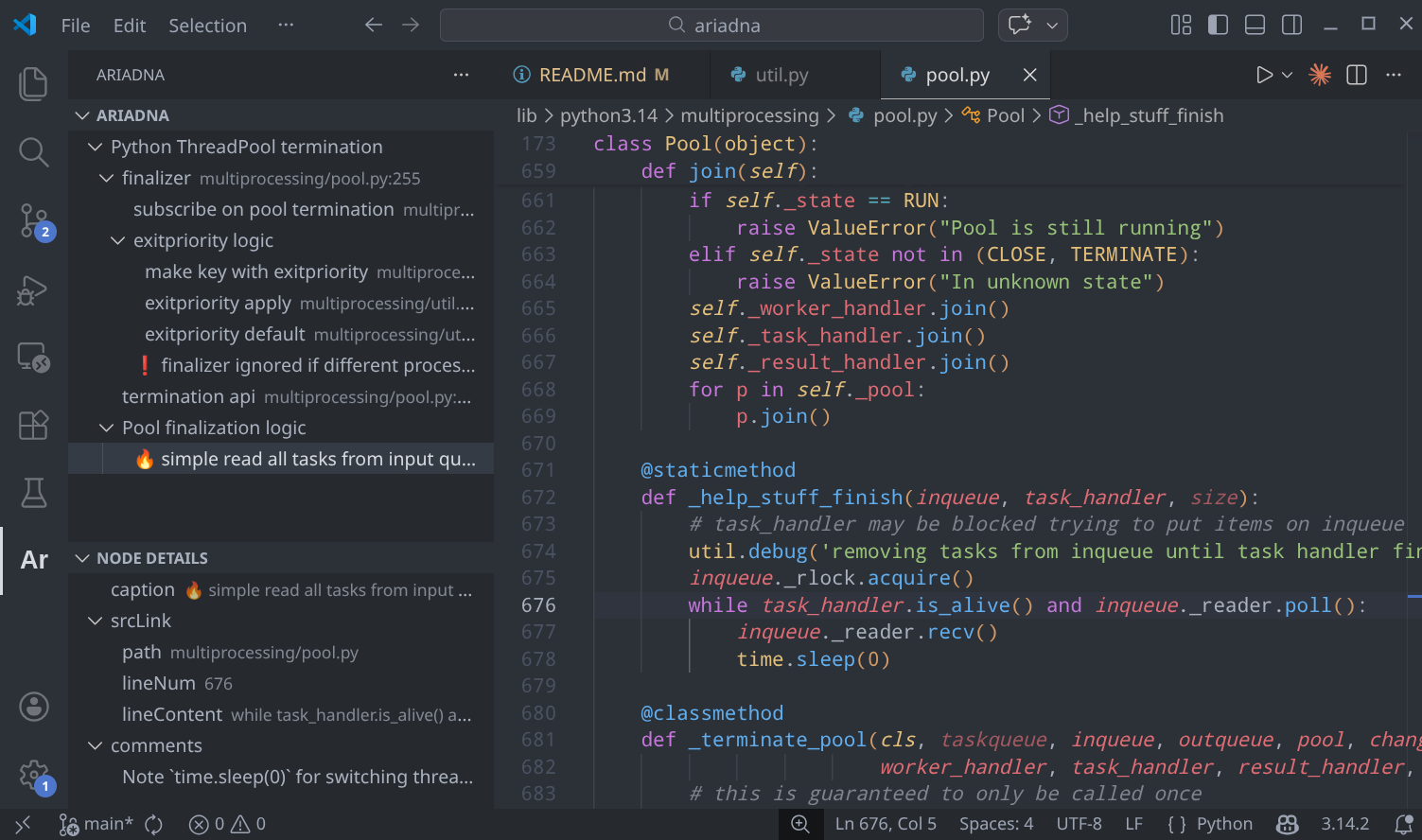
Ariadna helps developers create a clear roadmap of use cases, especially in large projects, by providing a structured, navigable layer of documentation directly connected to your code.

In many projects, understanding how different parts of the system interact — and why they exist — can be difficult, especially when documentation is scattered or inconsistent. Ariadna solves this problem by allowing developers to create Threads, each representing a single use case, and to break down project into Nodes, which correspond to meaningful units of code and logic.

main_screenshot.png

Features

  • Thread — one documentation space per use-case
  • Node — document key parts of your code
  • srcLink — attach documentation to a specific location (file + line)
  • Multiple comments per Node
  • JSON-like hierarchical structure (Nodes can have children)
  • Emoji labeling for expressive documentation

🚀 Getting Started

Installation

  1. Open VS Code
  2. Go to Extensions
  3. Search for Ariadna
  4. Click Install

Quick Start

  1. Create a new Thread using the "Create New Thread" button
  2. Fill in root node:
    • title
    • rootPath (auto-detected, but can be modified)
    • description (optional)
    • vcsRev (optional)
  3. Click on New Node and link it to a code location using srcLink
    • Open the desired location in the editor
    • Click "Update From Editor" to populate the field automatically
  4. Change caption if needed (by default filled by srcLink.lineContent)
  5. Add comments
  6. Create child and neighbor tree Nodes if needed

Core Concepts

Thread

A Thread represents documentation for a single use-case.

Fields:

  • title — string
  • rootPath — auto-detected project root
  • description — string
  • vcsRev — project version / commit / tag

Threads allow you to quickly switch between different documented projects.

Node

A Node represents a meaningful, documented part of your project.

Fields:

  • caption — short title
  • srcLink — file path + line number
  • comments — array of explanations
  • children — optional nested Nodes

Nodes form a hierarchical structure that reflects the architecture or logical decomposition of your system.

Tech Stack

  • Claude Code
  • Language: TypeScript

License

BSD 2-Clause License

  • Contact us
  • Jobs
  • Privacy
  • Manage cookies
  • Terms of use
  • Trademarks
© 2026 Microsoft