Ollama Copilot Bridge
Use Ollama Cloud, local Ollama, or any Ollama-compatible OpenAI endpoint from the GitHub Copilot Chat model picker in VS Code.
Ollama Copilot Bridge registers an Ollama Bridge language model provider in VS Code so supported models can be selected inside GitHub Copilot Chat. It discovers your available models, streams responses into Copilot Chat, and keeps the setup flow inside the editor.
Technically, the extension integrates through VS Code's Language Model Provider API. The product goal is specifically to bridge Ollama-compatible models into GitHub Copilot Chat in VS Code, not to provide a standalone chat UI.
Ollama Copilot Bridge is community-built and is not affiliated with GitHub, Microsoft, or Ollama.
Screenshots
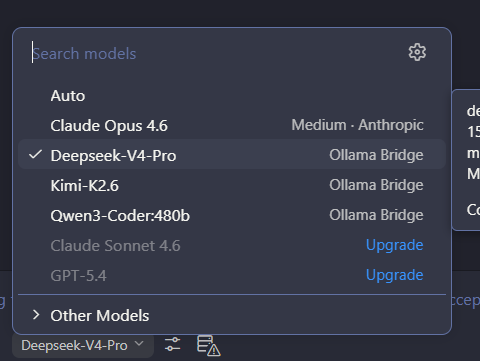
Select Ollama Bridge models directly from the GitHub Copilot Chat model picker in VS Code:
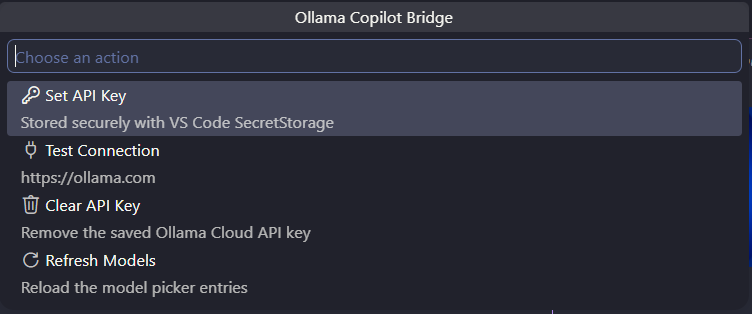
Manage your API key, test the connection, and refresh model discovery from the built-in command menu:
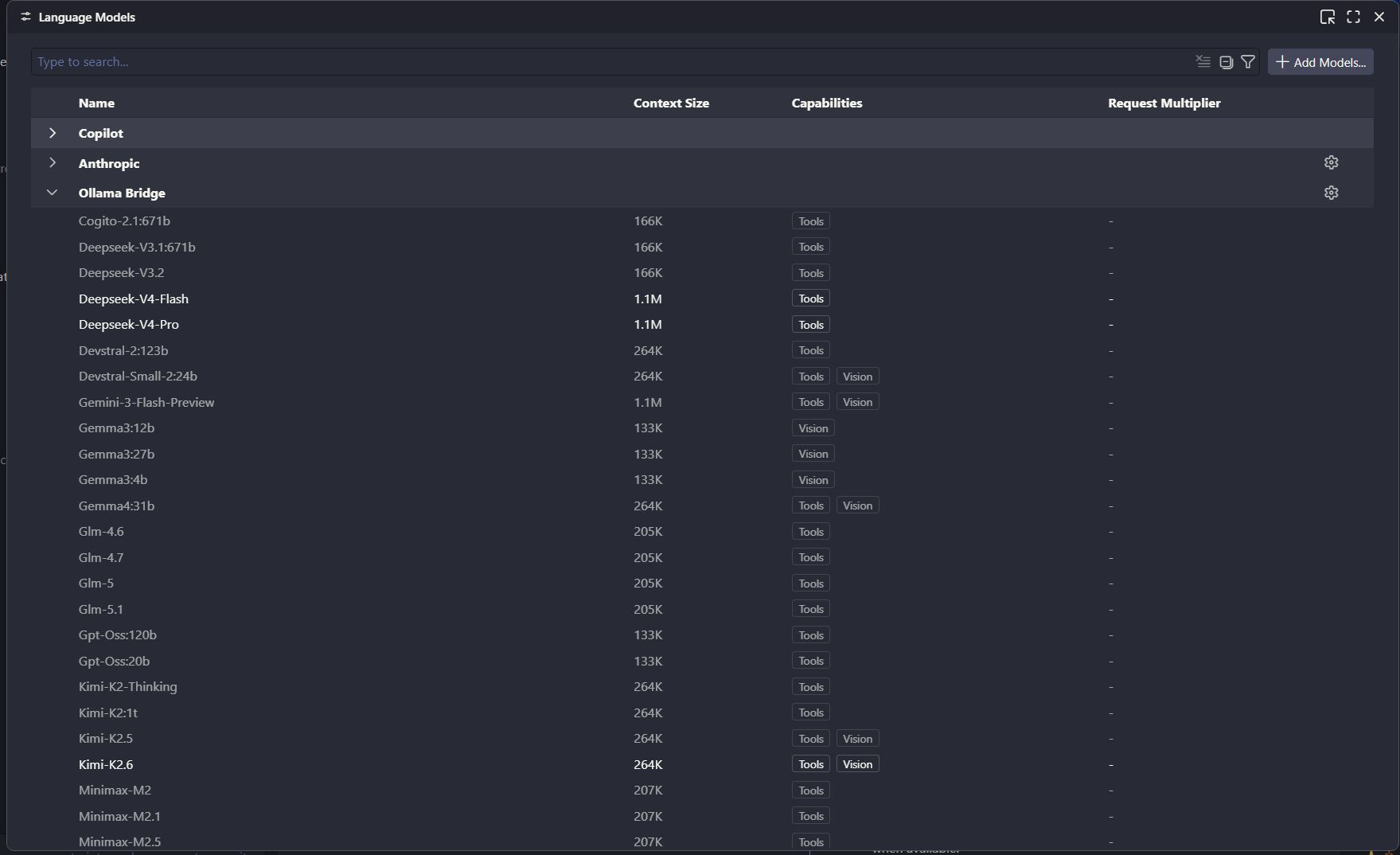
Review discovered model metadata, including context size and tool or vision capabilities, in VS Code's Language Models view:
Highlights
- Adds Ollama Bridge models to the GitHub Copilot Chat model picker in VS Code.
- Works with Ollama Cloud by default at
https://ollama.com/v1.
- Can show Cloud, Local, VPS, and custom endpoint models at the same time.
- Stores your API key with VS Code SecretStorage.
- Streams responses directly into GitHub Copilot Chat.
- Discovers model metadata such as context size, output limit, vision support, tool support, and request multiplier when available.
- Supports Agent mode tool calling for compatible models.
- Forwards image attachments to vision-capable models.
- Shows an estimated last-request context usage summary in the status bar hover.
- Retries temporary provider errors such as
429, 503, and 504.
Requirements
- VS Code
1.104.0 or newer.
- GitHub Copilot Chat in VS Code with contributed language model providers enabled.
- An Ollama Cloud API key, a local Ollama server, or another Ollama/OpenAI-compatible endpoint.
Quick Start
- Install Ollama Copilot Bridge.
- Open the Command Palette.
- Run
Ollama Copilot: Set API Key / Configure Connection.
- Choose Ollama Cloud, local Ollama, remote Ollama, or a custom endpoint.
- Run
Ollama Copilot: Test Connection.
- Open GitHub Copilot Chat in VS Code and select an Ollama Bridge model from the model picker.
By default, the extension connects to:
https://ollama.com/v1
Commands
| Command |
What it does |
Ollama Copilot: Manage |
Opens the extension action menu. |
Ollama Copilot: Set API Key / Configure Connection |
Configures connection type, base URL, OpenAI path, and API key from one flow. |
Ollama Copilot: Clear API Key |
Removes the saved API key. |
Ollama Copilot: Refresh Models |
Reloads model picker entries. |
Ollama Copilot: Test Connection |
Checks API access and model discovery. |
Ollama Copilot: Diagnostics |
Opens timing, cache, retry, and last chat metrics in the output panel. |
Ollama Cloud
The default configuration is ready for Ollama Cloud:
{
  "ollamaCopilot.connectionMode": "cloud",
  "ollamaCopilot.baseUrl": "https://ollama.com",
  "ollamaCopilot.openaiCompatiblePath": "/v1"
}
After setting your API key, run Ollama Copilot: Test Connection to confirm that the extension can reach your account and discover models.
Local Ollama
To use a local Ollama server:
{
  "ollamaCopilot.connectionMode": "local",
  "ollamaCopilot.baseUrl": "http://localhost:11434",
  "ollamaCopilot.openaiCompatiblePath": "/v1"
}
Then run Ollama Copilot: Refresh Models.
Multiple Connections
Ollama Copilot Bridge can expose several model sources at the same time:
- Cloud: hosted Ollama Cloud models.
- Local: models running on your local Ollama server.
- VPS: a self-hosted Ollama server behind your own remote endpoint.
- Custom: any OpenAI-compatible endpoint that follows the expected chat format.
The primary connection keeps the original model IDs so existing GitHub Copilot Chat agents and workflows do not need to change. Secondary connections use an internal route prefix, while the Copilot Chat model picker shows the origin in the model detail.
Example picker behavior:
Kimi-K2.6          Cloud
Gpt-Oss:120b      Cloud
Llama3.2          Local
Llava             Local
Qwen2.5-Vl        VPS
If a secondary connection has a model with the same provider ID, its internal route becomes unique:
local::llava
vps::llava
The visible model name remains readable, and the model detail/tooltip explains where it comes from.
Example settings:
{
  "ollamaCopilot.connections": [
    {
      "id": "cloud",
      "label": "Cloud",
      "type": "cloud",
      "enabled": true,
      "primary": true,
      "baseUrl": "https://ollama.com",
      "openaiCompatiblePath": "/v1",
      "requiresApiKey": true
    },
    {
      "id": "local",
      "label": "Local",
      "type": "local",
      "enabled": true,
      "primary": false,
      "baseUrl": "http://localhost:11434",
      "openaiCompatiblePath": "/v1",
      "requiresApiKey": false
    },
    {
      "id": "vps",
      "label": "VPS",
      "type": "remote",
      "enabled": true,
      "primary": false,
      "baseUrl": "https://your-ollama-server.example",
      "openaiCompatiblePath": "/v1",
      "requiresApiKey": true
    }
  ]
}
API keys are stored separately per connection in VS Code SecretStorage.
Remote Ollama Or Custom Endpoint
Run Ollama Copilot: Set API Key / Configure Connection and choose Remote Ollama / VPS or Custom OpenAI-Compatible.
You can paste either a base URL or a full Ollama endpoint path. The extension normalizes common paths such as /api/tags, /api/show, /api/chat, /v1/models, and /v1/chat/completions back to the server base URL before saving settings.
Model Discovery
The bridge discovers models through Ollama's OpenAI-compatible /models endpoint and falls back to native Ollama endpoints when needed.
Each discovered model can be registered with:
- model ID and display name
- model family
- context window
- output token limit
- image capability
- tool-calling capability
- request multiplier metadata
Model metadata is cached in VS Code global storage so the picker can open quickly after the first successful discovery. A manual refresh can still update the cache when models change.
If discovery fails, the extension does not publish placeholder models. This keeps a fresh install in a ready-to-connect state until an API key or endpoint is configured successfully.
Vision Models
The bridge forwards image attachments from GitHub Copilot Chat in VS Code to Ollama-compatible chat requests when the selected model supports vision.
Vision is enabled when:
- Ollama metadata reports a
vision capability.
- The model appears to be from a known multimodal family such as
kimi-k2.6, llava, pixtral, gemma3, qwen-vl, qwen2-vl, qwen2.5-vl, minicpm-v, or moondream.
- You manually mark a model as image-capable with
ollamaCopilot.visionModels.
Manual vision configuration accepts exact model IDs and * wildcards:
{
  "ollamaCopilot.visionModels": [
    "kimi-k2.6*",
    "qwen2.5-vl:*",
    "my-vision-model:*"
  ]
}
After changing this setting, run Ollama Copilot: Refresh Models.
If a text-only model receives an image request, the bridge returns a clear error instead of silently dropping the attachment.
For compatible models, Ollama Copilot Bridge translates GitHub Copilot Agent mode tools in VS Code into OpenAI-compatible tool definitions.
The model can request tools, but GitHub Copilot Chat and VS Code remain in control of tool execution, permission prompts, and returned tool results. The bridge converts streamed tool_calls back into VS Code language model tool call parts, then sends tool results back to the Ollama-compatible endpoint.
Context Usage Hover
After a chat request, hover the Ollama Bridge status bar item to see an estimate of:
- input context used
- model context window
- estimated response tokens
- total estimated tokens for the last request
- max output tokens
- request multiplier
This is a bridge-owned estimate. GitHub Copilot Chat and VS Code control their own internal context indicator.
Settings
| Setting |
Default |
Description |
ollamaCopilot.enabled |
false |
Enables the provider after a connection is configured. |
ollamaCopilot.connectionMode |
cloud |
Connection profile: cloud, local, remote, or custom. |
ollamaCopilot.connections |
[] |
Multiple Cloud, Local, VPS, or custom endpoint definitions shown together. |
ollamaCopilot.baseUrl |
https://ollama.com |
Ollama Cloud, local Ollama, or another compatible base URL. |
ollamaCopilot.openaiCompatiblePath |
/v1 |
OpenAI-compatible API path. |
ollamaCopilot.defaultModel |
gpt-oss:20b |
Fallback model when discovery fails. |
ollamaCopilot.visionModels |
["kimi-k2.6*"] |
Model IDs or wildcard patterns treated as image-capable. |
ollamaCopilot.pinnedModels |
[] |
Model IDs or wildcard patterns shown first in the picker. |
ollamaCopilot.hiddenModels |
[] |
Model IDs or wildcard patterns hidden from the picker. |
ollamaCopilot.modelCacheTtlMs |
3600000 |
How long model metadata cache is reused. |
ollamaCopilot.metadataConcurrency |
6 |
Maximum concurrent metadata requests during discovery. |
ollamaCopilot.maxInputTokens |
8192 |
Fallback input context when metadata is unavailable. |
ollamaCopilot.maxOutputTokens |
2048 |
Fallback output token limit when metadata is unavailable. |
ollamaCopilot.requestTimeoutMs |
120000 |
Request timeout in milliseconds. |
ollamaCopilot.retryMaxAttempts |
4 |
Retry attempts for temporary provider failures. |
ollamaCopilot.retryBaseDelayMs |
1500 |
Base delay for retry backoff. |
Example:
{
  "ollamaCopilot.enabled": false,
  "ollamaCopilot.connectionMode": "cloud",
  "ollamaCopilot.baseUrl": "https://ollama.com",
  "ollamaCopilot.openaiCompatiblePath": "/v1",
  "ollamaCopilot.defaultModel": "gpt-oss:20b",
  "ollamaCopilot.visionModels": ["kimi-k2.6*"],
  "ollamaCopilot.pinnedModels": ["kimi-k2.6*", "gpt-oss:*"],
  "ollamaCopilot.hiddenModels": ["*-preview"],
  "ollamaCopilot.modelCacheTtlMs": 3600000,
  "ollamaCopilot.metadataConcurrency": 6,
  "ollamaCopilot.maxInputTokens": 8192,
  "ollamaCopilot.maxOutputTokens": 2048,
  "ollamaCopilot.requestTimeoutMs": 120000,
  "ollamaCopilot.retryMaxAttempts": 4,
  "ollamaCopilot.retryBaseDelayMs": 1500
}
Troubleshooting
No Models Appear
Run Ollama Copilot: Test Connection, verify your API key, and confirm that ollamaCopilot.baseUrl plus ollamaCopilot.openaiCompatiblePath points to a reachable endpoint.
Images Do Not Work
Use a vision-capable model or add the model ID to ollamaCopilot.visionModels, then refresh models.
Use GitHub Copilot Agent mode in VS Code and a model that can produce compatible tool calls. Tool execution is controlled by GitHub Copilot Chat and VS Code, so permission prompts and execution behavior come from the editor.
Requests Timeout
Increase ollamaCopilot.requestTimeoutMs or reduce the request size. Temporary cloud errors are retried automatically according to the retry settings.
Responses Feel Slow
Run Ollama Copilot: Diagnostics after a slow request. Useful fields include:
Last chat first token: time until Ollama started streaming.Last chat duration: total generation time.Last retry count: whether the request had to back off and retry.Last model source: whether model discovery came from cache or network.
If first token and duration are high but model discovery is cached, the slowdown is usually from the selected model, cloud load, long context, image payload size, tool-call loops, or provider rate limiting rather than the extension itself.
Privacy And Security
- API keys are stored with VS Code SecretStorage.
- API keys are not written to the workspace,
settings.json, or extension files.
- Prompts, images, and tool results are sent to the endpoint you configure.
- Local Ollama keeps requests on your configured local server; Ollama Cloud sends requests to Ollama's hosted service.
Known Limits
- This extension is designed for GitHub Copilot Chat in VS Code.
- This extension does not replace GitHub Copilot inline completions.
- This extension does not modify closed internal Copilot UI.
- The Copilot Chat model picker and internal context indicator are controlled by VS Code and GitHub Copilot.
- Exact token counting depends on each model tokenizer, so context usage is an estimate.
- Image support depends on VS Code passing the attachment and the selected model actually supporting vision.
- Agent mode quality depends on the selected model's tool-calling behavior.
Development
npm install
npm run compile
npm run lint
npm test
npm run package
To debug locally, press F5 in VS Code and run the extension in an Extension Development Host.
Support
Report issues or feature requests:
https://github.com/Noizboy/ollama-copilot-bridge/issues
Support The Project
Ollama Copilot Bridge is built and maintained as an independent open-source project. If it saves you setup time, helps you use your preferred models inside GitHub Copilot Chat, or makes your coding workflow smoother, consider supporting its continued development. Donations help cover testing time, marketplace maintenance, documentation, and new features for Cloud, Local, VPS, vision, and agent workflows.
Every coffee is a small vote that says this tool is useful and worth improving.

License
MIT

