JewelryUI
A VS Code extension with two handcrafted dark themes — rich, deep colors precisely cut like a gem.
Themes
💎 Jewelry
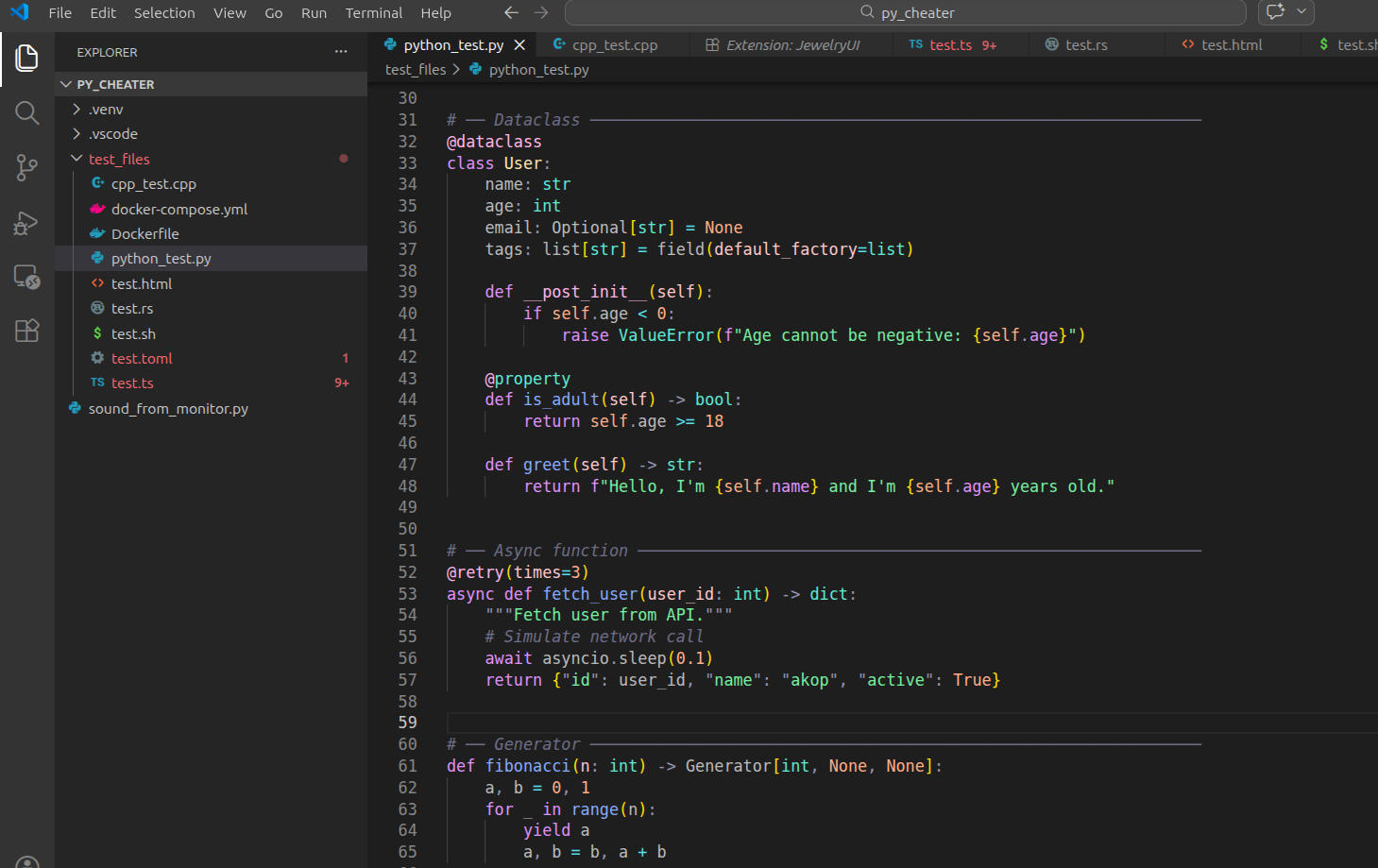
Inspired by Obsidian's default dark palette. Warm purples, soft blues and greens on a deep dark background — like looking at gemstones under a jeweler's loupe.
🌊 Ocean Jewelry
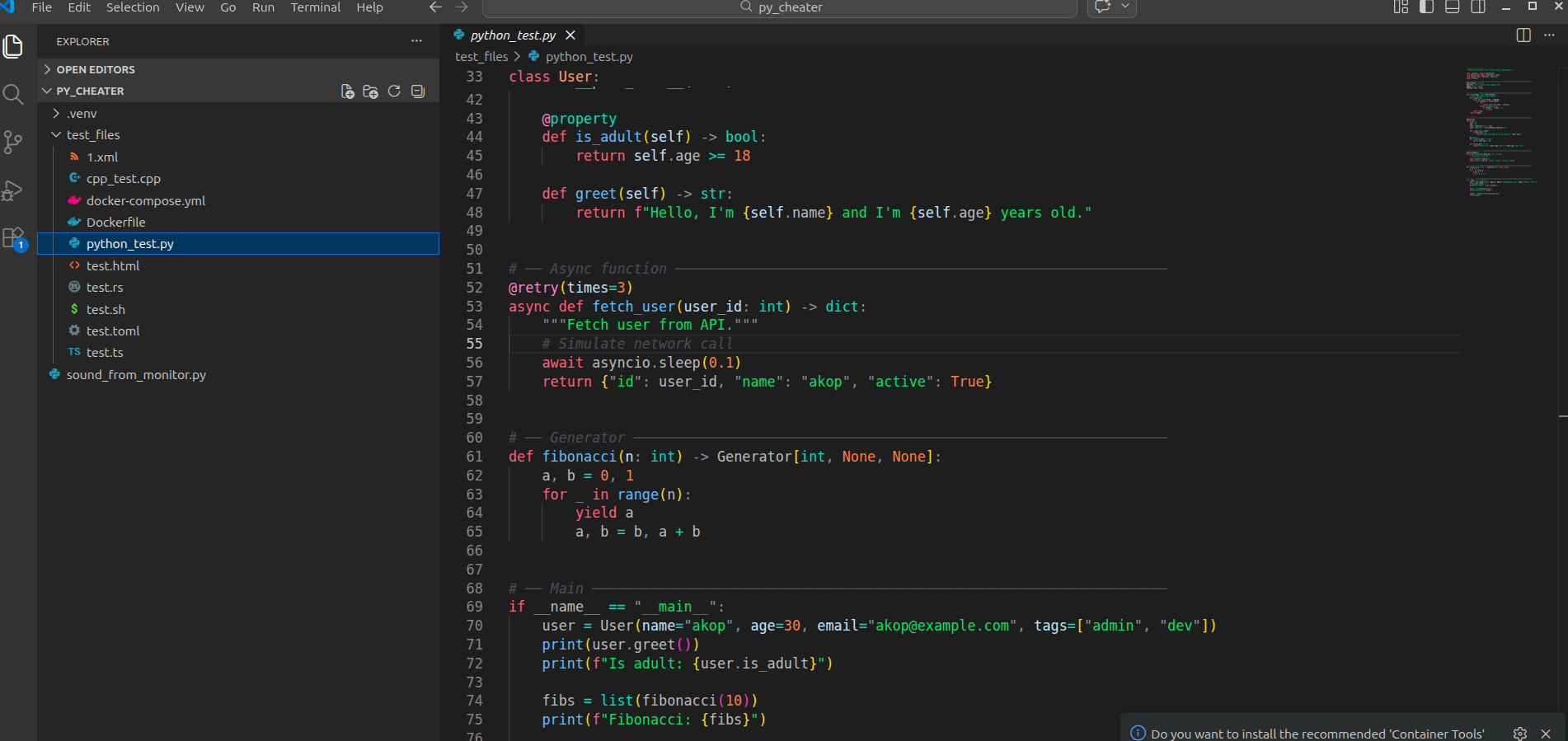
A deep-sea dark theme. Cool ice blues and bioluminescent greens contrasted with warm coral reds and amber — like precious stones discovered on the ocean floor.
Screenshots
💎 Jewelry
🌊 Ocean Jewelry
Color Palettes
💎 Jewelry
| Token |
Color |
Preview |
| Keywords / storage |
#cba6f7 |
🟣 Mauve |
| Functions / methods |
#89b4fa |
🔵 Blue |
| Strings |
#a6e3a1 |
🟢 Green |
| Classes / structs |
#f9e2af |
🟡 Yellow |
| Type annotations |
#94e2d5 |
🩵 Teal |
| Interfaces |
#74c7ec |
🩵 Sky |
| Numbers / booleans |
#fab387 |
🟠 Peach |
| Properties |
#89dceb |
🩵 Cyan |
| Parameters |
#f2cdcd |
🌸 Flamingo |
this / self |
#f38ba8 |
🔴 Red |
| Decorators / macros |
#f5c2e7 |
🩷 Pink |
| Comments |
#6c7086 |
⬜ Overlay |
| Errors |
#f38ba8 |
🔴 Red |
🌊 Ocean Jewelry
| Token |
Color |
Preview |
| Keywords / storage |
#ff7b72 |
🔴 Coral |
| Functions / methods |
#79c0ff |
🔵 Ice Blue |
| Strings |
#56d364 |
🟢 Bio Green |
| Classes / structs |
#ffa657 |
🟠 Amber |
| Type annotations |
#39d4c5 |
🩵 Teal |
| Interfaces |
#79c0ff |
🔵 Ice Blue |
| Numbers / booleans |
#f0883e |
🟠 Orange |
| Properties |
#39d4c5 |
🩵 Teal |
| Parameters |
#cae8ff |
🩵 Pale Blue |
this / self |
#ff9bce |
🩷 Pink |
| Decorators / macros |
#ff9bce |
🩷 Pink |
| Comments |
#484f58 |
⬜ Dark Grey |
| Errors |
#ff7b72 |
🔴 Coral |
Language Support
| Language |
Highlights |
| Python |
Decorators, f-strings, dataclasses, dunder methods |
| TypeScript |
Interfaces, generics, enums, decorators |
| JavaScript |
Template literals, destructuring, async/await |
| Java |
Annotations, generics, package declarations |
| C |
Preprocessor directives, pointers, macros |
| C++ |
Templates, namespaces, smart pointers, lambdas |
| Rust |
Lifetimes, traits, macros, enums, pattern matching |
| HTML |
Tags, attributes, JSX/TSX components |
| CSS |
Selectors, variables, at-rules, pseudo-classes |
| XML |
Tags, attributes, namespaces, CDATA, entity refs |
| YAML |
Keys, anchors, aliases, scalars |
| TOML |
Tables, keys, datetimes, inline tables |
| Bash |
Variables, heredocs, flags, built-ins |
| Dockerfile |
Instructions, ARG/ENV, multi-stage builds |
| Docker Compose |
Services, volumes, networks, anchors |
XML Highlights
Both themes provide full XML tokenization including:
- Tag names and punctuation (
<, >, </, />)
- Attribute names and values
- Namespace prefixes and URIs (
xmlns:xsi, xsi:schemaLocation)
- Entity references (
&, <, >)
- CDATA blocks (
<![CDATA[ ... ]]>)
- DOCTYPE declarations
- Processing instructions (
<?xml ... ?>)
Editor Defaults
Both themes ship with sensible editor defaults:
- Tree indent: 20px with always-visible guides
- Tab height: compact
- Auto save: after 5s delay
- Mouse wheel zoom: enabled
- Bracket pair colorization: independent per bracket type
- TypeScript / JavaScript auto-imports and suggestions: enabled
These are defaults only — your own settings.json values always take priority.
Installation
Search JewelryUI in the VS Code Extensions panel, or:
code --install-extension Akop4.jewelryui
Then Ctrl+Shift+P → Preferences: Color Theme → choose Jewelry or Ocean Jewelry.
Feedback & Issues
Found a color that looks off?
Open an issue at github.com/Akopov4/jewerly_ui/issues and include:
- The language / file type
- The token name (use Developer: Inspect Editor Tokens and Scopes)
- A screenshot if possible
License
MIT © 2026 Akop4
| |

