
Clusage - Claude Usage Tracker
Real-time cost, token & quota tracking for Claude Code - directly in VS Code.
Track every dollar, token, and quota percentage across all your Claude Code sessions without leaving your editor.



✨ Overview
Claude Usage connects to Claude Code's local session files and your Anthropic API quota headers to give you instant visibility into:
- 💰 How much you've spent - today, this week, this month, all time
- 📊 Which projects and models are driving your costs
- ⚡ Live quota consumption for your current session and weekly limit
- 🔢 Token breakdown across input, output, cache read, and cache write
Zero configuration. No API keys. No accounts. It just works.
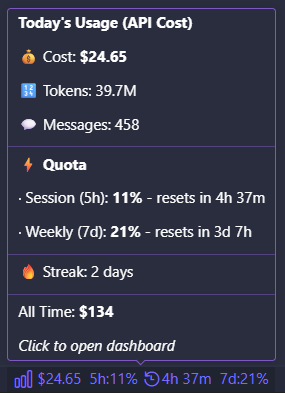
🖥️ Status Bar
The status bar item updates in real time as you use Claude Code:
⬡ $4.26 5h:60% 🕐1h23m 7d:8%
| Segment |
What it shows |
$4.26 |
Your total spend today |
5h:60% |
5-hour quota used - live from Anthropic API headers |
🕐1h23m |
Time until the 5-hour quota window resets |
7d:8% |
Weekly quota used - live from Anthropic API headers |
When quota headers are unavailable, only the cost is shown: ⬡ $4.26
Hover over the item for a detailed breakdown table. Click to open the full dashboard.
📋 Dashboard
Open with a click on the status bar item or via the Command Palette:
Claude Usage: Open Dashboard (Ctrl+Shift+P)
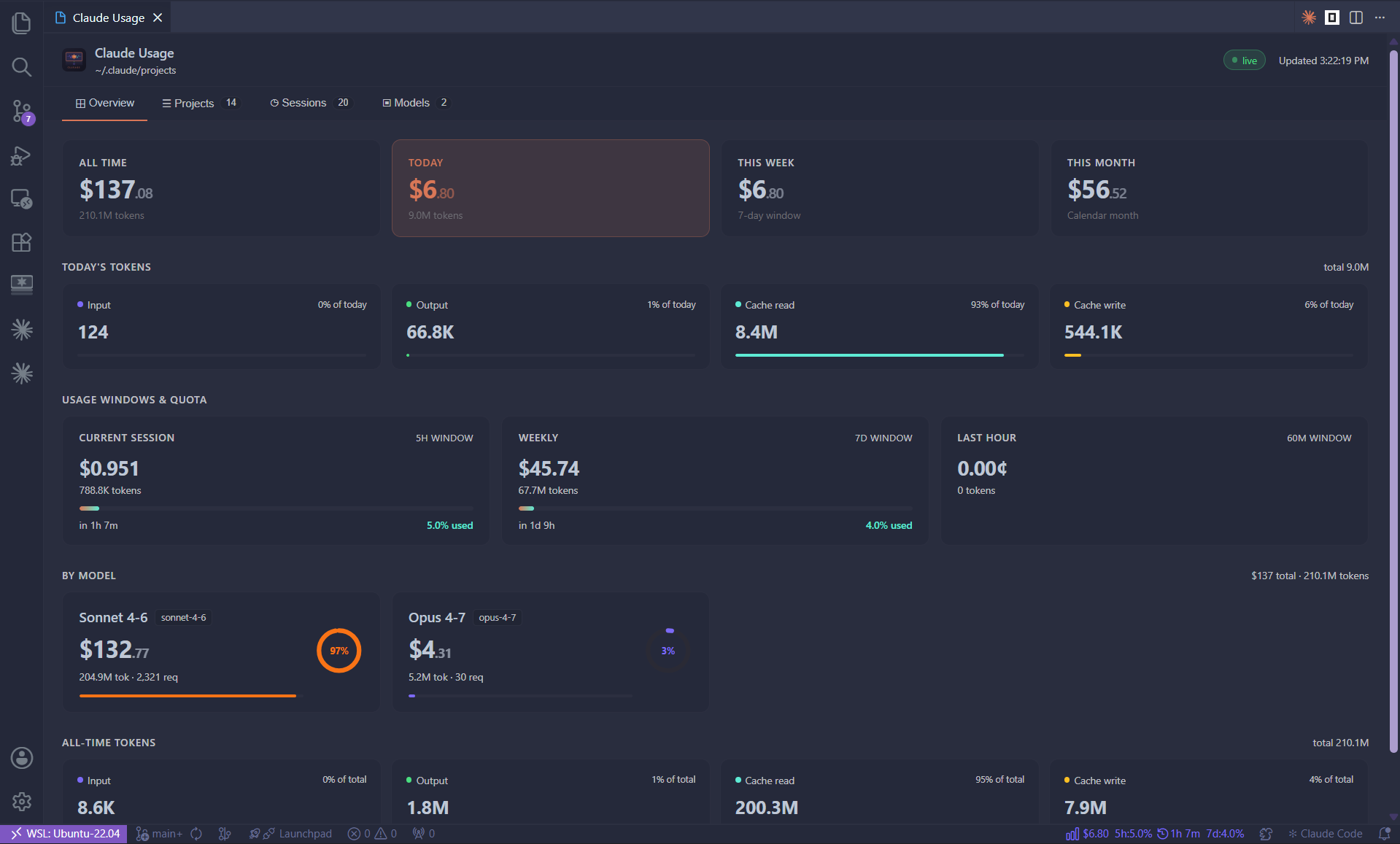
The dashboard is a beautiful dark-themed panel with six sections:
💳 Spend Overview
Four hero cards showing your costs at every time horizon:
| Card |
Period |
| All Time |
Every session ever recorded |
| Today |
Since midnight, local time |
| This Week |
Rolling 7-day window |
| This Month |
Calendar month to date |
⚡ Usage Windows & Live Quota
Three cards showing rolling usage windows - the first two powered by live Anthropic API rate-limit headers, the same data shown on claude.ai/settings/usage:
| Card |
Data Source |
| Current Session (5h) |
anthropic-ratelimit-unified-5h-utilization response header |
| Weekly |
anthropic-ratelimit-unified-7d-utilization response header |
| Last Hour |
Computed from local JSONL session data |
Each quota card shows:
- Spend and token count for that window
- An animated progress bar that turns amber at 70% and red at 90%
- Exact reset countdown (
Resets in 1h 28m)
- Percentage used with one decimal place for precision
No manual limits to configure - quota is read directly from Anthropic's API.
🔢 Token Breakdown
All-time token totals split into four types with proportional colour-coded bars:
| Type |
Description |
Typical Cost |
| Input |
Non-cached prompt tokens |
Mid |
| Output |
Generated response tokens |
Highest |
| Cache Read |
Prompt tokens served from cache |
Lowest |
| Cache Write |
Prompt tokens written to cache |
Low–Mid |
📁 Projects
A sortable table of every project you've used Claude Code in, ranked by total spend:
- Project name (derived from session working directory)
- Session count
- Total token count
- Total cost with a relative bar chart
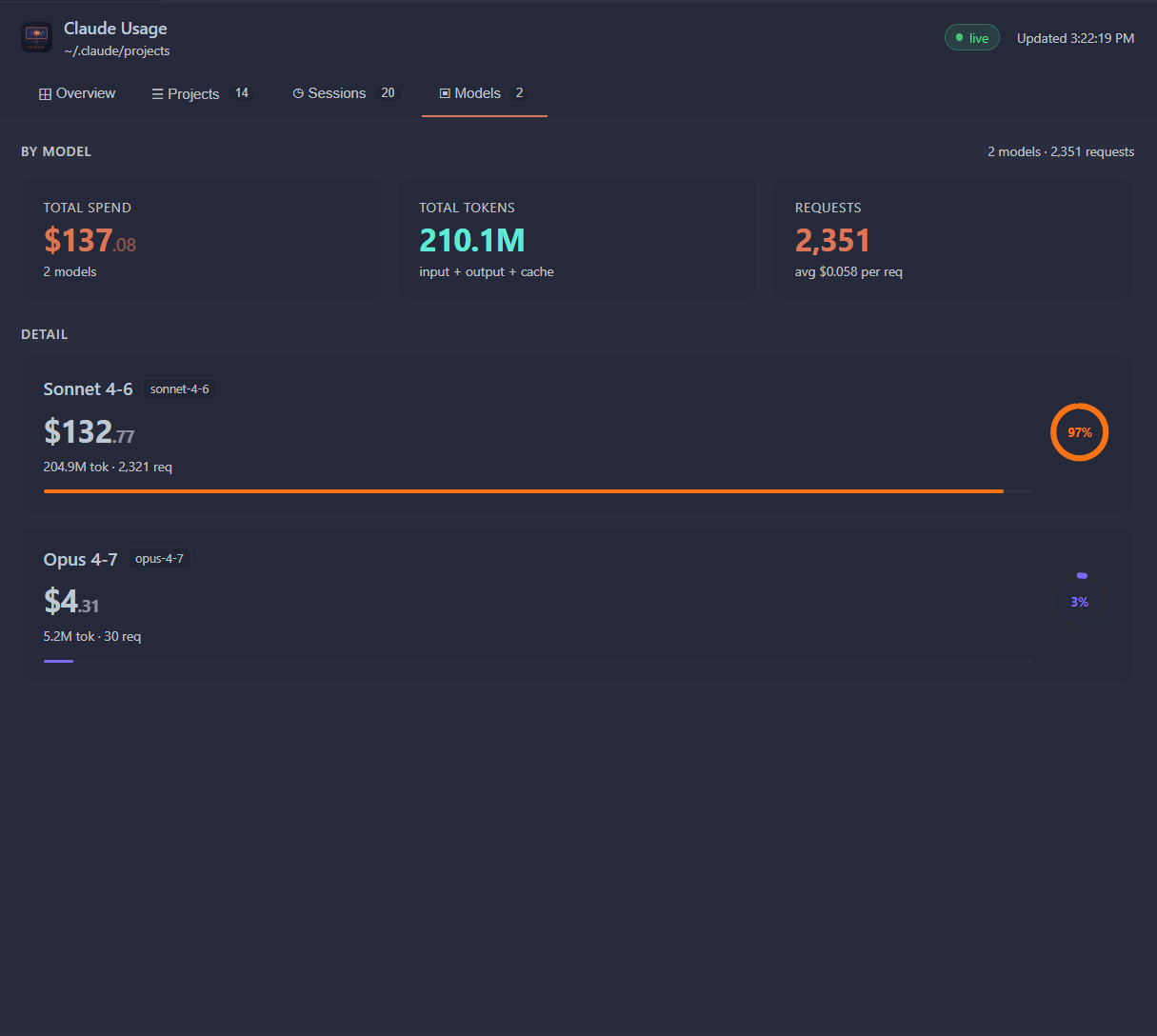
🤖 By Model
Per-model cards showing spend, token usage, and request count. Instantly see whether Claude Opus 4.6 or Sonnet 4.6 is driving your bill.
🕐 Recent Sessions
The 20 most recent sessions showing:
- Project name
- Model used (tagged pill)
- Session cost
- Token count
- Relative timestamp (
2m ago, 21h ago, 6d ago)
⚙️ How It Works
Claude Code writes a .jsonl file for every conversation under ~/.claude/projects/. Claude Usage:
- Scans all
~/.claude/projects/**/*.jsonl files on startup
- Filters to final assistant messages only (
stop_reason != null) - avoids double-counting the streaming header that carries duplicate token counts
- Computes cost locally using published Anthropic per-token pricing
- Watches for new writes with a file-system watcher - refreshes within 500 ms of any Claude Code activity
- Fetches live quota on startup, ~1 second after any new Claude Code activity, and every 5 minutes as a fallback - makes a 1-token API call to
api.anthropic.com and reads the anthropic-ratelimit-* response headers using the OAuth token already stored in ~/.claude/.credentials.json
The dashboard and status bar stay in sync automatically. No polling loops, no manual refreshes.
📦 Requirements
| Requirement |
Details |
| Claude Code |
Must be installed and signed in - provides ~/.claude/ |
| VS Code |
Version 1.85 or later |
| Network |
Access to api.anthropic.com for live quota (graceful fallback if unavailable) |
| Platform |
Windows, macOS, Linux (including WSL) |
🚀 Installation
From the VS Code Marketplace
Search for Claude Usage in the Extensions panel (Ctrl+Shift+X) and click Install.
From a .vsix file
code --install-extension clusage-2.1.0.vsix
Build from source
git clone https://github.com/AjaySingh10/clusage.git
cd clusage
npm install
npm run compile
Then press F5 in VS Code to launch an Extension Development Host.
💲 Pricing Reference
Costs are computed locally using these published rates:
| Model |
Input |
Output |
Cache Write (5m) |
Cache Read |
| Claude Fable 5 |
$10.00 / MTok |
$50.00 / MTok |
$12.50 / MTok |
$1.00 / MTok |
| Claude Opus 5 |
$5.00 / MTok |
$25.00 / MTok |
$6.25 / MTok |
$0.50 / MTok |
| Claude Sonnet 5 (intro, through 2026-08-31) |
$2.00 / MTok |
$10.00 / MTok |
$2.50 / MTok |
$0.20 / MTok |
| Claude Sonnet 5 (list, from 2026-09-01) |
$3.00 / MTok |
$15.00 / MTok |
$3.75 / MTok |
$0.30 / MTok |
| Claude Haiku 4.5 |
$1.00 / MTok |
$5.00 / MTok |
$1.25 / MTok |
$0.10 / MTok |
Note: Prices are approximate estimates based on published rates and may not reflect your exact invoice. Always refer to anthropic.com/pricing for the latest figures.
🔒 Privacy
| What |
Detail |
| Data storage |
All session data is read locally from ~/.claude/ - nothing is uploaded |
| Outbound requests |
One minimal API call to api.anthropic.com/v1/messages (max_tokens=1, ~$0.000001) after each Claude Code response and every 5 minutes as a fallback, used solely to read rate-limit headers |
| Analytics |
None |
| Telemetry |
None |
| Third-party services |
None |
⚠️ Known Limitations
- Cost figures are estimates - actual invoices may differ due to plan discounts, overages, or pricing changes
- Quota figures reflect your Claude.ai / Claude Code plan limits, not raw Anthropic API key limits
- Sessions interrupted mid-stream may show incomplete costs until Claude Code flushes the JSONL file
- The extension requires Claude Code to be signed in via OAuth - API-key-only setups will show usage data but no live quota
🤝 Contributing
Bug reports and pull requests are welcome.
npm run watch   # TypeScript watch mode
# Press F5 in VS Code → Extension Development Host with live reload
Please open issues at github.com/AjaySingh10/clusage/issues.
📄 License
MIT © 2026 Ajax

