English |
한국어 |
简体中文 |
日本語 |
Español |
Français
Agent Tracker
A VS Code extension that shows current Claude and Codex usage and time until reset, and tracks token usage and task duration from conversation logs.
Features
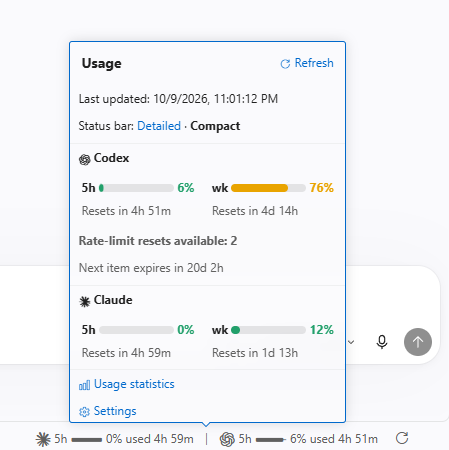
Check usage from the status bar
- Current usage — See Claude and Codex subscription usage and time until reset in the VS Code status bar.
- Details card — Click to open a card with 5-hour and weekly usage, reset times, and available Codex usage resets.
- Automatic and manual refresh — Usage refreshes every 15 minutes by default. Use the refresh button for an immediate update.
Compare tokens and time by conversation, period, and model
- Token and time statistics — View total tokens, average tokens per request, and average duration in tables and charts by conversation, day, month, project, or model.
- Usage history — See usage counts and proportions for skills, plugins, subagents, and models.
- Improve your workflow — Compare average tokens and time per request before and after changing models or adopting skills and plugins to refine how you use agents.
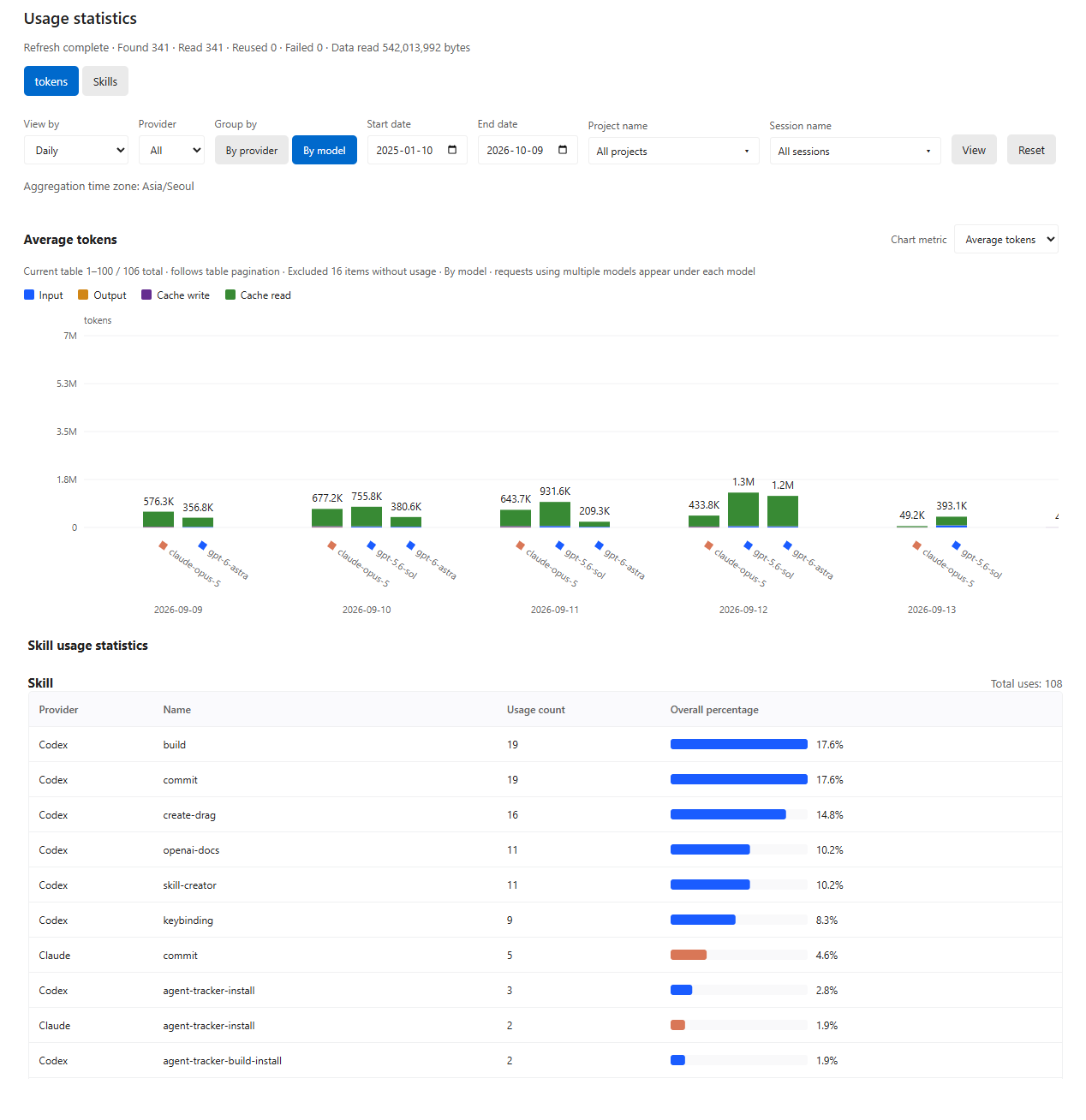
Open Usage statistics from the card or run Agent Tracker: Open Usage Statistics from the Command Palette. Statistics are calculated from local conversation logs when you open the view.
Installation and removal
Install
Requires Node.js 22.15+, VS Code 1.101+, and the code command available in your terminal. Sign in through Claude Code or the Codex CLI first.
npx agent-tracker-vscode@latest
To install the installer command globally with npm:
npm install -g agent-tracker-vscode@latest
agent-tracker-vscode
After installation, run Developer: Reload Window from the VS Code Command Palette. Use the same installation commands to update. On macOS, if code is unavailable, first run Shell Command: Install 'code' command in PATH.
To install into a specific profile, provide the name of a profile you have already created:
npx agent-tracker-vscode@latest --profile "Work"
Clicking the card's status bar item again to close it requires the optional local VS Code patch (Korean).
Uninstall
Select Agent Tracker → Uninstall in the VS Code Extensions view, or run:
code --uninstall-extension AgentTracker.agent-tracker
If you installed into a specific profile, add --profile "Work" to the uninstall command. To also remove the globally installed npm package:
npm uninstall -g agent-tracker-vscode
The npm package and the VS Code extension are uninstalled separately.
VS Code extension settings
Click Settings in the card or search for @ext:AgentTracker.agent-tracker in VS Code Settings.
All setting keys below use the agentTracker. prefix.
| Setting |
Default |
Description |
language |
auto |
Follow the VS Code language. Choose Korean, English, Simplified Chinese, Japanese, Spanish, or French |
claude.enabled / codex.enabled |
true |
Track subscription usage and log statistics for each provider |
quota.refreshPolicy |
automatic |
Refresh automatically. manual fetches usage only when you click refresh |
quota.pollingIntervalSeconds |
900 |
Automatic refresh interval in seconds. Minimum 30; pauses in inactive windows |
codex.showStatusBar |
true |
Show Codex in the status bar. Usage queries continue when hidden |
display.percentage |
used |
Show the used percentage. remaining shows the remaining percentage |
display.detail |
detailed |
Show 7-day and 5-hour usage. compact shows only 5-hour usage |
display.colorMode |
automatic |
Use the theme color. Also supports white, black, and custom |
display.customColor |
#ffffff |
HEX color for custom mode |
codex.showReserve |
false |
Show GPT Reserve usage when available for your account |
codex.showResetCredits |
true |
Show available usage resets and their next expiry when provided by your account |
usage.enabled |
true |
Enable token and time statistics from local conversation logs |
usage.skillsEnabled |
true |
Count skill, plugin, subagent, and model usage |
usage.showApiCosts |
false |
Show estimated API costs in USD. Subscription usage is shown as zero |
usage.excludeEmptyUsage |
true |
Exclude requests with neither model nor token information from charts and averages; keep them in tables |
usage.timezone |
System time zone |
Time zone for daily and monthly statistics. Example: Asia/Seoul |
dataHome |
~ |
Shared parent folder containing .claude and .codex. Set in user settings |
claude.cleanupPeriodDays |
null |
Claude log retention in days. Values of 1 or more update Claude settings; null preserves the existing value |
codex.executable |
codex |
Codex CLI command or executable path |
Use Agent Tracker: Delete Statistics Data to clear aggregated statistics. Original conversation logs are preserved, and statistics are recalculated when you reopen the view.
Usage and development reference

