Skip to content
| Marketplace
Sign in
Visual Studio Code>Other>Create Missing FilesNew to Visual Studio Code? Get it now.
Create Missing Files

Create Missing Files

AfanasevAV

|
3 installs
| (0) | Free
Quickly create missing files referenced in imports
Installation
Launch VS Code Quick Open (Ctrl+P), paste the following command, and press enter.
Copied to clipboard
More Info

Create Missing Files

Create missing files from imports with one click.

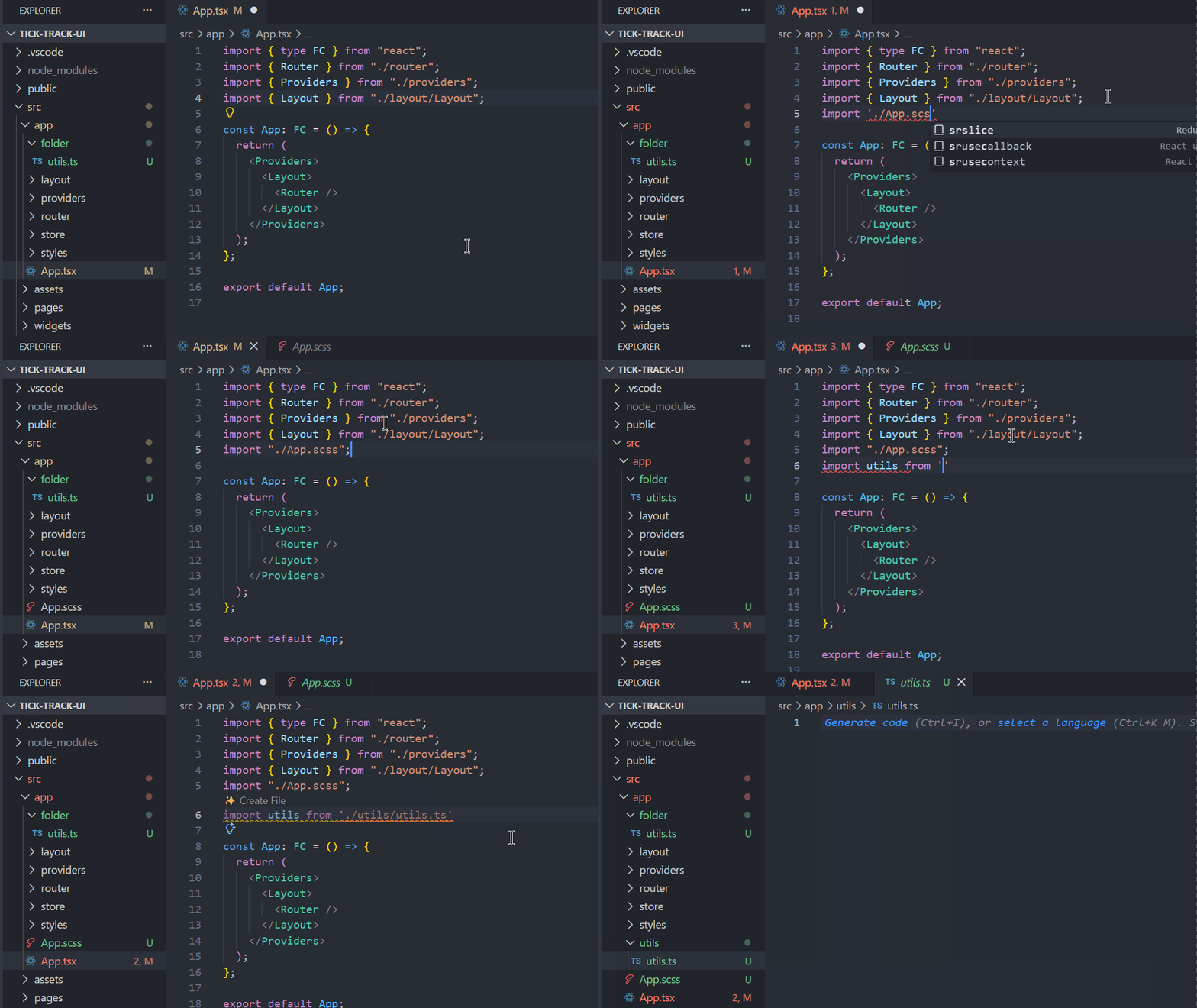
Demo

How it works

When you import a file that doesn't exist, this extension shows a quick action to create it.

Hover

Hover over any import path and click "Create File".

CodeLens

A "Create File" button appears above any missing import.

Settings

  • createMissingFiles.autoCreate - Create files without asking (default: off)
  • createMissingFiles.extensions - Which file types to watch (default: .scss, .css, .js, .ts, .jsx, .tsx, .json, .vue)

Supports

  • JavaScript, TypeScript
  • React, Vue
  • SCSS, CSS
  • Contact us
  • Jobs
  • Privacy
  • Manage cookies
  • Terms of use
  • Trademarks
© 2026 Microsoft