Large File Compare
Diff and sort very large text files (200k–2M lines) — SQL/CSV exports, logs, config — that VS Code's built-in diff editor can't handle. Free.
On a 1M-line CSV pair, VS Code's built-in diff took 30–40 s, lagged, and fell back from
side-by-side to an inline view; Large File Compare renders a true side-by-side diff in
~5 s and scrolls smoothly. Reading and diffing run in a background worker (with a progress
bar and a Cancel button), and only the visible rows are ever in the DOM, so it stays smooth at
a million-plus lines.
It also does two things the built-in diff can't do at any size:
- Sort-then-compare — compare files whose rows are in a different order.
- Key-column compare — match rows by an ID column (record reconciliation), so an edited
row shows as one changed row instead of a delete + add.
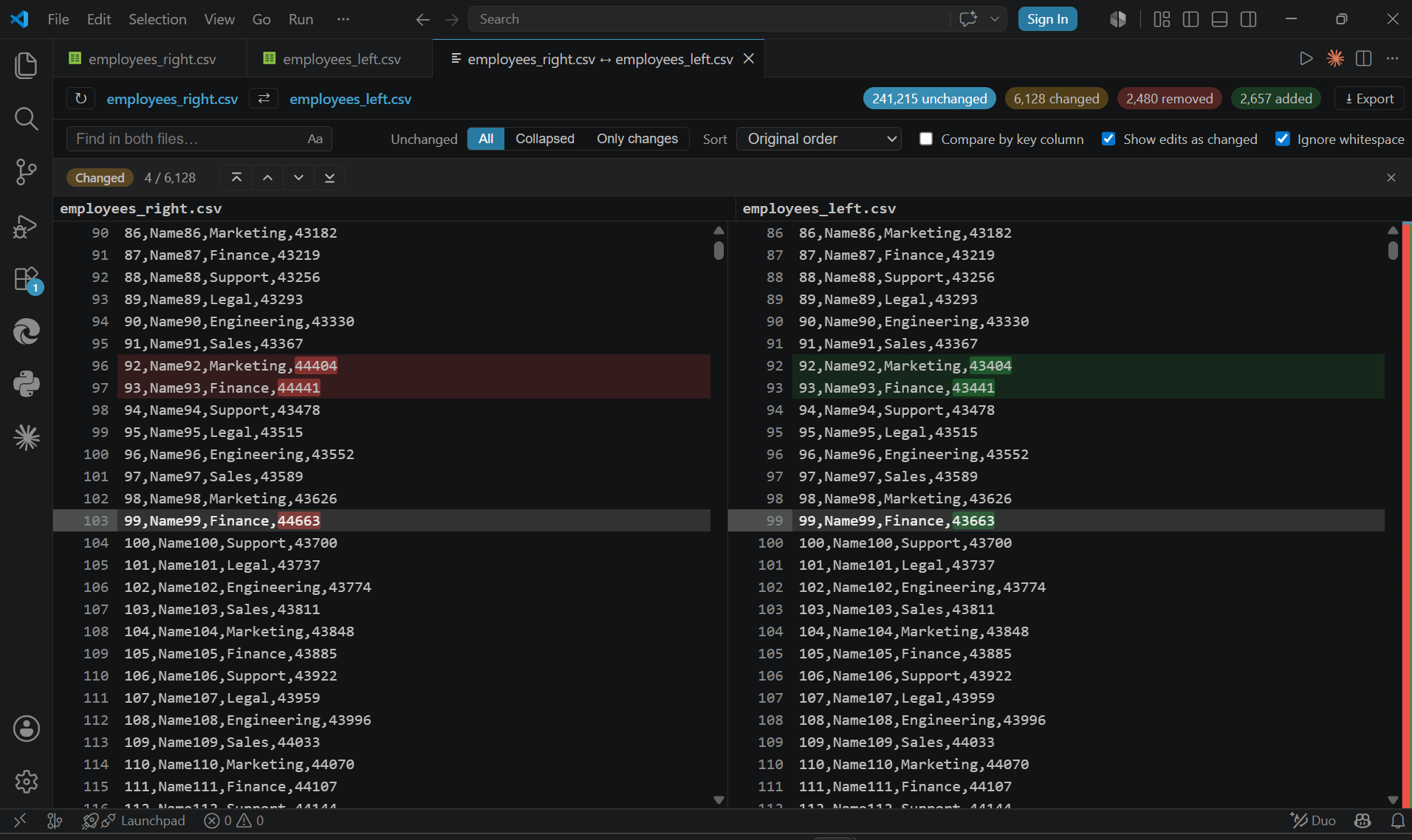
What the panel looks like
A comparison opens in one panel: a toolbar (find, sort, key-column, and an unchanged-rows
view toggle), a summary row with clickable unchanged / changed / removed / added counts,
two color-coded side-by-side panes, and a clickable overview ruler (change-map) down
the right edge.
Compare modes
Choose based on your files:
- As-is — line-by-line, when both files are already in the same order (config files,
ordered logs).
- Sort first (alphabetical / numeric, asc/desc) — when the order differs and there's no ID
column; shows which lines exist in one file but not the other. Both sides are sorted the same
way, so a line present in both at different positions counts as unchanged. (Sorting drops row
pairing — an edited line appears as a separate removed + added.)
- Key-column — match rows by one delimited column (a record's key). Same key + different
content = one changed row; a key present in only one file = added / removed.
Pick a delimiter (comma, tab, pipe, or semicolon) and a column number (1 = first column).
Example: delimiter
, + column 1 reconciles two CSV dumps by their first id column,
even when the rows are in a different order.
Features
- Unchanged-rows view — one toggle:
- All — every row.
- Collapsed — GitHub-style folds ("⋯ 10,000 unchanged lines", click to expand).
- Only changes — hide unchanged rows entirely, so a 900k-row file collapses to just its
differences.
- Find on either side — matches highlighted inline; step through with Enter / Shift+Enter.
- Navigate — click a summary count to jump through added / removed / changed rows; click
the overview ruler to jump anywhere in the file.
- Export the diff to CSV (columns: Status, left line #, right line #, left text, right
text) or plain text, for changed rows only or all rows.
- Copy a row — right-click for Copy left / Copy right / Copy row (both), or select a row
and press
Ctrl/Cmd+C.
- Two panes scroll in lock-step, both vertically and horizontally.
Getting started
Pick whichever fits:
- Compare two files — Ctrl/Cmd-click two files in the Explorer, right-click → Diff
Selected (Large File Compare). The first is the left side, the second the right; swap them
with the ⇄ button in the panel toolbar.
- One side at a time — also works on open editor tabs and unsaved documents: right-click
one → Select for Diff (Large File Compare), then right-click the other → Diff with
Selected (Large File Compare).
- Command Palette (
Ctrl+Shift+P) → Large File Compare: Compare Two Files, then pick
two files.
Requirements
Notes & limitations
- Comparison is always case-insensitive — lines differing only in letter case count as
unchanged. There is no case-sensitive mode yet, so don't rely on this tool to catch
case-only differences (e.g.
NULL vs null).
- Ignore whitespace is on by default (leading/trailing whitespace ignored); turn it off in
the toolbar to compare spacing exactly.
- Binary files are detected and rejected — pick text files.
Release notes
See CHANGELOG.md.
| |

