A VS Code extension that bundles the day-to-day work with GitLab and Claude Code:
time tracking on issues, a GitLab MCP server for Claude Code, management of
skills & agents, and AI-assisted code reviews — all sharing one GitLab token and
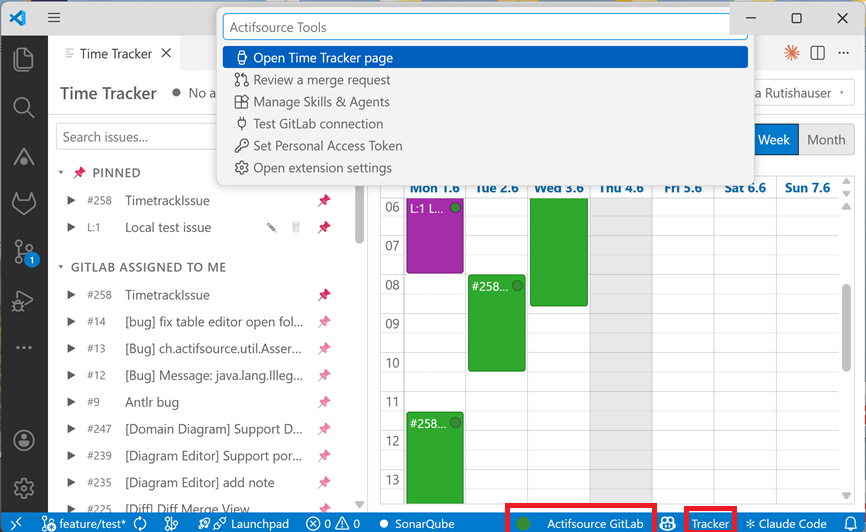
a connection lamp in the status bar.
Contents
What can the extension do?
| Area |
In short |
| ⏱️ Time tracking |
Timer or calendar entries on GitLab issues, buffered locally, synced to GitLab timelogs on demand. Plus purely local issues with no GitLab link. |
| 🟦 Jira time tracking |
The same booking flow for Jira Cloud issues — entries sync as Jira worklogs (REST + API token). Shown alongside GitLab in the same calendar. |
| 🔌 GitLab MCP |
One click enables the GitLab MCP server for Claude Code (CLI in the terminal) — token kept secure, never written to disk in clear text. |
| 🟦 Atlassian MCP |
One click enables the official Atlassian (Jira/Confluence) MCP server for Claude Code — OAuth in the browser, no token to manage. |
| 🧩 Skills & agents |
A dedicated page to enable/disable Claude Code skills and agents (bundled templates + your own files) — and to install skills, agents and plugins from remote GitHub sources. |
| 🔍 Code reviews |
Starts a Claude review of a merge request or the local branch — results in chat, as draft notes, or posted directly to the MR. |
| ✅ To-Do board |
A standalone Kanban board with custom columns and drag&drop cards; due dates surface in the status bar. Stored machine-globally, independent of issues. |
| 📊 Claude session usage |
A cross-project overview of all your local Claude Code sessions — token usage per session/project and an estimated (subscription-hypothetical) USD cost. |
| 🗂️ Feature tasks |
A live board visualizing the Claude Code feature-workflow queue (.claude/feature-tasks.json) — running/queued chains, dependencies and file conflicts. |
| 🚦 Pipeline / CI status |
The newest GitLab pipeline or GitHub Actions run of your current branch, live in the status bar — with job logs, retry/cancel, failure notifications and one-click Claude root-cause analysis. |
| 🕹️ Agent Office |
A pixel-art office visualizing your live Claude Code subagents: every agent walks in, works at a desk with a speech bubble showing its current tool call, and hands its result to the coordinator when done. |
| 🔨 Task Runner |
Up to five workspace tasks on global shortcuts (F7, Ctrl+F7, Shift+F7, Ctrl+Shift+F7, Alt+F7), assigned on the Task Runner page; re-triggering restarts a still-running task. |
| 📝 TODO List |
A bottom-panel view of every TODO/FIXME/HACK comment in the workspace, updated live while you type. Optional git blame authors per item and a filter over exactly those author names. Costs nothing while hidden. |
Quick start
- Set the GitLab URL:
Settings → actifsourceTools.gitlabUrl, e.g. https://gitlab.example.com.
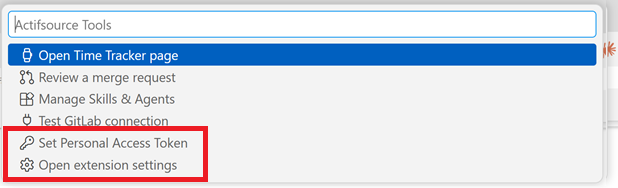
- Set the token: Command Palette (
Ctrl+Shift+P) → Actifsource Tools: Set Personal Access Token (scope api, see below).
- Open the panel:
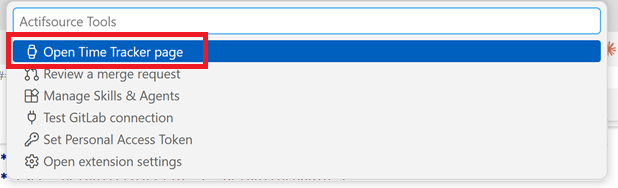
Actifsource Tools: Open (or click the green dot in the status bar).
- (optional) Enable MCP for Claude:
Actifsource Tools: Enable GitLab MCP for Claude Code.
GitLab personal access token
The extension both reads and writes to GitLab (creating/deleting timelogs, posting
review comments). Therefore:
- Scope:
api (full read/write). read_api is not enough once times are synced
or reviews are posted.
- Account role: at least Reporter (issues + time + comments), Developer
recommended for the full MR review workflow.
- The token is stored only in
vscode.SecretStorage (on Windows via DPAPI) — never
in settings.json or ~/.claude.json.
Create it in GitLab: User Settings → Access Tokens → scope api.
Features in detail
1. Time tracking
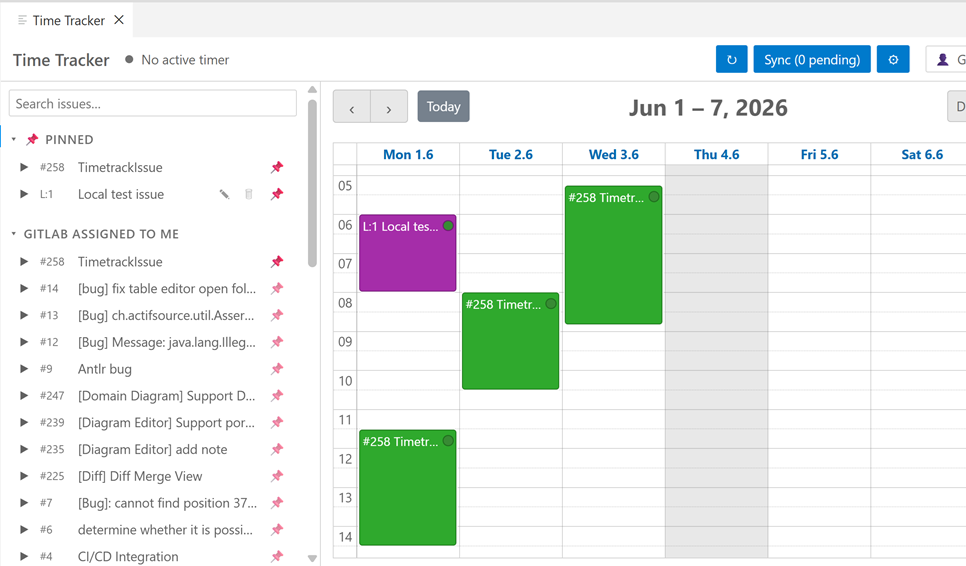
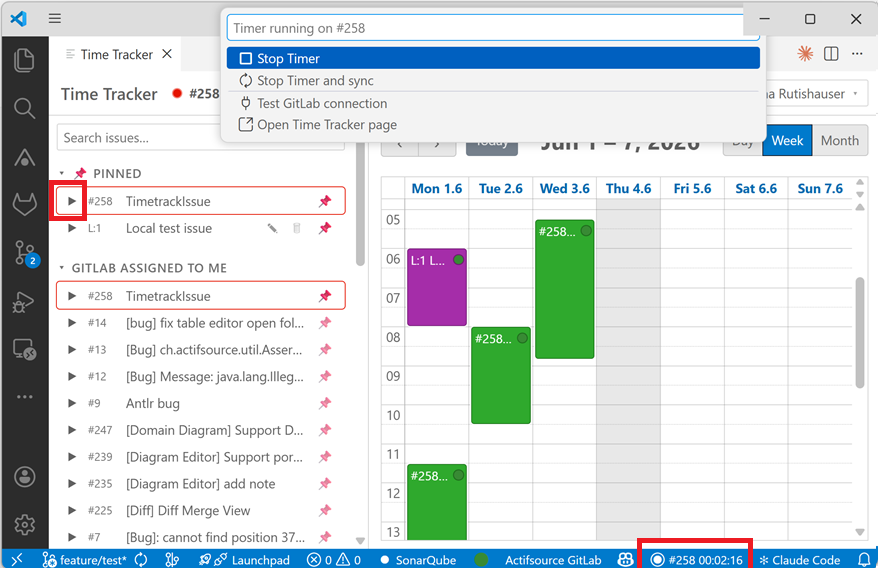
- Issue list with sections: pinned, GitLab — assigned to me, local, and
optionally project/group (see
defaultProjectId / defaultGroupId).
- Issue search: typing filters the loaded issues (title, ticket id
#258/258, Jira key);
a "🌐 Search globally" entry in the results extends the search server-side across
all enabled GitLab and Jira accounts — including issues assigned to other users and
closed issues (struck through, sorted last). Exact Jira keys (PROJ-123) are found
globally too.
- Exactly one active timer that survives webview and VS Code restarts.
- Calendar (day/week/month): create/edit entries via context menu, move them by drag;
24-hour axis.
- Traffic-light dot per entry: 🔴 not synced · 🟡 changed, not synced yet · 🟢 synced.
- Sync sends each booking as a GitLab timelog (GraphQL
timelogCreate /
timelogDelete) — one entry = one timelog, with no negative correction rows in the
time-tracking report. Editing the same entry multiple times is collapsed into a single
sync (no duplicates).
- Revert discards all pending changes locally after a confirmation: new entries are
deleted, edited entries return to their last synced state (Discard change), deleted entries
are restored. Nothing is sent to a server; already-synced bookings are not touched.
- Local issues (
L:<n>): purely local, machine-global issues with no GitLab link —
bookable in the calendar, pinnable; "synced" into a global file.
- Transfer booked time: right-click a local issue to move all of its booked time
onto a picked ticket (GitLab, Jira or another local issue). Nothing is sent to a server
automatically — the retargeted entries land in the pending queue and are booked on the
next manual Sync. The local issue is kept (empty); blocked while a timer runs on it.
- Month report: a monthly timesheet view (tickets × days with per-day, per-ticket and
grand totals) next to the calendar. Data is fetched from the server per month, so
closed issues are included; the calendar shows the same server-backed history for
past months as read-only entries.
- Clickable issue ids: the ticket id in the calendar, the month report and the issue
list opens the ticket in the browser (GitLab/Jira; local issues have no URL).
- Issue agent actions: right-click a GitLab/Jira issue to run Claude Code on it —
Refine (work out the spec), Plan (work out the implementation plan),
Implement (autonomous subagent: branch, code, verify, commit — optionally in a
git worktree) and Ask, each in the terminal or the Claude Code view.
- View another user (read-only): shows their assigned issues and their logged time —
no editing/booking. The user search spans all enabled GitLab and Jira accounts.
Jira time tracking (worklogs)
The same booking flow as GitLab, but for Jira Cloud — entries sync as Jira worklogs.
- Configure
actifsourceTools.jira.url (e.g. https://your-site.atlassian.net) and
actifsourceTools.jira.email, then run Actifsource Tools: Set Jira API Token with a token
from id.atlassian.com (stored in SecretStorage). Optional: jira.defaultProjectKey, jira.jql.
- Jira issues appear in a "Jira assigned to me" section (assignee = currentUser(), plus the
optional project/JQL) and book time in the same calendar as GitLab/local entries.
- Sync creates/deletes Jira worklogs (one entry = one worklog); editing replaces the
worklog. Reconcile pulls in your own worklogs and removes locally-deleted ones.
- Only your own worklogs are touched (matched by Atlassian account id).
2. GitLab MCP for Claude Code
Enables the GitLab MCP server (@zereight/mcp-gitlab) for Claude Code in the integrated
terminal — so Claude can work with GitLab directly (issues, MRs, comments …).
- The command
Actifsource Tools: Enable GitLab MCP for Claude Code writes a gitlab
entry into the user-global ~/.claude.json and injects the token as an environment
variable into new integrated terminals.
- Reuse: uses the same token and URL as time tracking — no second token needed.
GITLAB_API_URL is derived from gitlabUrl.
- Secure:
~/.claude.json only contains the reference ${GITLAB_PAT}, never the value.
- After enabling: open a new integrated terminal, start
claude, run /mcp.
Actifsource Tools: GitLab MCP Status shows a checklist (token, entry, npx on PATH …).
Atlassian (Jira/Confluence): Actifsource Tools: Enable Atlassian MCP for Claude Code
adds the official Atlassian remote MCP server as a native SSE entry
({ "type": "sse", "url": "https://mcp.atlassian.com/v1/sse" }) to ~/.claude.json.
Authentication is OAuth 2.1 — a browser window opens in Claude Code on first use;
no token is stored or configured. It targets your Atlassian Cloud site(s) via the
hosted gateway (not your site URL directly). Enable/disable/status are also in the green-dot menu.
More MCP servers, each with enable/disable/status commands and green-dot menu entries:
GitHub MCP (token-based, used by the GitHub PR review), Actifsource MCP (local
server, URL/port configurable) and Playwright MCP (browser automation, optional CDP
endpoint to attach to a running browser). Actifsource Tools: MCP Status (all servers)
shows one combined checklist.
3. Manage skills & agents
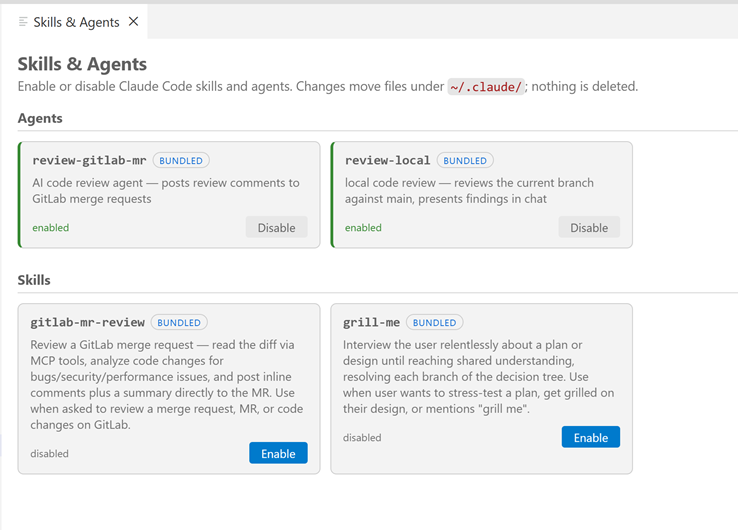
A dedicated page (Actifsource Tools: Manage Skills & Agents) to enable/disable Claude
Code skills and agents — bundled templates and your own files under ~/.claude/.
- Enable moves/writes into the live directory (
~/.claude/agents/<name>.md or
~/.claude/skills/<name>/) that Claude Code scans at session start.
- Disable moves it into a disabled store — never deleted, fully reversible.
- Visible before enabling: an agent's requested tools/model, whether a skill ships
scripts/, and an origin badge (bundled/user).
- A hand-authored file of the same name is never overwritten (conflict is shown).
- With
actifsourceTools.autoUpdateAgentAndSkill (default on), managed copies are
refreshed from the latest bundled version at startup.
- The page also manages CLAUDE.md chapters (appended between marker comments to
~/.claude/CLAUDE.md) and status-line scripts (bundled ai/statusLine/*, copied to
~/.claude/ and wired into ~/.claude/settings.json).
Remote sources (skills, agents & plugins from GitHub)
The page also lists artifacts from GitHub repositories — configured in
actifsourceTools.remoteSources or added via the "Add remote source…" wizard:
- Remote skills and agents appear alongside the local ones and can be installed,
updated and uninstalled per card. Installs are pinned to the resolved commit SHA
and are never auto-updated — an Update button appears when the source moved on.
- Plugins get their own section and are installed through the
claude CLI
(claude plugin install). Plugin installs and skills shipping scripts/ require an
explicit confirmation.
- A Sources panel lists every source with an enable/disable checkbox — the extension
bundle first (unchecking it hides bundled items you haven't installed yet; setting
actifsourceTools.bundledSourceEnabled), then the remotes, then Add remote source…;
collapsed via a Show more / Show less divider. Bundled default sources and plugins ship
with the extension. Private repositories are accessed with a registered GitHub account's token
(public ones work anonymously).
- Installed items always stay visible, even when their source is unchecked — installed
skills, agents and plugins remain listed and can still be toggled or uninstalled.
4. Code reviews
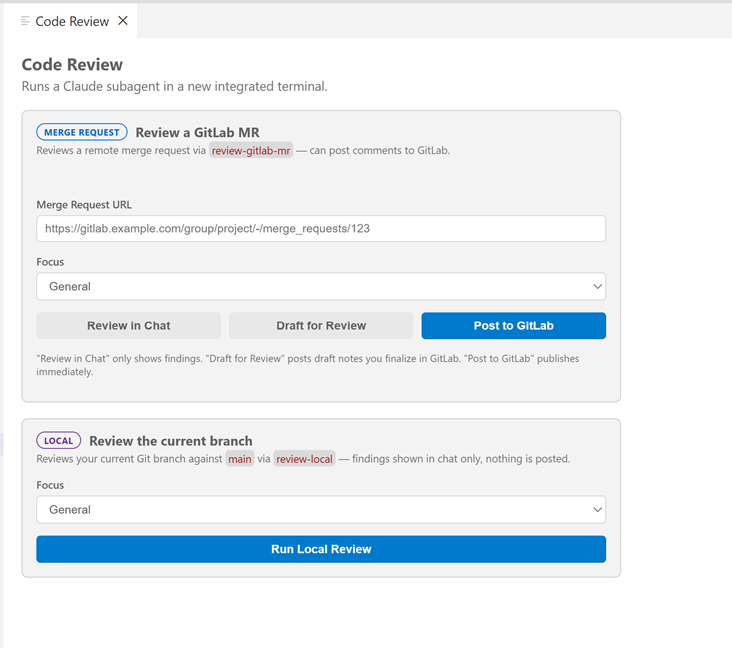
The page Actifsource Tools: Review a Merge Request starts a Claude review in a new
integrated terminal — two clearly separated variants:
- 🔵 Merge Request / Pull Request: one smart URL field accepts GitLab MR and GitHub
PR URLs and picks the matching agent (
review-gitlab-mr / review-github-pr), then
Review in Chat, Draft for Review, or Post directly. GitHub reviews use
GitHub's pending-review model (inline comments inside a review).
- 🟣 Local (
review-local): reviews the current branch against main, results in chat
only — nothing is posted, no token/MCP required.
The required review agent must be enabled; if it is not, the page blocks the review and
offers to enable it. MR reviews additionally require MCP and a token to be ready.
5. To-Do board
A standalone Kanban page (Actifsource Tools: Open To-Do Page) — separate from issues and
the timer, for quick personal tasks.
- Columns with custom names: add, rename, delete and reorder (◀▶).
- Cards = title + optional due date + notes, with 5 fixed colors; drag&drop between
columns and to reorder.
Done (checkbox, strikethrough) and archived are separate
states; a top-bar toggle switches the whole board between Active and Archived views.
- Due-date reminder in the status bar: while any active to-do is due today or overdue,
a
🔔 <count> item appears (tooltip lists them, click opens the board), tinted by the
highest-priority color among them.
- Ticket references: a card can reference 0–n tickets (GitLab/Jira/local) as clickable
chips, with navigation in both directions (ticket → board, board → ticket) and a
Create To-Do from Ticket command.
- Saved workspace context (💾): a card can carry at most one snapshot of your workspace
— open editors, cursor positions, breakpoints and branch metadata — restored explicitly
via commands (with or without branch switch). Nothing is saved or restored automatically,
and the working tree is never touched (no stash, no commit).
- Stored machine-globally in
todo-data.json; the folder is overridable via
actifsourceTools.todoStorageDirectory.
6. Claude session usage
A standalone page (Actifsource Tools: Claude Session Usage) giving the cross-session,
historical view that Claude Code's native /usage (current session only) doesn't provide.
- Reads Claude Code's own local transcripts (
~/.claude/projects/**/*.jsonl) — not the
extension's data — and lists every session grouped by project.
- Per session: token usage (input / output / cache-write / cache-read, per model),
duration and message count, plus an estimated USD cost.
- Cost is an estimate. Because you are typically on a subscription, the $ figure is
hypothetical "as-if-API"; tokens are shown primary, $ small. Pricing is fetched live from
Anthropic's public pricing page (toggle
actifsourceTools.claudeSessionUsage.fetchLivePricing)
with a built-in fallback.
- Right-click a session to copy a context link (a prompt pointing Claude at that
transcript) or resume the session in a terminal (
claude --resume).
7. Feature tasks
A standalone board (Actifsource Tools: Feature Tasks) that visualizes the Claude Code
feature-workflow task registry (.claude/feature-tasks.json) — the plan → review →
background-implementation queue.
- Queue columns: one column per running task, with queued tasks stacked under the task
they wait on; tasks with no running blocker collect in a "Waiting to run" column.
- Dependencies drawn as arrows / chips ("waits for" / "blocks"), and file conflicts
between a queued task and its blockers highlighted in red.
- Each card shows its execution mode (workspace / worktree / chat) and, when available,
the session channel title; collapsed by default, running cards show a progress strip.
- Finished (3 newest) + collapsible History; delete finished tasks or "Clear
finished". The file is polled every 5 s while visible and never modified except by
explicit deletes. A banner warns if the feature workflow isn't set up.
8. Pipeline / CI status
A status bar item showing the newest GitLab pipeline or GitHub Actions workflow run
of the branch checked out in the workspace — no extra configuration: the repo's git remote
is matched by host against your registered GitLab/GitHub accounts.
- At a glance: icon + pipeline number per state (running with job progress like
test 2/5, passed, failed with red background, pending, canceled, manual action with
yellow background, CI: none when the branch never ran a pipeline). The tooltip lists
all stages/jobs with status and duration.
- Click menu: open the pipeline in the browser, show jobs and view a job log inside
VS Code, retry failed jobs, cancel a running pipeline, refresh, and jump to older
pipelines of the branch. Actions only appear when they make sense in the current state.
- Notifications: when one of your own pipelines fails (trigger user = token owner),
a warning toast offers Show Log, Analyze with Claude and Ignore — at most once per
pipeline. An optional success toast (
pipelineStatus.notifyOnSuccess, default off) reports
a previously running pipeline turning green.
- Analyze with Claude: fetches the failed jobs' logs (trimmed to the relevant tail),
saves them to temp files and starts Claude Code in a terminal with the pipeline context —
goal: a clear root cause and a concrete fix suggestion. Works best with the GitLab/GitHub
MCP enabled (the action offers the setup if it isn't).
- Polling: fast while a pipeline is running (default 10 s), slow otherwise (default
60 s), immediate refresh on branch switch; both intervals are settings. Connection
problems degrade silently to an "unavailable" state — never error popups.
9. Agent Office
A pixel-art office (Actifsource Tools: Agent Office) that visualizes live Claude Code
subagent activity of the current workspace — read from the local session transcripts
under ~/.claude/projects/, no API calls.
- The coordinator (your main Claude session) sits at the top desk; every subagent
walks in through the door and takes a seat: 5 fixed workstations first, then the meeting
table, then standing room around it (at most 40 figures are drawn, the rest are counted
in the top bar).
- While working, a figure "types" with a speech bubble showing its current tool call
(
📖 file.ts, 🔍 "pattern", 💻 build, …); finished agents carry a folder to the
coordinator, hand it over ("✔ done!") and leave through the door.
- Ambient behavior: stalled agents fetch a coffee, thinking agents step to the
whiteboard, writing agents visit the printer (one per spot, with cooldowns). The idle
coordinator takes coffee/printer breaks and waters the plants — and runs back to his
desk the moment work starts.
- Detects direct agents, workflow-tool runs and git-worktree agents; a session
picker covers the recent sessions of the workspace. Click a figure for task, state, tool
calls, tokens and an Open transcript button.
10. Task Runner
Up to five workspace tasks on global keybindings — for the "rebuild" reflex without leaving
the keyboard, wherever the focus is (editor, terminal, webview, explorer).
- Assign tasks on the Task Runner page (
Actifsource Tools: Task Runner, also in the
lamp menu): one row per slot with the default keybinding, a task input with suggestions,
and Run/Clear buttons. Values are stored in the workspace settings
(actifsourceTools.taskRunner.task1 … task5).
- Default shortcuts: Run Task 1
F7, 2 Ctrl+F7, 3 Shift+F7,
4 Ctrl+Shift+F7, 5 Alt+F7 (mac: Cmd instead of Ctrl). Pressing a shortcut
again while its task still runs terminates and restarts it.
- While a slot is empty its shortcut is inactive and the keys keep their normal binding.
- A previously configured
buildTask.name is migrated to Run Task 1 automatically.
A tree view in the bottom panel (next to Terminal/Problems) listing every tagged comment
of the workspace — not to be confused with the To-Do board, which holds your own cards.
- Open it via the lamp menu → TODO List (command
Actifsource Tools: TODO List). The tab
is not shown until you ask for it; Hide TODO List in the view's … menu removes it again.
- Only active while visible. Scanning, file watching and blame run exclusively while the
TODOS tab is showing; switch to Terminal and the feature stops completely. On re-show it
reconciles the index (only changed files are re-read), so nothing flickers.
- Live updates: a TODO you type appears after ~300 ms, a deleted one disappears; branch
switches and external edits are picked up through file watchers.
- Streaming scan: the cold start uses the ripgrep bundled with VS Code (falling back to
VS Code's own file search when rg is unavailable — silently). Files containing a tag word are
listed the moment ripgrep reports them, shown as plain rows with
… until they are parsed;
afterwards the files are parsed one after the other and each file's items appear underneath
it right away. While the scan runs, the title-bar Refresh button becomes Stop Scan —
stopping keeps whatever was found so far. Timings of every scan (ripgrep, parse, slow files)
are written to the Actifsource TODOS output channel (… menu → Show Log).
- Comment-aware: only tags inside comments count (
TODO, TODO:, TODO(name):); a
"TODO" in a string or todoStore in code is ignored. Comment syntax comes from the
installed language definitions.
- Items are grouped by file; click an item to jump to the line; right-click to copy it or
reveal the file in the Explorer.
- Show authors (
$(person)) annotates every item with the last editor of its line from
git blame (-w -M -C, unsaved buffers included); uncommitted or untracked lines show as
you (uncommitted).
- Filter by author… (
$(filter)) offers a multi-select over exactly the author names blame
produced for the listed TODOs — plus a Me shortcut when git config user.email matches
some of them. The active filter is shown in the view title; items whose author is not yet
known stay visible until blame catches up.
- Built-in tags are
TODO, FIXME, HACK; add your own via
actifsourceTools.codeTodos.additionalTags (e.g. NOTE, XXX).
Status bar
On the left the Tracker item (active timer / pinned issues to start one), next to it
"● ToolTime" with a connection lamp:
- ⚪ grey = not configured · 🔴 red = connection failed · 🟢 green = connected.
- Clicking the dot opens a menu: Time Tracker page, To-Do page, TODO List, Claude session
usage, Feature tasks, Agent Office, Task Runner, Review, Skills & Agents, MCP toggles,
accounts, settings.
- Next to it the CI item with the current branch's pipeline status (see
Pipeline / CI status); click it for pipeline actions.
- Right of the tracker the Claude usage item (
5h 39% · 7d 27%) with Claude Code's
session and weekly rate-limit usage; turns red above 80%, click refreshes. Requires
Claude Code credentials on this machine; disable via claudeUsage.enabled.
Settings
All under the prefix actifsourceTools.:
| Setting |
Type |
Default |
Purpose |
accounts |
array |
[] |
Registered accounts (managed via Add/Manage Accounts). Per-account scope can be edited here: GitLab projectId/groupId, Jira projectKey/jql. |
roundTo |
1 | 5 | 15 | 30 |
1 |
Round time slots to N minutes on sync. |
gitlabMCP.enabled |
boolean |
false |
Register the GitLab MCP server for Claude Code. |
gitlabMCP.oauth |
boolean |
true |
Use OAuth (native remote) for the GitLab MCP instead of a personal access token. |
gitlabMCP.readOnly |
boolean |
false |
Run the GitLab MCP server in read-only mode (token mode only). |
gitlabMCP.accountId |
string |
"" |
Registered GitLab account the MCP targets (set via Enable GitLab MCP). |
atlassianMCP.enabled |
boolean |
false |
Register the official Atlassian (Jira/Confluence) remote MCP server (OAuth, no token). |
githubMCP.enabled |
boolean |
false |
Register the GitHub MCP server (PAT via Authorization header; requires a registered GitHub account). |
githubMCP.accountId |
string |
"" |
Registered GitHub account the MCP targets (set via Enable GitHub MCP). |
actifsourceMCP.enabled |
boolean |
false |
Register the local Actifsource MCP server. |
actifsourceMCP.url |
string |
http://localhost |
Base URL of the local Actifsource MCP server. |
actifsourceMCP.port |
number |
8085 |
Port of the local Actifsource MCP server. |
playwrightMCP.enabled |
boolean |
false |
Register the Playwright MCP server (npx @playwright/mcp@latest, stdio). |
playwrightMCP.cdpEndpoint |
string |
http://127.0.0.1:9222 |
CDP endpoint to attach to a running browser; empty lets Playwright launch its own. |
autoUpdateAgentAndSkill |
boolean |
true |
Update managed skills/agents from the bundle at startup (remote installs are never auto-updated). |
remoteSources |
array |
[] |
GitHub repos ({name, repo, ref?, path?, accountId?, enabled?}) offering skills/agents/plugins on the Skills & Agents page; installs are pinned to a commit SHA. |
bundledSourceEnabled |
boolean |
true |
Offer the skills, agents, plugins, CLAUDE.md chapters and status-line scripts bundled with the extension on the Skills & Agents page (display filter; installed items always stay listed). |
todoStorageDirectory |
string |
"" |
Folder for the To-Do board's todo-data.json (empty = global storage; leading ~ expanded). |
claudeSessionUsage.fetchLivePricing |
boolean |
true |
Fetch live model pricing from Anthropic for the session-usage cost estimate (fallback: built-in prices). |
pipelineStatus.enabled |
boolean |
true |
Show the CI pipeline status of the current branch in the status bar. |
pipelineStatus.notifications |
boolean |
true |
Notify when one of your own pipelines fails (independent of the status bar item). |
pipelineStatus.notifyOnSuccess |
boolean |
false |
Also notify when one of your own, previously running pipelines succeeds. |
pipelineStatus.pollIntervalSeconds |
number |
60 |
Refresh interval while no pipeline is running. |
pipelineStatus.activePollIntervalSeconds |
number |
10 |
Refresh interval while a pipeline is running or pending. |
claudeUsage.enabled |
boolean |
true |
Show Claude Code's session (5h) and weekly (7d) rate-limit usage in the status bar (red above 80%). |
claudeUsage.pollIntervalSeconds |
number |
60 |
Claude usage refresh interval in seconds. |
taskRunner.task1 … task5 |
string |
"" |
Workspace tasks run by the Run Task 1–5 shortcuts (F7, Ctrl+F7, Shift+F7, Ctrl+Shift+F7, Alt+F7; empty = shortcut inactive). Assigned on the Task Runner page. |
codeTodos.tags |
array |
["TODO","FIXME","HACK"] |
Built-in comment markers of the TODO List (case-sensitive whole words inside comments). |
codeTodos.additionalTags |
array |
[] |
Extra markers on top of the built-ins, e.g. NOTE, XXX, REVIEW. |
codeTodos.ripgrepPath |
string |
"" |
Path to an rg binary for the cold-start scan (empty = VS Code's bundled rg or rg on PATH; none → silent findFiles fallback). |
codeTodos.excludeGlobs |
array |
[] |
Additional globs excluded from the TODO scan (on top of files.exclude / search.exclude). |
codeTodos.maxFileSizeKb |
number |
1024 |
Files larger than this are skipped by the TODO scan. |
Commands
All in the Command Palette under "Actifsource Tools: …":
| Command |
Effect |
Open |
Open the Time Tracker panel. |
Set Personal Access Token |
Store the GitLab token in SecretStorage. |
Clear Personal Access Token |
Remove the token. |
Test Connection |
Check the connection to GitLab (updates the lamp). |
Refresh Issues |
Reload the issue list. |
Sync Pending Changes |
Sync pending bookings to GitLab. |
Stop Timer |
Stop the active timer. |
Enable / Disable GitLab MCP for Claude Code |
Write/remove the MCP entry. |
GitLab MCP Status |
Show the status checklist. |
Enable / Disable Atlassian MCP for Claude Code |
Write/remove the Atlassian (OAuth) MCP entry. |
Atlassian MCP Status |
Show the Atlassian MCP status checklist. |
Enable / Disable GitHub / Actifsource / Playwright MCP for Claude Code |
Write/remove the respective MCP entry (each with its own Status command). |
MCP Status (all servers) |
One combined checklist over all MCP servers. |
Manage Skills & Agents |
Open the skills/agents page. |
Review a Merge Request |
Open the review page (GitLab MR, GitHub PR + local). |
Open To-Do Page |
Open the To-Do Kanban board. |
Create To-Do from Ticket |
Create a card referencing a picked GitLab/Jira/local ticket. |
Save Context on To-Do / Restore Context (with/without branch switch) / Discard Saved Context |
Save/restore/discard a workspace context on a to-do card. |
Add / Remove Ticket Reference to To-Do |
Manage a card's ticket references. |
Claude Session Usage |
Open the Claude session usage overview. |
Feature Tasks |
Open the feature-workflow task board. |
Agent Office |
Open the pixel-art subagent visualization. |
Add Account / Manage Accounts / Account Info |
Register and manage GitLab/Jira/GitHub accounts. |
Run Task 1 … Run Task 5 |
Run the workspace task of a slot (F7, Ctrl+F7, Shift+F7, Ctrl+Shift+F7, Alt+F7). |
Task Runner |
Open the Task Runner page to assign tasks to the five slots. |
TODO List |
Show the TODOS view in the bottom panel (hidden until requested). |
TODOS: Show Authors (git blame) / TODOS: Hide Authors |
Toggle the blame author next to every TODO item. |
TODOS: Filter by Author… / TODOS: Clear Author Filter |
Multi-select filter over the blame author names of the listed TODOs. |
TODOS: Refresh / TODOS: Stop Scan |
Re-scan the workspace; while a scan runs the title-bar button turns into Stop Scan, which aborts it and keeps what was found so far. |
TODOS: Show Log / TODOS: Hide TODO List |
Open the "Actifsource TODOS" output channel (scan timings) / remove the TODOS tab from the panel. |
Set / Clear Jira API Token |
Store/remove the Jira API token in SecretStorage. |
Test Jira Connection |
Check the Jira connection and reload Jira issues. |
Pipeline Actions |
Open the pipeline click menu (same as clicking the CI item). |
Refresh Pipeline Status |
Poll the current branch's pipeline immediately. |
Open Pipeline in GitLab |
Open the displayed pipeline in the browser. |
Show Pipeline Jobs / Job Log |
List the jobs; pick one to view its log in an editor tab. |
Retry Failed Pipeline Jobs |
Retry the failed jobs of the displayed pipeline. |
Cancel Running Pipeline |
Cancel the running pipeline. |
Analyze Pipeline Failure with Claude |
Start a Claude root-cause analysis of the failed pipeline. |
Requirements
- VS Code ≥ 1.85.
- GitLab (self-hosted or gitlab.com) with a PAT (scope
api).
- For MCP/reviews: Claude Code (CLI) installed and on
PATH, plus Node.js/npx
(the MCP server runs via npx @zereight/mcp-gitlab).
| |


